Key Features of the Claude API
On this page6 items
In 10 seconds
The two things to master in the API are tool use and structured outputs.
The first gives Claude tools to work with; the second guarantees the shape of the response.
Tool use#
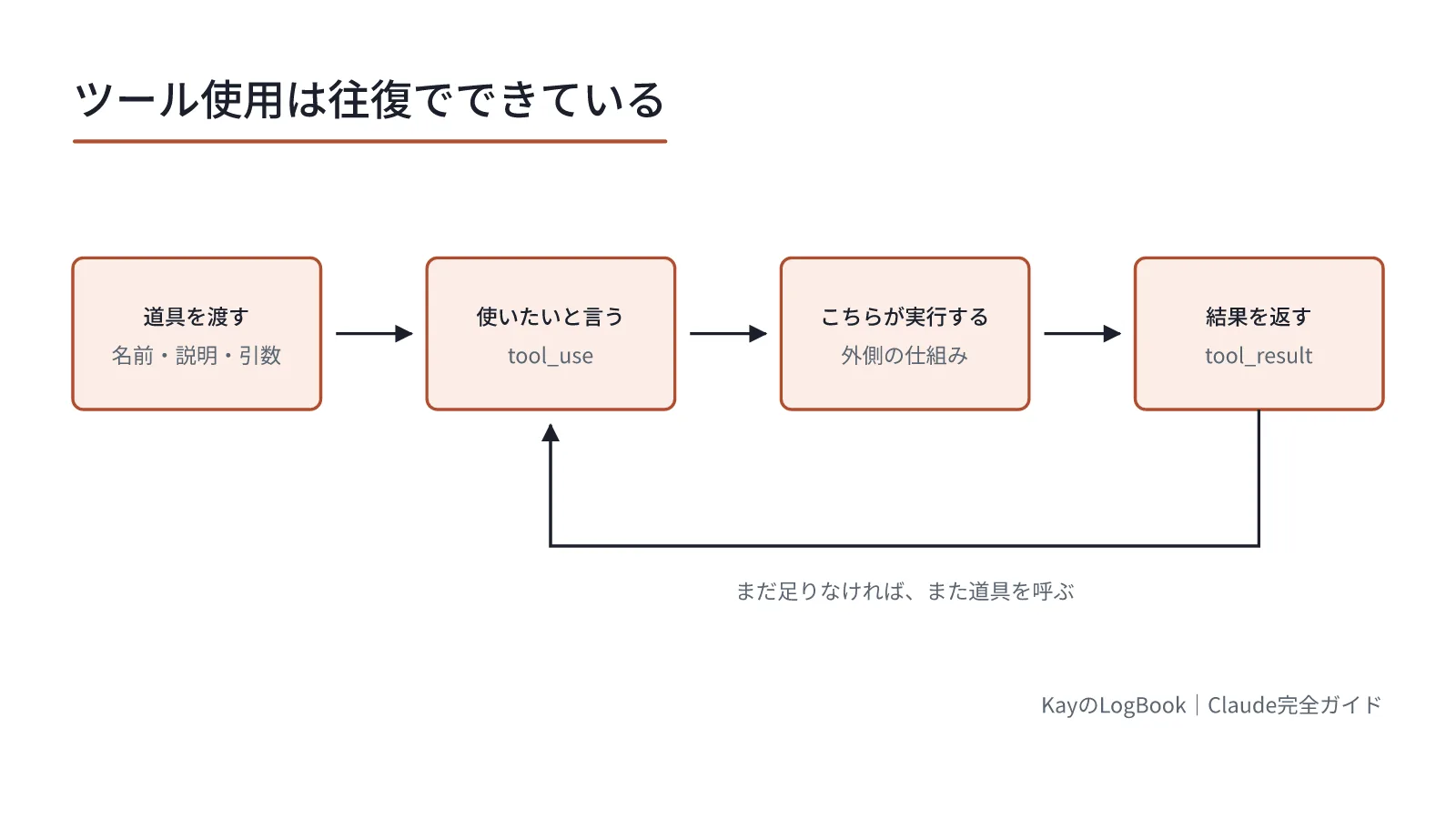
Chapter 3, #20 covered the concept. Here is what it looks like in the API.
- In the request’s
tools, you pass each tool’s name, description and argument format - Claude returns a
tool_useblock: “this tool, with these arguments” - Your code runs it
- You send the result back as a
tool_result - Claude looks at it and answers, or calls another tool
Step 3 is your responsibility. Claude does not run anything.
There are two kinds of tools. Client-side tools (run by your own code) and server-side tools (run on Anthropic’s side: web search, web fetch, code execution and so on). With the latter, the results come straight back, so you don’t need any code to run them.
If writing this round trip yourself is tedious, the SDK has a mechanism called Tool Runner that handles running the tools and sending the results back automatically.
Structured outputs#
This is the mechanism that guarantees the response always comes back in the JSON shape you specify. In real work, this is the one that pays off.
Asking for “reply in JSON” in the prompt usually works, but occasionally breaks. A preamble sentence sneaks in, code block markers are left at the end, a field goes missing. Process 10,000 items and a few will definitely be broken.
With structured outputs, that is guaranteed.
from pydantic import BaseModel

class Quote(BaseModel):
    company: str
    item: str
    unit_price: int
    due_date: str

response = client.messages.parse(
    model="claude-opus-5",
    max_tokens=1024,
    messages=[{"role": "user", "content": "Extract the following from this quote..."}],
    output_format=Quote,
)
print(response.parsed_output)
No parse error handling, no retries needed. If you build the quote-processing job with the API, this is the core of it.
In TypeScript you can do the same thing with Zod.
There is a similar feature called “strict tool use.” It guarantees the tool’s arguments instead. The distinction is simple.
| What it guarantees | |
|---|---|
| Structured outputs | The shape of the final response |
| Strict tool use | The shape of the arguments passed to tools |
You can use both at the same time.
Schemas have limitations. Recursive structures, numeric ranges (such as minimum) and string length constraints are not supported. Objects must have additionalProperties: false.
One more caveat that matters in practice: the first use of a new schema takes time to compile. The result is cached for 24 hours, so design things to reuse the same schema.
Other features#
Thinking depth. For involved reasoning, Claude thinks deeply by default. Thinking tokens are billed as output, so you can turn it down for simple tasks (#53).
Web search. A server-side tool. As described in Chapter 2, #18, it comes with citations. It costs $10 per 1,000 searches, on top of token costs.
Web fetch. This one has no extra charge; you pay only for the tokens of the fetched content.
Files. If you use images or PDFs repeatedly, you can upload them to the Files API and reference them by file_id. It reduces how much you send each time. The image limits described in Chapter 2, #17 apply to the API as well.
Try it: process a quote with structured outputs (5 minutes)
Have one PDF or image ready.
Prompt
“`
Using the Claude API, write a Python script that extracts the following
from the attached document.・Date, counterparty, amount
・Use structured outputs (output_format) to guarantee the shape
・For fields that can’t be read, use null rather than an empty string
・Pull the schema out into a separate variable so it can be reusedDon’t run it yet. Just show me the code.
“`Expected result: a schema is defined and
messages.parseis used. How unreadable fields are handled is reflected in the types.If it doesn’t work: if the code just asks for “reply in JSON” in the prompt, that’s exactly the pattern this page is trying to avoid. Add “use
output_format” to your request.
Common pitfalls#
Asking for JSON in the prompt. It works, but breaks as volume grows. Use structured outputs.
Changing the schema every time. It forces recompilation and invalidates the cache. Make it reusable.
Forgetting to run the tool. When a tool_use comes back, nothing is complete until your side runs it and sends the result back.
Overlooking the extra charge for server-side tools. Web search is billed separately.
Summary#
- Tool use is a round trip. Your code does the running
- Structured outputs guarantee the shape of the response. The more volume, the more it pays off
- Reuse schemas. The first use takes time to compile
- Web search has a charge separate from tokens