Claude Pricing: The Big Picture
On this page9 items
In 10 seconds
Monthly plans and the API are billed separately. The main difference between plans is how much you can use, and that amount is counted in tokens.
The API is pay-as-you-go, and output costs roughly five times as much as input.
Pricing tends to be confusing. The reason is clear: two very different ways of paying sit side by side.
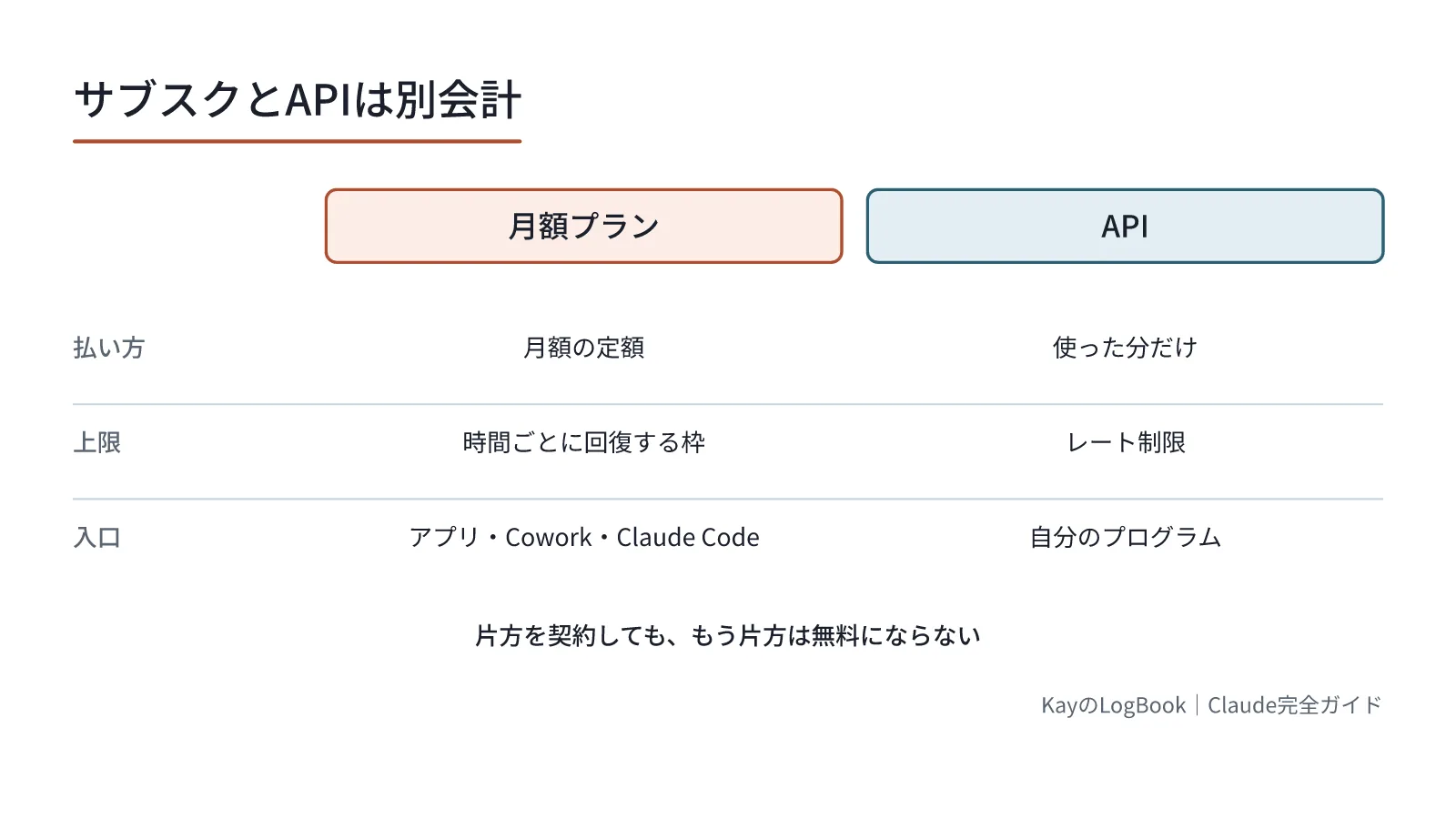
Monthly plans are flat-rate for what you use in the apps. The API is pay-as-you-go for the amount you use. The two are billed separately, and subscribing to one doesn’t make the other free. Once you keep these apart, the rest is detail.
Note that this is the only page that gives specific prices. Prices go out of date quickly, and if they were scattered across other pages, revisions would be impossible to keep track of.
Monthly plans#
This is what’s listed on the claude.com pricing page. All prices are in US dollars.
| Plan | Monthly price | Positioning |
|---|---|---|
| Free | $0 | Try the basic features |
| Pro | $17 billed annually / $20 billed monthly | More usage, plus Cowork and more |
| Max 5x | From $100/month | 5× the usage of Pro |
| Max 20x | Tiered | 20× the usage of Pro |
| Team | $20 per seat billed annually / $25 billed monthly | Admin features, SSO, shared use |
| Enterprise | $20 per seat + API-equivalent usage | Audit logs, permission management, and more |
Team also offers premium seats with more usage ($100 per seat, billed annually).
The main difference between plans is “how much you can use”. There are feature differences too, but what matters most day to day is the usage allowance. It’s fine to start free and upgrade once hitting the limit becomes inconvenient.
How usage allowances work#
Monthly plans aren’t “unlimited”. There’s a set amount you can use per period of time, and once you use it up you wait until it resets.
This allowance is counted by the amount of text you send and receive, in other words, tokens (#03). The longer the documents you paste, the faster it runs down. If you feel you’re hitting the limit often, reviewing how much material you’re passing in can sometimes help more than upgrading your plan.
API billing#
The API is fully pay-as-you-go. Input and output each have a price per million tokens. These are the figures as of August 2026.
| Model | Input (per million tokens) | Output (per million tokens) |
|---|---|---|
| Claude Fable 5 | $10 | $50 |
| Claude Opus 5 | $5 | $25 |
| Claude Sonnet 5 | $2 | $10 |
| Claude Haiku 4.5 | $1 | $5 |
What they all share is that output costs more than input, roughly five times as much. Having it produce long answers over and over costs more than you might expect.
There are also ways to reduce costs.
- Batch processing: submit large volumes of non-urgent work together for half price
- Prompt caching: if you send the same preamble every time, from the second time on it costs one tenth of the input price
- Web search: $10 per 1,000 searches, charged separately from token costs
Up to 1 million tokens can be used at no extra charge on every model. Working with long documents doesn’t make it more expensive per token.
How to keep costs down#
If you’re using chat, start with the free plan. Upgrading once it’s not enough is plenty.
If you’re using the API, order matters. First build something that works with a deeper model, then test whether a lighter model is enough. If you start the other way round, you can’t tell whether things don’t work because of the model or because of how you built it.
Either way, reducing how much you pass in helps most. Before handing over a whole PDF, extract the few relevant pages. That alone changes your consumption.
Try it: get a feel for the cost of your usage (3 minutes)
Prompt
Every day, I want to have it read about three A4 pages of material and produce a summary of about 800 characters. If I keep this up for 20 days a month, calculate roughly how many tokens that comes to. Show input and output separately, along with the calculation.Expected result: Input and output are calculated separately, and the process is shown.
If it doesn’t work: If you have it calculate the cost too, it may write prices from memory. Have it go only as far as the token count, and apply the price table yourself to be sure.
Common pitfalls#
Thinking that subscribing to a plan also gives you the API. They’re billed separately. Using the API requires signing up on the API side.
Hitting the limit and immediately moving up a plan. If the cause is that you paste large amounts of material every time, you’ll hit the limit in the same place even after upgrading. Look at how you’re using it first.
Copying the figures in this table straight into your documents. Prices change. If you put them in internal documents, always include the date you checked and the source URL.
Tips for advanced use#
If you use it as a team, beyond managing seat counts you need a way to see what is being used and how much. Enterprise has spending limits, and the API has a usage dashboard. This is covered in #82.
Related pages#
- #03 What are tokens?: the unit of billing
- #07 Model differences and how to choose: which model to pick
- #44 Cost control and saving tokens: day-to-day savings
- #53 API cost optimization: tricks for high-volume processing
Summary#
- Monthly plans and the API are billed separately. The main difference between plans is the usage allowance
- The API is pay-as-you-go, and output costs roughly five times as much as input. Batch is half price, caching is one tenth
- The most effective saving is reducing how much you pass in