Companion Tools (Excel, Browser, Design, and More)
On this page7 items
In 10 seconds
You can call Claude from inside the apps you already use.
The difference is how far it can reach. Local files, cloud documents, or the page you are viewing.
Cowork is powerful, but it requires you to change how you work. You set up a folder and work in it.
If you don’t want to leave the apps you already use, there are other options.
How far it can reach#
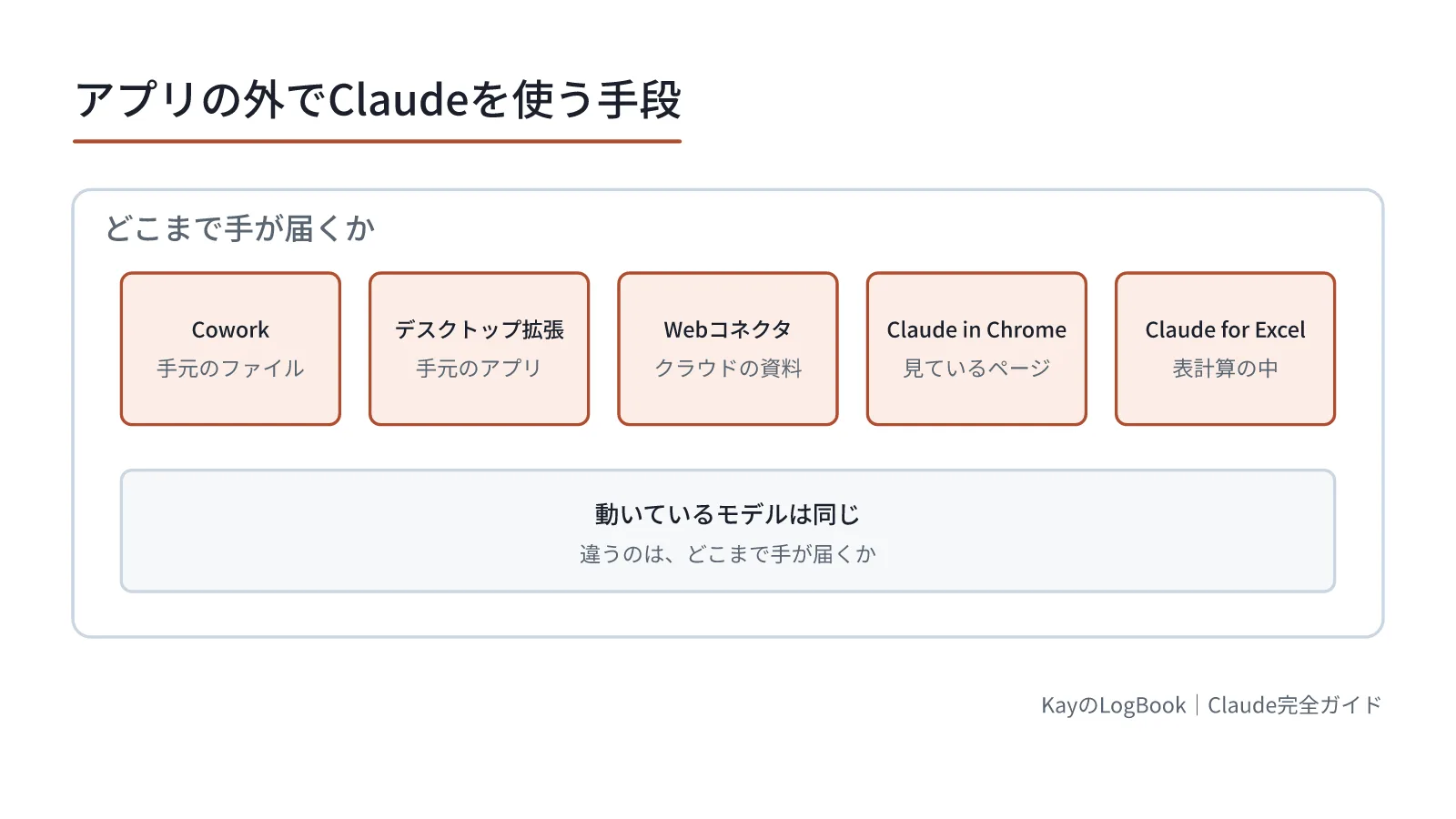
Cowork. It can touch files in the folders you connect. The most freedom of all (No.26).
Desktop extensions. Installed into the desktop app, they reach local files, the browser, and apps on your computer.
Web connectors. They connect to cloud services like Google Drive, Notion, Slack and Asana. They don’t reach your local computer. The scheduled runs in No.31 work on this side.
Claude in Chrome. A browser extension that reads the page you are viewing and can click and navigate between pages. Available on all paid plans.
Claude for Excel. An Excel add-in. You can use it directly inside the spreadsheet. It can also connect to external data providers.
Choosing between them#
The decision comes down to where your material is.
| Where the material is | What to use |
|---|---|
| A local folder | Cowork, desktop extensions |
| A cloud service | Web connectors |
| The page you are viewing | Claude in Chrome |
| An open Excel workbook | Claude for Excel |
The other axis is whether you want to avoid interrupting your work.
Take quotes as an example. To process five companies’ quotes at once, use Cowork. To open Excel and check just one company’s, use Claude for Excel. To work while checking specs on a supplier’s website, use Claude in Chrome.
Even for the same job, what you pick changes with scale and situation.
How they differ from Cowork#
These are easy to confuse, so let’s be clear.
Cowork is a tool for “handing off work”. You give it a folder, wait a while, and receive the result.
Companion tools are tools for “helping with work”. While you do the work yourself, they help with the task at hand.
It helps to think of it this way: the former is agent-style use, the latter is chat-style use, happening inside the app you have open.
More tools, more pathways#
Rather than ending with setup, here is a caution.
The official safety guide states plainly that unfamiliar MCP servers and plugins expand what Claude can do, but also add pathways for attacks to reach Claude.
What No.21 said applies directly. Every connection you add opens one more entrance for text coming from outside.
There are two habits to adopt:
- Connect only what you use. Don’t add things just because they look handy
- Check where they come from. Install from official stores or the original distributor
Common pitfalls#
Installing everything first and thinking later. The more connections you add, the harder it is to know what reaches where. One at a time, in order of having a reason to use it.
Thinking the browser extension can do everything. It is strong on the page you are viewing, but it doesn’t reach local files. Misunderstand its reach and you’ll keep asking for things it can’t do.
Getting stuck when roles overlap with Cowork. When unsure, decide by scale. Batch processing goes to Cowork; a single item in the moment goes to a companion tool.
Try it: Take stock of where your material lives (3 minutes)
Prompt
“`
I’ll list where the documents I use at work are kept.
For each one, tell me what’s needed for Claude to reach it.
Answer with one of “Cowork”, “desktop extension”, “web connector”,
“browser extension”, or “Excel add-in”.・(List four to six locations. e.g. the invoices folder on my desktop,
meeting minutes on the shared drive, the internal wiki, a client’s portal site)
“`Expected result: Each location gets its own method. You can see that no single method reaches everything.
If it doesn’t work: If everything comes back as Cowork, your list leans toward “local folders”. Add cloud services and websites too.
Summary#
- The axes for choosing are where your material is and whether you want to avoid interrupting your work
- Cowork is for handing off; companion tools are for helping
- The browser extension doesn’t reach local files
- The more connections you add, the more entrances for outside text