Security and Privacy
On this page10 items
In 10 seconds
Whether your data is used for training depends on your plan and settings. Don’t decide based on assumptions.
And whether it’s okay to hand something over isn’t decided by training alone. The moment you hand it over, its reach widens.
Page after page so far has said “check before you hand it over.” What that check consists of is this page.
Whether it’s used for training depends on your environment#
First, let’s sort out what the official sources say. Treatment differs by plan, so check your own environment.
Individual plans (Free, Pro, Max). According to the official documentation, by default your data is not used for training. It is used in the following cases.
- When you have explicitly allowed it (privacy settings)
- When it is judged necessary for a safety review (conversations flagged as problematic may be analyzed)
- When you join a special program for testers
Also, incognito chats are not used for training even if you have allowed it.
Feedback data (thumbs up/down) is treated separately: it is said to be retained for up to 5 years and used after being disconnected from your user ID.
Team plan. The pricing page explicitly lists as a feature that your content is not used for model training.
Enterprise plan. You can set your own data retention period. If you don’t set one, data is retained indefinitely, and it can be set as short as 30 days.
The most reliable thing is to actually open and look at your own privacy settings. Don’t rely on what this page says.
Training is only part of the decision#
This is where the biggest misunderstanding lies.
It’s not used for training, so it’s safe. That is wrong.
The moment you hand something over, the following happens.
- It stays in your conversation history. If you ever show your screen to someone, it appears there (#05)
- It may be saved to memory. It can surface in other conversations too (#16)
- It exists on the service side for the retention period
- It may run up against company policy
Whether you can hand over customer information is a separate question from training settings. Your contracts with business partners may also govern how their information is handled.
Drawing the line before handing things over#
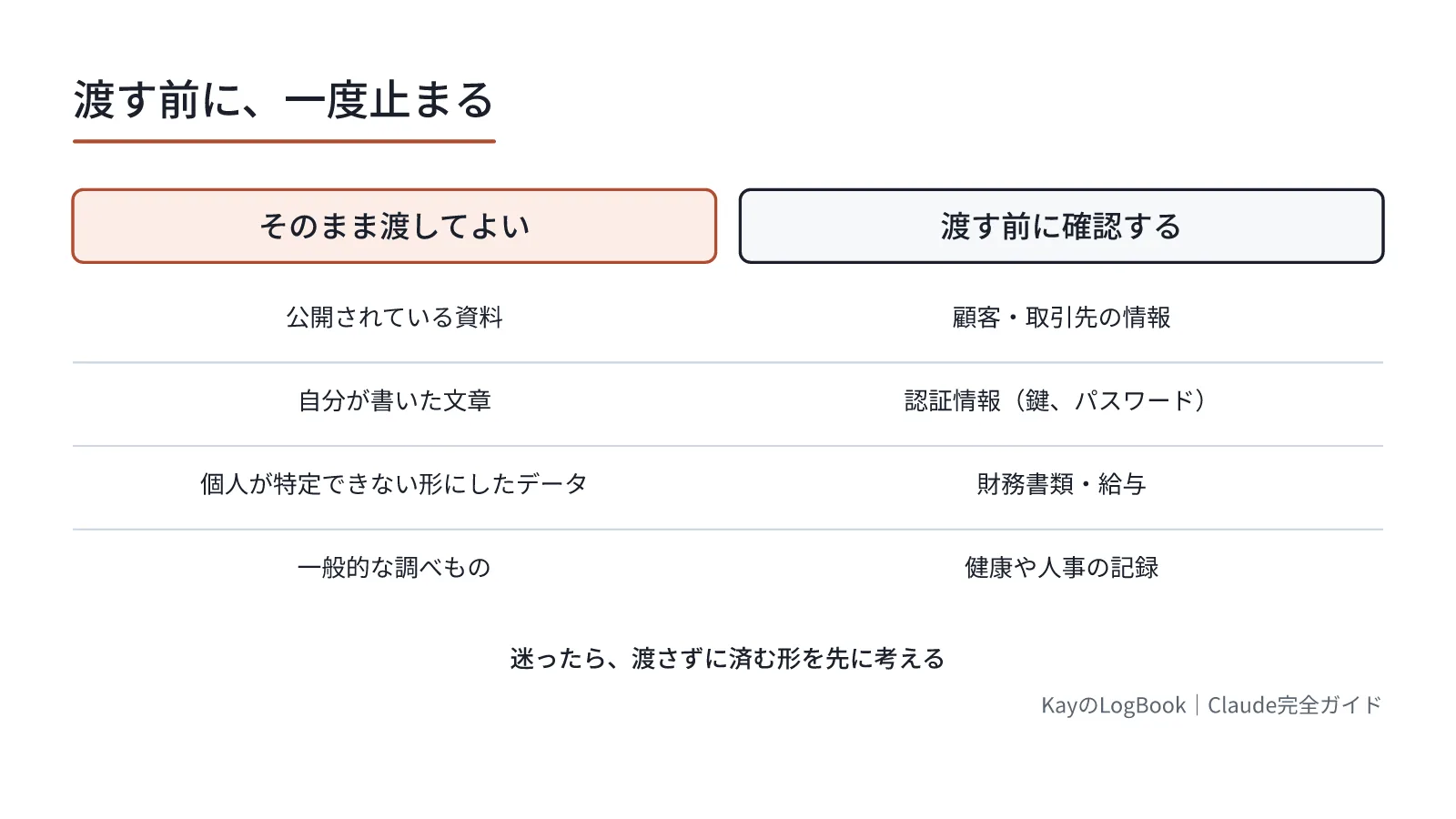
Fine to hand over as is.
- Publicly available material
- Text you wrote yourself
- Data in a form that can’t identify individuals
- General research
Check before handing over.
- Customer and business partner information
- Credentials (keys, passwords, tokens)
- Financial documents and payroll
- Health and HR records
As noted in Chapter 4, #27, the official safety guide explicitly says not to grant access to financial documents, credentials, or personal records.
First think of a way to avoid handing it over#
In practice, this shift in thinking is what works best.
Before asking whether it’s okay to hand something over, ask whether you can avoid handing it over at all.
- Replace customer names with Company A, Company B
- Round the amounts, or convert them to ratios
- Make a copy with only the columns you need
- Drop columns that can identify individuals
If you anonymize before handing it over, the decision itself becomes unnecessary. This is the pattern repeated in Chapter 8, #57 and #59, and Chapter 9, #68.
Create company rules#
If a team is using it, don’t leave it to individual judgment. There are three things to decide.
1. What may be handed over. For each category of information, in three tiers: allowed, check first, not allowed.
2. Where it may be used. Personal accounts or company accounts. Including the idea of a dedicated work folder from Chapter 4, #27.
3. What to do when an incident happens. Who to report to, and what to stop.
The most dangerous pattern is rolling it out with the third item missing. A detailed approach is in #82.
Please draft rules for using AI in our company.

- In three tiers per information category: "OK to provide / check first / do not provide"
- Five typical situations where the decision is unclear, and how to think about each
- Procedures for when an incident happens

My company's situation: (industry, size, information handled)

Don't cite the names of laws or standards. We'll confirm with legal and IT in the end.
Not letting it cite law names is for the same reason as Chapter 8, #62.
About contracts, payroll, and customer information#
The judgments from Chapter 8, #62 (contracts) and #63 (accounting) are consolidated here.
Here’s the conclusion: these belong on the “check before handing over” side.
Check with your company’s policies, your IT department, and your contracts with business partners. If you can’t confirm, don’t hand it over.
And first consider a way to avoid handing it over. With a contract, you can still identify the issues with party names and amounts redacted.
Try it: think of a way to avoid handing it over (5 minutes)
Think of one document you’re hesitant to hand over. Don’t actually hand it over.
Prompt
“`
I’d like to give (type of document) to an AI to (what I want to do),
but it contains sensitive information.
- List 3 ways to get it done without handing the document over
- For each, also write what you’d no longer be able to do
- If there’s any part that really must be provided, point that out too
I’m not giving you the document itself yet.
“`Expected result: Ideas like anonymization, excerpting, and substitution come back. Looking at “what you’d no longer be able to do” reveals the parts you never needed in the first place.
If it doesn’t work: Describe the type of document a bit more specifically. Once it knows what information is sensitive, the ideas become concrete.
Common pitfalls#
Thinking it’s safe because it isn’t used for training. That’s only part of the decision.
Relying on what this page says. Actually open and check your own settings.
Thinking after handing it over. It can’t be undone.
Leaving it to individual judgment. If a team uses it, set rules.
Related pages#
- #05 What AI Remembers and What It Doesn’t — conversation history and memory
- #27 Setup and Designing Folder Permissions — designing what it can touch
- #62 Groundwork for Contracts and Legal / #63 Accounting and Tax — decisions go here
- #82 Rolling It Out to Teams and Companies — company-wide rollout
Summary#
- Whether it’s used for training depends on plan and settings. Open your settings and check
- Training is only part of the decision. History, memory, retention, and company policy matter too
- Before asking whether you can hand it over, ask whether you can avoid it
- In teams, don’t leave it to individual judgment; set rules