Websites and Running a Blog
On this page10 items
In 10 seconds
This guide itself is the example. 87 pages — manuscripts, diagrams, and publishing — all run through Claude Code.
What made the difference wasn’t having it write text, but a system that stops things at the checks.
The actual production workflow#
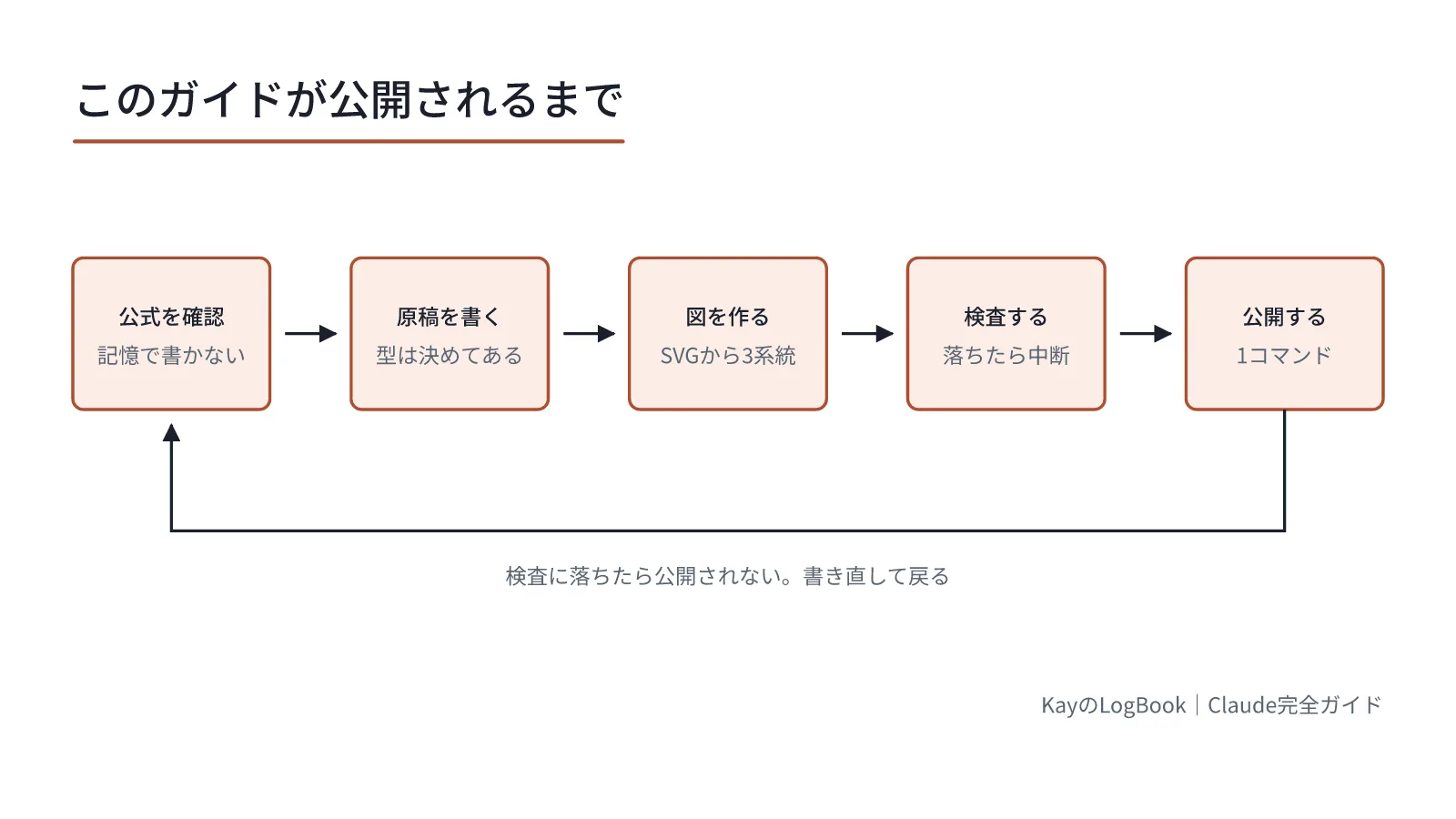
This guide is produced in the following order.
1. Check official information. Model names, pricing, and feature availability are always written only after opening the official documentation. The date of checking and the URLs referenced are recorded for each page.
2. Write the manuscript. The page template is fixed: a summary of 100 characters or fewer at the top, a “Try it” section required on every page, and other sections only as needed.
3. Make the diagrams. Each is made once as an SVG and exported in three variants: web, slides, and book.
4. Run the checks. This is the main point. It’s covered next.
5. Publish. A single command posts to WordPress. Uploading images, applying SEO metadata, and inserting links into the table of contents are all automatic.
What made the difference was the checks#
A system that prevents publishing mistakes did more good than writing faster.
Before posting, a machine checks the following. If anything fails, it doesn’t get posted.
- Are all required fields filled in?
- Do the page number and the destination URL match?
- Do the diagram references match the body text? (If either side is missing, abort)
- Are the formatting rules followed?
- Is the opening summary 100 characters or fewer?
- Are there any links to unpublished pages?
Why it ended up this way: the formatting rules were broken three times in one day. Even rewriting the instructions more forcefully didn’t make them stick.
If the same rule is broken twice, it’s not a problem of attention but a problem of the system (No.25, No.41). Instead of relying on someone to remember, it was made impossible to get through.
The same thing happened with diagram exports#
Diagram creation has checks too. When a font can’t be found, the export looks successful, but a different font gets substituted. No error appears.
When this was actually tested, with the specified font missing, the export finished with exit code 0, a monospaced font was substituted, and the layout broke. All you get is a warning.
So now the export checks that the font exists beforehand, checks afterward that no substitution occurred, and if it did, deletes the output and aborts.
When you find a step that fails silently, put a stop there. That’s the biggest lesson from making this guide.
What worked for writing articles#
Structure over drafts. For some chapters, discussing the structure and writing it yourself was faster than having it write from scratch.
Decide terminology first. Translations of loanwords tend to waver. A glossary is made first and Claude is made to follow it (the same idea as No.13 and No.58).
Link only to published pages. Links to unpublished pages are never added; each time a page is published, links are created by machine. Doing it by hand always misses some.
What we paid attention to for SEO#
Put the answer at the top. People coming from search don’t read everything. Each page starts with a summary of 100 characters or fewer.
Write a title and description for each page. These are also applied automatically.
What not to do: text padded for search, numbers that aren’t facts, unfounded claims. As with the other pages in this chapter, anything going out includes “don’t add anything that isn’t written.”
How far to automate#
Only the publish button is pressed by a human. The command is automated, but a person runs it.
This policy has been consistent since Chapter 4, No.31: don’t build things that send stuff out while nobody is watching.
Try it: What parts of your site management can be automated? (5 min)
Prompt
“`
I’ll list the steps for running my site. For each one,
classify it as one of the following.
OK to automate (mistakes can be undone)
OK to automate with checks (also say what should be checked)
Should be done by a human (also say why)
(about 5 steps)
“`Expected result: Steps are sorted into the three groups. Publishing, sending, and deleting land in “should be done by a human.”
If it doesn’t work: If everything is “OK to automate,” ask again, adding “who would be affected if it went wrong.”
Common pitfalls#
Focusing on writing fast. What helps is a system that keeps mistakes from going out.
Creating links by hand. As pages grow, some will always be missed.
Leaving checks as warnings. Warnings get ignored. Make them abort.
Related pages#
- No.83 How this guide was made — A record of the production
- No.41 Hooks and plugins — Processing that always runs
- No.34 What is Claude Code? — Not just a tool for code
Summary#
- This guide itself is the example. Manuscripts, diagrams, and publishing all run through Claude Code
- What made the difference wasn’t speed but a system that stops things at the checks
- When you find a step that fails silently, put a stop there
- Only the publish button is pressed by a human