Health and Your Body
On this page12 items
In 10 seconds
Don’t use it to make decisions about diagnosis or treatment. Use it only to organize records and prepare questions for your doctor.
This page also doesn’t cover setting specific targets for how much to eat or exercise.
First, what this page does not cover#
This page does not cover the following:
- Deciding what illness you have
- Deciding on treatment
- Deciding whether to take or change medication
- Deciding whether you should see a doctor
- Setting specific targets for food intake or exercise
If you have urgent symptoms, contact a medical provider before reading this page.
The official documentation states it clearly too: Claude is not designed to interpret complex diagnostic images, and its output is not a substitute for professional advice or diagnosis. Don’t have it assess images such as CT or MRI scans.
Where to draw the line#
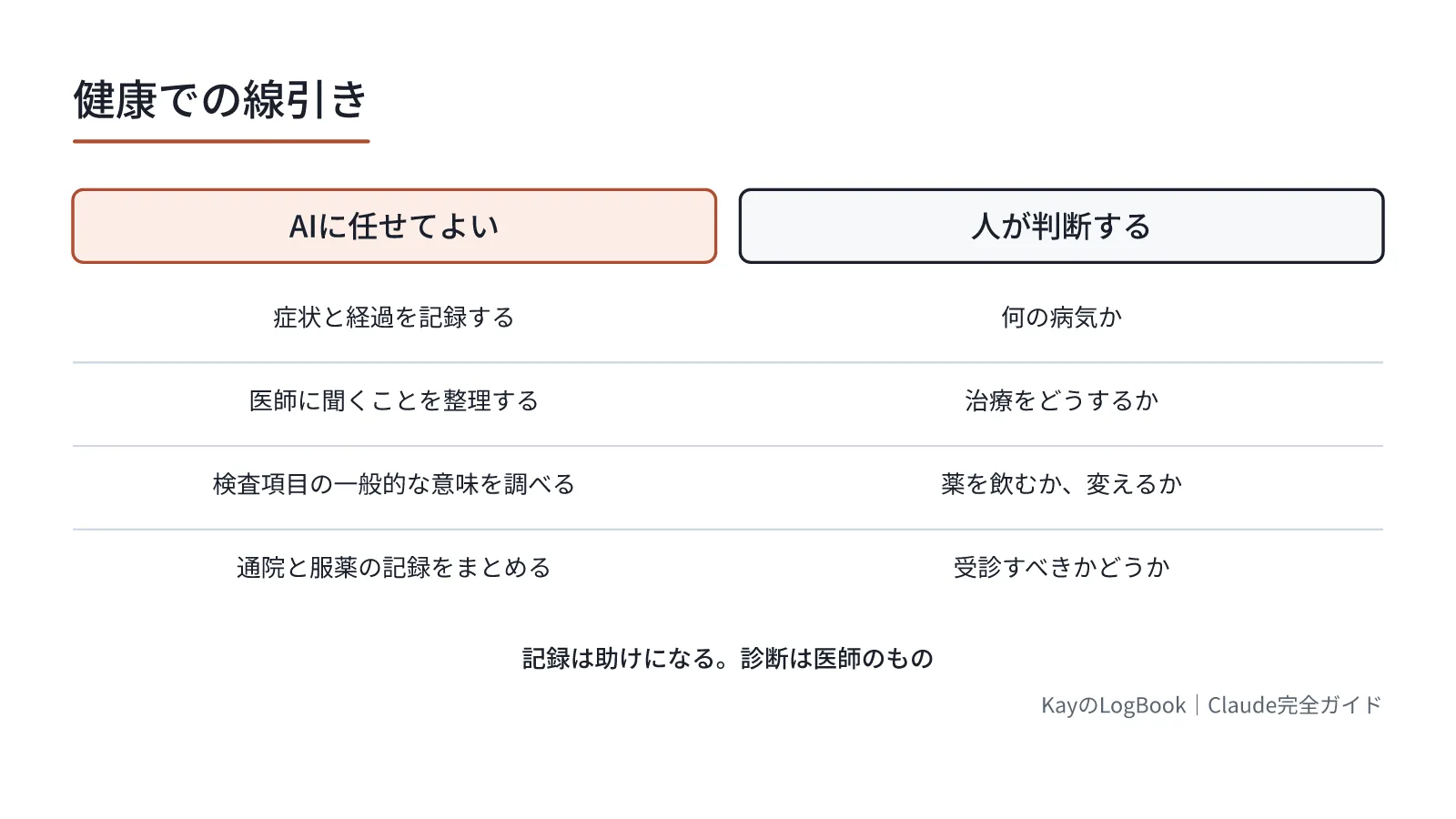
There are four uses.
Recording symptoms and their progression#
This is the most practical use. Few people can describe the course of their symptoms accurately at an appointment.
Please organize my symptom notes.

- In chronological order: when, and what happened
- In a way that shows how the symptoms changed
- Do not fill in anything I haven't said
- Do not make judgments or guess at a diagnosis

(Write down what you remember, in any order, as is)
Always include the last two lines. Without them, a plausible-sounding diagnosis comes attached.
If you keep a daily log, just sending what happened that day in casual language is fine. You can have it summarized later.
Organizing questions for your doctor#
Appointments are short. Coming home having forgotten to ask something is a preparation problem.
I'm going to see a (specialty) doctor. Please organize what I want to ask.

- Up to 7 questions, highest priority first
- Put "things I'll regret not asking once I get home" at the top
- Also list the information I should give (since when, how it has changed, other medications I take)
- Do not guess at a diagnosis or treatment plan
This is the most valuable use on this page. It isn’t diagnosing anything. It’s only helping you prepare.
Looking up what test items generally mean#
The item names listed on your test results. Learning what kind of indicator each one generally is can be helpful.
What does (test item name) generally measure?

- Don't talk about reference ranges, since they differ by testing facility
- Don't judge whether my result is good or bad either
- Tell me how I might ask my doctor about it
Leave reference ranges and the evaluation of your own results out of it. Reference ranges differ by facility, and interpretation changes depending on combinations with other values and your personal situation.
Records of visits and medications#
If you see several medical providers, your records get scattered.
Please combine my visit records into a single table.

- Date, provider, department, prescribed medications, next appointment
- Transcribe the medication names exactly as I wrote them. Do not correct them
- Do not judge duplicates or drug interactions. I'll check with a pharmacist
The key point is not letting it correct medication names. Some drugs have similar names.
Ask a pharmacist about drug interactions. Showing them your medication record book is the most reliable way.
About photos#
Taking photos of your skin or an affected area to keep a record is useful for tracking progress. But don’t have Claude judge them.
As explained in No.17 in Chapter 2, it makes mistakes when the image quality is low, the angle is different, or the subject is small. And with health, those mistakes cause real harm.
If you have it search#
Health information is a mix of good and bad. If you have it search, always open the sources (No.18).
Check whether they are sites of public institutions, medical societies or medical providers. Personal blogs and product promotion pages get mixed in.
Try it: organize what to ask before an appointment (5 min)
If you have an upcoming appointment, use that. If not, think back to a past one.
Prompt
“`
I’m going to see a (specialty) doctor. Please organize what I want to ask.
- Up to 7 questions, highest priority first
- Put “things I’ll regret not asking once I get home” at the top
- Also list the information I should give (since when, how it has changed, other medications I take)
- Do not guess at a diagnosis or treatment plan
Situation: (your symptoms and their progression, as much as you can remember)
“`Expected result: The questions come back in priority order, with a list of information to give. No guessed diagnosis is included.
If it doesn’t work: If a diagnosis appears, the last instruction isn’t taking effect. Knowing about this behavior is valuable in itself.
Common pitfalls#
Having it guess a diagnosis. Include “do not guess” every time.
Asking it to evaluate test values. Reference ranges differ by facility.
Having it read diagnostic images. The official documentation explicitly says this is out of scope.
Searching your symptoms and getting anxious. Check the sources. If you’re still worried, see a doctor.
Related pages#
- No.17 Giving Claude Files, Images and PDFs — the limits with photos
- No.18 Web Search and Research — checking sources
- No.71 Procedures, Paperwork and Manuals — insurance paperwork
Summary#
- No diagnosis and no treatment decisions. For urgent symptoms, go to a medical provider
- It’s useful for organizing records and preparing questions for your doctor
- Don’t let it guess diagnoses or evaluate test values
- Check drug interactions with a pharmacist