What AI Remembers and What It Doesn't
On this page8 items
In 10 seconds
Claude’s memory is split into four layers: within the conversation, memory, projects, and training data.
Which layer you put something in determines how far it carries. Forgetting and remembering too much are both cases of choosing the wrong layer.
“I told it before, but it doesn’t remember” and “It brings up earlier conversations on its own.” These two complaints look like opposites, but they come from the same cause. There are several places where memory is stored, and how far something carries depends on where it went in, but that’s hard to see.
If you don’t get this straight, one of two things happens: it’s gone when you thought it was remembered, or it’s still there when you thought you’d deleted it. The latter shows up as content from a previous conversation appearing on a screen you’re showing to someone. Of all the pages in Chapter 1, this is the one closest to real-world harm.
The four layers of memory#
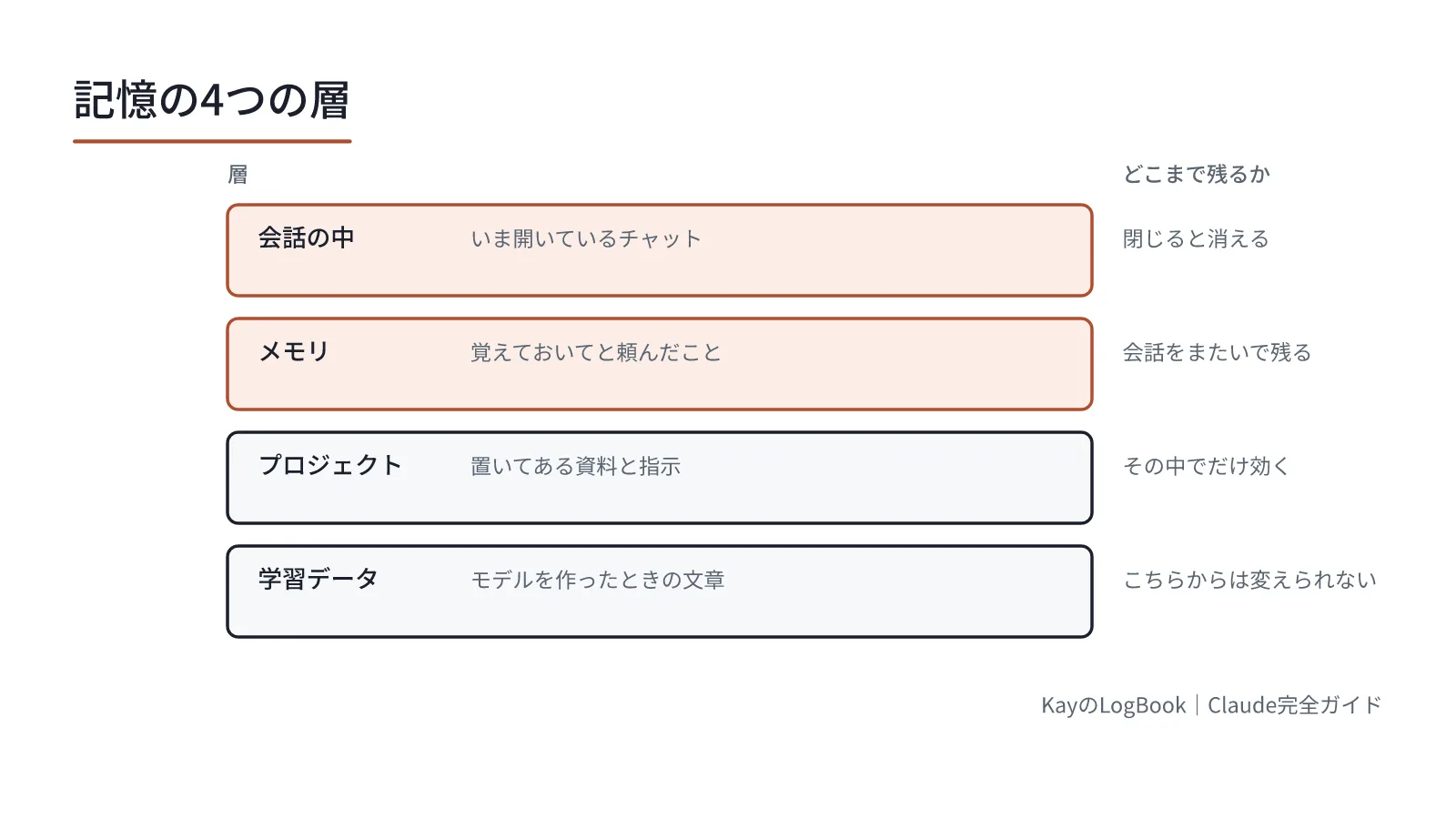
Within the conversation. Only inside the chat you have open right now. What you say here is referenced as long as the conversation continues. It isn’t carried over to other conversations. And even within this conversation, anything beyond the context window drops out of view (No.04).
Memory. Things you’ve asked it to “remember this” persist across conversations. Your name, what you do, your style preferences. They take effect even when you start a new conversation. It’s convenient, but things can also stick around unintentionally, so make sure you can check what’s in there yourself.
Projects. A box where you keep materials and instructions together. It only affects conversations started inside that box. It doesn’t show up in conversations outside the box. If you keep a separate box for each job, things don’t get mixed up.
Training data. The text the model read when it was built. You can’t change it. And it only contains material up to a certain point in time. As noted in No.02, the materials you hand over in a conversation don’t become training data.
When something you “taught” it disappears#
The most common pattern is having only said it within the conversation.
Say “Don’t use polite language from now on” once, then open a new conversation the next day, and it’s back to polite language. That’s normal behavior. The instruction went into the “within the conversation” layer, and once the conversation changes, it’s gone.
If you want something to apply across conversations, you need to put it in memory, write it in the project instructions, or set it as a style. You’ve just chosen the wrong layer; nothing is broken.
The other pattern is compaction kicking in during a long conversation. Even within the same conversation, the format you set at the start falls apart. That’s the topic of No.04.
When you want to delete something, where do you delete it?#
The opposite accident happens too. When you show someone your screen, it’s a problem if content from an earlier conversation appears.
- Delete just that conversation → Delete it from your chat history
- Delete what it remembers → Review the contents of memory and delete them
- Separate things by job → Split them into projects
Training data can’t be deleted. In the first place, whether the information you provide ends up in training data depends on your plan and settings. This is important, so it’s covered again in No.78 in Chapter 11.
Try it: Take stock of what it remembers right now (2 min)
Prompt
List everything you currently remember about me as bullet points. For each, also note where it's stored (in this conversation / memory / project materials).Expected result: You get a list of what it remembers, with storage locations noted separately.
If it doesn’t work: If nothing comes up, you’re not using memory yet. Finding that out is useful in itself. If the distinction between storage locations is fuzzy, looking directly at the memory settings on screen is more reliable.
Common pitfalls#
Putting everything into memory. It’s loaded into every conversation, so the more there is, the more space it takes, and it pops up even in unrelated situations. Limit it to things that are a hassle to say every time.
Getting confused about when to use projects versus memory. The rule of thumb is scope. If you want it to apply only to that job, use a project; if you want it to apply all the time, use memory.
Feeling that something remains even after you deleted it. It may be in a different layer. Deleting a conversation doesn’t delete memory.
Tips for going further#
If you use Claude Code, there’s a fifth place to store things: CLAUDE.md. You write your project’s conventions in a file, and its strength is that you can read the contents yourself and the history is kept. This is covered in No.38.
Related pages#
- No.04 The context window — Why things disappear even within the same conversation
- No.16 Memory, user preferences, and styles — How to actually use them
- No.14 Projects — How to make a box
- No.78 Security and privacy — Whether your data is used for training
Summary#
- Memory has four layers: within the conversation, memory, projects, and training data
- When something you “taught” it disappears, it’s almost always because you chose the wrong layer
- When deleting, too, first figure out which layer it’s in