Working with AI on the Assumption It Will Make Mistakes
On this page11 items
In 10 seconds
The more wrong it is, the more natural the text reads. Naturalness and correctness are determined separately.
So instead of trying to spot errors by reading, have a procedure for verifying.
This page picks up where Chapter 1, No.02 left off. It covers how the properties described there actually show up, and how to deal with them.
Why it makes mistakes#
As explained in No.02, Claude predicts the next word. What it chooses is not the correct word, but the likely word.
In most cases, the likely word matches the correct one. The problem is the cases where they don’t match.
From this comes the most important property in practice.
The naturalness of the text and the correctness of its content are determined separately.
Because it is good at producing natural text, the text stays natural even when the content is wrong. That is why it is hard to see through by reading.
The danger zones are predictable#
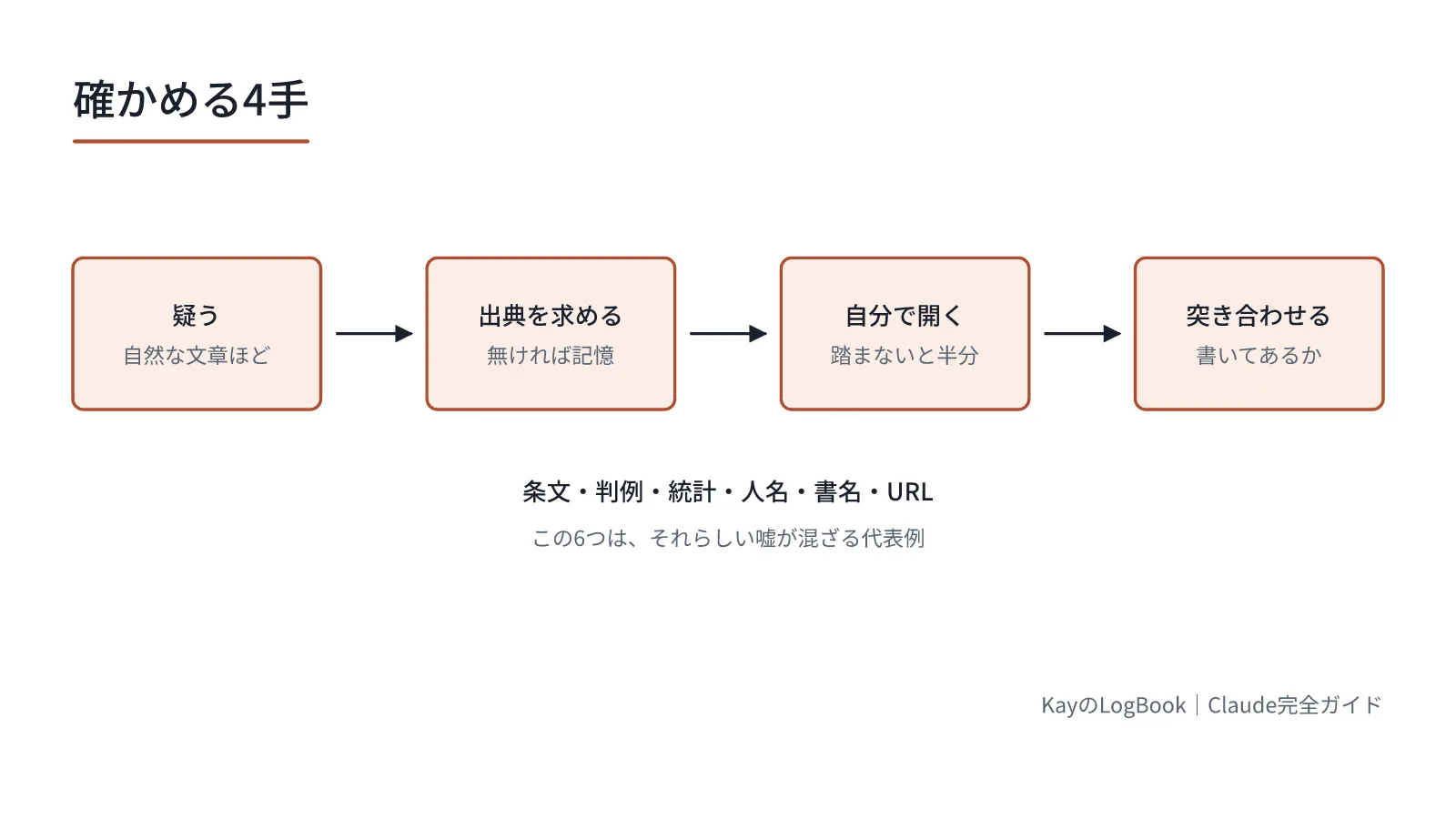
Statutes, court cases, statistics, people’s names, book titles and URLs.
What they have in common is that they follow a fixed format and are easy to fake convincingly. Statute-like numbers, paper-like titles, plausible URLs. All of them can be produced in form alone.
And the mistakes are hard to notice. You’re asking because you don’t know, so you can’t judge whether the answer you get is correct.
The statute that doesn’t exist#
This example has come up repeatedly in this guide.
Ask “What does the law say about this?” and you may get an answer complete with article numbers. In statute-like language, with statute-like numbers.
They don’t necessarily exist.
That is why in Chapter 8, No.62 and Chapter 9, No.71 we made a template out of asking: don’t cite article numbers or names of laws; quote the original text.
A summarized statute can’t be verified. A quotation of the original text can.
This pattern applies to other fields too. Don’t have it summarize the source; have it produce the original text
Four steps to verify#
1. Be skeptical. Be more skeptical the more natural the text is. It’s the opposite of intuition.
2. Ask for sources. “Show me the URLs of the pages you referenced.” If no source comes with it, it’s answering from memory (No.18).
3. Open them yourself. Many people skip this. If you don’t click through, asking for sources is only half as useful.
4. Cross-check. Does the page you opened actually say that? Content can drift even in the process of summarizing search results.
Of the four steps, the third is the most often skipped, and the most effective.
Pointing out errors doesn’t fix them#
There is one more property you should know.
If you say “that’s wrong,” it will correct itself. However, it may also “correct” things that were right.
The reason is that it can’t distinguish a valid correction from being led. As explained in No.02, Claude returns “the likely response” given the flow of conversation. When told it is wrong, correcting itself is the likely response.
So don’t verify facts by asking Claude again. Verify them with primary sources.
Drawing the line on what to delegate#
Here is a summary of what the previous chapters have repeated.
Safe to delegate.
- Work that is self-contained within materials you provided (summarizing, organizing, extracting, comparing)
- Work that can be verified (does the code run, does the calculation add up, do the counts match)
- Work that organizes thinking (identifying issues, counterarguments, drafting questions)
Not to delegate.
- Work that has it produce facts from memory (figures, proper nouns, systems and regulations)
- Work in fields where you can’t notice mistakes
- Irreversible operations (Chapter 3, No.19)
- Final decisions
The line can be drawn by “can it be verified?”.
“Don’t make it count by eye” is the same idea#
“Do calculations in code” from Chapter 8, No.59 actually follows the same principle.
A count done by eye can’t be verified, but code can be read. Even if the code is wrong, that is a mistake you can read and fix.
Convert it into a verifiable form. That is the conclusion of this page.
- Facts → have it give sources, and open them yourself
- Calculations → have it run them in code
- Statutes → have it quote the original text
- Counts → cross-check against the input
Try it: click through the sources and cross-check (5 minutes)
Try this in a field you know well, and the effect becomes clear.
Prompt
“`
Tell me about “(a somewhat detailed fact in a field you know well)”.・Research it before answering
・Always show the URLs of the pages you referenced
・If there are parts you aren’t confident about, say so explicitly
“`When the answer comes back, actually open the URLs and cross-check against what they say.
Expected result: it’s usually correct. However, details are sometimes off.
If it doesn’t work: if everything matched perfectly, that is a result too. What matters is that you went through the verification procedure once. From now on, you only need to run it on information you’ll base decisions on.
Common pitfalls#
Trusting natural-sounding text. Naturalness and correctness are separate things.
Not opening the sources. Skip this, and the procedure is only half as meaningful.
Verifying by asking Claude again. It will “correct” itself to match your lead.
Using it in a field you don’t know, and not noticing. Get used to it in fields where you can verify (Chapter 8, No.64).
Related pages#
- No.02 How large language models work — why it makes mistakes
- No.18 Web search and research — telling memory from search
- No.59 Data analysis and reports — don’t make it count by eye
- No.62 Groundwork for contracts and legal matters — don’t let it cite statutes
Summary#
- The more wrong it is, the more natural the text reads. Don’t try to spot errors by reading
- The danger zones are statutes, court cases, statistics, people’s names, book titles and URLs
- Of the four verification steps, opening sources yourself is the most skipped and the most effective
- Draw the line by whether it can be verified. Convert things into a verifiable form