Permission Modes, Sandboxing and Rewind in Claude Code
On this page7 items
In 10 seconds
This is about how much you let it do automatically and how you undo mistakes.
Rewind is handy, but files deleted with bash can’t be restored. It’s no substitute for Git.
Chapter 3, #21 said to “set the boundaries first.” In Claude Code, that becomes concrete settings.
The six permission modes#
These are the ones listed in the official documentation. You can switch between them with Shift+Tab.
| Mode | Behavior |
|---|---|
default (manual) | Asks for confirmation the first time each tool is used |
acceptEdits | Automatically accepts file edits and commands like mkdir and mv |
plan | Read-only. Doesn’t modify the source |
auto | Approves automatically, with safety checks running in the background |
dontAsk | Automatically denies anything not allowed in advance |
bypassPermissions | Skips confirmation |
For daily work, going back and forth between plan mode and manual is enough. Use plan while exploring and planning, then switch to manual when you start implementing. This is exactly the pattern from #37.
The official docs give a strong warning about bypassPermissions. It skips confirmation even for writes to protected paths like .git and .claude. Use it only in environments where breakage doesn’t matter, such as containers or virtual machines.
dontAsk is an interesting setting that works the other way. Only what you’ve allowed runs; everything else is denied. It suits cases where you want long automated runs but with a narrow scope.
Allow and deny rules#
Separately from modes, you can write what to allow and what to deny. They go in a settings file you can share via Git, so you can apply the same constraints to the whole team.
Paths use the same syntax as gitignore. For example, putting Read(*.env) on the deny list keeps Claude from reading files containing credentials.
The official docs are also clear about the limits, though. Read and Edit deny rules only apply to Claude’s file tools and the bash commands Claude Code recognizes (cat, head and so on). If a Python or Node script opens the file, it goes straight through.
If you want to block things at the OS level, enable the sandbox. It applies to every process.
Rewind#
This is how you undo a mistake. Every time you send a prompt, the state just before it is recorded automatically.
Run /rewind, or press Esc twice with the input field empty, to open the menu. There are four choices.
- Restore code and conversation
- Restore conversation only (code stays as it is now)
- Restore code only (conversation is kept)
- Summarize from here (frees up context)
The last one is quietly useful. You can compress the intermediate steps of a long debugging session while keeping your original instructions (#44).
Rewind is no substitute for Git#
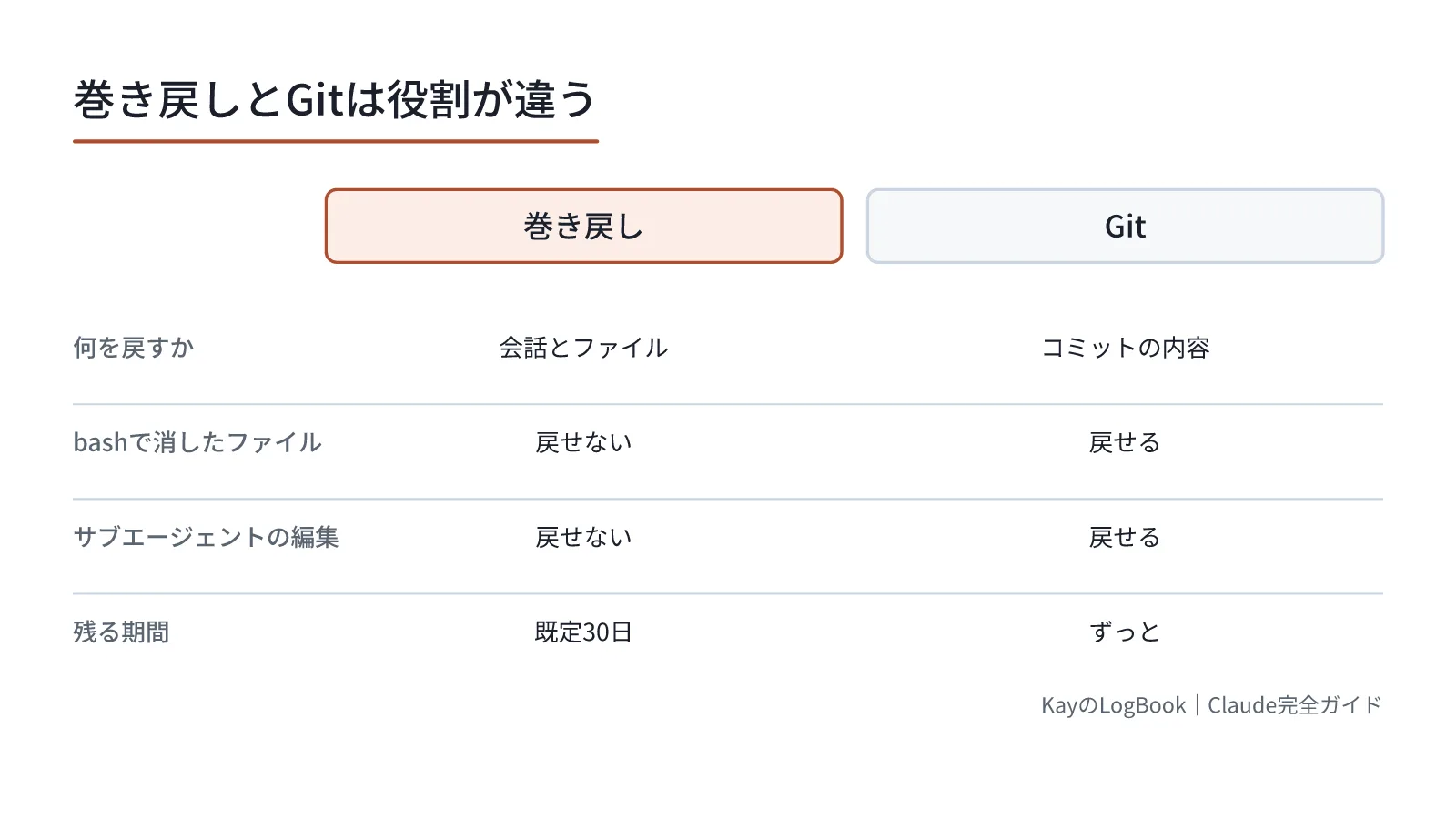
This is where not knowing leads to accidents. Here are the limitations stated in the official docs.
Changes made by bash commands aren’t tracked. If Claude runs rm file.txt or mv old.txt new.txt, rewind can’t restore it. Only changes made through Claude’s file editing tools are recorded.
Subagent edits normally aren’t restored. Changes made by subagents running in the background are outside the scope of /rewind. You’ll have to restore them with Git.
Changes made outside aren’t tracked. Things you fixed yourself in an editor, or that another session changed, are out of scope.
Symbolic links aren’t restored. They’re skipped, with a warning.
Checkpoints are kept for 30 days by default.
In other words, rewind is a tool for quick redos during a session; keeping history is Git’s job. The official docs also say it “is not a replacement for version control.”
Commit before you start working. That’s the most reliable insurance.
Try it: see the limits of rewind (5 minutes)
Try this in a repository you don’t mind throwing away.
Prompt
Create a file called test1.txt and write "A" in it.Next, have it deleted via bash.
Delete test1.txt using a bash command.Then open
/rewindand try restoring the code.Expected result: the file doesn’t come back. Even though it was created with the edit tool, what bash deleted isn’t tracked.
If it doesn’t work: if it did come back, the deletion may have gone through the file tool rather than bash. That’s a lesson too: the result depends on which path the change took.
Common pitfalls#
Thinking you’re safe because you can rewind. Some paths can’t be undone. Commit with Git before you start.
Switching to bypassPermissions because confirmations are tedious. It’s the setting the official docs warn about. The fix for tedium is narrowing the scope (#21).
Not using plan mode. This is the biggest waste. Having Claude investigate in a read-only state is both safe and fast.
Summary#
- For daily work, going back and forth between plan mode and manual is enough
- Deny rules are handy, but they don’t apply to reads and writes via scripts. To block at the OS level, use the sandbox
- Files deleted with bash and edits by subagents can’t be rewound
- Commit before working. Rewind is no substitute for Git