add and commit
What you will learn on this page
- Choose only the changes you want to record from several, and commit them
- Understand why each commit should carry one meaning
- Write commit messages you can read back later
- Know the pitfalls of
git add .andgit commit -a
On this page10 items
In Part 2, #08, we saw how changes move from the working tree → the staging area → the repository. On this page, we’ll use that flow to build a history you can read later.
Record changes separately, by meaning#
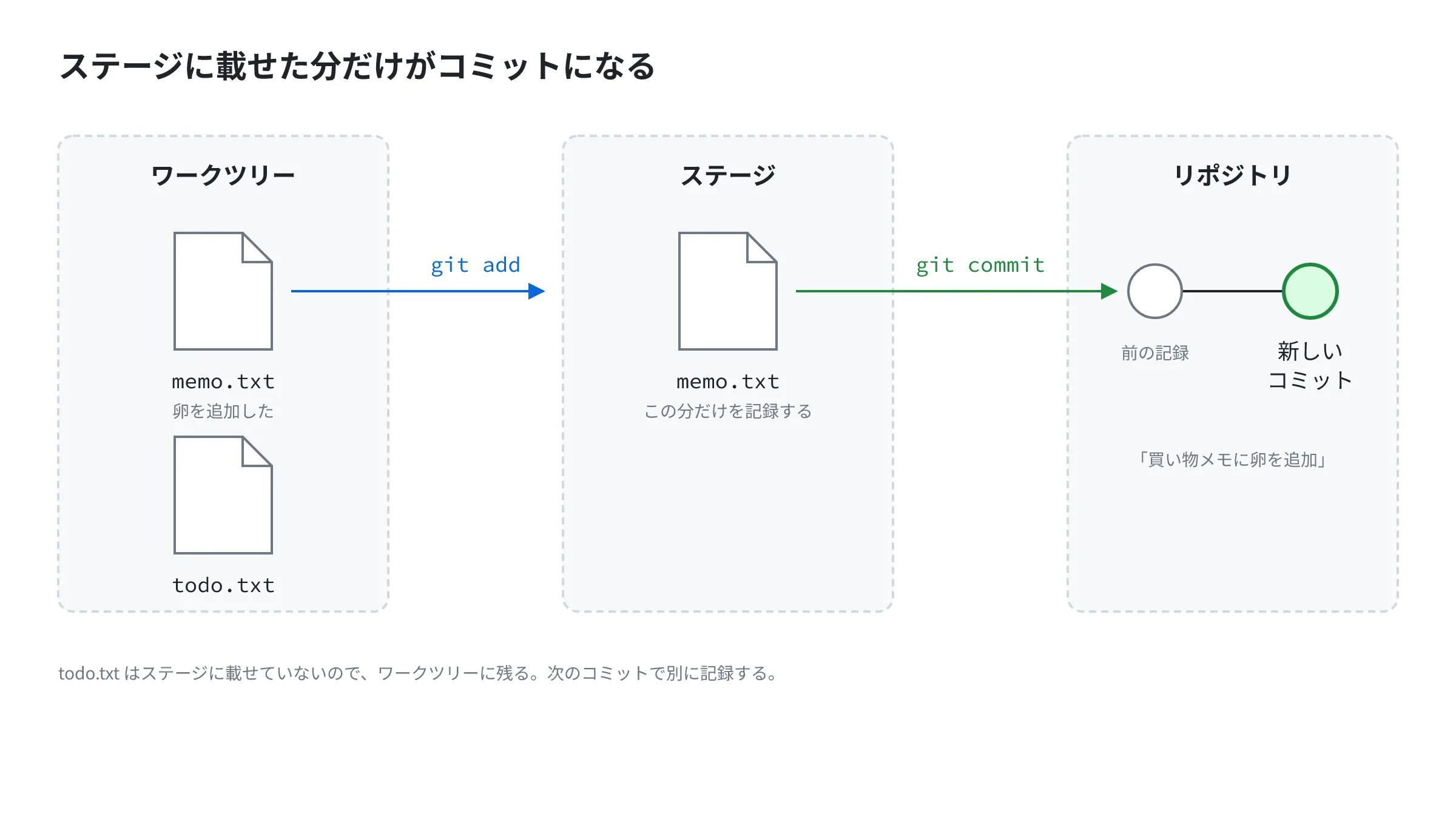
Even if there are two changes in the working tree, only the memo.txt change you put on the staging area becomes a commit. todo.txt is recorded separately in the next commit.
You could record both at once. The reason to separate them anyway is that a commit becomes the unit of “what a change is for.” If “add eggs” and “create a to-do list” are mixed into one commit, then when you want to undo just one of them (Part 2, #14 and #15), the other gets dragged along too.
Recording changes separately in practice#
This continues from Part 2, #08. memo.txt still has the “Buy eggs” line, not yet recorded. Let’s add one new file to that.
cd ~/git-practice
echo "Book a dentist appointment" > todo.txt
git status

# Output:
# On branch main
# Changes not staged for commit:
#   (use "git add <file>..." to update what will be committed)
#   (use "git restore <file>..." to discard changes in working directory)
#   modified:   memo.txt
#
# Untracked files:
#   (use "git add <file>..." to include in what will be committed)
#   todo.txt
#
# no changes added to commit (use "git add" and/or "git commit -a")
There are two changes. First, stage just memo.txt and record it.
git add memo.txt
git commit -m "Add eggs to the shopping memo"

# Output:
# [main c9990eb] Add eggs to the shopping memo
#  1 file changed, 1 insertion(+)
Next, record todo.txt.
git add todo.txt
git commit -m "Create a to-do list"

# Output:
# [main 1fe223f] Create a to-do list
#  1 file changed, 1 insertion(+)
#  create mode 100644 todo.txt
Show the list of records one line each, and the three commits appear, newest first.
git log --oneline

# Output:
# 1fe223f Create a to-do list
# c9990eb Add eggs to the shopping memo
# d9110b5 Create the shopping memo
The seven characters on the left are the beginning of the hash (the commit’s ID) covered in Part 1, #05. The values differ in every environment. How to read git log is covered in detail in Part 2, #11.
How to write commit messages#
A message is an explanation for your future self and for others. What you changed can be seen from the diff, but why you changed it isn’t preserved unless you write it down.
| Style | Example | Verdict |
|---|---|---|
| Doesn’t say what was done | fix update asdf | ✕ Indistinguishable in a list |
| Says what was done | Add eggs to the shopping memo | ○ Readable in a list |
| Also says why | Summary on line 1, reason after a blank line | ◎ You can judge it later |
When you want to include the reason, run git commit without -m. The editor you configured in Part 2, #06 opens; write in the following form, save, and close it.
Add eggs to the shopping memo

Ingredients for the cake I'm making this weekend. They're sold at the same store as milk, so I kept them in the same memo.
Line 1 is a summary, line 2 is blank, and the reason goes on line 3 onward: that’s the Git convention. Only the first line is shown in lists (git log --oneline and so on), so make the first line alone tell you what the commit is.
A good unit for a commit#
There’s no single right answer, but if you’re unsure, judge by these three points.
- It contains only one meaning: If you’re tempted to write the message as “X and Y,” consider whether it can be split
- Record at a clean stopping point: Try not to record states that are broken midway
- Small and frequent: A big record can’t be split later, but small records can be combined later (Part 4, #26)
Caveats for commands that stage everything at once#
git add .#
git add .. means “everything under the current folder.” It stages modified files and new files all at once, which is convenient, but it’s a cause of recording files you didn’t intend to. Config files containing passwords and temporary work files get staged indiscriminately too.
Always check the list with git status before using it. How to exclude files you never want recorded is covered in Part 2, #12 (.gitignore).
git commit -a#
git commit -a -m "Add bread"With -a, you skip git add and commit all changes to “files that have been recorded before.” Newly created files are not included. It’s easy to end up with a mismatch where a file you thought you included isn’t there, so until you’re used to it, explicitly choosing with git add is more reliable.
FAQ#
Q. After committing, I noticed a typo in the message or something I forgot to include.
A. If it’s the most recent commit, you can redo it (git commit --amend). This is covered in Part 2, #14.
Q. It says nothing to commit, working tree clean and I can’t commit.
A. It means there isn’t a single change to record. Check that you didn’t forget to save the file, and that you aren’t working in a different folder.
Q. What happens if I run git commit without staging anything?
A. It shows no changes added to commit and no commit is created. You never end up with an empty record.
Summary#
- Only the changes you put on the staging area become a commit
- Give each commit one meaning. It becomes the unit when you undo things later
- Write a summary on line 1 of the message, then the reason after a blank line
git add .stages unintended files too. Check withgit statusbefore using itgit commit -adoesn’t include newly created files
Next page#
10. Reading where you are with status and diff: How to check for yourself “which files have changed, and where” before recording.