The Four Objects (blob / tree / commit / tag)
What you will learn on this page
- Understand that Git stores only four kinds of objects
- Explain what blob, tree, commit and tag each contain
- Open and inspect the contents of objects with
git cat-file - Understand that IDs are computed from contents, and what that implies
On this page12 items
In Part 3, #16, we saw that a commit is “a photo of the whole project at that moment.” On this page, we take that photo apart. Everything stored inside .git ultimately comes down to just four kinds of parts. Git calls these parts objects.
How the four objects relate#
First, create a folder inside the folder and record it.
cd ~/git-practice
mkdir recipes
echo "Eggs 2" > recipes/cake.txt
git add recipes
git commit -m "Add the cake recipe"
Taken apart, this commit is nested like this.
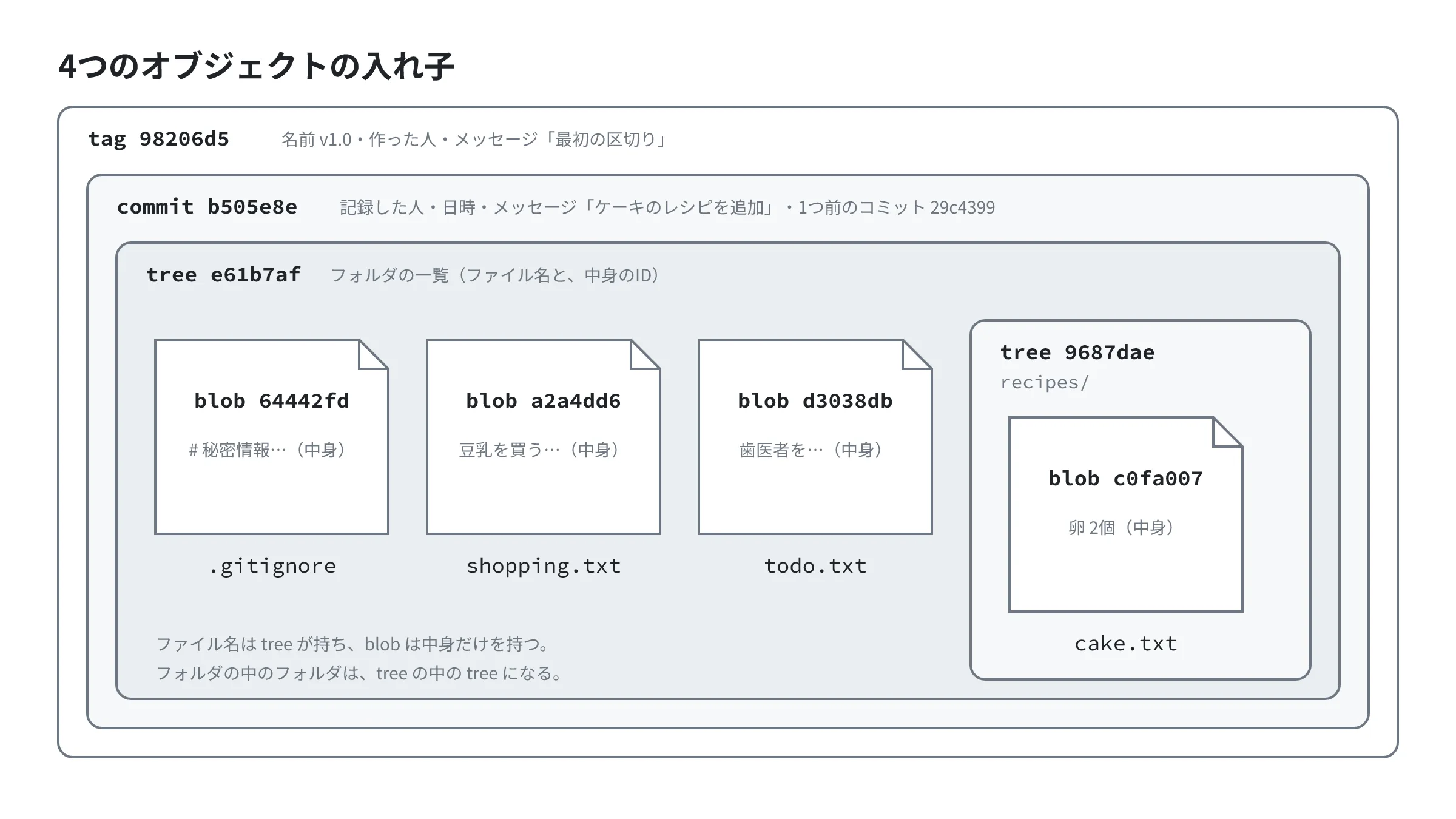
From the outside in, it gets more detailed, from “what was recorded” down to “the contents of the files.”
| Object | What it holds | Corresponds to |
|---|---|---|
| blob | Only the contents of a file | A file |
| tree | File and folder names, and the ID of each one’s contents | A folder |
| commit | The ID of the top-level tree, the ID of the previous commit, and who recorded it, when, and the message | One recording |
| tag | The ID of the commit it points to, a name, who made it and a message | A marker attached to a recording |
The diagram is drawn as nesting, but in reality nothing is inside anything; each object just points to the others by writing their IDs. Below, we open them one at a time to check.
Opening objects: git cat-file#
git cat-file is a command that shows the contents of an object. -t shows the type, and -p shows the contents.
commit#
git cat-file -t HEAD

# Output:
# commit

git cat-file -p HEAD

# Output:
# tree e61b7af4857312e4b55eaa25dd4c4e0cd7a03f2b
# parent 29c43994091deca933abfcfca9795596789675ee
# author Taro Yamada <[email protected]> 1792630800 +0900
# committer Taro Yamada <[email protected]> 1792630800 +0900
#
# Add the cake recipe
That’s all a commit holds. It doesn’t contain a single file’s contents. The tree line points to “the photo of the whole project at this moment,” and the parent line points to “the previous commit.” 1792630800 is the date and time expressed in seconds.
tree#
git cat-file -p 'HEAD^{tree}'

# Output:
# 100644 blob 64442fd642ae90b9c4be6583fa758d8b2e884f66  .gitignore
# 040000 tree 9687daeb9b93472bfcd466d61e6d8c3acef4e967  recipes
# 100644 blob b476a44f760c3e31ea53e0f144eb37b5dda5f0e0  shopping.txt
# 100644 blob d3038db570e4c542737f1ab3a559741e5af3628f  todo.txt
HEAD^{tree} means “the tree that HEAD’s commit points to” (it’s wrapped in quotes so the shell doesn’t misinterpret the symbols). It’s the same listing as git ls-tree in Part 3, #16, and you can see the recipes folder is included as a tree. The leading 100644 marks a regular file, and 040000 marks a folder.
git cat-file -p HEAD:recipes

# Output:
# 100644 blob 420d610ed161ab1b1b630cc70311c03fa214b1ce  cake.txt
HEAD:recipes means “recipes in HEAD’s commit.” A folder inside a folder becomes a tree inside a tree.
blob#
git cat-file -p HEAD:shopping.txt

# Output:
# Buy soy milk
# Buy eggs
# Buy bread
A blob is the file’s contents themselves. The file name isn’t written anywhere. The tree holds the name. That’s why when you renamed a file in Part 2, #13, the content blob stayed the same and only the name inside the tree changed.
IDs are computed from contents#
All the long alphanumeric strings that have appeared so far are object hashes (IDs). Git computes a 40-digit value from an object’s contents using a method called SHA-1, and uses that as the ID.
If the contents are the same, the value is the same no matter who computes it or when. As a test, let’s compute the ID from the same contents as memo.txt, which you first created in Part 2, #08.
echo "Buy milk" | git hash-object --stdin

# Output:
# dea7672d5492473303cc27bf0d7fe1c2934ff95a

git cat-file -p dea7672

# Output:
# Buy milk
git hash-object is a command that only computes “what the ID would be for these contents.” Pass the resulting ID to git cat-file, and the contents you recorded in Part 2, #08 come out. It should be the same dea7672… on your machine too.
This explains several properties of Git.
- Identical contents are stored only once (Part 3, #16): the same ID means the same object
- You can tell when records are corrupted: if the contents change by even one character, the ID no longer matches
- Commit IDs differ from machine to machine: a commit’s contents include who recorded it and when
Where they’re stored#
Objects are stored inside .git/objects, in a folder named after the first 2 characters of the ID, with the remaining 38 characters as the file name.
ls .git/objects/b4/

# Output:
# 76a44f760c3e31ea53e0f144eb37b5dda5f0e0
This is shopping.txt’s blob, b476a44…. The contents are compressed, so you can’t read them by opening them with cat. To read them, use git cat-file.
tag: a marker attached to a recording#
The fourth object, tag, gives a name to a specific commit to serve as a marker.
git tag -a v1.0 -m "The first milestone"
git cat-file -p v1.0

# Output:
# object b505e8e8f92abb8142a6ca486600de9100f98e42
# type commit
# tag v1.0
# tagger Taro Yamada <[email protected]> 1792630800 +0900
#
# The first milestone
The object line points to the commit the marker is attached to. How to use tags is covered in #30 in Part 5.
About the direction of the arrows#
A commit points to the previous commit via parent. In other words, in the records, newer things point to older things, a link that runs backward in time. When creating a new commit, the only thing Git knows is “the current commit,” so the only option is to write “this is my parent” in the newer one.
The diagrams in this guide arrange commits with older on the left and newer on the right, and deliberately don’t draw arrows pointing to parents. Drawing arrows makes it easy to read them against the flow of time. Read the lines in the diagrams as representing only the order “this commit comes after that one.”
FAQ#
Q. Why can’t empty folders be recorded?
A. A tree is “a list of the files and folders inside it,” so if a folder is empty, there’s nothing to write as a tree. The .gitkeep mentioned in Part 2, #12 is a workaround designed around this mechanism.
Summary#
- Git stores only four kinds of objects: blob, tree, commit and tag
- A blob holds only a file’s contents; a tree holds a list of file names and the IDs of their contents
- A commit points to the top-level tree and the previous commit, and holds who recorded it, when, and the message
- IDs are computed from contents, so identical contents get identical IDs
- A commit points to the previous commit. The diagrams in this guide arrange commits left to right to follow the flow of time
Next page#
18. What is HEAD? Detached HEAD — We look at what HEAD, used many times in Part 2, really is, and the state in which you lose track of “where you are now.”