Understanding Tracking Branches (upstream)
What you will learn on this page
- How to tell apart the three: your local branch, the tracking branch and the remote branch
- How to explain that origin/main is "a copy of GitHub's main as last seen"
- What it means to set upstream with
git push -u - How to read ahead and behind in
git branch -vv
On this page8 items
When you pushed for the first time in 39, you added -u: git push -u origin main. In 40, git status told you “behind origin/main by 1 commit.” This page makes clear what that origin/main and -u actually are. Once you understand this, you’ll be able to read everything Git tells you when you push and pull.
There are three “main”s#
In your practice repository, there are actually three things named “main.”
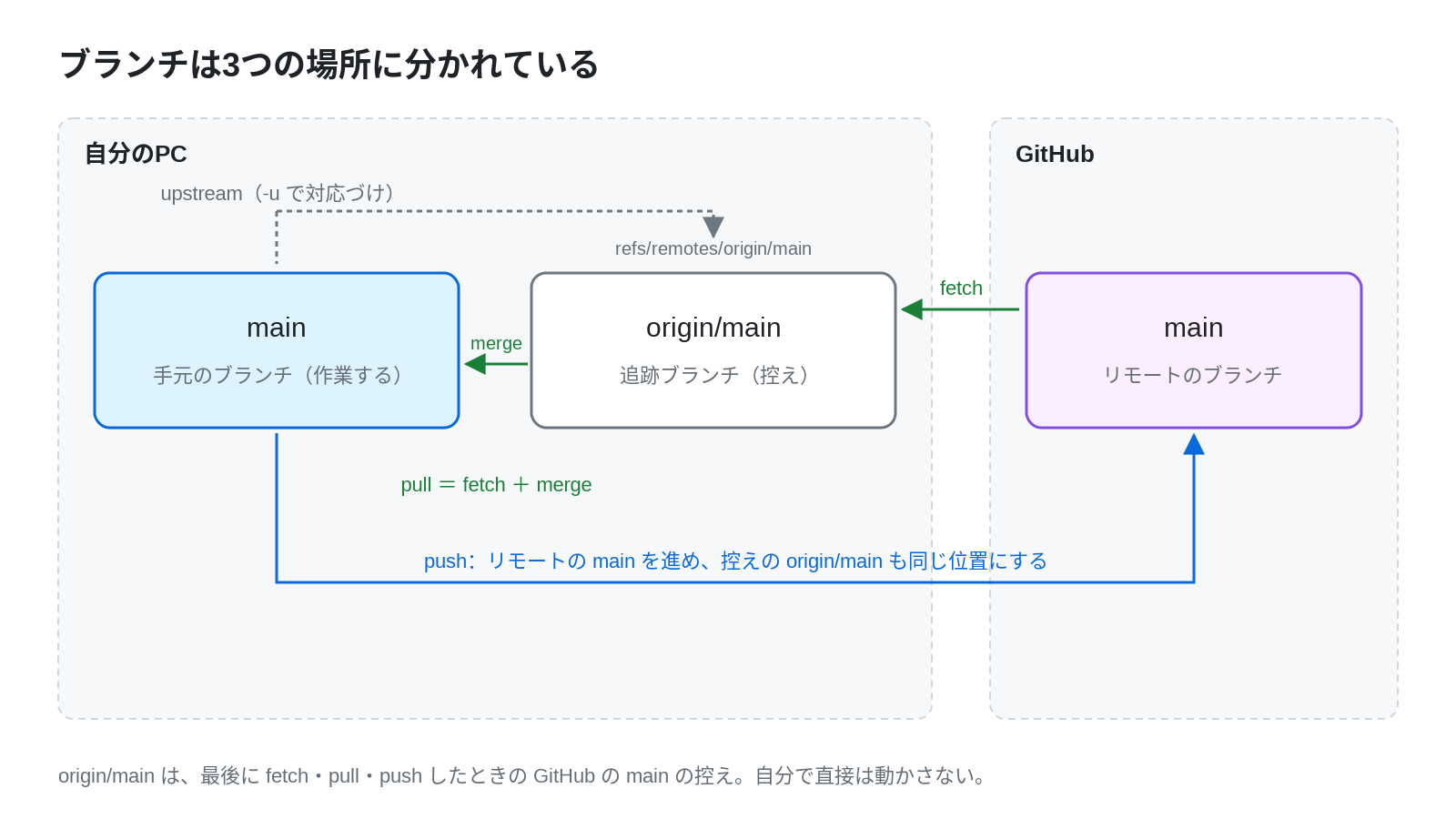
| Name | Where it lives | What it is | When it moves |
|---|---|---|---|
main | Your computer | Your local branch. This is where you work | When you commit or merge |
origin/main | Your computer | Tracking branch. A copy of GitHub’s main | When you fetch, pull or push |
| GitHub’s main | GitHub | The remote branch | When someone pushes |
The one in the middle, origin/main, is a copy recording where GitHub’s main was the last time you communicated with GitHub. Because it’s local, you can look at it even without an internet connection. But it isn’t necessarily GitHub’s current state. If someone has pushed, the copy is out of date. Updating the copy is what fetch in 40 does.
What the copy really is#
In Part 3, #19, you saw that a branch is a file in .git/refs/heads/. Tracking branches live right next door, in .git/refs/remotes/.
cd ~/git-practice
ls .git/refs/remotes/originHEAD
main
shopping-listUnder refs/remotes/origin/, the names of the branches on GitHub are listed. Like local branches, their contents are commit IDs. The fetch = +refs/heads/*:refs/remotes/origin/* you saw in 36 was the rule “copy GitHub’s refs/heads/ to refs/remotes/origin/ locally.”
upstream: linking a local branch to its copy#
Which tracking branch is your local main paired with? This pairing is called upstream. The -u in git push -u was short for --set-upstream.
git branch -vv* main 0293f47 [origin/main] Merge branch 'main' of https://github.com/<username>/git-practiceWith -vv, each branch’s upstream is shown inside [ ]. main’s upstream is origin/main. This pairing is written in the repository’s settings (.git/config).
git config --get-regexp '^branch\.main'branch.main.remote origin
branch.main.merge refs/heads/mainThis means “main is paired with origin’s refs/heads/main.” Once upstream is set, you get two conveniences:
- You can use
git pushandgit pullwithout writing the destination or branch name git statustells you whether you’re “ahead or behind” compared with the copy
When there’s no upstream#
Create a new branch and try pushing without -u.
git switch -c shopping-list
echo "Buy tissues" >> shopping.txt
git commit -am "Add tissues to shopping memo"
git pushfatal: The current branch shopping-list has no upstream branch.
To push the current branch and set the remote as upstream, use
git push --set-upstream origin shopping-listIt stopped you, saying “shopping-list has no upstream.” That’s because Git doesn’t know where to send it. Add -u as suggested.
git push -u origin shopping-listremote:
remote: Create a pull request for 'shopping-list' on GitHub by visiting:
remote: https://github.com/<username>/git-practice/pull/new/shopping-list
remote:
To https://github.com/<username>/git-practice.git
* [new branch] shopping-list -> shopping-list
branch 'shopping-list' set up to track 'origin/shopping-list'.Lines starting with remote: are messages from GitHub. It’s telling you “go here if you want to create a pull request” (pull requests are covered in Part 7, #45). The last line shows that shopping-list’s upstream has been set to origin/shopping-list.
Reading ahead and behind#
With an upstream, the difference between your local branch and the copy is shown as a number.
git switch main
git branch -vv* main db07100 [origin/main: ahead 1, behind 1] Add handkerchief to shopping memo
shopping-list f818c73 [origin/shopping-list] Add face masks to shopping memoThis is the display after fetching, in a situation where you committed “handkerchief” on your original computer while, in the meantime, “shoe polish” was pushed to GitHub from your laptop.
| Display | Meaning | What to do next |
|---|---|---|
[origin/main] | Same as the copy | Nothing |
ahead 1 | Your local branch is 1 commit ahead | Push |
behind 1 | Your local branch is 1 commit behind | Pull |
ahead 1, behind 1 | Each side has commits the other doesn’t (diverged) | Pull to combine them, then push |
git status shows the same thing in sentences.
Your branch and 'origin/main' have diverged,
and have 1 and 1 different commits each, respectively.
What to watch out for here is that these numbers are compared against the copy (origin/main). If you haven’t fetched, the copy is still old, so even if GitHub has new commits, they won’t show up as behind. When you “want to compare against the latest state,” run git fetch first.
FAQ#
Q. A branch I deleted on GitHub still shows up in my local git branch -a.
A. Tracking branches aren’t deleted automatically. Running git fetch --prune (-p for short) cleans up copies of branches that no longer exist on GitHub.
Q. Can I change the upstream later?
A. git branch -u origin/branch-name resets the upstream of the branch you’re currently on.
Summary#
- main exists in three forms: your local branch, the tracking branch (origin/main) and the remote branch
- origin/main is a copy of GitHub’s main as of the last time you communicated. It lives in
.git/refs/remotes/ - upstream is the pairing of a local branch with a tracking branch. Set it with
git push -u - With an upstream, you can write
git pushandgit pullbriefly, andgit statustells you the difference - ahead means your local branch is ahead; behind means it’s behind. The numbers are compared against the copy, so fetch first to compare against the latest
Next page#
42. Putting an Existing Project on GitHub — To wrap up Part 6, walk through the whole process of publishing a folder that never used Git to GitHub from scratch.