Creating, Switching and Deleting Branches
What you will learn on this page
- Switch and create branches with
git switchandgit switch -c - Understand that switching swaps the contents of the working tree
- Understand how uncommitted changes are handled when you switch
- Rename branches with
git branch -m, and delete them knowing the difference between-dand-D
On this page11 items
In #21, we learned that a branch is a sticky note attached to a commit. On this page, you’ll practice the full set of operations: creating a branch, switching with git switch, renaming it and deleting it. You’ll also see how switching swaps the contents of the working tree.
Create and switch#
Let’s write a cookie recipe on a branch separate from main. First create the branch, then move to it.
cd ~/git-practice
git branch cookie
git switch cookieSwitched to branch 'cookie'git switch <branch> is the command that reattaches HEAD to that branch. In the terms of Part 3, #18, the contents of .git/HEAD are rewritten to ref: refs/heads/cookie.
git branch* cookie
mainThe * has moved to cookie. If you commit now, only cookie moves forward, as we saw in #21.
echo "Butter 100g" > recipes/cookie.txt
git add recipes/cookie.txt
git commit -m "Add cookie recipe"[cookie 4b541f5] Add cookie recipe
1 file changed, 1 insertion(+)
create mode 100644 recipes/cookie.txtThe [cookie 4b541f5] on the first line means “recorded 4b541f5 on the cookie branch.”
Create and switch in one step#
Instead of typing git branch and git switch one after the other, adding -c (create) does it in a single command.
git switch -c <branch-name>In real work, this is what you’ll use almost every time.
Switching swaps the contents of the working tree#
Go back to main and compare what’s in the recipes folder.
ls recipes
git switch main
ls recipescake.txt
cookie.txt
Switched to branch 'main'
cake.txtWhen you go back to main, cookie.txt disappears from the working tree. It wasn’t deleted; the commit main points to doesn’t contain cookie.txt, so the working tree was swapped to match that state. Go back with git switch cookie and it reappears.
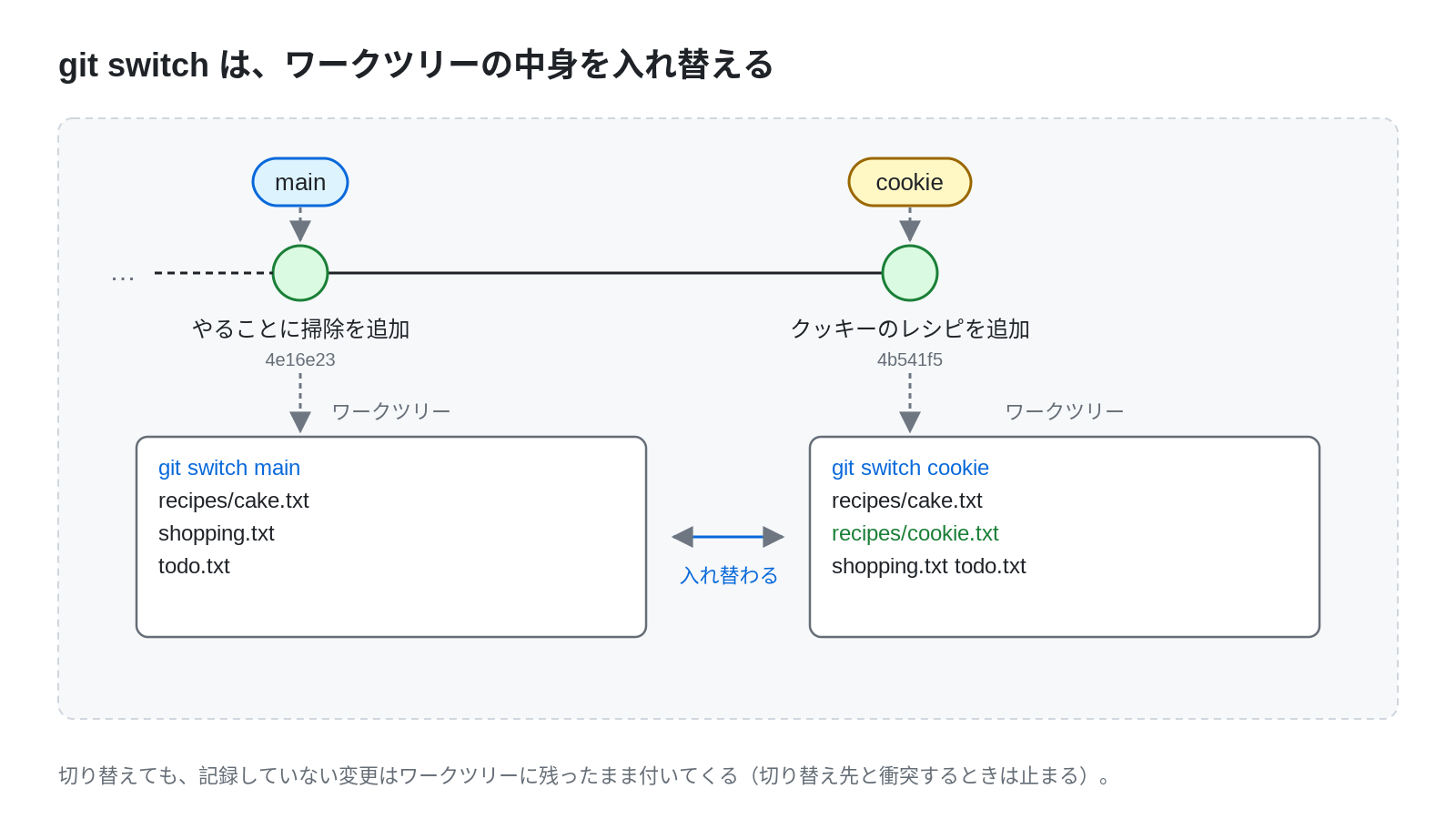
git log --oneline --decorate --graph --all -n 3* 4b541f5 (cookie) Add cookie recipe
* 4e16e23 (HEAD -> main) Add cleaning to the to-do list
* 370768c (tag: v1.0) Add cake recipecookie is one commit ahead of main. main doesn’t know about the cookies yet. How to bring cookie’s changes into main is covered next, in #23.
What happens to uncommitted changes?#
What gets swapped when you switch is “the committed contents.” Changes you haven’t committed yet don’t belong to any branch.
echo "Buy apples" >> shopping.txt
git switch cookieSwitched to branch 'cookie'
M shopping.txtgit status -s M shopping.txtThe M shopping.txt line tells you “you moved while carrying a modified file.” There’s only one working tree and one staging area (Part 2, #08), so uncommitted changes come along with you when you switch.
However, if carrying them along would overwrite the contents of the branch you’re switching to, Git stops the switch.
git switch main
git restore shopping.txt
echo "Draft" > recipes/cookie.txt
git switch cookieerror: The following untracked working tree files would be overwritten by checkout:
recipes/cookie.txt
Please move or remove them before you switch branches.
AbortingThe draft recipes/cookie.txt you created on main collides with the file of the same name recorded on the cookie branch, so the switch was aborted. This is a safety mechanism to protect your changes.
Delete the draft you created for practice.
rm recipes/cookie.txtGo back to the previous branch#
git switch - takes you back to the branch you were on just before. It’s handy when going back and forth between two branches.
git switch -c tmp-test
git switch -Switched to a new branch 'tmp-test'
Switched to branch 'main'Renaming and deleting#
Renaming: git branch -m#
git branch -m cookie recipe-cookie
git branch -v* main 4e16e23 Add cleaning to the to-do list
recipe-cookie 4b541f5 Add cookie recipe-m (move) renames a branch. It just rewrites the name on the sticky note, so it has no effect at all on commits. To rename the branch you’re on, write just one name: git branch -m <new-name>.
Deleting: -d and -D#
git branch -d tmp-testDeleted branch tmp-test (was 4e16e23).-d (delete) deletes a branch. tmp-test pointed to the same commit as main, so nothing is lost by deleting it. So what happens if you try to delete recipe-cookie, which hasn’t been brought into main yet?
git branch -d recipe-cookieerror: the branch 'recipe-cookie' is not fully merged
hint: If you are sure you want to delete it, run 'git branch -D recipe-cookie'
hint: Disable this message with "git config set advice.forceDeleteBranch false"Git refuses because it’s “not fully merged.” Deleting this branch would leave no name through which to reach the cookie commit. If you still want to delete it, use the uppercase -D.
| Option | Behavior |
|---|---|
-d | Deletes only branches that have been merged. Refuses if unmerged |
-D | Deletes even if not merged |
We’ll bring recipe-cookie into main next, in #23, so leave it instead of deleting it.
FAQ#
Q. I’ve heard you can also switch branches with git checkout.
A. You can. git checkout <branch> does the same thing as git switch, and git checkout -b <name> is the same as git switch -c <name>. However, checkout also doubles as the operation for restoring files (today’s git restore), which is confusing, so Git 2.23 added switch and restore, which split those roles. This guide uses switch. If you see checkout in older articles, mentally substitute it.
Q. What characters can I use in branch names?
A. Lowercase letters, numbers and hyphens are the safe choice. Spaces and characters such as ~ ^ : ? aren’t allowed. Names separated by /, like feature/login, are allowed and commonly used (covered in #28).
Summary#
- Switch with
git switch <name>, and create and switch withgit switch -c <name>. Go back to the previous branch withgit switch - - Switching swaps the contents of the working tree to the state of that branch’s commit
- Uncommitted changes come along when you switch. If they would overwrite something, Git stops you
- Rename with
git branch -m -ddeletes only merged branches;-Ddeletes forcibly
Next page#
23. How Merging Works (Fast-forward and 3-way) ── Bring the cookie recipe you wrote on recipe-cookie into main, and learn to tell the two kinds of merge apart.