worktree ── Opening Multiple Branches at Once
What you will learn on this page
- Understand worktree as a way to "open one repository in multiple folders"
- Open another branch in a separate folder with
git worktree add - Understand why the same branch can't be open in two places at once
- Clean up folders you're done with using
git worktree remove
On this page9 items
In #29, when an interruption came up mid-task, you shelved your changes with stash before dealing with it. That’s enough for short interruptions, but for long tasks or ones where you go back and forth repeatedly, shelving and unshelving every time gets tedious. This page covers worktree, which lets you prepare a separate folder for each branch and keep them open at the same time.
Opening one repository in two folders#
Until now, each repository had a single place to work (the working tree). Switching branches swaps out the contents of that folder (Part 4, #22).
With git worktree, you can add working trees to a single repository. An added working tree lives in a separate folder and can have a different branch open. Commits and branch records are shared in one place: the original .git.
Let’s set up a scenario where, partway through writing a salad recipe, you want to quickly fix your shopping list.
cd ~/git-practice
echo "Dressing 2 tbsp" >> recipes/salad.txt
git status -s M recipes/salad.txt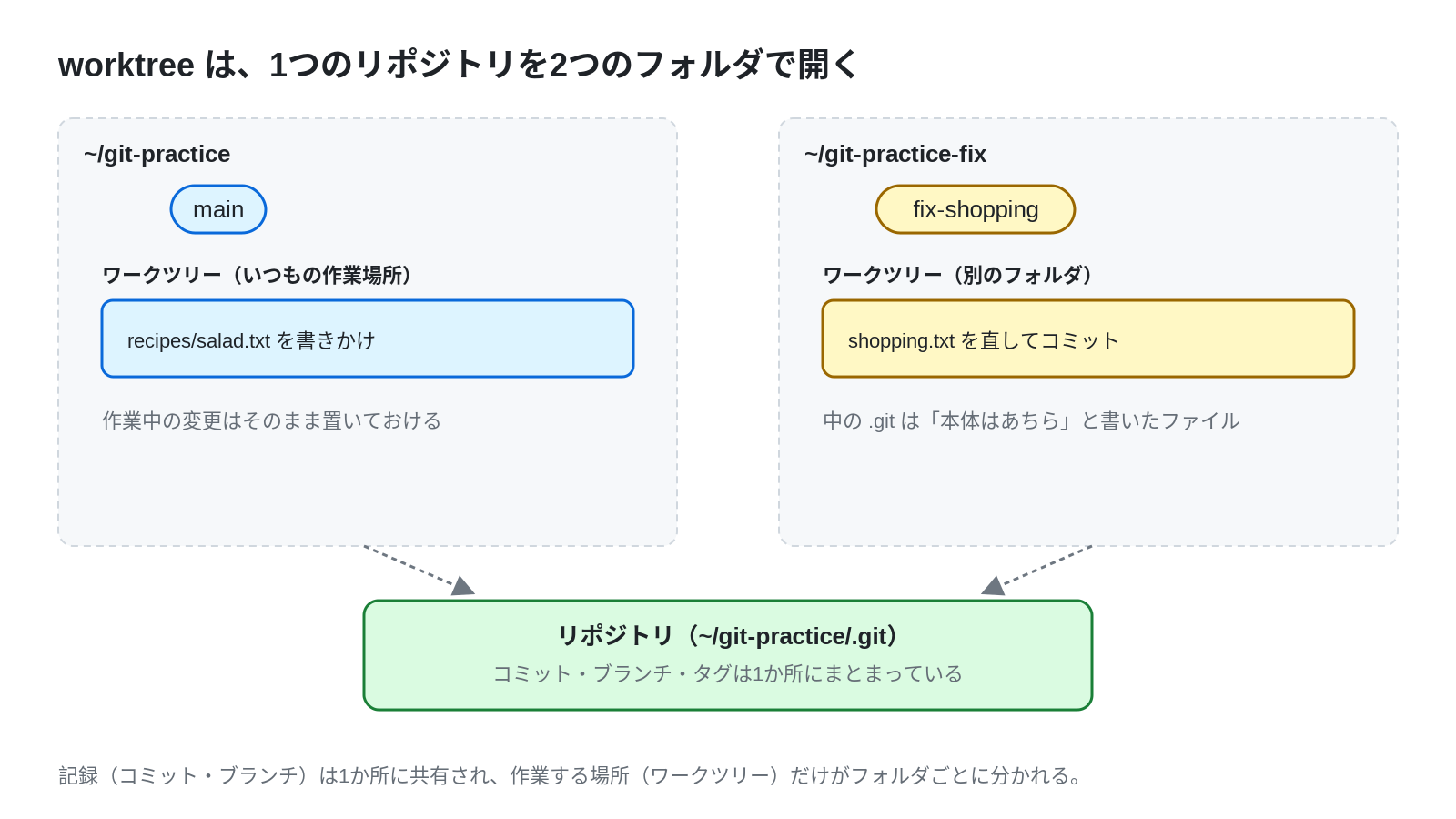
Adding a working tree: git worktree add#
Without touching the half-written salad.txt, open a branch for the shopping list in a neighboring folder.
git worktree add ../git-practice-fix -b fix-shoppingPreparing worktree (new branch 'fix-shopping')
HEAD is now at a5850eb Fix the amount of salt in the cakegit worktree add <folder> -b <branch-name> means “create a new branch fix-shopping and open it in the folder ../git-practice-fix”. .. is the parent folder, so ~/git-practice-fix was created next to ~/git-practice. To open an existing branch, leave off -b: git worktree add <folder> <branch-name>.
git worktree list/Users/taro/git-practice a5850eb [main]
/Users/taro/git-practice-fix a5850eb [fix-shopping]The two working trees are listed, along with the branch each has open.
Working in the added folder#
cd ../git-practice-fix
git status
sed -i.bak 's/Buy bread/Buy sliced bread/' shopping.txt && rm shopping.txt.bak
git commit -am "Change bread to sliced bread"On branch fix-shopping
nothing to commit, working tree clean
[fix-shopping dbebf33] Change bread to sliced bread
1 file changed, 1 insertion(+), 1 deletion(-)The new folder starts clean, with no changes, at the latest state of the fix-shopping branch. The half-written salad.txt has no effect here.
In this folder, .git isn’t a folder but a one-line file.
cat .gitgitdir: /Users/taro/git-practice/.git/worktrees/git-practice-fixAll it contains is a pointer saying “the repository itself is inside the original folder’s .git”. The contents of .git that you saw in Part 3, #20 exist only in the original folder.
Returning to the original folder#
cd ../git-practice
git status -s
git branch -v M recipes/salad.txt
+ fix-shopping dbebf33 Change bread to sliced bread
* main a5850eb Fix the amount of salt in the cakeThe half-written salad.txt is still there. And commit dbebf33 on fix-shopping, made in the neighboring folder, is visible from here too, because the history is shared in one place. + marks “a branch open in another working tree”.
The same branch can’t be open in two places#
git worktree add ../another mainPreparing worktree (checking out 'main')
fatal: 'main' is already used by worktree at '/Users/taro/git-practice'main is already open in the original folder, so it was refused. If the same branch were open in two places and you committed in both, it would be unclear which work advanced the branch, so Git stops you. If you only want to look, you can open the commit directly (the detached HEAD from Part 3, #18), as in git worktree add --detach ../another main.
Merging and cleaning up#
Merge the fixed shopping list into main. The original folder is on main, so you can merge right away (Part 4, #23).
git merge fix-shoppingUpdating a5850eb..dbebf33
Fast-forward
shopping.txt | 2 +-Clean up the working tree you’re done with using git worktree remove.
git worktree remove ../git-practice-fix
git worktree list
git branch -d fix-shopping/Users/taro/git-practice dbebf33 [main]
Deleted branch fix-shopping (was dbebf33).The folder is gone, and the list is back to one entry. The branch remains separately, so delete it with git branch -d.
Finally, commit the salad recipe you were in the middle of writing.
git commit -am "Add dressing to the salad"FAQ#
Q. Files like .env are missing from the new folder.
A. A working tree only gets the files Git tracks. .env, which you excluded in Part 2, #12, and files you haven’t committed yet won’t appear in the new folder. Copy them by hand if you need them.
Q. I moved the folder to the Trash.
A. It will still appear in git worktree list. Running git worktree prune cleans up the records of working trees that no longer exist.
Summary#
- worktree is a way to open one repository in multiple folders. The history is shared; only the places you work are separated
git worktree add <folder> -b <branch-name>opens a new branch in a separate folder- The same branch can’t be open in two working trees at once
- When you’re done, clean up with
git worktree remove. It stops if there are uncommitted changes - Use stash for short interruptions and worktree for long back-and-forth work
Next page#
34. submodule and subtree ── Compare two ways of bringing another repository inside your own.