Git's Three Areas
What you will learn on this page
- The roles of the three areas: the working tree, the staging area and the repository
- Which area
git addandgit commiteach move changes into - How to read from
git statusoutput which area a file is currently in - How to unstage changes you've staged
On this page10 items
In Part 2, #07, you turned a practice folder into a repository. From here you’ll start recording files, but first, let’s get a grip on the most important mechanism in Git. Inside Git, changes are recorded by passing through three places in order.
The three areas#
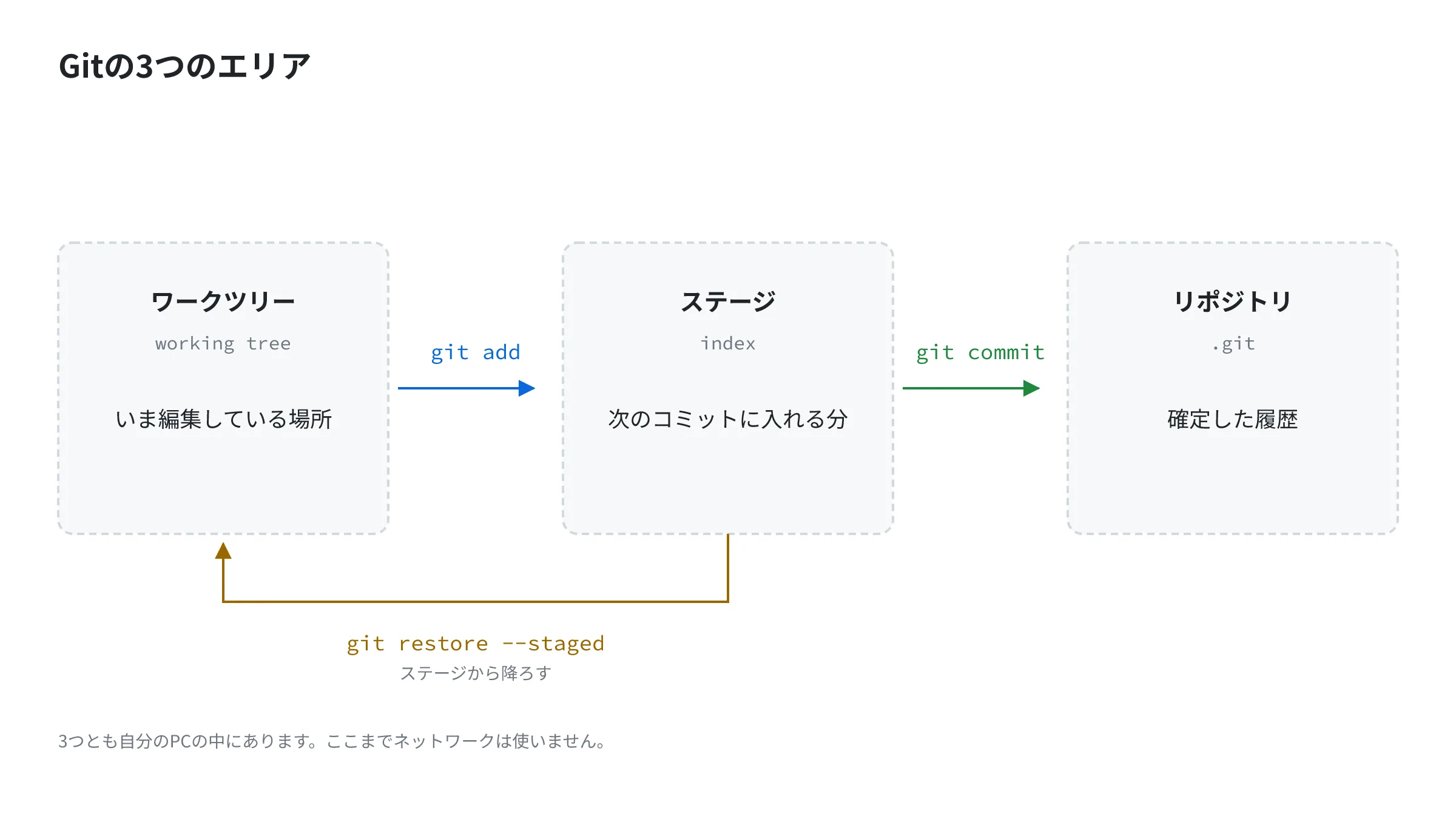
Moving from left to right brings you closer to a record. The upper arrows are operations that move forward; the lower arrow is the one that moves back.
- Working tree: the folder you normally see. It’s where you edit files in your editor, and changes here aren’t recorded at all yet
- Staging area: the place where you put changes that will go into the next commit. You add things here with
git add. Inside Git it’s called the index, and that name also appears in documentation and error messages - Repository: the
.gitfolder you saw in Part 2, #07. Withgit commit, the changes in the staging area are recorded together as one commit
All three are inside your own computer. No internet connection or sending anything anywhere is involved.
Why put a “staging area” in between?#
If you could commit files directly, there would be one fewer step. The staging area exists anyway so you can choose what goes into a commit.
For example, say you made two separate fixes while working. With a staging area, you can stage just one and commit it first, then put the other in the next commit. Because each commit can carry a single meaning, people reading the history later (including your future self) can understand “what this record was for.” How to choose is covered in Part 2, #09.
Try moving a file through#
In the practice folder ~/git-practice, create a file.
cd ~/git-practice
echo "Buy milk" > memo.txt
echo "…" > filename creates a file with that text written in it. You can also create a file with the same contents in an editor.
In the working tree#
git status

# Output:
# On branch main
#
# No commits yet
#
# Untracked files:
#   (use "git add <file>..." to include in what will be committed)
#   memo.txt
#
# nothing added to commit but untracked files present (use "git add" to track)
Untracked files are “files Git has never yet included in a record.” The file is in the working tree, but Git is only watching it so far.
Staging it#
git add memo.txt
git status

# Output:
# On branch main
#
# No commits yet
#
# Changes to be committed:
#   (use "git rm --cached <file>..." to unstage)
#   new file:   memo.txt
It has moved under Changes to be committed. This is the staged state.
Recording it in the repository#
git commit -m "Create shopping memo"

# Output:
# [main (root-commit) d9110b5] Create shopping memo
#  1 file changed, 1 insertion(+)
#  create mode 100644 memo.txt
What follows -m is the commit message. The d9110b5 part is a different value for every record.
git status

# Output:
# On branch main
# nothing to commit, working tree clean
working tree clean means “there’s no difference between the working tree and what’s recorded in the repository.” All three areas have the same contents, and this is the starting point for your work.
Unstaging#
Change the file after recording it, and try moving back and forth with the staging area.
echo "Buy eggs" >> memo.txt
git add memo.txt
git status

# Output:
# On branch main
# Changes to be committed:
#   (use "git restore --staged <file>..." to unstage)
#   modified:   memo.txt
>> appends a line to the end of the file. You’ve staged it, but if you decide you don’t want this change in the next commit after all, unstage it with git restore --staged.
git restore --staged memo.txt
git status

# Output:
# On branch main
# Changes not staged for commit:
#   (use "git add <file>..." to update what will be committed)
#   (use "git restore <file>..." to discard changes in working directory)
#   modified:   memo.txt
#
# no changes added to commit (use "git add" and/or "git commit -a")
It’s back under Changes not staged for commit. Unstaging leaves the file’s contents as they are. If you check with cat memo.txt, the “Buy eggs” line is still there. Unstaging and discarding changes are different operations.
FAQ#
Q. What happens if I edit a file further after running git add?
A. What’s staged is the contents at the moment you ran git add. Later edits exist only in the working tree and won’t go into the commit until you git add again. In git status, the same file appears under both “Changes to be committed” and “Changes not staged for commit.”
Summary#
- Changes in Git move through the working tree → staging area → repository in order to be recorded
- The staging area, also called the index, is where you choose what goes into the next commit
git addstages changes, andgit commitrecords them in the repositorygit restore --stagedonly unstages; it doesn’t change the file’s contents- All three areas are inside your own computer and have nothing to do with an internet connection
Next page#
09. add and commit — See how to choose changes, and what units and messages to record them in, so your history is readable later.