References (refs) and What a Branch Really Is
What you will learn on this page
- Understand that a branch is really a 41-byte file containing a commit ID
- Explain what happens at the file level when you create or advance a branch
- Understand how HEAD, branches and tags point to one another
- Understand why you shouldn't edit the files in refs by hand
On this page10 items
In Part 3, #18, we saw that the contents of HEAD are ref: refs/heads/main. This page opens up refs/heads/main, the file it points to. Once you understand this, the meaning of describing a branch as “a named pointer to a commit” in Part 4, #21 becomes plain to see.
What are references (refs)?#
A commit ID is 40 characters long, which isn’t something people can memorize and use. So Git lets you refer to IDs by name. This naming mechanism is called a reference (ref for short), and refs are kept together in the .git/refs folder.
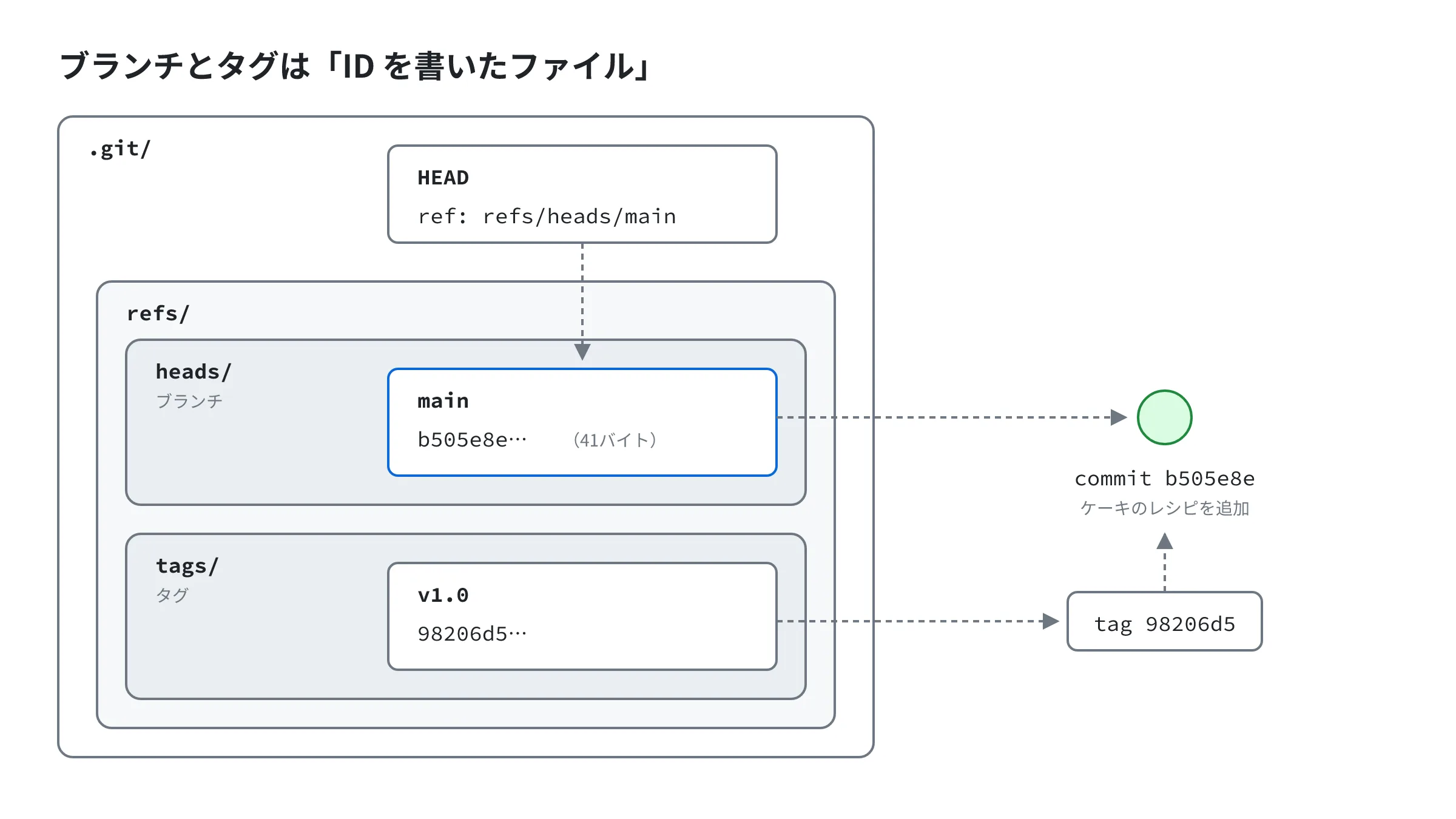
Branches live under refs/heads/, and tags under refs/tags/. In both cases, the contents are a file with a single line containing an ID.
A branch is a 41-byte file#
cd ~/git-practice
cat .git/refs/heads/main

# Output:
# b505e8e8f92abb8142a6ca486600de9100f98e42

wc -c .git/refs/heads/main

# Output:
#       41 .git/refs/heads/main
wc -c is a command that counts a file’s size in bytes. The 40-character ID plus one newline character marking the end of the line makes exactly 41 bytes. That’s all the main branch really is.
A branch doesn’t contain files or history. A branch merely points to one ID saying “this is the latest commit,” and the history before that is linked from commit to commit via parent, as we saw in Part 3, #17.
Creating a branch = creating one file#
Let’s try creating a branch (branch operations are covered in detail in Part 4, #22).
git branch experiment
ls .git/refs/heads

# Output:
# experiment
# main

cat .git/refs/heads/experiment

# Output:
# b505e8e8f92abb8142a6ca486600de9100f98e42
One 41-byte file named experiment has been added, and its contents are the same ID as main. Not a single file has been copied. This is why creating any number of branches is instant and barely uses any space.
Once you’ve checked, delete it.
git branch -d experiment

# Output:
# Deleted branch experiment (was b505e8e).
Advancing a branch = rewriting the file’s contents#
When you commit, the file of the branch HEAD points to is rewritten with the new commit’s ID. A record of this is kept in .git/logs/, and the reflog from Part 2, #15 reads from there.
tail -n 1 .git/logs/refs/heads/main

# Output:
# 29c43994091deca933abfcfca9795596789675ee b505e8e8f92abb8142a6ca486600de9100f98e42 Taro Yamada <[email protected]> 1792630800 +0900 commit: Add cake recipe
On the left is the ID before the rewrite (the Revert from Part 2, #15), and next to it is the ID after the rewrite (the cake recipe from Part 3, #17). This one line, “rewrote the contents of main from 29c4399… to b505e8e…,” is half of what a commit really is. The other half is saving the objects we saw in Part 3, #17.
Tags work the same way#
cat .git/refs/tags/v1.0

# Output:
# 98206d50345d4cba6f0ef0f0908a213aa1f6a61f

git cat-file -t 98206d5

# Output:
# tag
The file for tag v1.0, created in Part 3, #17, holds the ID of a tag object. The tag object in turn points to a commit: two levels.
The difference between branches and tags is whether they move. A branch advances with every commit, but a tag stays pointing at the commit it was created on. That’s why tags are used as markers like “the state when v1.0 was released” (Part 5, #30).
Listing them all: git show-ref#
git show-ref

# Output:
# b505e8e8f92abb8142a6ca486600de9100f98e42 refs/heads/main
# 98206d50345d4cba6f0ef0f0908a213aa1f6a61f refs/tags/v1.0
All references and the IDs they point to are listed. In Part 6, references starting with refs/remotes/ join this list.
Why you shouldn’t edit them by hand#
Once you understand how it works, you might be tempted to edit the files directly. But operate on the refs files with Git commands.
- The file may not exist: As references accumulate, Git saves them together in a single file called
.git/packed-refs(Part 3, #20). When that happens, therefs/heads/mainfile disappears, but the main branch hasn’t gone anywhere - No record is kept: If you edit by hand, nothing is recorded in
.git/logs/, and you can’t go back with the reflog - The storage format is set to change: In the future Git 3.0, the storage format for references in newly created repositories is planned to change to a different format called reftable. In that case, refs won’t be individual files like the ones we’ve seen here (source: Git’s BreakingChanges)
Even if the storage format changes, the idea that “a reference is a name attached to an ID, and a branch is a name pointing to the latest commit” stays the same. What this page has confirmed is that idea.
FAQ#
Q. How are branch names containing slashes, like refs/heads/feature/login, stored?
A. They’re stored as folders. A file named login is created inside the .git/refs/heads/feature/ folder. This mechanism is what lets you categorize branch names with slashes.
Summary#
- A reference (ref) is a name attached to a commit ID. Refs are kept in
.git/refs - A branch is really a 41-byte file containing one line with a commit ID
- Creating a branch adds one file, and committing rewrites its contents
- A tag stays pointing at the commit it was created on. A branch advances
- The storage format of references can change, so don’t touch the files by hand; use commands
Next page#
20. A tour of the .git folder ── A walk through everything inside .git, including what lies beyond the HEAD, objects and refs we’ve opened so far.