tag: Marking Versions
What you will learn on this page
- Explain a tag as "a fixed name attached to a commit"
- Understand the difference between lightweight and annotated tags and when to use each
- Tag past commits too
- Read from
git describeoutput how far you've moved since the latest tag
On this page11 items
In #29, we set aside in-progress changes temporarily. This page is about the opposite: places you want to keep forever. It covers tags, which give a name to a specific commit, like “the point we released as v1.0” or “the version used at the event”, so you can go straight back to it later.
A tag is a “name that doesn’t move”#
In Part 3, #19, we saw that branches and tags are both “files containing a commit ID”. There’s just one difference.
- A branch moves forward to the new commit each time you commit
- A tag keeps pointing to the commit it was attached to and never moves
So you use a branch for “where you’re working now” and a tag for “where you’ll want to come back to later”. In Part 3, #17, we attached a tag called v1.0 to the practice repository. That’s the first tag that already exists.
cd ~/git-practice
git tagv1.0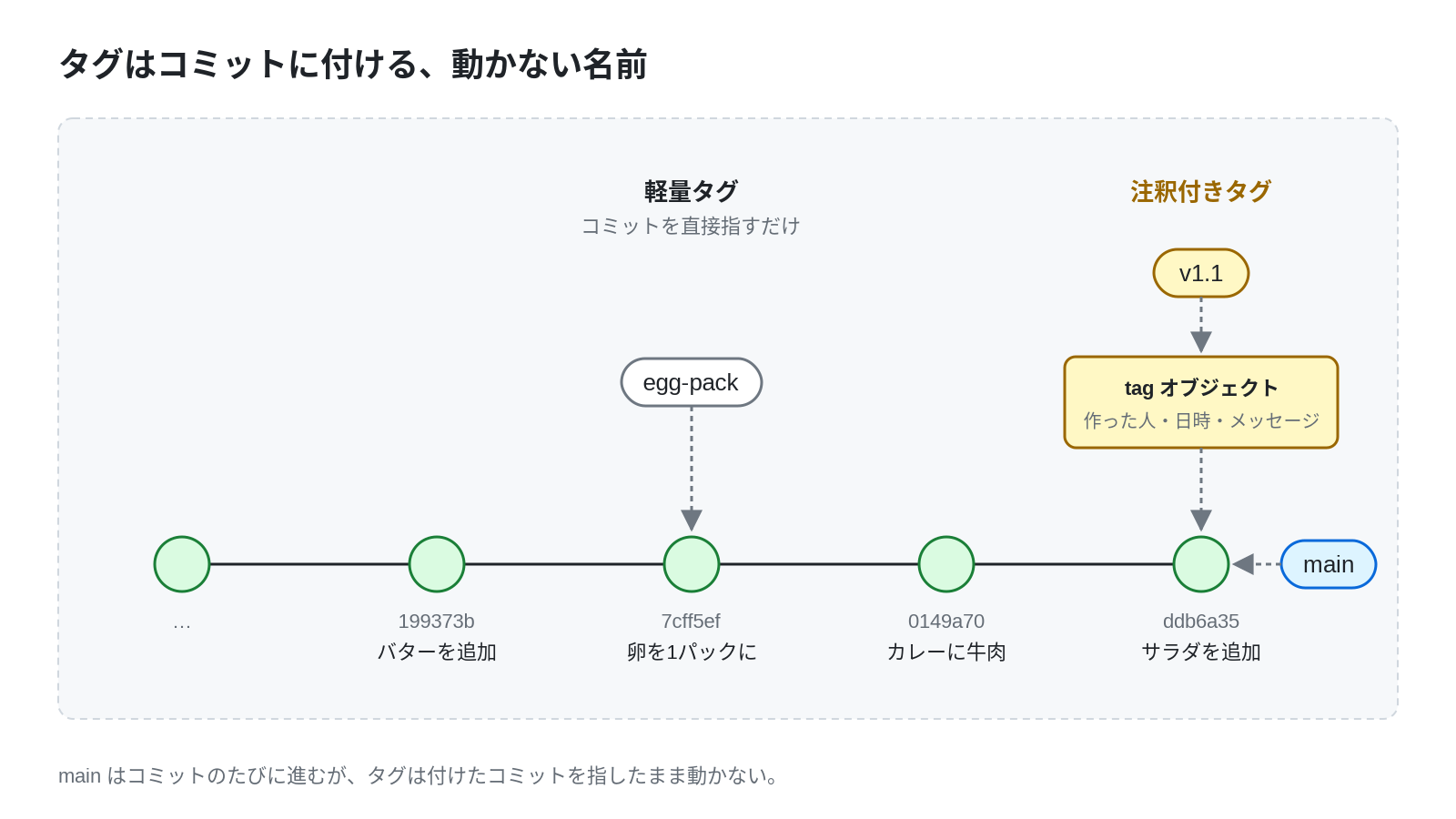
There are two kinds of tags: the lightweight tag on the left of the diagram and the annotated tag on the right.
Annotated tags: for marking versions#
An annotated tag records “who attached it, when, and why” in the tag itself. Use this kind for marking versions you hand to other people.
git tag -a v1.1 -m "Version with salad and curry added"
git show v1.1 --stattag v1.1
Tagger: Taro Yamada <[email protected]>
Date: Thu Oct 22 10:00:00 2026 +0900
Version with salad and curry added
commit ddb6a35e5d86c07e40b155f6e4fa36e80f07a8fa
Author: Taro Yamada <[email protected]>
Date: Thu Oct 22 10:00:00 2026 +0900
Add salad recipe
(rest omitted)-a means annotated, and -m is the tag’s message. The first half is information about the tag itself; from commit onward is the commit the tag points to.
An annotated tag is stored as a tag object, one of the four objects we saw in Part 3, #17.
git cat-file -t v1.1tagLightweight tags: for your own markers#
Without -a, you get a lightweight tag. It just gives a name to a commit ID; who attached it and when isn’t recorded.
You can tag not only the current commit but past commits too. Let’s put a personal marker on the commit two back (changing the eggs to one pack).
git tag egg-pack HEAD~2
git cat-file -t egg-pack
git log --oneline --decorate -n 4commit
ddb6a35 (HEAD -> main, tag: v1.1) Add salad recipe
0149a70 Add beef to the curry
7cff5ef (tag: egg-pack) Change eggs to one pack
199373b Add butter to the shopping listgit cat-file -t answers commit. A lightweight tag doesn’t create a tag object; it points to the commit directly.
| Annotated tag | Lightweight tag | |
|---|---|---|
| How to create | git tag -a name -m "message" | git tag name |
| What’s recorded | Who attached it, when, and a message | Nothing (just the name) |
| Best for | Marking versions you hand to others (v1.0, etc.) | Temporary personal markers |
If in doubt, use an annotated tag. You’ll be able to check later “what this version was”.
Finding and reading tags#
Listing and filtering#
git tag -negg-pack Change eggs to one pack
v1.0 First milestone
v1.1 Version with salad and curry addedWith -n, the first line of each message is listed too (for lightweight tags, the message of the commit it points to is shown). As tags pile up, you can filter by pattern, like git tag -l 'v1.*'.
Distance from the latest tag: git describe#
git describe
git describe HEAD~1v1.1
v1.0-18-g0149a70git describe describes a commit using the nearest annotated tag. The first line shows that HEAD is exactly v1.1. The second line, v1.0-18-g0149a70, means “commit 0149a70, 18 commits after v1.0” (the g marks that a Git ID follows). It’s handy for saying “which version it happened in” when reporting a bug.
Going back to look at a tagged point#
git switch --detach v1.0This lets you check the files as of the tag. HEAD points directly to the tag’s commit, which is the detached HEAD from Part 3, #18, so when you’re done looking, go back with git switch main.
Deleting and re-tagging#
Delete personal markers once you’re done with them.
git tag -d egg-packDeleted tag 'egg-pack' (was 7cff5ef)Only the name (the tag) disappears; the commit stays as is.
FAQ#
Q. How should I name tags?
A. For marking versions, a v followed by numbers joined with . (v1.0, v1.1.0, etc.) is common. The rules for incrementing the numbers (semantic versioning) are covered in Part 8, #55 (Distributing versions with Releases and tags).
Q. How do I share tags with other people?
A. Tags need to be sent separately from branches. This is covered, along with how to send your local history to GitHub, in Part 6 and in Part 8, #55 (Distributing versions with Releases and tags).
Summary#
- A tag is a fixed name attached to a commit. A branch moves forward with each commit, but a tag doesn’t move
- An annotated tag (
-a) stores who attached it, when, and a message as a tag object. Use it for marking versions - A lightweight tag is just a name pointing directly to a commit. Use it for personal markers
git describeexpresses how far you’ve moved since the latest annotated tag- Don’t move tags for versions you’ve handed to others
Next page#
31. blame and search (grep / log -S): how to investigate from the history “who wrote this line, when, and why”.