Undoing Things, Part 2 (revert and reflog)
What you will learn on this page
- Understand the difference between
git resetandgit revert, and how to choose between them - Cancel out changes with
git revertwhile keeping the record - Find a commit you thought you'd undone with
git reflog - Understand what even reflog can't recover
On this page8 items
At the end of Part 2, #14, we undid the “Add post office to to-do list” commit along with its changes. This page first gets that commit back. Then it covers another way of undoing: canceling changes out without erasing the record.
The difference between reset and revert#
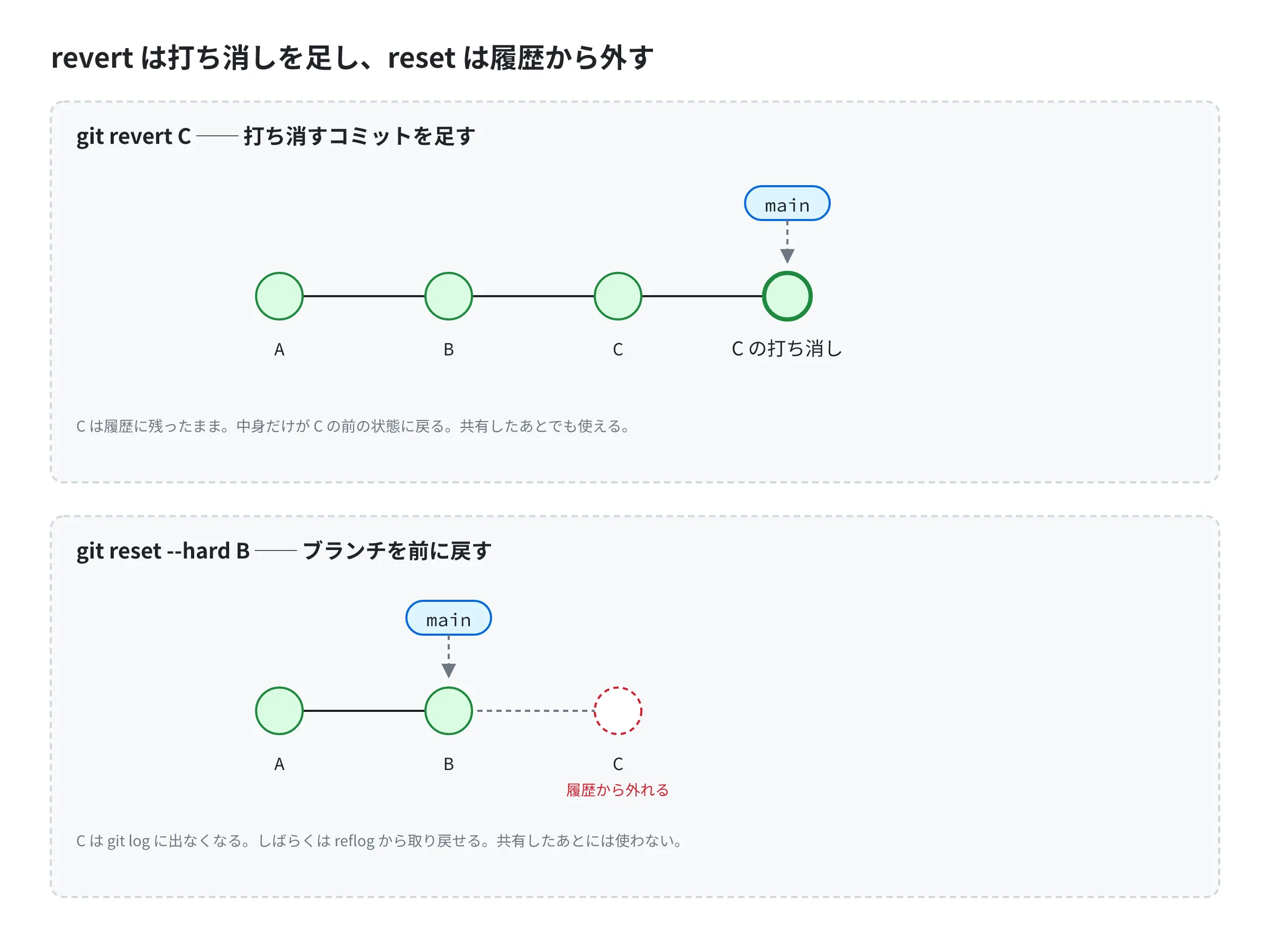
Both operations “make C’s changes as if they never happened,” but they go about it in opposite ways.
git resetmoves the branch back to a past commit. C no longer appears ingit log, and the history itself is rewrittengit revertadds the exact opposite of C’s changes as a new commit. C stays in the history, and only the contents return to the state before C
The criterion for choosing is whether you’ve shared that commit with anyone.
| Situation | What to use | Why |
|---|---|---|
| A commit that exists only on your machine | reset (Part 2, #14) | Keeps the history clean. Nobody is affected |
| A commit you’ve shared with others | revert | It doesn’t rewrite history, so it won’t conflict with other people’s history |
| When in doubt | revert | It just adds a record; nothing is lost |
Sharing is covered in Part 6. In Parts 2 to 5, you’re working only inside a practice folder, so using either one won’t cause trouble. While you can still try both, get a hands-on feel for the difference.
reflog: a record of where HEAD has moved#
git log shows only “commits reachable from the current branch.” The commit you undid no longer appears.
cd ~/git-practice
git log --oneline -n 2

# Output:
# 1acb8f0 Add bread to shopping list
# b90cd28 Stop tracking config.txt
However, Git doesn’t delete the commit itself right away. And it separately records when HEAD moved and to which commit. That’s the reflog (reference log).
git reflog -n 3

# Output:
# 1acb8f0 HEAD@{0}: reset: moving to HEAD~1
# fd7152c HEAD@{1}: commit: Add post office to to-do list
# 1acb8f0 HEAD@{2}: commit: Add bread to shopping list
The movements of HEAD are listed, newest first.
HEAD@{0}: Now. Came back to1acb8f0viaresetHEAD@{1}: Just before that. Created thefd7152ccommitHEAD@{2}: Further back
fd7152c at HEAD@{1} is the “Add post office to to-do list” commit we undid. Once you know the hash, you can go back to it.
Getting back a commit you undid#
git status -s

# Output:
# (nothing is displayed)

git reset --hard fd7152c

# Output:
# HEAD is now at fd7152c Add post office to to-do list
The branch points to fd7152c again, and the “Go to the post office” line is back in todo.txt.
git log --oneline -n 3

# Output:
# fd7152c Add post office to to-do list
# 1acb8f0 Add bread to shopping list
# b90cd28 Stop tracking config.txtrevert: canceling out while keeping the record#
Now let’s cancel out the recovered “Add post office to to-do list” commit, this time with revert.
git revert --no-edit HEAD

# Output:
# [main bb5686f] Revert "Add post office to to-do list"
#  Date: Thu Oct 22 01:03:21 2026 +0900
#  1 file changed, 1 deletion(-)
HEAD specifies the commit you want to cancel out. Commits other than the most recent one can be specified by hash, as in git revert 1acb8f0. Without --no-edit, an editor opens so you can edit the message of the canceling commit.
git log --oneline -n 3

# Output:
# bb5686f Revert "Add post office to to-do list"
# fd7152c Add post office to to-do list
# 1acb8f0 Add bread to shopping list
The original commit fd7152c remains, and the canceling commit bb5686f has been added on top. The “Go to the post office” line is gone from todo.txt, but the history still shows that it was “added once and later undone.”
What even reflog can’t recover#
The reflog is powerful, but it isn’t all-powerful.
| What can be recovered | What can’t be recovered |
|---|---|
| Anything you’ve committed at least once | Edits you never committed (things discarded by the “erasing” operations in Part 2, #14) |
| Commits undone with reset or amend | Old reflog entries past their expiry |
| Operations on another PC (the reflog exists only on that PC) |
By default, undone commits can be traced from the reflog for roughly 30 days. After that, Git may delete them when it cleans up.
There’s one takeaway from this: as long as you’ve committed it, Git can recover almost anything. Committing frequently at natural breakpoints in your work is the most reliable insurance.
FAQ#
Q. The same hash appears in the reflog several times.
A. It means HEAD came back to that commit several times. The reflog isn’t a record of “which commits exist” but of “how HEAD moved,” so the same commit can appear repeatedly.
Q. What happens if you revert a commit that was itself a revert?
A. It cancels the cancellation, and the original change comes back. All three commits remain in the history.
Summary#
resetmoves the branch back and rewrites history;revertadds a canceling commit and keeps the history- Cancel out shared commits with
revert. When in doubt, userevert git reflogis a record of HEAD’s movements, and you can use it to find the hash of a commit you undid- Edits you never committed can’t be recovered, even with the reflog
- Frequent commits are the most reliable insurance
Next page#
16. Git saves snapshots, not diffs ── This is where Part 3 begins. We look at what Git saves inside a commit, starting from how it works.