Git Stores Snapshots, Not Differences
What you will learn on this page
- Understand the difference between the "diff-based" and "snapshot-based" approaches
- Confirm that each Git commit holds the state of every file at that point
- Understand why holding everything doesn't increase storage
- Understand where the differences shown by
git diffcome from
On this page8 items
This starts Part 3. In Part 2, you learned how to operate Git. In Part 3, we look at what Git stores behind the scenes and how it traces through it.
On a first read, skimming is fine. But going through this part turns the branches and merges in Part 4 into “understanding from the mechanism” rather than “memorizing steps”. Part 3’s #18 and #19 in particular are direct prerequisites for Part 4.
Two ways of recording#
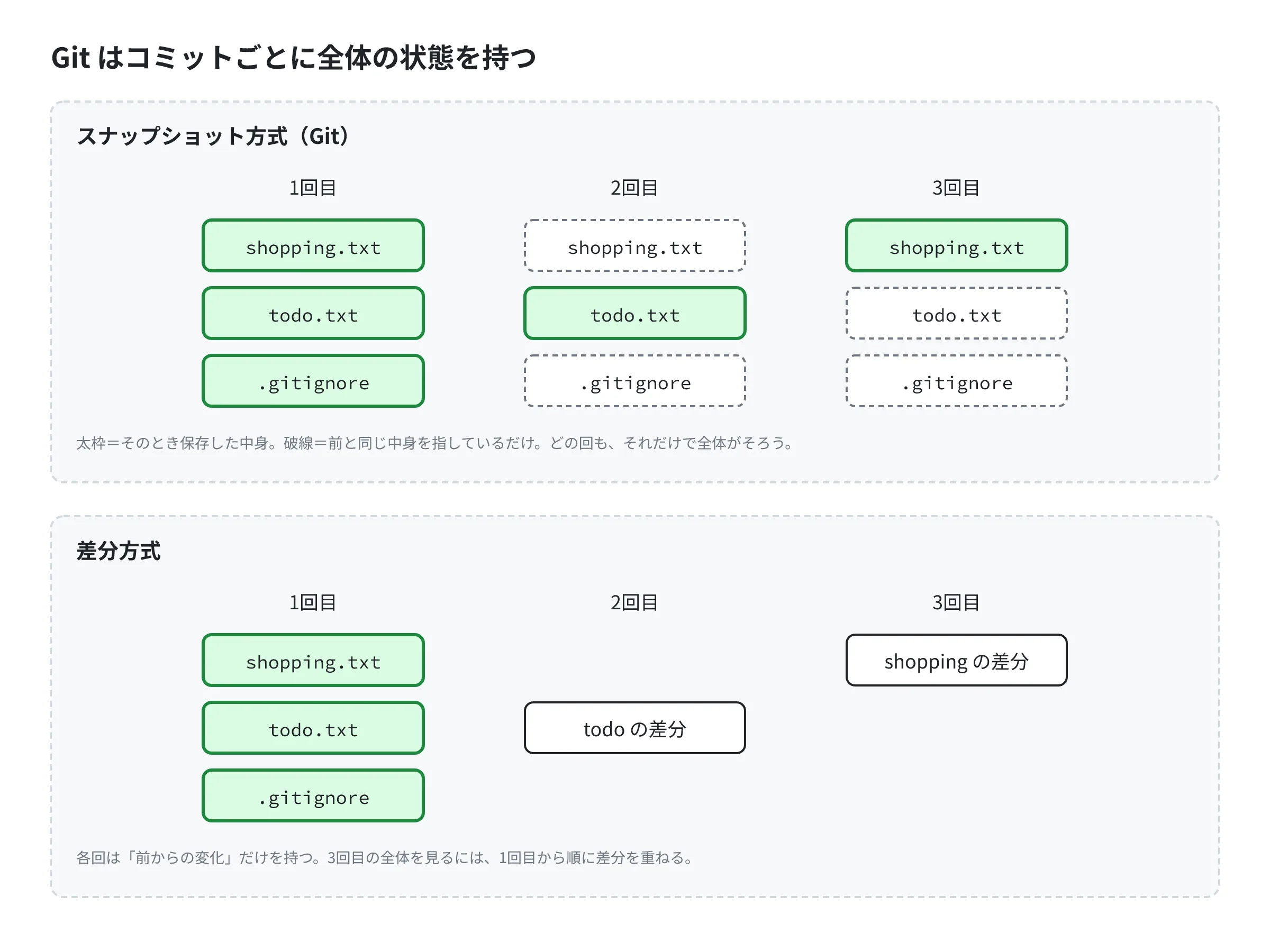
Version control software broadly records history in one of two ways.
- Diff-based: records the initial state and then accumulates the changes (diffs) from there. To see the whole of the 3rd version, you apply the diffs in order starting from the 1st
- Snapshot-based: each time you record, it holds the state of every file at that point in full. Every version is complete on its own
Git is the latter. A snapshot means “a single photo capturing a moment”, and a commit is exactly that photo. In Part 1, #05, we called a commit “a record of changes”, but more precisely the structure is a chain of “photos of the whole at each point”, and comparing photos reveals the changes.
Checking that it really holds everything#
You can list what a commit holds with git ls-tree. Let’s look at the latest commit in the practice folder.
cd ~/git-practice
git ls-tree HEAD

# Output:
# 100644 blob 64442fd642ae90b9c4be6583fa758d8b2e884f66  .gitignore
# 100644 blob a2a4dd6683d9012c00d693af6c5b1f02f225a091  shopping.txt
# 100644 blob d3038db570e4c542737f1ab3a559741e5af3628f  todo.txt
The latest commit is the “Revert” from Part 2, #15, which changed only todo.txt. Even so, all three files are listed. The long alphanumeric string on each line is an ID pointing to that file’s content (covered in detail in Part 3, #17).
Let’s also look at the commits one and two back.
git ls-tree HEAD~1

# Output:
# 100644 blob 64442fd642ae90b9c4be6583fa758d8b2e884f66  .gitignore
# 100644 blob a2a4dd6683d9012c00d693af6c5b1f02f225a091  shopping.txt
# 100644 blob 04db51d409e081cec2c991dd2a558fee63053023  todo.txt

git ls-tree HEAD~2

# Output:
# 100644 blob 64442fd642ae90b9c4be6583fa758d8b2e884f66  .gitignore
# 100644 blob a2a4dd6683d9012c00d693af6c5b1f02f225a091  shopping.txt
# 100644 blob d3038db570e4c542737f1ab3a559741e5af3628f  todo.txt
Two things can be read from this.
- Unchanged files keep the same ID.
.gitignoreandshopping.txtpoint to the same ID in all three commits. The content isn’t saved three times; three commits point to one and the same content - The todo.txt in the latest commit and the one two back have the same ID (
d3038db…). As a result of the revert in Part 2, #15 undoing “Go to the post office”, todo.txt went back to exactly the same content as two commits earlier. Git gives the same ID to the same content, so instead of saving it anew, it simply points to the earlier content
Why holding everything doesn’t make it heavy#
Hearing that every file is held every time, you might think storage grows with each record. In reality, two mechanisms keep it in check.
- The same content is stored only once: as we just confirmed, unchanged files simply point to the same content as before. Only the changed files are newly stored
- Content is compressed when stored: all content is stored compressed. On top of that, as records accumulate, Git repacks its storage files, packing similar content together as deltas to reduce size (we’ll look at this in Part 3, #20)
The second point might make you think “so it’s diff-based after all”, but that’s about how things are packed for storage. The way Git thinks about commits is still “each one is a photo of the whole”. Whenever you open any commit, there’s no need to rebuild it step by step from another commit.
So where do git diff’s differences come from?#
The differences we saw in Part 2, #10 and #11 aren’t stored anywhere. Every time you run git diff or git log -p, Git compares two photos and recalculates them.
The git diff output in Part 2, #10 contained this line:
index 520f940..d3038db 100644520f940 and d3038db are the IDs of the contents of the two todo.txt versions being compared. It’s the same d3038db… that appeared in git ls-tree above. The diff was the result of comparing “this content” with “that content”, displayed on the spot.
What you gain from snapshots#
- You can go back to any point instantly: just open the photo of the commit you want; there’s no need to trace through everything in between
- Branches are cheap to create: as we’ll see in Part 4, #21, a branch is nothing more than a name for “which photo it points to”
- Corruption is detectable: since IDs are calculated from content, if stored content gets even slightly corrupted, it no longer matches its ID
FAQ#
Q. If I change a large file just a little, is it saved in full every time?
A. The changed file’s content at that point is newly stored. But it’s compressed, and later, when the storage files are repacked, it’s packed as a delta against similar content, so it won’t balloon to many times its size. Files like video and images, which are already compressed and don’t delta well, tend to increase storage, so be careful with them.
Summary#
- A Git commit holds not the differences from before, but the state of every file at that point (a snapshot)
- Unchanged files simply point to the same content as the previous commit and aren’t stored twice
- Identical content gets the same ID no matter when it’s recorded
git diff’s differences aren’t stored; they’re calculated on the spot by comparing two snapshots- Deltas may be used for compression in storage, but commits are still handled as snapshots
Next page#
17. The four objects (blob / tree / commit / tag): open up a snapshot and look at the four kinds of parts Git actually stores.