Branching Strategies (GitHub Flow / Git Flow / Trunk-Based)
What you will learn on this page
- Understand that a branching strategy is "a set of rules for how to create and integrate branches"
- Explain the differences between GitHub Flow, Git Flow and trunk-based development in terms of the number and lifetime of branches
- Know the rules of thumb for choosing a strategy to fit your team and what you're building
- Know how to name branches like
feature/...and the caveats involved
On this page9 items
In #21 to #27, you gathered the tools for creating branches and bringing them in with merge, rebase and cherry-pick. To wrap up Part 4, this page covers the team rules for “how to use” them: branching strategies. It compares the three best-known ones and considers which to choose.
What is a branching strategy?#
While you’re working alone, you’re free to decide when to create a branch and when to bring it into main. But once several people are involved, things get confusing unless you decide on points like these.
- Which branch is the “finished product” (which one gets published or released)
- Where working branches are created from, and where they are brought into
- Whether to integrate with merge or rebase, and who reviews before integrating
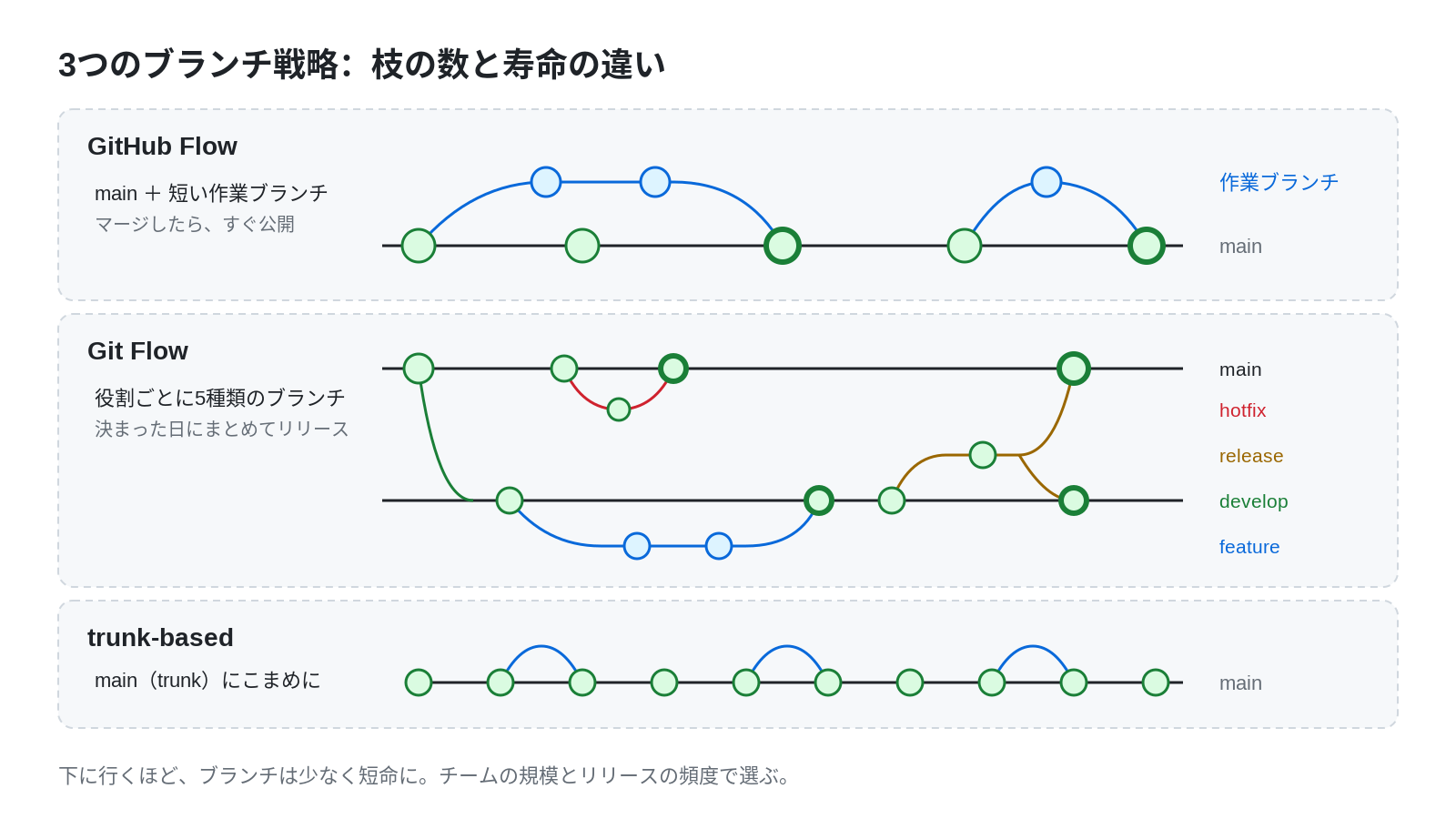
A template for these rules is a branching strategy (also called a branching model or workflow). The three best known are GitHub Flow, Git Flow and trunk-based development. The main differences are “how many long-lived branches there are” and “how long working branches live before being integrated.”
GitHub Flow: just main and short working branches#
There is only one long-lived branch: main. GitHub’s official documentation describes it with the following flow.
- Create a working branch from main with a descriptive name
- Commit on the working branch and push it to GitHub
- Open a pull request (a request to have your changes brought in; covered in #45 in Part 7)
- Respond to review comments with additional commits
- Once approved, merge into main
- Delete the working branch
main is kept “ready to publish at any time,” and the assumption is that you publish right after merging. With few rules, it’s easy to learn, and it suits things that are updated and published frequently, like websites and services.
What we’ve been doing in Part 4 of this guide, namely “create a working branch from main, bring it into main when done, then delete it,” is almost exactly this.
Git Flow: five kinds of branches, each with a role#
This model was published in 2010 by Vincent Driessen in an article titled “A successful Git branching model.” There are two long-lived branches, plus three kinds of temporary branches.
| Branch | Lifetime | Role |
|---|---|---|
main (master in the original article) | Permanent | Holds only released versions. Tagged at each release |
develop | Permanent | Collects development for the next release |
feature/... | Until the feature is done | Created from develop and brought into develop |
release/... | During release preparation | Created from develop, finished up, then brought into both main and develop |
hotfix/... | Until the urgent fix is done | Created from main and brought into both main and develop |
It suits things released in larger units, like “ship version 2.0 on such-and-such date,” and things where multiple versions are maintained in parallel. On the downside, there are many kinds of branches, and it’s easy to get wrong what goes where.
Trunk-based: integrate into main frequently#
The trunk is main. Everyone integrates into main frequently, at least about once a day. Even when working branches are created, they are limited to short-lived ones integrated within a few hours to a day or two.
Because branches are short-lived, the conflicts from #24 rarely grow large, and the problem of “integrating a branch that was left alone for a long time is painful” doesn’t arise in the first place. In exchange, half-built features also end up in main, so it presupposes mechanisms such as automated tests that constantly confirm nothing is broken, and hiding unfinished features behind settings (called feature flags).
Which one to choose#
| GitHub Flow | Git Flow | Trunk-based | |
|---|---|---|---|
| Long-lived branches | main | main, develop | main |
| Working branch lifetime | A few days | Until the feature is done (tends to be long) | A few hours to 1–2 days |
| Releases | Right after merging | Batched, at set times | Anytime (always releasable) |
| Best suited to | Websites and services, small to mid-sized teams | Apps and libraries released with version numbers | Frequently updated services with solid automated testing |
If in doubt, starting with GitHub Flow is recommended. Branches are just main and working branches, and working branches are kept small and integrated early — that alone is enough to keep things running, whether you’re alone or on a team. When you need to maintain multiple versions in parallel, adopt ideas from Git Flow; when you want to integrate more frequently, adopt ideas from trunk-based development. That order is plenty.
Naming branches#
Whatever the strategy, give working branches names that make clear what the work is. A common style is to put the type before a /, such as feature/ (adding a feature) or fix/ (fixing a bug).
cd ~/git-practice
git branch feature/rice-recipe
git branch fix/egg-count
git branch --list 'feature/*' feature/rice-recipegit branch --list 'pattern' lists only the branches whose names match. Separating with / makes it easy to filter by type.
As seen in Part 3, #19, a branch is really a file under .git/refs/heads/, so names containing / are stored as folders.
ls .git/refs/heads/featurerice-recipeBecause of this, you can’t create a branch named feature while a folder named feature exists.
git branch featurefatal: cannot lock ref 'refs/heads/feature': 'refs/heads/feature/rice-recipe' exists; cannot create 'refs/heads/feature'Remember that you can’t use feature and feature/... at the same time. Delete the practice branches.
git branch -d feature/rice-recipe fix/egg-countDeleted branch feature/rice-recipe (was deb9a28).
Deleted branch fix/egg-count (was deb9a28).FAQ#
Q. Do I need a branching strategy even if I’m working alone?
A. You don’t need strict rules, but it’s handy to decide just this: “keep main always working, and do your work on branches.” Even if another task interrupts you midway, you can go back to main and deal with it calmly.
Q. Should I create a develop branch?
A. If you adopt Git Flow, yes. Otherwise, adding another long-lived branch besides main makes it hard to tell which one is the latest. GitHub Flow and trunk-based development don’t use one.
Summary#
- A branching strategy is a team’s rules for how to create branches and where and how to integrate them
- GitHub Flow uses only main and short working branches. Publish right after merging
- Git Flow has five kinds: main, develop, and feature, release and hotfix. For software released in batches
- Trunk-based development integrates into main frequently. It presupposes mechanisms like automated tests
- If in doubt, start with GitHub Flow. Name branches so their type is clear, like
feature/...
Next page#
29. stash: temporarily setting work aside — This starts Part 5. It covers how to set unfinished changes aside without committing them and move to another branch.