A Tour Inside the .git Folder
What you will learn on this page
- Explain the contents of the
.gitfolder in five groups by role - Know which file the stage (index) actually is
- Understand that
git gcrepacks how objects are stored - Know what inside
.gityou may and may not touch by hand
On this page11 items
When you ran git init in Part 2, #07, a single folder called .git was created. In Part 3, we’ve opened up HEAD, objects, and refs inside it. This page tours everything, including the rest, and sorts out where in .git the operations from Parts 2 and 3 were being written.
The overall map#
cd ~/git-practice
ls -F .git

# Output:
# COMMIT_EDITMSG
# config
# description
# HEAD
# hooks/
# index
# info/
# logs/
# objects/
# ORIG_HEAD
# refs/
Entries ending in / are folders. Compared with right after git init in Part 2, #07, COMMIT_EDITMSG, index, logs/, and ORIG_HEAD have been added. Each was created by later operations.
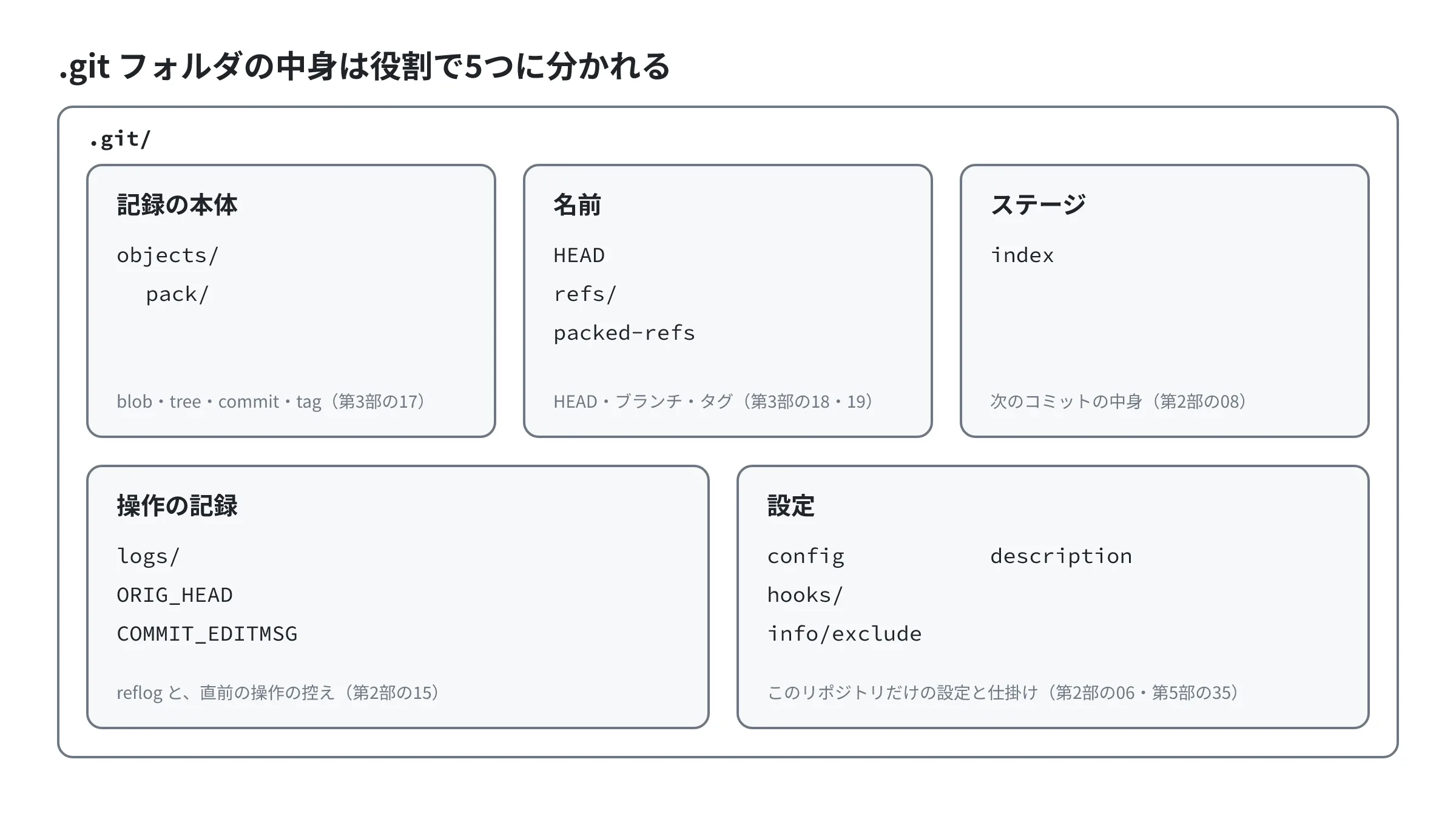
Let’s go through them one role at a time.
1. The body of the record: objects/#
This is where the blobs, trees, commits, and tags from Part 3, #17 are stored. All of your history lives here. The other files are helpers for “calling the objects stored here by name” and “remembering which one you’re looking at right now.”
git gc: repacking how things are stored#
git count-objects -v

# Output (excerpt):
# count: 44
# size: 176
# in-pack: 0
Right now, 44 objects are each stored as an individual file (count). Now run git gc.
git gc
git count-objects -v

# Output (excerpt):
# count: 0
# size: 0
# in-pack: 44
# packs: 1
The 44 objects have been packed into a single file inside objects/pack/ (in-pack). The “compressing similar contents as deltas” mentioned in Part 3, #16 happens during this repacking.
You normally don’t need to run git gc yourself. When objects pile up, Git does it automatically at an appropriate time. Even after repacking, nothing changes in how things look from commands like git cat-file.
2. Names: HEAD, refs/, packed-refs#
As seen in Part 3, #18 and #19, HEAD represents where you are now, and files under refs/ represent branches and tags.
Look at refs/ after git gc, and things have changed.
ls .git/refs/heads .git/refs/tags

# Output:
# .git/refs/heads:
#
# .git/refs/tags:

cat .git/packed-refs

# Output:
# # pack-refs with: peeled fully-peeled sorted
# b505e8e8f92abb8142a6ca486600de9100f98e42 refs/heads/main
# 98206d50345d4cba6f0ef0f0908a213aa1f6a61f refs/tags/v1.0
# ^b505e8e8f92abb8142a6ca486600de9100f98e42
The refs/heads/main file is gone, and the refs are written together in a single file called packed-refs. When Part 3, #19 said “sometimes there’s no file,” this is the state it meant. The main branch hasn’t disappeared. The next time you commit, Git creates refs/heads/main again.
The line starting with ^ is the ID of the commit that the preceding tag v1.0 leads to. It’s noted down so Git doesn’t have to follow the two steps of tag → tag object → commit every time.
3. The stage: index#
The stage you saw in Part 2, #08 is actually a single file called index. Its contents aren’t in a readable form, but you can list them with a command.
git ls-files --stage

# Output:
# 100644 64442fd642ae90b9c4be6583fa758d8b2e884f66 0 .gitignore
# 100644 c0fa007ec11499026d24c4028de6083e274444fc 0 recipes/cake.txt
# 100644 a2a4dd6683d9012c00d693af6c5b1f02f225a091 0 shopping.txt
# 100644 d3038db570e4c542737f1ab3a559741e5af3628f 0 todo.txt
It’s a list of file names and blob IDs, very similar to the tree in Part 3, #17. The stage is “a draft of the next commit’s tree.” git add was the operation that saves a file’s contents to objects as a blob and rewrites the ID in this draft. git commit builds a tree from this draft and records it.
4. Records of operations: logs/, ORIG_HEAD, COMMIT_EDITMSG#
| Name | Contents | When it’s used |
|---|---|---|
logs/ | A record of HEAD and branch movements | The reflog in Part 2, #15 |
ORIG_HEAD | The ID of the commit HEAD was at just before a big move like reset | When undoing the previous operation |
COMMIT_EDITMSG | The last commit message you wrote | When writing a message in an editor |
git log --oneline -n 1 ORIG_HEAD

# Output:
# f72abeb Add bread to the shopping list
ORIG_HEAD remembers where HEAD was before you ran reset --hard in Part 2, #15. You can use git reset --hard ORIG_HEAD to “undo the previous reset,” but the reflog can trace back any number of steps, so this guide uses the reflog.
5. Settings: config, hooks/, info/exclude, description#
cat .git/config

# Output (example):
# [core]
#   repositoryformatversion = 0
#   filemode = true
#   bare = false
#   logallrefupdates = true
#   ignorecase = true
#   precomposeunicode = true
config is the file for settings for this repository only, introduced as --local in Part 2, #06. When you set something without --global, as in git config user.email …, it’s written here. The exact lines differ slightly by OS.
| Name | Role |
|---|---|
hooks/ | Where you put mechanisms that automatically run processing before or after commits and so on. At first it contains only samples ending in .sample (Part 5, #35) |
info/exclude | A .gitignore that applies only to your local copy of this repository. It isn’t committed, so write files only you want to exclude here |
description | A description used by some browsing tools. Usually not used |
What you may and may not touch by hand#
| OK to touch | Don’t touch |
|---|---|
info/exclude (write patterns you want to exclude) | objects/, refs/, packed-refs, HEAD, index |
hooks/ (following the steps in Part 5, #35) | logs/ |
config (safer via the git config command) |
Git rewrites the files in the right column while keeping them consistent with each other. If you edit them by hand, the relationships Git’s commands rely on break, and recovery becomes difficult. The rule is: read freely, change through commands.
FAQ#
Q. If I copy the .git folder, can I duplicate the whole repository?
A. Yes. If you copy the project folder along with .git, you get a complete duplicate including history. That’s because a Git repository is entirely self-contained in this one folder. How to transfer between computers using commands is covered in Part 6.
Summary#
- The contents of
.gitcan be divided into five groups: the body of the record, names, the stage, records of operations, and settings - All history is in
objects/; everything else is a helper for calling it by name and remembering where you are - The stage is actually
index, which serves as a draft of the next commit’s tree git gcrepacks objects and refs, but nothing changes in how they look from commands- Inside
.git, read freely and make changes through commands
Next page#
21. What is a branch? ── This begins Part 4. Building on what Part 3 revealed, that “a branch is a 41-byte file,” you’ll get a correct picture of branches.