What Is Version Control?
What you will learn on this page
- Understand the limits of managing history with file names
- Explain the three problems a version control system solves
- Understand the difference between centralized and distributed systems, and why Git is distributed
On this page12 items
Before learning Git, let’s get clear on what problem version control actually solves. If this doesn’t click, every command that comes later will feel like a “meaningless ritual.”
A folder with three “final versions”#
You’ve surely seen a folder like this.
proposal.docx
proposal_revised.docx
proposal_revised2.docx
proposal_final.docx
proposal_final_with_tanaka_feedback.docx
proposal_final_version_this_is_it.docx
This is version control in its own right. But it has three problems.
Problem 1: You can’t tell what changed#
To find the difference between proposal_revised2.docx and proposal_final.docx, all you can do is open both and compare them by eye. The more files there are, the more impossible this becomes.
Problem 2: Why it changed isn’t recorded#
A month later, when you wonder “Why did I cut this part again?”, the answer is nowhere to be found. You can’t write the reasoning behind a decision in a file name.
Problem 3: Multiple people can’t work on it at once#
If two people edit at the same time, one person’s work will inevitably be overwritten. So people email files back and forth and announce “I’ve got it right now.”
What a version control system does#
A version control system (VCS) solves these three problems as follows.
| Problem | The version control system’s answer |
|---|---|
| You can’t tell what changed | Automatically computes a diff and shows only the changed lines |
| Why it changed isn’t recorded | Requires a message to be attached every time you record |
| People can’t work at once | Each person works independently, and the work is merged automatically afterward |
What’s important is the idea of not duplicating files but keeping “when, who, where, and why something changed” as a chain of records. The history of changes, not the files themselves, takes center stage.
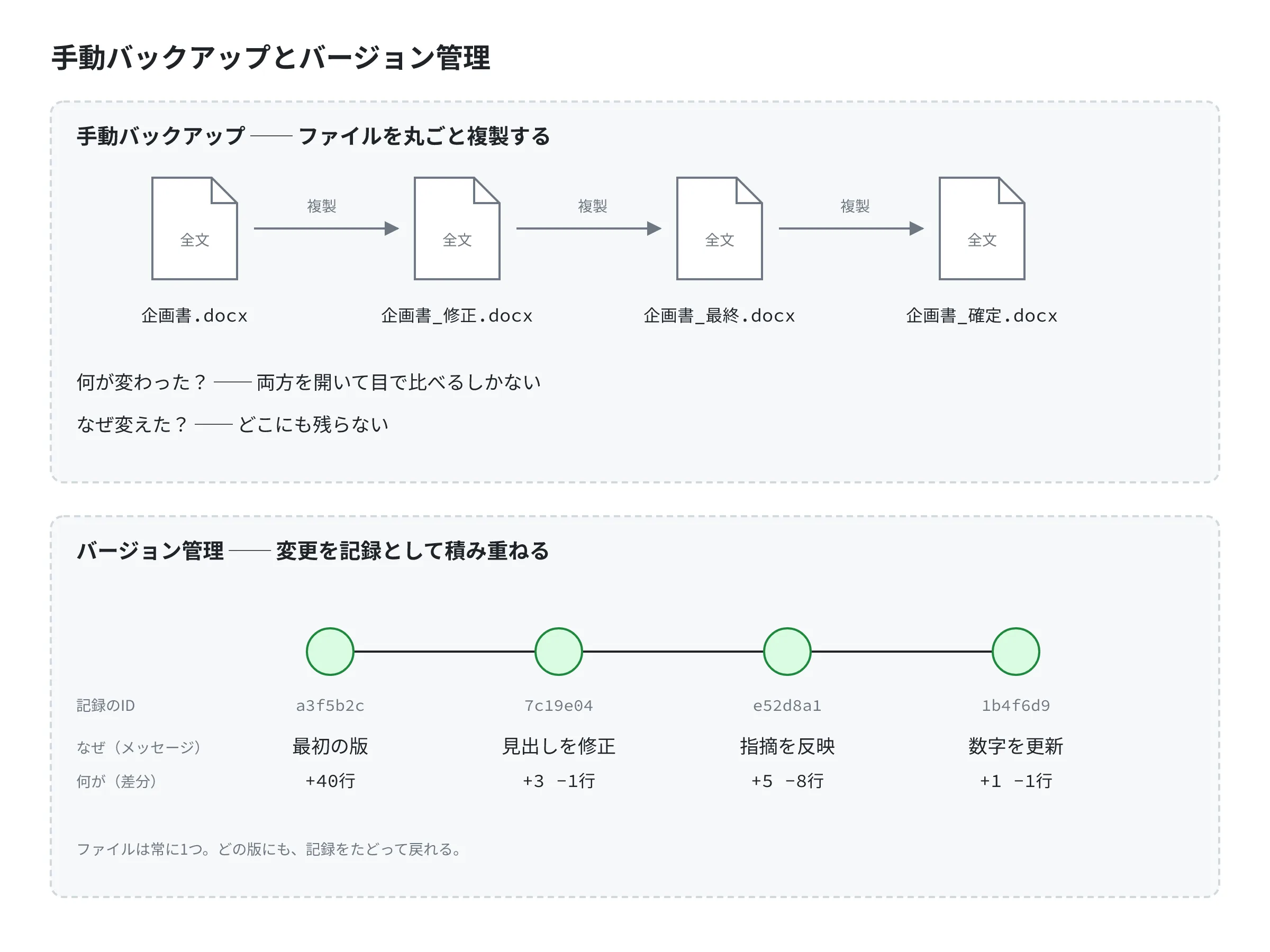
Doing it manually just adds a file for every version, leaving neither diffs nor reasons. With version control, each record carries the “why” (the message) and the “what” (the diff).
Centralized and distributed#
There are two broad kinds of version control systems.
Centralized (Subversion, etc.)#
A single history exists on a server, and everyone reads and writes to it directly.
                   ┌──────────┐
                   │  Server  │ ← the history exists only here
                   └────┬─────┘
            ┌───────────┼───────────┐
[PC A] [PC B] [PC C] ← each has only the latest snapshot- Pros: Simple and easy to understand
- Cons: If the server goes down or the network drops, you can’t even look at the history
Distributed (Git)#
Everyone has a complete copy of the history locally.
                   ┌──────────┐
                   │  GitHub   │ ← a place for sharing (just one more copy)
                   └────┬─────┘
            ┌───────────┼───────────┐
[PC A] [PC B] [PC C] ← each has the full history- Pros: You can view and record history even offline. It’s fast. If one copy breaks, it can be restored from another
- Cons: You have to keep two places in mind, “local” and “shared,” which easily confuses beginners
Git is distributed. And this very property of “having two places” is the biggest reason beginners stumble. The next page sorts out the relationship between those two places (Git and GitHub).
Great with text files, weak with binaries#
Git can compute diffs for files whose contents are text.
| Type | Examples | Fit with Git |
|---|---|---|
| Text | .txt .md .html .css .js .py .csv | ◎ Diffs line by line |
| Binary | .docx .xlsx .psd .jpg .mp4 | △ No diffs; saved whole |
You can manage Word and Excel files with Git too, but it can’t show “what changed,” and the entire file is saved with each change, so the repository bloats. Think of Git as a tool suited to managing text, such as design documents and source code.
FAQ#
Q. How is it different from Dropbox or Google Drive?
A. Cloud storage is a tool for “always syncing the latest state.” It can restore past versions, but it can’t record the reasons for changes, run multiple lines of work in parallel, or propose changes and review them before bringing them in. Git isn’t a syncing tool; it’s a tool for designing history.
Q. If I’m developing alone, isn’t version control unnecessary?
A. You from three months ago is a stranger. Just knowing that “you can reliably go back to a working state” lets you make bold changes. Collaboration is merely a side benefit.
Summary#
- Version control by file name breaks down on three points: diffs, reasons, and simultaneous work
- A version control system records the history of changes, not copies of files
- Git is distributed, and everyone has a complete copy of the history locally
- Distributed systems are fast and robust, but you need to keep two places in mind: “local” and “shared”
- Git excels at managing text files; binary files can’t be diffed
Next page#
03. The Difference Between Git and GitHub ── Clear up, once and for all, the confusion beginners run into first.