Understanding rebase
What you will learn on this page
- You can explain rebase as an operation that "moves commits onto a different base"
- You can straighten a fork into a single line with
git rebase main - You'll understand why commit IDs change when you rebase
- You'll know why you must not rebase shared commits, and how to undo a rebase
On this page9 items
In #23 and #24, you combined forked history into one with a merge. This page covers the other way of bringing changes in: rebase. Rebase is an operation that moves a branch’s commits so the history lines up in one straight line.
Rebase means “changing the base”#
The “base” in rebase is the commit at the root where the branch forked off — its foundation. Re-base means “changing the base.”
In your practice repository, create a forked state. On a branch, write a pudding recipe in two commits, and commit on main in between.
cd ~/git-practice
git switch -c recipe-pudding
echo "3 eggs" > recipes/pudding.txt
git add recipes/pudding.txt
git commit -m "Add pudding recipe"
echo "300ml milk" >> recipes/pudding.txt
git commit -am "Add milk to pudding"
git switch main
echo "Take out the trash" >> todo.txt
git commit -am "Add taking out the trash to todo"
git log --oneline --decorate --graph --all -n 5* 66549f1 (HEAD -> main) Add taking out the trash to todo
| * ad7f9e8 (recipe-pudding) Add milk to pudding
| * 5cf83e1 Add pudding recipe
|/
* 52db35e Merge branch 'oat-milk'
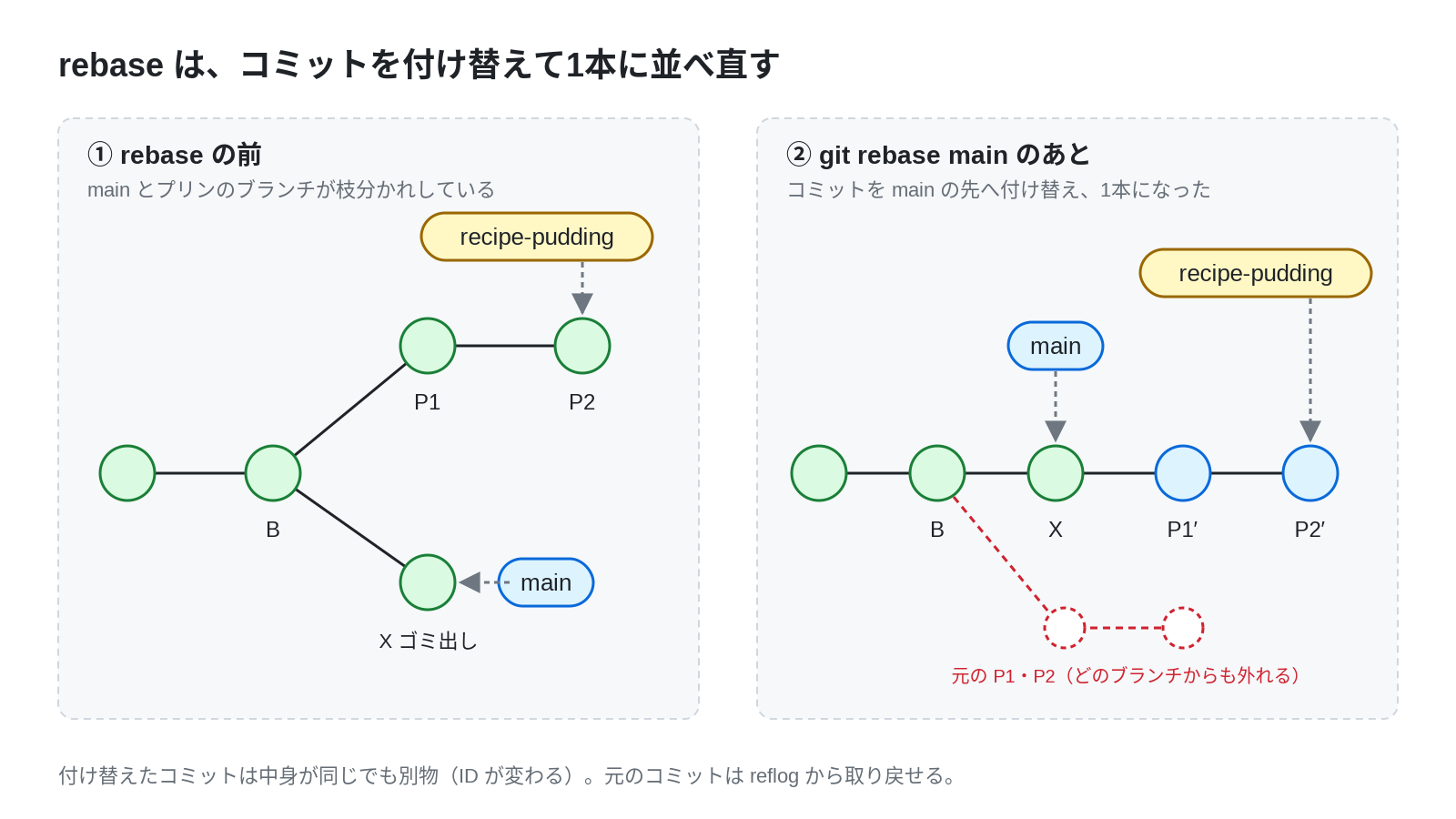
|\ The base of recipe-pudding is 52db35e. After that, main moved on to 66549f1. Merging now would give a 3-way merge as in #23, but rebase instead places the two pudding commits back on top of main’s latest commit, 66549f1.
Running git rebase#
For a rebase, you stand on the branch you want to move, then specify the new base. Note that this is the opposite direction from a merge (where you stand on the receiving side).
git switch recipe-pudding
git rebase mainSuccessfully rebased and updated refs/heads/recipe-pudding.git log --oneline --decorate --graph --all -n 4* 7137480 (HEAD -> recipe-pudding) Add milk to pudding
* e0c6b9b Add pudding recipe
* 66549f1 (main) Add taking out the trash to todo
* 52db35e Merge branch 'oat-milk'
|\ The fork is gone, and the two pudding commits line up in a single line as a continuation of main. The history looks as if the branch had been created “after taking out the trash.”
If you now bring this into main, you get the Fast-forward from #23.
git switch main
git merge recipe-puddingUpdating 66549f1..7137480
Fast-forward
recipes/pudding.txt | 2 ++
1 file changed, 2 insertions(+)
create mode 100644 recipes/pudding.txtThe changes came in without a merge commit. “Rebase, then merge with a Fast-forward” is the most typical way to use rebase.
git branch -d recipe-puddingWhy the IDs change#
Before and after the rebase, the ID of the same “Add pudding recipe” commit changed from 5cf83e1 to e0c6b9b.
As you saw in Part 3, #17, a commit records the ID of its parent commit, and a commit’s ID is computed from its entire contents. When rebase changes the parent from 52db35e to 66549f1, the contents change, so the ID changes too. In other words, rebase isn’t moving the original commits; it’s creating new commits with the same changes.
You can see what happened along the way in the reflog (Part 2, #15).
git reflog -n 57137480 HEAD@{0}: rebase (finish): returning to refs/heads/recipe-pudding
7137480 HEAD@{1}: rebase (pick): Add milk to pudding
e0c6b9b HEAD@{2}: rebase (pick): Add pudding recipe
66549f1 HEAD@{3}: rebase (start): checkout main
ad7f9e8 HEAD@{4}: checkout: moving from main to recipe-puddingDon’t rebase shared commits#
Because the IDs change, there’s one important rule for rebase.
You can rebase commits that exist only on your own machine. Any branch you haven’t yet sent to GitHub (push, in Part 6, #39) is fine to rebase freely.
If there’s a conflict partway through a rebase#
Because rebase recreates commits one at a time, a conflict can occur partway through. Fixing it when it stops works the same as in #24: fixing the files and running git add are the same. What comes after is a little different.
| Command | What it does |
|---|---|
git rebase --continue | Recreates the fixed commit and moves on to the remaining commits (the equivalent of git commit in a merge) |
git rebase --skip | Drops the current commit and moves on to the next |
git rebase --abort | Stops the rebase and returns to the state before it started |
Merge or rebase: which to use#
| Merge | Rebase | |
|---|---|---|
| Shape of history | Forks and joins remain as they are | Lines up in one straight line |
| Existing commits | Unchanged | Recreated (IDs change) |
| Usable after sharing | Yes | No |
| Resolving conflicts | All at once | May occur for each commit |
Neither one is “correct.” Merge “keeps what happened as it happened”; rebase “tidies things into a readable shape before keeping them.” When in doubt, use merge for shared history, and rebase when bringing your own local working branch up to date with the latest main. Which one a team standardizes on is covered in #28, branching strategies.
FAQ#
Q. I’ve seen git pull --rebase written somewhere.
A. It’s an option to use rebase instead of merge when bringing in the latest changes from GitHub or elsewhere. The idea is the same as on this page: your commits that haven’t been sent yet are moved on top of the latest history you just pulled in. It’s covered in Part 6, #40.
Q. Can I rebase main itself?
A. main is almost always shared, so avoid it. It’s safest to decide that you only ever rebase in one direction: moving your own working branch onto main.
Summary#
- Rebase moves a branch’s commits onto a new base, lining the history up in one line
- Stand on the branch you want to move and run
git rebase main. Bringing it into main afterward is a Fast-forward - The moved commits are newly recreated commits with different IDs. The originals can be traced through the reflog
- Don’t rebase shared commits. Only rebase commits that exist only on your own machine
- If a conflict occurs partway, fix it,
git add, thengit rebase --continue. To stop, use--abort
Next page#
26. Tidying history with interactive rebase — Use rebase’s interactive mode to squash, drop, and reword commits, tidying your history before you share it.