How Merging Works (Fast-forward and 3-way)
What you will learn on this page
- Bring in changes from another branch with
git merge - Explain the difference between fast-forward and 3-way merges in terms of the shape of the history
- Understand the merge base and merge commits (commits with two parents)
- Check which branches have been merged with
git branch --mergedand clean them up
On this page9 items
In #22, you recorded a cookie recipe on the recipe-cookie branch. On this page, you’ll bring it into main. The operation of bringing changes in is called merging (merge: joining together). A merge takes one of two forms, fast-forward or 3-way, and which one you get depends on the shape of the history.
The basics: stand on the receiving side and run git merge#
git merge <branch> is the command that brings the changes from the specified branch into the branch you’re currently on. The direction is easy to get backwards, so remember it as “stand on the receiving side (main) first, then name the branch you’re bringing in.”
cd ~/git-practice
git switch main
git merge recipe-cookieUpdating 4e16e23..4b541f5
Fast-forward
recipes/cookie.txt | 1 +
1 file changed, 1 insertion(+)
create mode 100644 recipes/cookie.txtThe second line says Fast-forward.
git log --oneline --decorate --graph -n 3* 4b541f5 (HEAD -> main, recipe-cookie) Add cookie recipe
* 4e16e23 Add cleaning to the to-do list
* 370768c (tag: v1.0) Add cake recipemain has advanced to the same commit as recipe-cookie. No new commit was created.
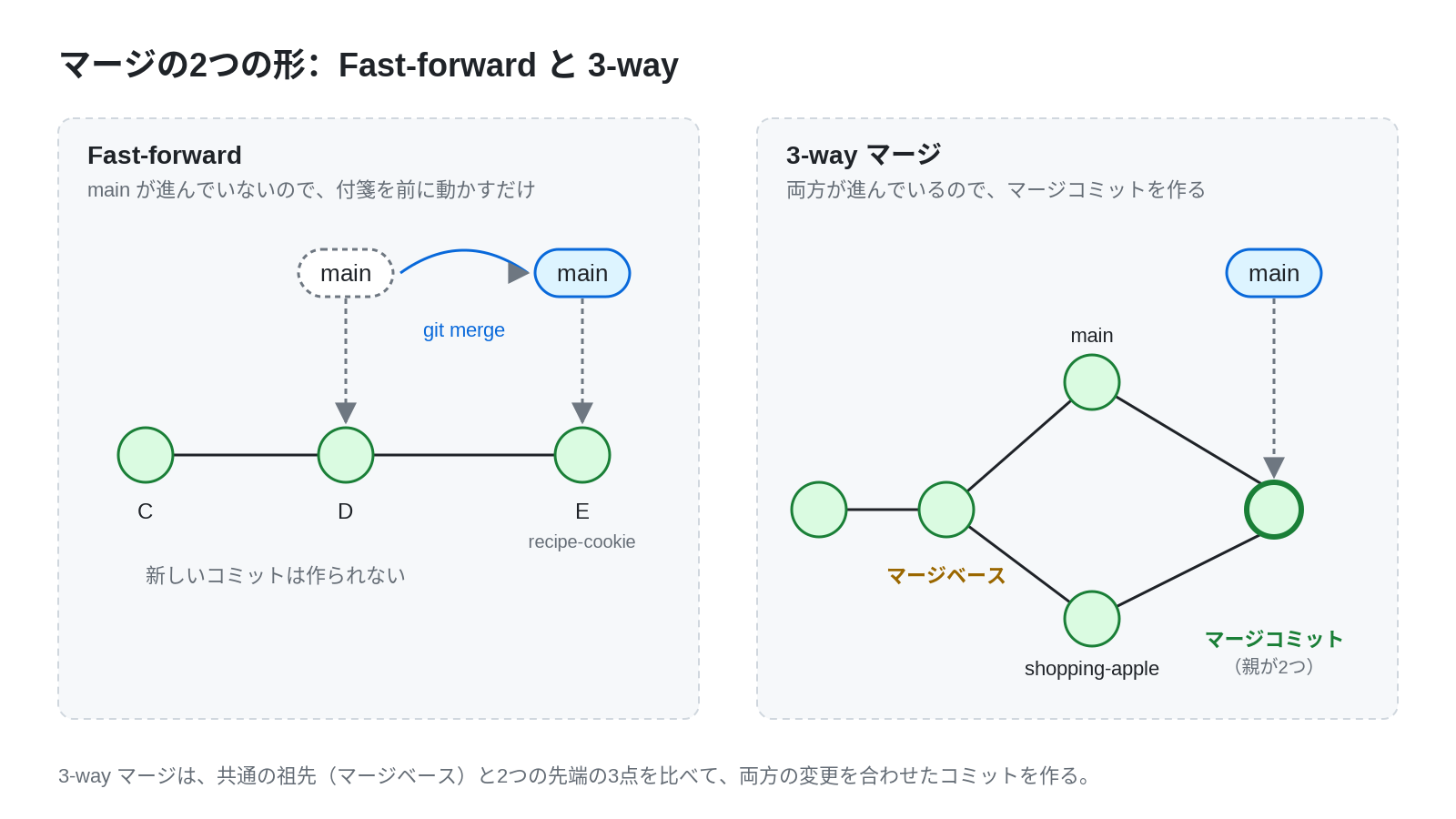
Fast-forward: just moving the sticky note forward#
After recipe-cookie was created, main got no new commits. In other words, recipe-cookie’s history is a “continuation” of main’s history.
In this case, there’s nothing to combine in order to bring it in. Re-stick main’s sticky note on the same commit as recipe-cookie, and the merge is done. This is a fast-forward. Updating 4e16e23..4b541f5 means “moved main from 4e16e23 to 4b541f5.”
3-way merge: when both sides have moved on#
This time, let’s create a situation where both branches have moved forward independently. Record a change to the shopping memo on a branch, and a change to the to-do list on main.
git switch -c shopping-apple
echo "Buy apples" >> shopping.txt
git commit -am "Add apples to shopping memo"
git switch main
echo "Water the flowers" >> todo.txt
git commit -am "Add watering to the to-do list"
git log --oneline --decorate --graph --all -n 4* dd3f00e (HEAD -> main) Add watering to the to-do list
| * 587a247 (shopping-apple) Add apples to shopping memo
|/
* 4b541f5 (recipe-cookie) Add cookie recipe
* 4e16e23 Add cleaning to the to-do listAt the |/, the history splits into two lines. Just moving main’s sticky note forward wouldn’t bring in shopping-apple’s apples. This is where you merge.
git merge shopping-appleMerge made by the 'ort' strategy.
shopping.txt | 1 +
1 file changed, 1 insertion(+)git log --oneline --decorate --graph -n 5* ca9807e (HEAD -> main) Merge branch 'shopping-apple'
|\
| * 587a247 (shopping-apple) Add apples to shopping memo
* | dd3f00e Add watering to the to-do list
|/
* 4b541f5 (recipe-cookie) Add cookie recipe
* 4e16e23 Add cleaning to the to-do listThe history that split into two lines has joined back together at ca9807e. A commit like this, which combines two lines of history, is called a merge commit.
Why “3-way”?#
Git compares the following three points to decide the result of the merge.
| What’s compared | In this case |
|---|---|
| The common ancestor before the two lines split (the merge base) | 4b541f5 Add cookie recipe |
| The tip of the branch you’re on | dd3f00e (main) |
| The tip of the branch being brought in | 587a247 (shopping-apple) |
You can check the merge base with git merge-base A B. Before merging, that would be git merge-base main shopping-apple. Now, after the merge, main already contains shopping-apple, so specify the merge commit’s first parent (HEAD^1) and second parent (HEAD^2).
git merge-base HEAD^1 HEAD^24b541f59822864b80799607d10f7a1950890b8f9Compared to the merge base, todo.txt changed on main and shopping.txt changed on shopping-apple. For parts that changed on only one side, Git adopts that change, producing a state that includes all the changes from both sides. If you compared only the two tips, you couldn’t tell whether “main doesn’t have the apples line” means it was “deleted” or “not added yet.” Because the ancestor is included and three points are compared, Git can tell.
A merge commit has two parents#
Let’s open up the merge commit using the method from Part 3, #17.
git cat-file -p HEADtree 996bb0821c0f4eedd73e735831e19049043e74cf
parent dd3f00e5f823cc55b226131612308da74f43fdf7
parent 587a2478031e9009c864c112f0ca164097bee80f
author Taro Yamada <[email protected]> 1793111602 +0900
committer Taro Yamada <[email protected]> 1793111602 +0900
Merge branch 'shopping-apple'The only difference from an ordinary commit is that there are two parent lines. The first is the main side (the branch you were on when you merged), and the second is the shopping-apple side that was brought in. The tree is a snapshot of the state combining both sets of changes.
cat shopping.txt todo.txtBuy soy milk
Buy eggs
Buy bread
Buy apples
Book a dentist appointment
Go to the bank
Clean the room
Water the flowersBoth the apples and the watering are there.
Cleaning up merged branches#
A branch that has been merged has served its purpose. git branch --merged lists the branches that have already been brought into the branch you’re on.
git branch --merged* main
recipe-cookie
shopping-appleThe branches listed here can be safely deleted with -d (#22).
git branch -d recipe-cookie shopping-appleDeleted branch recipe-cookie (was 4b541f5).
Deleted branch shopping-apple (was 587a247).Even though the branch names are gone, the commits are part of main’s history thanks to the merge, so nothing is lost.
FAQ#
Q. Can I stop a merge partway through, or redo it?
A. If it stops partway (the conflicts in the next page, #24), git merge --abort takes you back to before the merge. If you want to undo a completed merge and haven’t shared it yet, you can go back to the pre-merge commit with git reset --hard HEAD~1 from Part 2, #14.
Q. In a 3-way merge, what happens if both sides changed the same line?
A. Git can’t decide which one to take, so the merge stops. That’s a conflict. On the next page, you’ll actually cause one and resolve it.
Summary#
git merge <branch>brings the specified branch into the branch you’re on. Stand on the receiving side before running it- If the receiving side hasn’t moved on, it’s a fast-forward: the sticky note just moves forward and no new commit is created
- If both sides have moved on, it’s a 3-way merge: Git compares the merge base and the two tips and creates a merge commit with two parents
- You can check the merge base with
git merge-baseand the merged branches withgit branch --merged - Branches that have been merged can be cleaned up with
git branch -d
Next page#
24. Resolving Conflicts ── Rewrite the same line on two branches, merge them, and finish the stopped merge by hand.