Excluding Files with .gitignore
What you will learn on this page
- Know which files must not be recorded
- Exclude files from recording by writing patterns in
.gitignore - Check which line is taking effect with
git check-ignore - Understand why
.gitignoredoesn't work on files that are already recorded
On this page8 items
In Part 2, #09, we noted that git add . can pick up files you didn’t intend. This page covers how to keep files you don’t want recorded out of Git’s view from the start.
What must not be recorded#
| Kind | Examples | Why it must not be recorded |
|---|---|---|
| Secrets | .env, key files, configs containing passwords | Once recorded, it stays in the history and is very hard to remove later |
| Automatically generated files | Logs, caches, build output | Can be regenerated from the source files any number of times. Their diffs are noise |
| Files created by the OS or editor | .DS_Store (macOS), Thumbs.db (Windows) | Unrelated to the content, and different for each person |
| Large external files | Downloaded assets, dependency packages | They make the repository heavy. Writing down how to obtain them is enough |
Secrets in particular are special. As you’ll see in Part 2, #15, Git is built so that even records you thought you deleted can be recovered. A password committed by mistake stays in the history even after you delete the file. So rather than “record it, then delete it,” you need to keep it from being recorded in the first place.
Writing .gitignore#
For practice, create three kinds of files that must not be recorded.
cd ~/git-practice
echo "PASSWORD=secret" > .env
echo "log" > debug.log
mkdir tmp
echo "cache" > tmp/cache.txt
git status -s

# Output:
# ?? .env
# ?? debug.log
# ?? tmp/
All three appear as ?? (untracked), and as things stand, git add . would record them. Create a file named .gitignore in the top-level folder of the repository, and write the things you want to exclude, one per line.
# Secrets
.env

# Logs and temporary files
*.log
tmp/
Create it in an editor, or with the following command.
printf '# Secrets\n.env\n\n# Logs and temporary files\n*.log\ntmp/\n' > .gitignore
git status -s

# Output:
# ?? .gitignore
The three files no longer appear, and .gitignore itself appears instead.
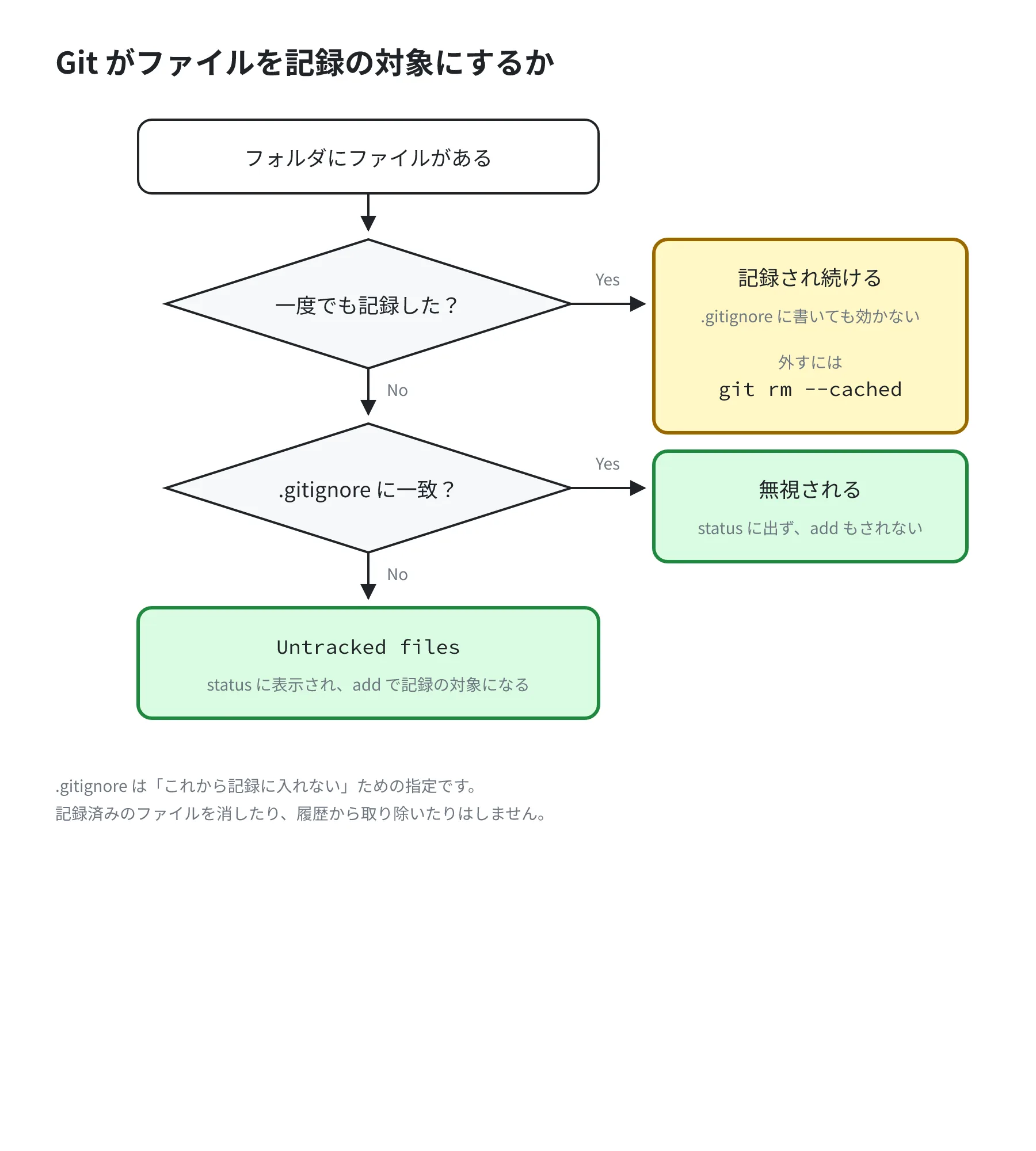
.gitignore acts at the second fork in the diagram. It has no effect on files that go down the Yes path at the first fork, “Ever recorded?” You’ll confirm this later on the page.
.gitignore is a file you do record. That way, the same exclusions apply to everyone working in the same folder.
git add .gitignore
git commit -m "Add .gitignore"How to write patterns#
| Pattern | Meaning | Matching examples |
|---|---|---|
.env | A file with this name (at any level) | .env, config/.env |
*.log | * is any string | debug.log, error.log |
tmp/ | A trailing / matches folders only | Everything inside tmp/ |
/todo.txt | A leading / matches only at the same level as .gitignore | todo.txt (sub/todo.txt doesn’t match) |
!important.log | ! cancels an exclusion | Records only important.log among the files excluded by *.log |
# comment | Lines starting with # are comments | — |
Blank lines are ignored. Separating entries by kind with comments and blank lines makes the file easier to reread later.
Checking that it works#
If something that should be excluded shows up, or the reverse happens, use git check-ignore -v to see which line is taking effect.
git check-ignore -v .env debug.log tmp/cache.txt

# Output:
# .gitignore:2:.env .env
# .gitignore:5:*.log    debug.log
# .gitignore:6:tmp/ tmp/cache.txt
It shows which pattern on which line of .gitignore excluded each file. If nothing is shown, the file doesn’t match any pattern.
If you specify an excluded file with git add, Git stops you.
git add .env

# Output:
# The following paths are ignored by one of your .gitignore files:
# .env
# hint: Use -f if you really want to add them.
Adding -f forces it in, but don’t use it on files containing secrets.
It doesn’t work on files already recorded#
.gitignore is a mechanism for ignoring untracked files. A file that has been committed even once becomes “tracked,” and even if you add a pattern to .gitignore later, its changes keep being recorded as before.
As a test, add a pattern that matches the already-recorded memo.txt.
echo "*.txt" >> .gitignore
echo "Buy bread" >> memo.txt
git status -s

# Output:
#  M .gitignore
#  M memo.txt
The change to memo.txt is still shown. Once you’ve confirmed this, restore both files.
git restore .gitignore memo.txtgit restore <file name> is the command that discards changes in the working tree and returns the file to its last recorded state. It’s covered in detail in Part 2, #14.
To stop tracking a recorded file, use git rm --cached. It stops Git from tracking the file while leaving it on your machine, and is covered in Part 2, #13.
FAQ#
Q. It’s tedious to write files I want to exclude in every project (like .DS_Store) every time.
A. You can create an exclude file that applies to your whole computer. Create a file at ~/.config/git/ignore and write patterns in it, and it’s used automatically in every repository. Then the project’s .gitignore only needs entries specific to that project.
Q. I want to record an empty folder, but git add doesn’t pick it up.
A. Git records only files, not folders themselves. You need to put at least one file inside. By convention, people often put an empty file named .gitkeep there (it’s not a Git feature, just a naming convention).
Summary#
- For secrets, don’t “record and then delete”; keep them out of the record from the start
- Write one pattern per line in
.gitignore, and commit.gitignoreitself git check-ignore -vshows which line is taking effect.gitignoreonly works on untracked files. It has no effect on files already recorded- Revoke leaked secrets before removing them from the history
Next page#
13. Moving, deleting, and untracking files ── Learn when to rename a recorded file, delete it, or stop tracking it while keeping it on your machine.