hooks: Running Scripts Before and After Git Operations
What you will learn on this page
- Understand that hooks are "scripts that run at fixed points in Git operations"
- Automatically check contents before a commit with a pre-commit hook
- Check commit messages with a commit-msg hook
- Understand that hooks aren't distributed with the repository, and how to share them
On this page8 items
Up to 34, Part 5 has gathered the tools used in real work one by one. The last one is a mechanism for using tools automatically. Mistakes like “I committed with conflict markers still in the file” (Part 4, #24) can be stopped by Git itself rather than by human attention.
hooks are “scripts that run at fixed points”#
A hook is “something you hang things on”. It’s a mechanism for hooking scripts you’ve prepared onto fixed points in operations like git commit and running them.
Hooks live in .git/hooks/, which we saw in Part 3, #20. Samples are there from the start.
cd ~/git-practice
ls .git/hooksapplypatch-msg.sample
commit-msg.sample
fsmonitor-watchman.sample
post-update.sample
pre-applypatch.sample
pre-commit.sample
pre-merge-commit.sample
pre-rebase.sample
(and a few more)If a file exists with the name minus the trailing .sample (such as pre-commit), Git runs it as a hook. The name indicates at which point it runs.
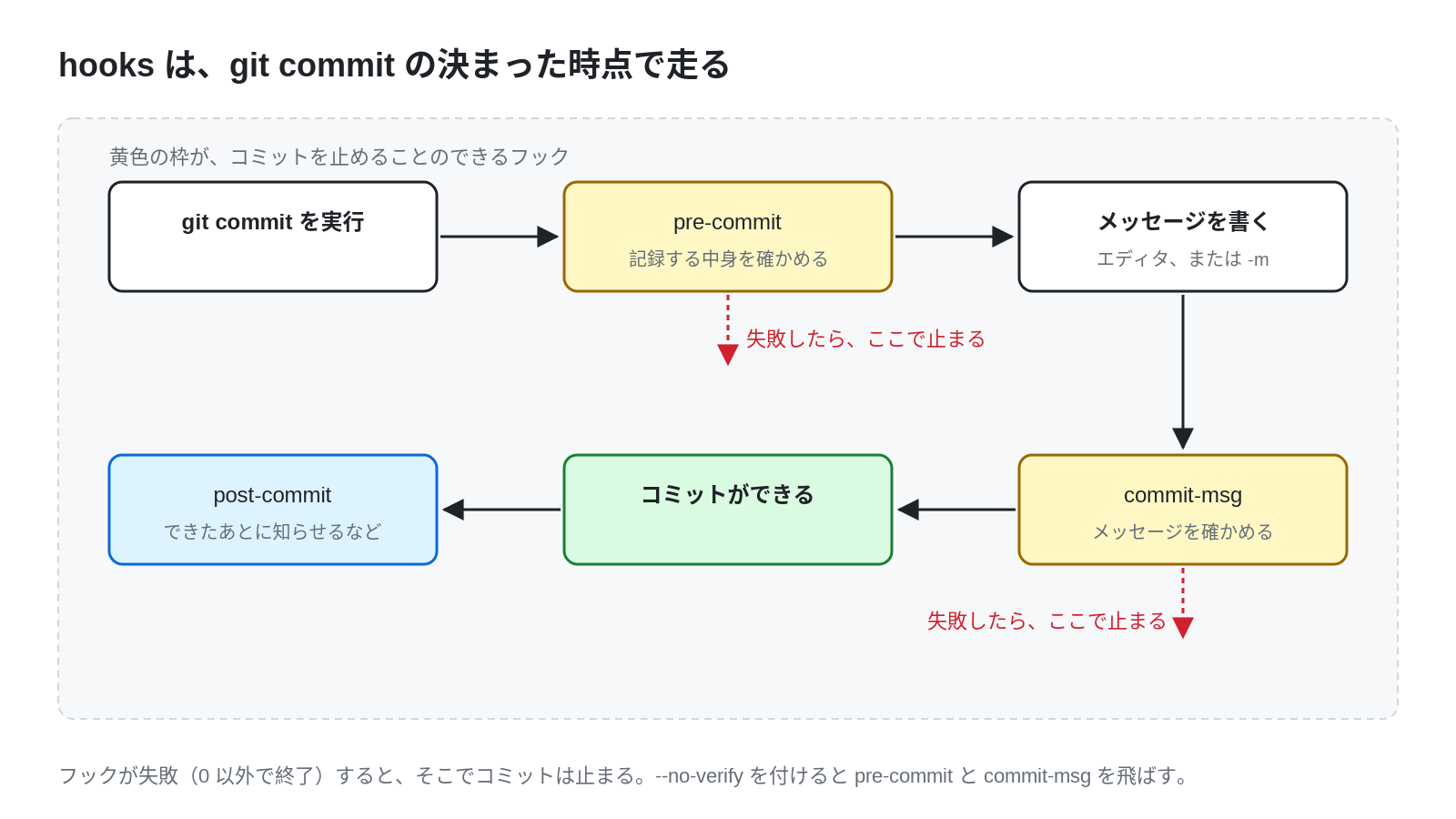
| Hook | When it runs | If it fails |
|---|---|---|
pre-commit | Right before the commit (before writing the message) | The commit stops |
commit-msg | Right after the message is written | The commit stops |
post-commit | Right after the commit is created | Nothing stops (it only notifies) |
“Fails” means the script exits with a non-zero exit code.
Checking contents before committing: pre-commit#
Let’s create a pre-commit hook that stops the commit if conflict markers or trailing whitespace remain. It’s one line.
cat > .git/hooks/pre-commit <<'EOF'
#!/bin/sh
# Stop if the changes about to be recorded still contain conflict markers or trailing whitespace
git diff --cached --check
EOF
chmod +x .git/hooks/pre-commit- From
cat > file <<'EOF'on the first line toEOFis a way of writing the text in between into a file. Creating a file with the same content in an editor works too git diff --cached --checkchecks the staged changes (Part 2, #10) for conflict markers and trailing whitespace. If there’s a problem, it reports it and exits with failurechmod +xmakes the file “executable”. Forget this and the hook won’t run. Git tells you withhint: The '.git/hooks/pre-commit' hook was ignored because it's not set as executable.
As a test, commit with a marker left in.
echo "<<<<<<< HEAD" >> todo.txt
git commit -am "Update the to-do list"todo.txt:6: leftover conflict markerThe hook reported “a conflict marker remains on line 6”, and no commit was created. Remove the marker and commit again, and it goes through. Since this is practice, we’ll just discard the change.
git restore todo.txtChecking the message: commit-msg#
The commit-msg hook checks the message you wrote. The message is written to a file, and that file’s location is passed to the hook ($1 inside the script).
Let’s create a hook that stops messages starting with “WIP” (work in progress). The aim is to keep commits meant as work in progress, like the ones we tidied up in Part 4, #26, out of main.
cat > .git/hooks/commit-msg <<'EOF'
#!/bin/sh
# Stop if the message starts with WIP (don't leave commits meant as work in progress)
case "$(head -n 1 "$1")" in
  WIP*|wip*)
    echo "The message starts with WIP. Please write a message that describes the change."
    exit 1 ;;
esac
EOF
chmod +x .git/hooks/commit-msgecho "Read a book" >> todo.txt
git commit -am "WIP"The message starts with WIP. Please write a message that describes the change.It stopped. With a message that describes the change, it goes through.
git commit -am "Add reading to the to-do list"[main e73a1b3] Add reading to the to-do list
1 file changed, 1 insertion(+)Skipping hooks: --no-verify#
When you really don’t want to be stopped just this once, git commit --no-verify skips pre-commit and commit-msg.
Hooks aren’t distributed with the repository#
As explained in Part 3, #20, the contents of .git/hooks/ are not tracked. Even if you commit, they won’t reach anyone else’s machine. This is also a Git safety measure to prevent malicious scripts from being distributed and run without permission.
When a team wants to use the same hooks, change the hooks folder to a tracked folder inside the repository.
mkdir .githooks
git config core.hooksPath .githooks
Hooks placed in .githooks can be committed as ordinary files, and each person can start using them by running git config core.hooksPath .githooks once. However, this means running scripts someone else prepared on your own machine, so read their contents before setting it up.
FAQ#
Q. Do hooks work on Windows too?
A. Yes. Git for Windows includes a mechanism for running scripts that start with #!/bin/sh. If you’re using Git Bash as described in Part 2, #06, you can create them with the same steps as on this page.
Q. Can I write them in something other than shell scripts?
A. Yes. Change what follows #! on the first line and you can write them in Python and so on. Making them executable (chmod +x) is still required.
Summary#
- hooks are scripts that run at fixed points in Git operations. They live in
.git/hooks/ - The file name indicates when it runs. pre-commit and commit-msg stop the commit if they fail
- Hook files won’t run unless made executable with
chmod +x --no-verifyskips them, but using it routinely defeats the purpose of hooks- Hooks aren’t distributed with the repository. To share them, use a tracked folder with
core.hooksPath
Next page#
36. The Idea of a Remote Repository ── This begins Part 6. We look at the idea of placing another repository outside your local Git. GitHub finally makes its appearance.