What Are Agents? AI Agents and MCP on Cloudflare
On this page16 items
This is the last page of Chapter 7. So far, everything has been about having AI answer: take a question, search your own data if needed, and return text. RAG and AI Search both sit inside that frame.
This page is about having AI act. An AI that decides for itself, uses tools, looks at the results, chooses its next move, and carries a task through to the end: that is an AI agent. And the common standard for giving those agents tools is MCP.
The reason Cloudflare is strong in this area lies in Durable Objects, covered in Chapter 5. It may seem a little surprising, but it will connect as you read on.
What you’ll learn on this page#
- What an AI agent is, and how it differs from workflows and copilots
- Why Durable Objects are a good fit for agents
- What you can do with the Cloudflare Agents SDK
- What MCP (Model Context Protocol) is
- What to watch out for when building agents
What is an AI agent?#
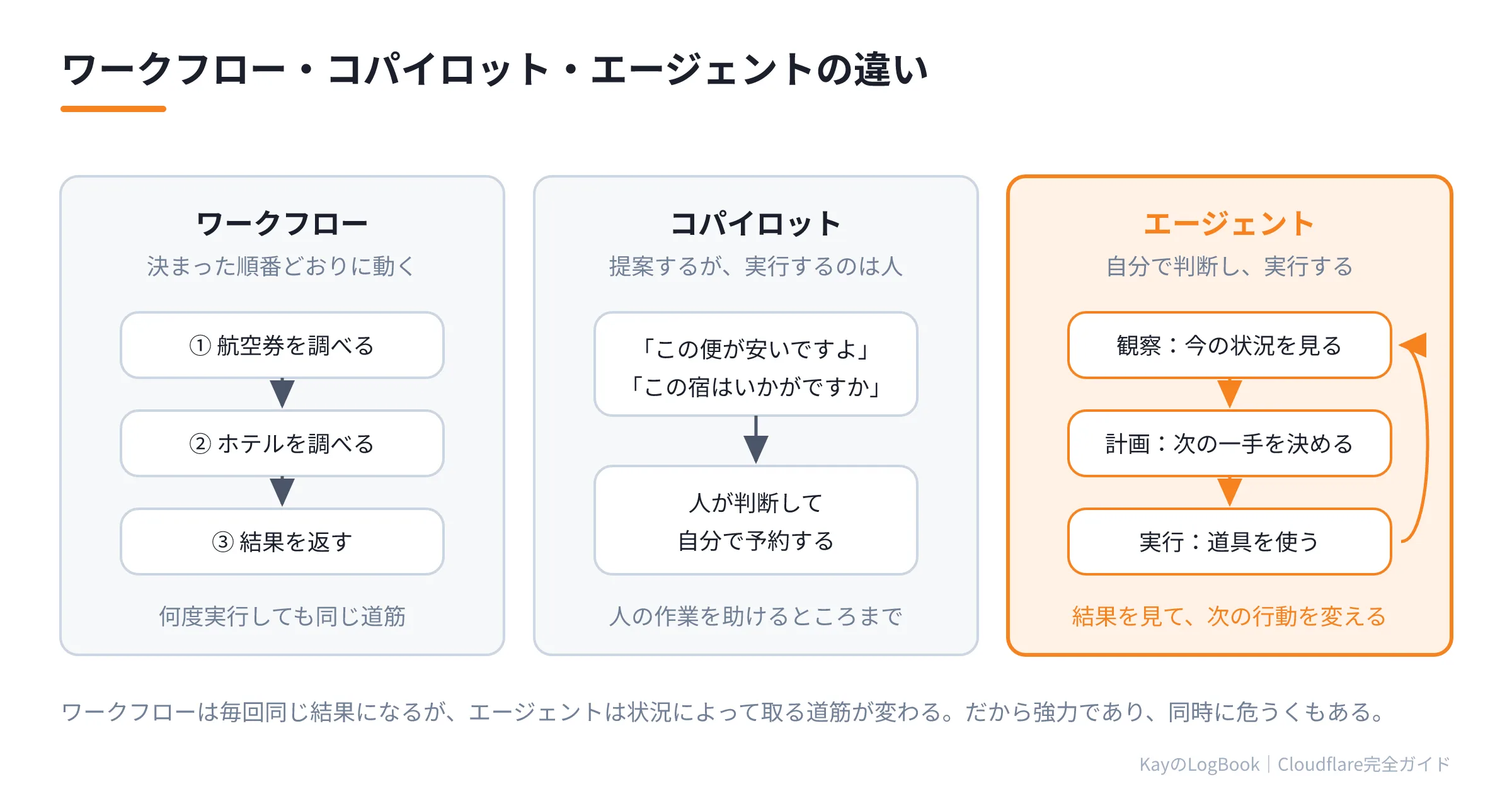
An agent is an AI system that executes tasks autonomously, deciding for itself how to use tools and how to proceed.
Comparing it with similar terms brings its outline into focus.
| How it works | Result | |
|---|---|---|
| Workflow | Executes a predefined procedure in order | The same every time (deterministic) |
| Copilot | Makes suggestions, but a person executes | Depends on human judgment |
| Agent | Looks at the situation and decides its next action itself | Can differ on every run (non-deterministic) |
Travel booking makes a good example.
- Workflow: Looks up flights, looks up hotels, returns the results. This order never changes. It can’t handle unexpected situations
- Copilot: Tells you “this flight is cheap,” but you are the one who books it
- Agent: Give it a budget and dates, and it researches, compares, looks for alternatives if a hotel is full, and goes all the way to booking
Workflows, covered in Chapter 5, is exactly the first kind. An agent is the opposite, and the essential difference is that it can take a different path on each run, even with the same input.
The three components of an agent#
- Decision engine: The part that decides what to do next. Usually an LLM
- Tools: The means of actually doing something. API calls, search, file operations, and so on
- Memory: The part that keeps track of history and progress so far
It then repeats the following loop.
- Observe: Check the current situation
- Plan: The AI decides what to do next
- Act: Use a tool
- Learn: Record the result in memory to prepare for the next round
Why Durable Objects?#
This is the core reason for building agents on Cloudflare.
Agents have properties that are fundamentally different from ordinary web applications.
- They keep state: They need to remember the conversation history, work in progress, and information they’ve gathered
- They live long: Rather than ending with one request, they may keep working on the same task for minutes, hours, or days
- They spend a lot of time waiting: Waiting for LLM responses, external API responses, human approval
- They are independent per user: Person A’s agent memory must not mix with person B’s
This doesn’t fit well with a model like Workers, which “starts when a request comes in and disappears once it responds.” You’d need an implementation that stores memory somewhere and rereads it every time.
Durable Objects, on the other hand, have the property that each object runs in one place, has its own dedicated storage, and sleeps when not in use. That matches the properties agents need almost perfectly.
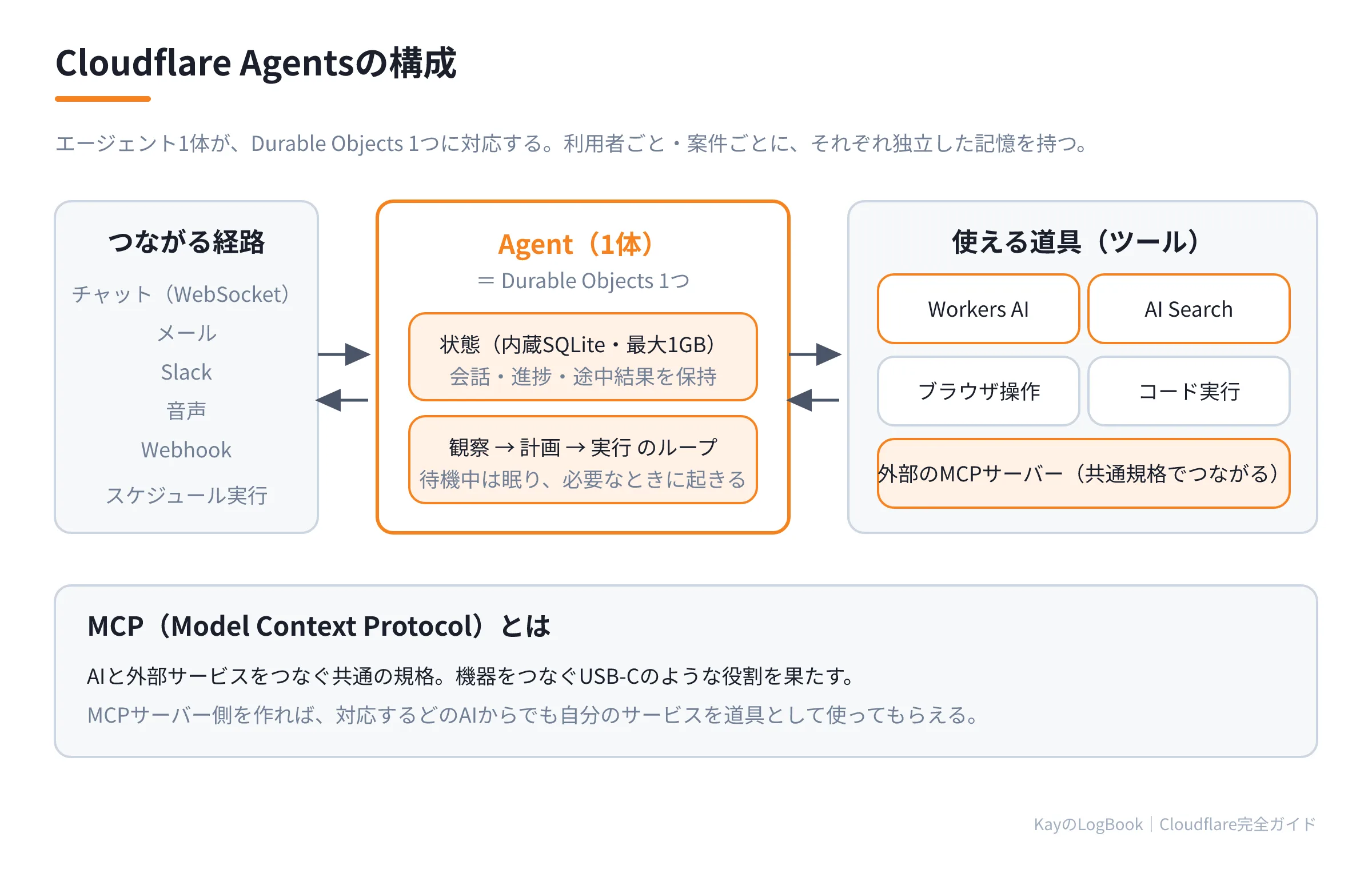
The Cloudflare Agents SDK is built on this correspondence. One agent is one Durable Object.
Cloudflare Agents SDK#
The SDK is provided as the agents npm package. You define your own agent by extending the Agent class.
import { Agent, callable } from "agents";

export class CounterAgent extends Agent {
  initialState = { count: 0 };

  @callable()
  increment() {
    this.setState({ count: this.state.count + 1 });
    return this.state.count;
  }
}
Just by putting values in this.state, the contents are saved automatically and not lost even after a restart. You don’t write any database code. On top of that, the state is automatically pushed over WebSocket to connected clients (such as browsers), so you don’t need UI update logic either.
In the configuration file, you register it as a Durable Object.
{
  "ai": { "binding": "AI" },
  "durable_objects": {
    "bindings": [{ "name": "CounterAgent", "class_name": "CounterAgent" }]
  },
  "migrations": [{ "tag": "v1", "new_sqlite_classes": ["CounterAgent"] }]
}
With the new_sqlite_classes setting, each agent gets its own dedicated SQLite database. Conversation history and progress records are all handled there.
Main features#
- State persistence and sync: Save with
setState, automatically pushed to connected clients - Real-time communication: Two-way exchange over WebSocket
- Hibernation: Sleeps while idle and wakes when needed. No charges while asleep
- Scheduled execution: Schedule things like “check again in 3 days” or “run every morning at 9”
- Human approval: Insert a human check before important operations (human-in-the-loop)
- Many entry points: Chat, email, Slack, voice, and webhooks all connect to the same agent
- Tool calls: Workers AI, AI Search, browser automation, sandboxed code execution, external MCP servers
Limits#
| Item | Details |
|---|---|
| Concurrent agents (per account) | Tens of millions or more |
| Agent types you can define | About 250,000 or more |
| Storage per agent | 1 GB |
| CPU time per agent | 30 seconds (reset on each request, scheduled run, and WebSocket message) |
| Wall-clock time per step | Unlimited (waiting on LLM or DB responses isn’t limited) |
The difference between 30 seconds of CPU time and unlimited wall-clock time is important. Even if it waits two minutes for an LLM response, it isn’t using CPU during that time, so it doesn’t hit the limit. This is why agents are good at work that involves “waiting.”
Pricing follows the Durable Objects and Workers pricing (covered on the Durable Objects page). It’s available on the free plan too, and you aren’t charged while it sleeps.
What is MCP (Model Context Protocol)?#
An agent’s value is determined by how useful its tools are. But if every AI connected to tools differently, service providers would have to build one integration for every AI they support.
MCP (Model Context Protocol) is an open common standard for solving this problem. Cloudflare’s official documentation describes it as “a USB-C port for AI applications.” Just as a single USB-C port lets you connect all kinds of peripherals through the same connector, supporting MCP lets you connect to any AI in the same way.
The three players#
- MCP host: The AI assistant or agent itself. The side that needs tools
- MCP client: The part built into the host that handles the connection to servers
- MCP server: The side that provides tools and resources. If you want AI to use your service, this is what you build
Two connection methods#
- Remote MCP: Connects over the internet. Communicates via Streamable HTTP and uses OAuth for authorization
- Local MCP: Connects within the same computer
What Cloudflare focuses on in particular is remote MCP servers. Users don’t need to install any software; they connect just by specifying a URL. Put it on Workers, and it’s equally fast from anywhere in the world.
Building an MCP server on Cloudflare#
The Agents SDK includes tooling for building MCP servers. Create one with the Wrangler CLI and deploy it, and it’s published as-is at a workers.dev URL.
With the July 28, 2026 version of the MCP specification, MCP became a fully stateless protocol. The SDK’s recommendations have changed accordingly.
createMcpHandler(): The current recommendation. Suited to providing stateless tools, with the simplest setupMcpAgent: The older approach that assigns one Durable Object per session. It has features involving state management, but is now deprecated and feature-frozen
If you’re building something new, choose createMcpHandler(). For migrating from an existing McpAgent, the documented procedure is to first add the stateless path and run both in parallel until existing sessions end.
Cloudflare itself also provides official MCP servers that can read account settings and operate services. And on the Cloudflare One side, there’s a feature called “MCP server portals” that brings internally used MCP servers together behind a single entry point, with access controlled by Cloudflare Access. It’s an answer to a new kind of management challenge: governing AI agent use as an organization.
Tips for designing MCP servers#
The guidelines in the official documentation are practical and worth following.
- Don’t turn APIs directly into tools: Rather than mechanically listing endpoints, design tools around “what the user wants to accomplish”
- Fewer, well-designed tools: AI uses a small number of well-designed tools more correctly than a large number of fine-grained ones
- Narrow the permissions: Split servers by purpose and keep each one’s permissions to a minimum
- Write descriptions carefully: The more you describe argument meanings, expected values, and constraints, the less the AI misuses them
- Prepare evaluation tests: When you change a tool’s description, measure whether the AI can still use it correctly
Points for beginners to watch out for#
- Autonomy is also a risk: Agents can take unexpected actions. For irreversible operations (sending money, deleting, sending email, etc.), always insert human approval
- Prepare for runaway costs: Because agents run loops, a single request may call an LLM dozens of times. Always set limits on call counts and spend with AI Gateway
- First consider whether a workflow is enough: If the procedure is fixed, Workflows is cheaper, faster, and more reliable. You only need an agent when the procedure can’t be decided in advance
- Design the unit of an agent: Per user, per case, or per conversation? That unit becomes the unit of the Durable Object directly. Changing it later is hard
- Memory isn’t infinite: It’s capped at 1 GB per agent. A design that keeps accumulating conversation history forever will eventually hit a wall
- Use only trusted external MCP servers: Tool descriptions act as instructions to the AI. Attacks that steer AI through malicious descriptions are known
Related services#
- Durable Objects: The actual body of each agent. Supports state retention and hibernation
- Workers: The runtime for agents and MCP servers
- Workers AI: Provides the LLM that serves as the decision engine
- AI Search: Gives agents a “tool for searching your own documents”
- AI Gateway: Logs an agent’s AI calls and puts limits on them
- Queues / Workflows: Better suited to processing with a fixed procedure
- Cloudflare Access: Authentication for MCP servers and agents
Summary#
- An AI agent decides for itself, uses tools, and chooses its next action based on the results. Unlike a workflow, its path can change on every run
- Its components are a decision engine (LLM), tools, and memory. It runs an observe → plan → act → learn loop
- Agents hold state, live long, and spend a lot of time waiting. These properties match Durable Objects
- In the Cloudflare Agents SDK, one agent is one Durable Object. With
setState, state is saved and synced automatically - MCP is a common standard connecting AI with external services. It’s the USB-C of AI
- MCP servers can be built and published on Cloudflare. The July 28, 2026 spec made it stateless;
createMcpHandler()is recommended andMcpAgentis deprecated - Autonomy is also a risk. Design in human approval, spending limits, and minimal permissions from the start
That completes Chapter 7, “AI.” Run models with Workers AI, manage them with AI Gateway, have them answer from your own data with RAG, Vectorize, and AI Search, and have them act with Agents: you should now see what role each of Cloudflare’s AI services plays.
In Chapter 8, you’ll put this knowledge to work hands-on. It covers concrete steps for connecting WordPress, publishing a NAS, developing with Workers, and building RAG with AI Search.