What Is RAG? How Retrieval-Augmented Generation Works
On this page21 items
Ask an AI “How many days of paid leave do we get under our company’s work rules?” and you won’t get the right answer. The model has never read your company’s work rules. Even so, the AI will confidently give you a plausible-sounding number.
The mechanism that solves this problem is RAG (Retrieval-Augmented Generation). The name looks intimidating, but what it does is surprisingly simple: search for the material for the answer first, and hand it to the AI along with the question. That’s all.
This page isn’t specific to Cloudflare; it’s common background knowledge for building AI applications. The next pages on Vectorize and AI Search, and the hands-on pages in Chapter 8, all build on this understanding.
What you’ll learn on this page#
- Why AI can’t answer about “things it doesn’t know”
- The basic idea of RAG, and its two stages
- What embedding (vectorization) actually does
- The flow of chunking, vector search and answer generation
- Which part of RAG each Cloudflare service handles
Three kinds of things AI can’t answer#
Large language models (LLMs) learn how words connect from the enormous amount of text they’re trained on. But in principle, they don’t have the following kinds of information:
- Things that happened after training: Models have a training data cutoff. They don’t know about news or spec changes after it
- Information that isn’t public: Internal manuals, meeting minutes, customer data, drafts on your own blog. There’s no way to learn information that isn’t on the internet
- Information that’s too detailed: Even if it was in the training data, the model won’t necessarily remember the details accurately
Worse, instead of saying “I don’t know”, models make up plausible lies. This is called hallucination. Nonexistent clause numbers and features that don’t exist slip into perfectly natural-sounding text.
Three solutions, and why RAG is chosen#
There are three main ways to deal with this problem.
| Method | What it does | Drawbacks |
|---|---|---|
| Paste everything into the prompt | Send the whole document along with the question | Large documents won’t fit. Each request is expensive |
| Fine-tuning | Train the model further on your own data | High cost and effort. Retraining with every update |
| RAG | Search for and pass only the parts relevant to the question | You need to set up a search mechanism |
RAG has become mainstream largely because when your data is updated, the change is reflected immediately. Unlike fine-tuning, swap out the documents and the new content is used from the next question. Costs stay down too, since only the needed parts are sent.
RAG has two stages#
The key to understanding RAG is to think of the preparation stage and the answering stage separately.
- Preparation (indexing): Process your documents into a searchable form and store them. Done only when documents are added or updated
- Execution (retrieval and generation): Each time a question comes in, find the relevant parts, pass them to the AI and have it write an answer
Many explanations feel confusing because they mix these two together. Let’s go through them in order.
Preparation: making documents searchable#
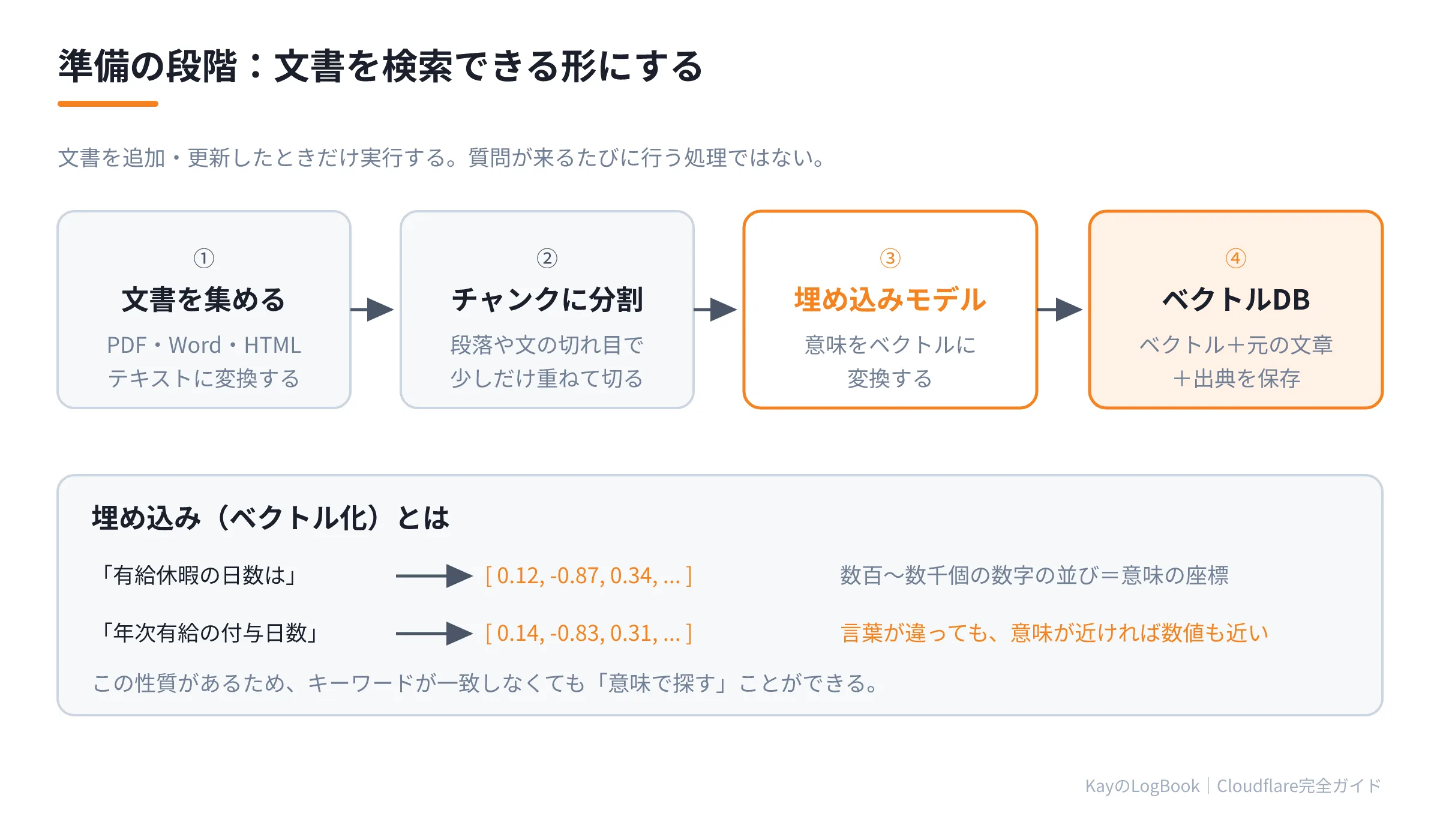
1. Collect documents and convert them to text#
They come in all sorts of formats: PDF, Word, HTML, Markdown and more. First, convert them into easy-to-handle text.
2. Split into chunks#
Instead of handling documents whole, cut them into small pieces called chunks.
There are two reasons to split. One is that there’s a limit to how much text you can pass to the AI. The other is that you want to pass only the parts relevant to the question. Passing the two relevant paragraphs is more accurate and cheaper than passing an entire 100-page manual.
How you cut takes some care. Cutting mid-sentence breaks the meaning, so the basic approach is to split at paragraph and sentence boundaries (called recursive chunking). Also, making neighboring chunks overlap slightly (overlap) makes it less likely you’ll miss content that straddles a boundary.
3. Embed (vectorize)#
This is the heart of RAG. Each chunk is passed through an embedding model and converted into a vector (a sequence of numbers).
A vector is a sequence of hundreds to thousands of numbers, like [0.12, -0.87, 0.34, ...]. Think of this sequence as the meaning of that text expressed as coordinates.
The important property is that texts with similar meanings end up close together as vectors.
- “number of paid leave days” and “annual paid leave days granted” → different words, but the vectors are close
- “number of paid leave days” and “parking lot location” → the vectors are far apart
With traditional keyword search, nothing matches unless it contains the word “paid leave”. Comparing vectors, you find it as long as the meaning is the same, even if the wording differs. This is “search by meaning” (semantic search).
4. Store in a vector database#
Store the vectors along with the original text and source information (file name, page number and so on). This store is a vector database, and on Cloudflare that role is played by Vectorize.
That’s the preparation. It runs only when documents are added or updated.
Execution: answering questions#
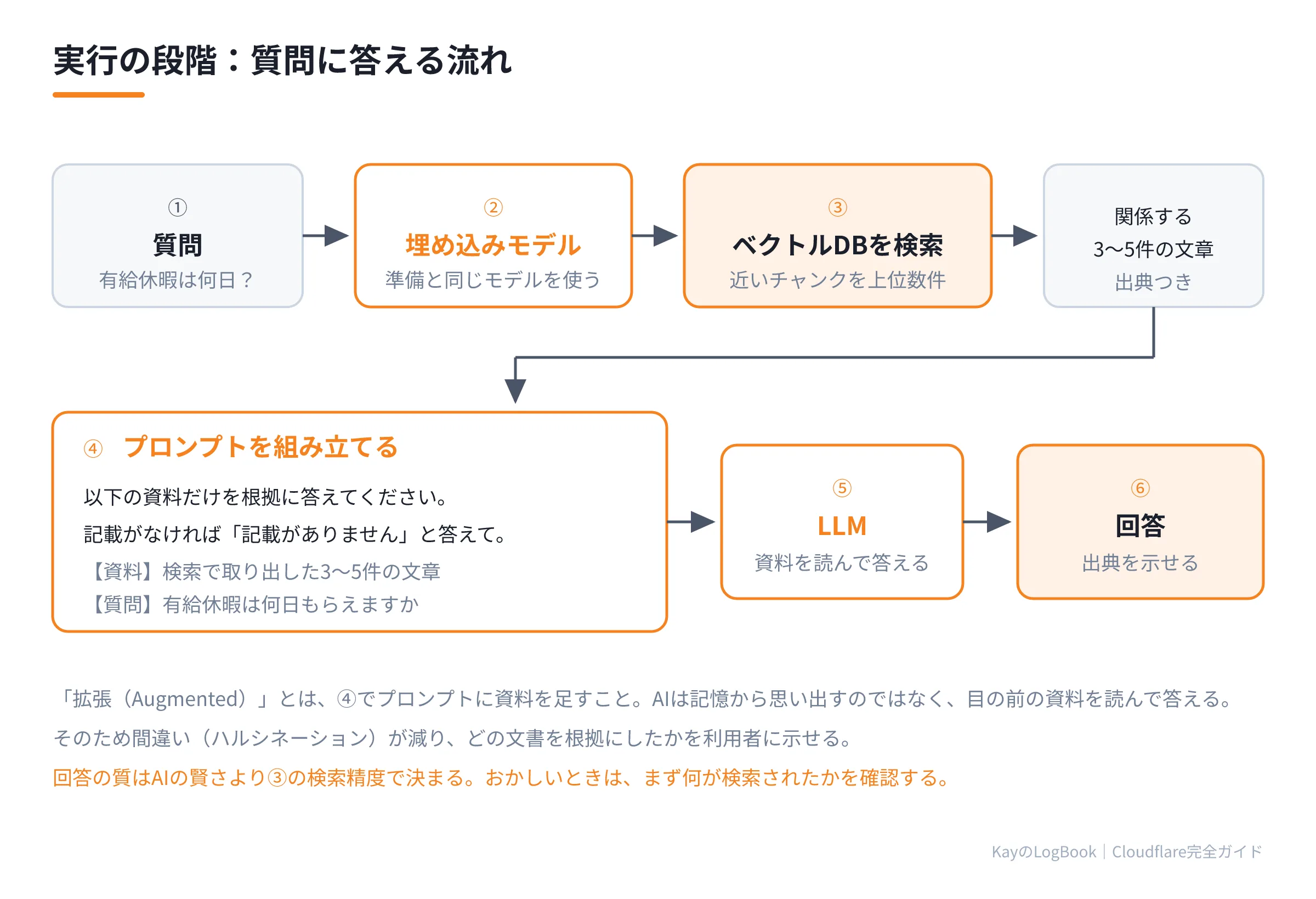
1. Receive the question#
Say the question “How many days of paid leave do I get?” comes in.
2. Convert the question to a vector too#
Turn the question into a vector using the same embedding model as in preparation. Using the same model is essential. Vectors from different models can’t be compared.
3. Search for nearby chunks#
Compare the question’s vector with the stored chunk vectors, and take the top few that are closest. How many to take is called topK. You specify a number like 3 or 5.
4. Build the prompt#
The retrieved chunks are built into the prompt passed to the AI along with the question. In practice it looks roughly like this:
Answer the question using only the materials below as evidence.
If the answer isn't in the materials, reply "This is not covered in the materials."

[Materials]
(Chunk 1 retrieved by the search)
(Chunk 2 retrieved by the search)
(Chunk 3 retrieved by the search)

[Question]
How many days of paid leave do I get?
“Augmented” refers to this adding of materials to the prompt.
5. The AI generates an answer#
The LLM reads the materials in front of it and answers. Because it relies on the text it was given rather than recalling from training, errors drop dramatically, and it can cite sources.
It’s standard practice to include the instruction “If it isn’t in the materials, say so.” This curbs the tendency to fill in unknowns with made-up stories.
Tricks for better accuracy#
That’s the basic flow, but in practice a few improvements are added.
Query rewriting: Users’ questions aren’t always suited to search as they are. A vague question like “How many days was that again?” is rewritten by an LLM into a more searchable form before searching.
Hybrid search: Vector search is strong on meaning but has a weakness: it’s poor at proper nouns and model numbers. For a search like “XR-2200 specifications”, keyword search is more reliable. Hybrid search runs both at once and combines the results.
Reranking: The candidates retrieved by the search are reordered by a more precise model. It reads the question and text together to score relevance, which raises accuracy at the cost of extra time and money.
Filtering by metadata: Narrow candidates by conditions other than vector closeness, such as “only documents from 2026 onward” or “only documents from the accounting department”. It’s an important feature also used for access control.
Building RAG on Cloudflare#
Cloudflare has services for each stage of RAG.
| RAG step | Cloudflare service |
|---|---|
| Storing source files | R2 |
| Chunking and processing | Workers |
| Generating embeddings | Workers AI (embedding models) |
| Storing and searching vectors | Vectorize |
| Generating answers | Workers AI or an external LLM |
| Managing and logging calls | AI Gateway |
| Handling every step for you | AI Search |
There are two ways to build it.
- Build it yourself: Combine Workers, Workers AI and Vectorize, and control the chunking method and search conditions in detail
- Use AI Search: Just put your data in, and it handles conversion, chunking, embedding, search and generation automatically
If you want something working first, choose AI Search; if you want fine control, build it yourself. Each is covered in the next two pages.
Points beginners should watch out for#
- With RAG, search quality is everything: Results depend less on how smart the AI is than on whether the right chunks are retrieved. When answers look wrong, first check “what was retrieved”
- If the source data is old, the answers will be too: RAG is faithful to its materials, so if the materials are wrong, it repeats the mistakes as is
- Chunk size takes trial and error: Too small and context is lost; too large and irrelevant information creeps in. Start medium and adjust
- Don’t postpone access control: Put every employee’s documents into one index and contents will be returned to people without permission. Design metadata filtering in from the start
- Always show sources: Showing on screen which part of which document was used as evidence lets users check for themselves. It makes a huge difference to trust
- You can’t change the embedding model midway: If you change it, every chunk has to be rebuilt
Related services#
- Workers AI: Handles generating embeddings and answers
- Vectorize: Storing and searching vectors
- R2: Where source PDFs and images are kept
- D1: Managing document attributes and permission information
- AI Gateway: Logs each RAG call and makes costs visible
Summary#
- RAG is a mechanism that “searches for the material for the answer and hands it to the AI along with the question”. It lets AI answer about your own data without retraining
- It’s split into a preparation stage (chunk → embed → store) and an execution stage (embed the question → search → generate)
- Embedding converts the meaning of text into numeric coordinates. Texts with similar meanings have nearby vectors
- Hybrid search, reranking, query rewriting and metadata filtering can improve accuracy
- On Cloudflare, you can build it yourself with R2, Workers, Workers AI and Vectorize, or leave it all to AI Search
- Answer quality is determined by search quality. Design source display and access control in from the start
At the center of RAG is a mechanism that stores vectors and quickly finds “nearby ones”. On the next page, we look in detail at Vectorize, which plays that role.