What Is AI Search? (Formerly AutoRAG) Managed RAG
On this page16 items
Over the last three pages, you’ve gathered all the parts for building RAG yourself. Create embeddings with Workers AI, store them in Vectorize, and search and assemble answers with Workers. In theory, that completes RAG.
But once you actually build it, you discover there’s more work than you expected. Converting PDFs to text, splitting into chunks, reindexing when files are updated, keeping a record of files that failed. Before you even get to the application itself, your time melts away on this groundwork.
Cloudflare AI Search is a service that takes on all of this groundwork for you. Put your data in, and it does everything else.
What you’ll learn on this page#
- What AI Search does automatically
- Supported data sources and file formats
- How to call it from a Worker, and how to publish it as an MCP server
- Settings you can tune (chunks, models, search methods)
- Pricing and limits, and when to build it yourself instead
What is AI Search?#
AI Search is a managed service that fully automates the RAG pipeline.
It was originally released in open beta in April 2025 under the name AutoRAG, and renamed to the current “AI Search” in September 2025. A lot of information still turns up under the old name, so remembering AutoRAG = AI Search avoids confusion.
As of August 2026 it’s still positioned as an open beta, but its features keep expanding steadily. In June 2026 the migration to a managed foundation was completed, and storage, vector indexing, and web crawling are now all built in.
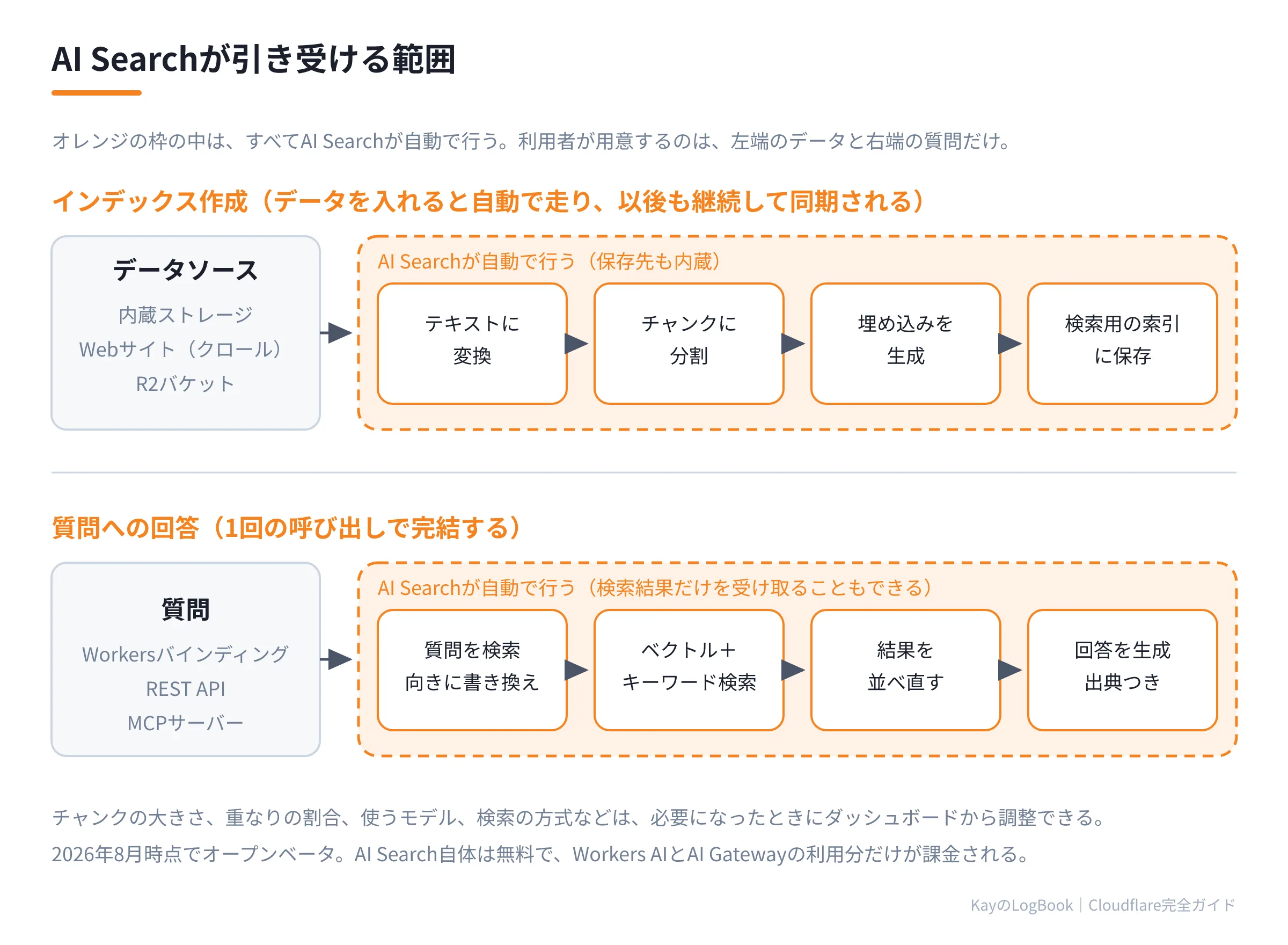
What does it do automatically?#
Let’s map it to the RAG steps covered in the previous pages.
Index creation (automatic, continuous)#
| RAG step | With AI Search |
|---|---|
| Load files | Fetched automatically from the connected data source |
| Convert to text | PDFs and Word files automatically converted to Markdown |
| Split into chunks | Recursive chunking runs automatically |
| Create embeddings | Generated automatically with a Workers AI embedding model |
| Store vectors | Saved automatically in the built-in vector index |
Particularly noteworthy is continuous syncing. When the data source changes, AI Search reindexes automatically. The problem that often occurs with homemade RAG, “I updated the file but the AI answers with the old content,” structurally can’t happen.
Answering questions (done in a single call)#
| RAG step | With AI Search |
|---|---|
| Embed the question | Automatic (same model as at storage time) |
| Rewrite the query | Can be turned on in settings |
| Vector search | Automatic |
| Combine with keyword search | Configurable as hybrid search |
| Reorder results | Reranking is configurable |
| Generate the answer | Automatic (you can choose the model) |
You can have it generate the answer, or just receive the retrieved chunks and use them yourself. The latter is handy when you want to use an external LLM for answer generation, or when using it as an agent’s tool.
Supported data sources#
There are three ways to bring data in.
1. Built-in storage: Upload files directly to the AI Search instance. Every instance has it from the start, so it’s the fastest way to try things out.
2. Website: Connect a domain you own, and AI Search crawls and ingests its pages. You can also choose a mode that discovers pages from both the sitemap and in-page links. If you want to build an AI that answers questions about your own blog or documentation site, this is the shortest path. There are also settings for adding headers for pages that require authentication, and for narrowing the ingested area with CSS selectors.
3. R2 bucket: Connect an existing R2 bucket. If your files already live in R2, you can make them searchable as they are.
Supported file formats#
- Handled as is: Text such as Markdown, JSON, YAML, source code in various languages, and configuration files
- Converted to Markdown: PDF, Word, Excel, OpenDocument formats, HTML, XML, CSV, images, Apple Numbers
There’s a limit of 4 MB per file. Files over this aren’t ingested and are recorded in the error log. Large PDFs need to be split before adding them.
Using it from a Worker#
Add an ai_search_namespaces binding to your Worker.
{
  "ai_search_namespaces": [
    { "binding": "AI_SEARCH", "namespace": "default", "remote": true }
  ]
}
In code, call it like this.
const results = await env.AI_SEARCH.get("my-instance").search({
  messages: [{ role: "user", content: "How many days of paid leave do I get?" }],
  ai_search_options: {
    retrieval: { max_num_results: 3 },
  },
});
Compare it with the Vectorize example on the previous page. The line that calls the embedding model is gone. Pass the question text as is, and embedding and search happen internally.
remote: true is specified because AI Search doesn’t run locally, so even during development with wrangler dev it has to query the production instance.
Besides Workers, it also supports the REST API, the Wrangler CLI, a Python SDK, and operation from the dashboard.
It can be published as an MCP server#
A distinctive feature of AI Search is publishing as an MCP server.
MCP (Model Context Protocol) is a common standard for AI agents to connect to external tools and data (covered in detail on the next page). Publish an AI Search instance as an MCP endpoint, and compatible AI agents can use it as a “tool for searching your documents.”
The public endpoint can be protected with authentication via Cloudflare Access, and you can set a custom domain like search.example.com. In other words, the Zero Trust mechanisms from Chapter 3 apply as they are.
Settings you can tune#
It works without any configuration at first, but there are settings to tune when accuracy falls short.
- Chunk size: Number of tokens per chunk
- Chunk overlap: The proportion of overlap between adjacent chunks (0–30%)
- Models used: For embedding, answer generation, reranking, and query rewriting, each
- Hybrid search: Combines vector search with BM25 keyword search
- Relevance boost: Ranks documents with specific metadata higher
- Metadata filtering: Narrows candidates by conditions at search time
- Path filters: Include or exclude files and URLs to ingest
- Similar-query cache: Reuses answers to semantically similar questions for speed and savings
- Connected AI Gateway: Track the models used and their costs with AI Gateway
When deciding chunk size, keep in mind its product with the number of results retrieved. If chunks are large and many are retrieved, you can exceed the generation model’s input limit or see costs spike.
Pricing and limits#
AI Search is free during the open beta. However, the Workers AI and AI Gateway usage it relies on internally is billed separately. Storage, vector indexing, and web crawling are included at no extra cost. Cloudflare has said the start of billing will be announced 30 days in advance.
| Item | Free plan | Paid plan |
|---|---|---|
| Instances (per account) | 100 | 5,000 |
| Files per instance | 100,000 | 1,000,000 (500,000 with hybrid search) |
| Monthly queries | 20,000 | Unlimited |
| Pages crawled per day | 500 | Unlimited |
| Size per file | 4 MB | 4 MB |
| Custom metadata fields (per instance) | 5 | 5 |
| Instances searchable in one cross-instance search | 10 | 10 |
The free plan’s 20,000 queries a month is plenty for search on a personal blog or for documentation.
When to build it yourself instead#
Let’s sort out how to choose between AI Search and the “build it yourself with Workers AI + Vectorize” approach from the previous pages.
| AI Search | Build it yourself | |
|---|---|---|
| Time to get started | Minutes | Days or more |
| File conversion and splitting | Automatic | Implement yourself |
| Reindexing on update | Automatic | Implement yourself |
| Flexibility in chunking | Tune within the provided range | Completely free |
| Flexibility in search logic | Within configurable range | Completely free |
| Custom preprocessing | Difficult | Anything goes |
| Turning it into an MCP server | Built-in feature | Implement yourself |
| Risk of beta-related changes | Yes | Low |
Here are rough guidelines for deciding.
- You just want an AI that answers from documents → AI Search is enough. In fact, there’s no reason to build your own
- You need custom preprocessing (fetching dynamically from internal systems, inserting your own permission checks, etc.) → Build your own
- You want fine control over chunking (not breaking tables, splitting by legal article, etc.) → Build your own
- You want to show something working first → The realistic route is to build with AI Search and move to your own build when you need to
Points for beginners to watch out for#
- Keep in mind that it’s an open beta: Specs and pricing may change. If you use it in a production system, make sure you can follow change announcements
- Watch the 4 MB limit: Large PDFs aren’t silently dropped; they’re recorded in the error log. Always check the ingestion results
- Public endpoints have no authentication by default: If you’re handling internal documents, always set up authentication with Cloudflare Access
- Only AI Search itself is free: Workers AI inference runs for every question. You can check costs in AI Gateway
- When answers miss the mark, look at the search results: AI Search can also return only the search results. Checking what’s being retrieved is the fastest way to isolate the problem
- Website crawling is limited to 500 pages a day on the free plan: Large sites can take several days to ingest
Related services#
- Workers AI: The embedding and generation models AI Search uses internally
- Vectorize: Where vectors are stored when you build RAG yourself
- RAG: The very mechanism AI Search automates
- R2: Object storage you can connect as a data source
- AI Gateway: Logging the models AI Search used and checking costs
- Cloudflare Access: Putting authentication on the public endpoint
Summary#
- AI Search (formerly AutoRAG) is a managed service that fully automates the RAG pipeline
- There are three kinds of data sources: built-in storage, websites, and R2 buckets. PDFs and Word files are automatically converted to Markdown
- Content is automatically reindexed when it changes, so answers are less likely to go stale
- It can be used via Workers bindings, the REST API, the CLI, and as an MCP server
- Chunks, models, hybrid search, caching, and more can be tuned later
- As of August 2026 it’s in open beta. AI Search itself is free; only Workers AI and AI Gateway usage is billed
- If your goal is “an AI that answers from documents,” use AI Search; if you need custom preprocessing or fine control, build your own
You now know how to have AI work with your own data. The next page, the last in Chapter 7, covers the idea of “agents,” where AI decides for itself, uses tools, and works through multiple steps, along with their common standard, MCP.