What Is Cloudflare Gateway? DNS and HTTP Filtering
On this page10 items
Whereas Access and Tunnel protect “access coming in to internal apps,” Cloudflare Gateway, the subject of this page, works in the opposite direction: it protects “traffic going out from devices to the internet.” In the Cloudflare One overview, it’s the checkpoint for flow ②.
Being lured to a phishing site, downloading malware, rogue traffic after a virus infection: all of these start with traffic “going out” from a device. Gateway is the filter standing at that exit.
What you’ll learn on this page#
- What a Secure Web Gateway (SWG) is
- Gateway’s three layers of filtering (DNS, network, HTTP)
- What TLS inspection (inspecting the contents of traffic) is
- Four ways to connect devices to Gateway
- Practical examples and caveats for homes and small teams
What is Cloudflare Gateway?#
A checkpoint for outgoing traffic (SWG)#
Gateway is a product in the category called SWG (Secure Web Gateway). It routes all traffic from devices to the internet through Cloudflare first, then inspects, allows, or blocks it based on policies.
Traditionally, this role was handled by “proxy servers” or “URL filtering appliances” installed at the office. But with a box sitting inside the office, you can’t protect laptops and phones used outside it. Gateway places the checkpoint on Cloudflare’s global network, so devices are protected by the same policies wherever they are. This is the SASE idea covered two pages ago.
Three layers of filtering#
Gateway’s inspection is divided into three layers depending on the stage of the connection at which it happens.
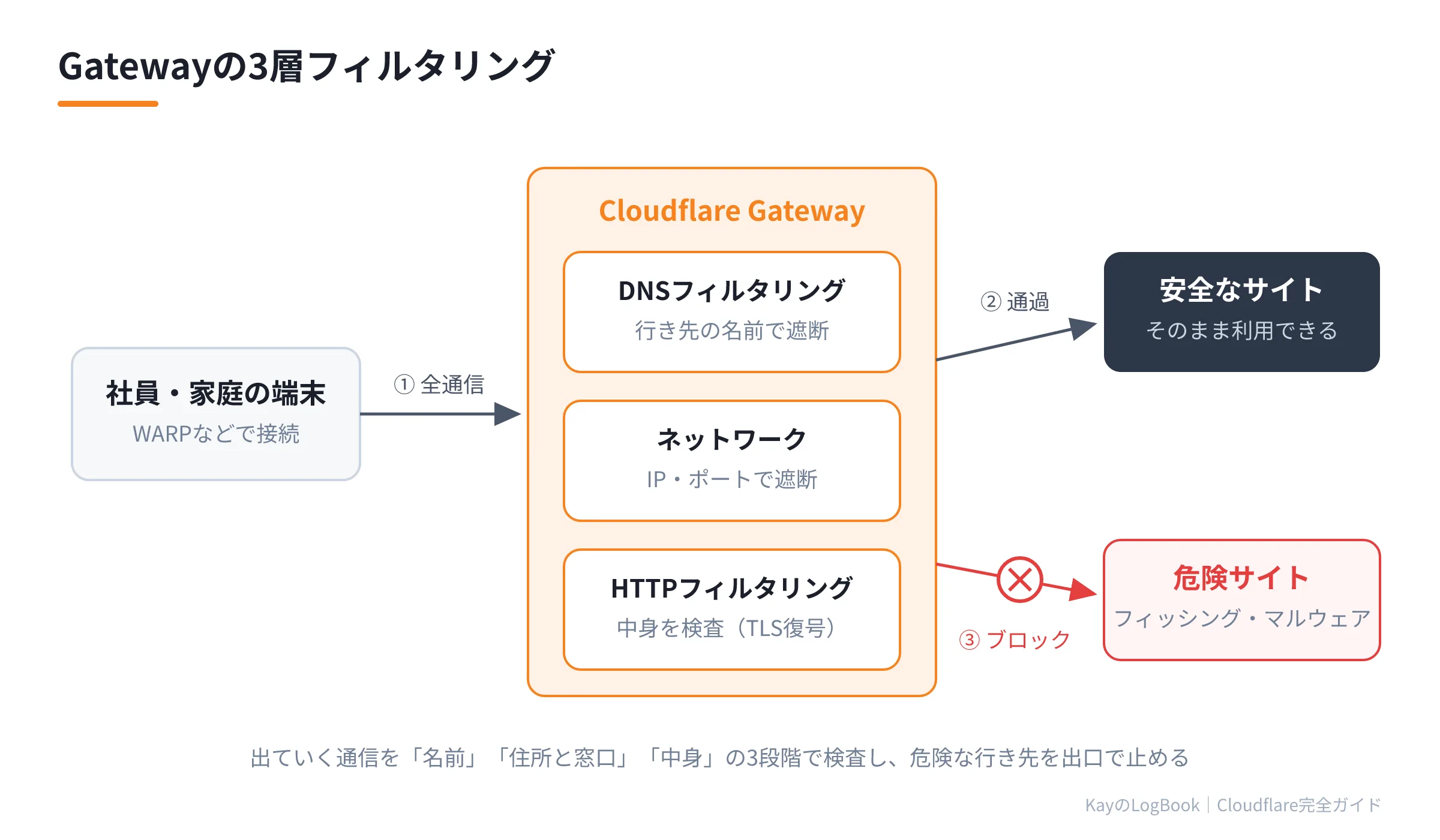
DNS filtering: stop by the destination’s “name”
As covered in Chapter 1, when a device connects somewhere, it first uses DNS to convert a domain name into an IP address. DNS filtering inspects the destination at this name-resolution stage and simply doesn’t return an answer for dangerous domains.
Cloudflare classifies dangerous domains, such as phishing, malware distribution, and scams, using its vast internet observation data. You can also block by content category, such as adult content or gambling, so it’s useful for “restricting sites not needed for work” or “protecting children’s devices.” Because it stops things at the entrance of the connection, it’s lightweight, and as described below, it’s also the easiest to set up.
Network filtering: stop by the destination’s “address and counter”
Traffic that doesn’t use DNS, or that uses specific ports or protocols, is inspected at the level of IP addresses and port numbers. This is the layer for rules focused on the type of traffic, such as “block SSH connections to outside hosts” or “block traffic to IP addresses in specific countries.”
HTTP filtering: inspect the “contents” of traffic
The deepest layer inspects the contents of web traffic itself. Fine-grained control by URL, virus scanning of downloaded files, blocking specific file types, and DLP (detecting leaks of sensitive data), covered two pages from now, all run at this layer.
The challenge here is encryption. Almost all web traffic today is encrypted with HTTPS, so its contents can’t be inspected as is. That’s why Gateway uses a mechanism called TLS inspection. Cloudflare decrypts the traffic, inspects it, then encrypts it again before delivering it. To use it, you need to install Cloudflare’s root certificate (a certificate that tells the device to trust the inspection) on each device. This is where what you learned about certificates in Chapter 1’s SSL/TLS page comes in.
Four ways to connect devices to Gateway#
Even if the checkpoint is in the cloud, it’s pointless unless traffic passes through it. There are four main ways to connect.
- WARP (Cloudflare One Client): Install an app on the device and send all its traffic to Cloudflare. All three layers are available and individual devices can be identified, making this the primary method (details on the next page)
- DNS locations: Simply change the DNS server setting on your router or device to the dedicated address you’re issued. Only DNS filtering is available, but no app installation is needed, and if you set it on your home router, every device in the house is covered at once
- PAC files / proxy endpoints: Point only browser traffic at Gateway (for web filtering)
- Site tunnels: Connect an entire office network to Cloudflare (Magic WAN, etc.; covered in Chapter 4)
A step-by-step rollout, “first DNS filtering for the whole home through the router’s DNS setting, then WARP on the devices you want to manage,” is the standard approach for individuals and small teams.
Example: what you can do for free#
Gateway is included in Cloudflare One’s Free plan (up to 50 users), and you can try DNS, network, and HTTP filtering (logs are retained for 24 hours; as of August 2026). For example, you can build a setup like this for free.
- Set a DNS location on your home router and block phishing and malware sites on every device
- On the children’s devices, also block the adult and gambling categories at all hours
- Install WARP on your work laptop and go as far as inspecting downloaded files
When you consider that you get an enterprise-grade web filter without buying commercial filtering software, there’s every reason to use it.
Points beginners should watch out for#
- Prepare before enabling TLS inspection: If you enable HTTPS inspection without distributing the root certificate, browsers will show warnings and even legitimate sites won’t open. Start with DNS filtering, and introduce HTTP inspection together with certificate distribution
- Some apps dislike inspection: Some apps, such as banking apps, detect interception and stop working. Gateway has settings to exclude specific apps and sites from inspection, so let the ones that break through via the exclusion list
- Don’t forget to explain it to users: If you deploy it at a company, traffic inspection touches on employee privacy. Documenting and communicating a policy on what is inspected and how far is a must, even before the technical side
- Blocking too much makes it meaningless: Filters that are too strict push users onto their personal phone connections, which actually weakens control. The realistic approach is to block only the “dangerous” categories first, then expand while watching how it goes
Related services#
- WARP (Cloudflare One Client): The device-side component that delivers traffic to Gateway (next page)
- DLP: Sensitive-data detection that runs on top of HTTP filtering (the last page of this chapter)
- DNS: Background knowledge for DNS filtering (Chapter 1)
- SSL/TLS: Background knowledge for TLS inspection (Chapter 1)
Summary#
- Gateway is an SWG (Secure Web Gateway) that inspects traffic going out from devices to the internet
- Inspection has three layers: DNS (the destination’s name), network (address and counter), and HTTP (contents)
- Seeing inside HTTPS requires TLS inspection and distributing a root certificate
- There are four ways to connect: WARP, DNS locations, PAC files, and site tunnels. With DNS locations, you can start with just a settings change
- All three layers of filtering are available even on the Free plan, which makes it practical for home filtering too