What Is Load Balancing? Load Distribution and Failover
On this page9 items
The last topic of Chapter 4 is Load Balancing. The previous two pages were about “protecting” (Magic Transit and Spectrum) and “connecting” (Cloudflare WAN); this page is about “distributing.”
As a website or service grows, a single server eventually can’t keep up. And as long as there’s only one server, the whole service stops whenever that one server stops. Line up multiple servers, distribute the traffic well, and automatically cut off the one that breaks. That’s the job of a load balancer, and Cloudflare provides it as a feature of its network.
What you’ll learn on this page#
- What load balancing is, and why it becomes necessary
- The building blocks of Cloudflare Load Balancing (endpoints, pools, monitors)
- How health checks and failover work
- The types of traffic distribution (steering)
- How pricing works, and what to consider before adopting it
What load balancing is: solving two problems at once#
Load balancing solves two problems: performance and availability.
The first is performance. When traffic grows, replacing your server with a single more powerful machine (scaling up) has limits and is expensive. So instead you line up multiple servers with the same role and have them share the work (scaling out). At that point, you need someone to hand out incoming requests to each server.
The second is availability. In a setup with only one server, that server is a single point of failure (a component whose failure brings everything down). If you split across multiple servers and automatically cut off a broken one, leaving the rest to carry the load, users see a service that never stopped. This switchover is called failover.
Traditionally, this job was done by dedicated hardware installed in a data center or by software you built yourself. Cloudflare Load Balancing is a service that takes over this job on Cloudflare’s global network. It works as an extension of the DNS and proxy mechanisms (Chapter 1), so there’s no hardware to buy and no extra software to install.
The building blocks of Cloudflare Load Balancing#
The configuration is built in the following three layers.
- Endpoints (origins): The individual servers that traffic is forwarded to
- Pools: Groups of endpoints. For example, you might make “two servers in Tokyo” and “two servers in Osaka” into separate pools
- Load balancer: The core that decides which pool gets traffic and how. It’s configured for a hostname (e.g. www.example.com)
You also set up a monitor to keep watch. A monitor runs periodic health checks against each endpoint from Cloudflare data centers around the world. It supports HTTP, HTTPS and TCP checks, and can inspect not just “whether a response comes back” but also “whether the status code is 200” and “whether the response body contains a specific string.”
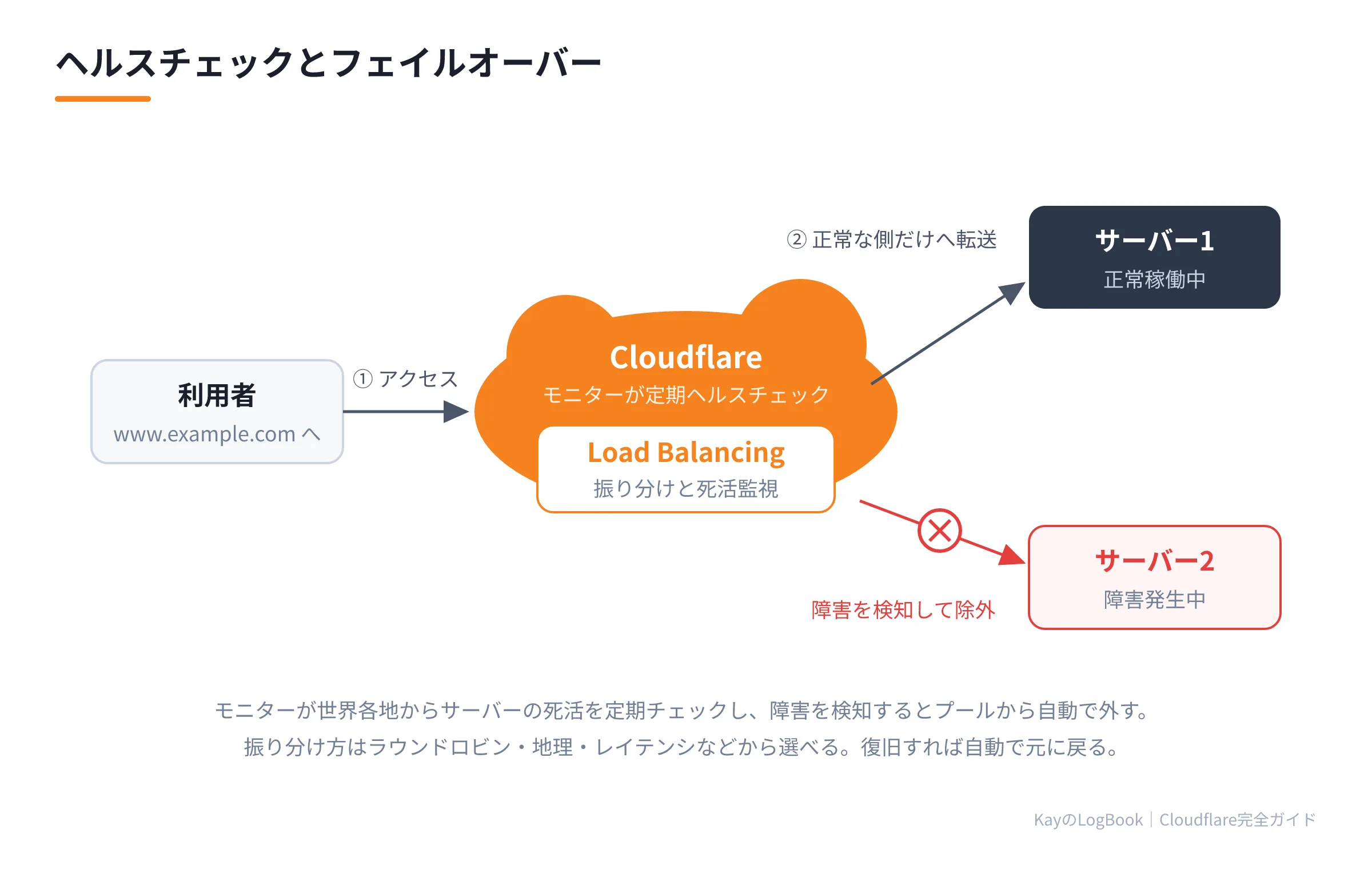
Endpoints that fail health checks are automatically removed from rotation. If every endpoint in a pool goes down, traffic switches to the next pool in a predetermined order. A disaster-recovery setup like “if the whole Tokyo pool goes down, switch to the Osaka pool” can be achieved with configuration alone. When recovery is detected, it automatically returns to the original setup.
How traffic is distributed (steering)#
When multiple pools are healthy, you can choose from several methods (steering policies) for where to send traffic.
- Fixed order: Always use the first pool, and move to the next only when it goes down. A pure failover setup
- Round robin / weighted: Distribute across multiple pools in turn or by ratio
- Geo-based (Geo): Specify which pool to use for each visitor region. A setup like “Japan goes to the Tokyo pool, Europe goes to the Frankfurt pool”
- Latency-based (Dynamic): Send to the pool with the best measured response time
- Proximity-based (Proximity): Send to the pool physically closest to the visitor
There’s also session affinity, which keeps sending the same visitor to the same endpoint for apps with login state, and custom rules that change behavior based on the content of the request. Which methods are available and how many settings you get depends on the plan; higher plans offer more options.
Which plans can use it#
Load Balancing is a paid add-on that can be added to any plan, including Free (as of August 2026). The price isn’t a flat fee but usage-based, depending on the number of origins and the amount of traffic, and a small setup can start from a few dollars a month. The main limits are as follows.
- On non-Enterprise plans, up to 20 each of load balancers, pools and endpoints
- The shortest health check interval is 60 seconds on Pro and 15 seconds on Business. Enterprise can go even shorter and adds more monitoring options, such as ICMP
- The number of custom rules and advanced steering options expand on higher plans
Points beginners should watch out for#
- You don’t need it while you have one server: For a personal blog or small site, making use of caching from Chapter 1 comes first. Load Balancing only becomes necessary “once there’s a real need to run multiple servers”
- Detection has a time lag: Health checks run at intervals, so it takes at least tens of seconds from a failure to the server being cut off. It’s not a mechanism that guarantees zero interruption
- Keeping data in sync is your job: Load Balancing only takes care of distribution. You need to provide your own mechanism (such as replication) for keeping databases and files consistent across servers
- Apps with sessions need design work: If you distribute traffic while login information is stored on each server, each request may land on a different server and the login is lost. Use session affinity, or design the app to store sessions externally
- It shines when combined with the orange cloud: Through the proxy (orange cloud), traffic can be distributed instantly per request. With DNS only (grey cloud), it relies on switching DNS responses, so how quickly changes take effect depends on caching
Related services#
- DNS and proxy: The foundation of Load Balancing. It works as an extension of the orange cloud (Chapter 1)
- CDN: If caching can handle the traffic in the first place, server load itself goes down (Chapter 1)
- Spectrum: TCP/UDP apps can also be distributed in combination with Load Balancing (previous page)
- Workers: An option that removes server management altogether. Covered in the next chapter
Summary#
- Load balancing solves two problems: performance (sharing the work) and availability (switching over on failure)
- Cloudflare Load Balancing consists of three layers (endpoints, pools, load balancer) plus monitors
- Health checks from around the world detect failures and automatically cut off broken servers or pools (failover)
- Distribution methods include fixed order, round robin, geo and latency
- A usage-based add-on available on every plan. But since it assumes multiple servers, adopting it once your scale has grown is soon enough
That completes Chapter 4, “Network Services.” From the next chapter, the topic changes significantly as we enter the world of using Cloudflare not as infrastructure but as a “development platform.” The entry point is Cloudflare Workers.