What Is DNS? How Name Resolution Works and Record Basics
On this page23 items
When you type “kaylog.io” into your browser and press Enter, the website appears in an instant. Behind the scenes, a lookup always takes place to find out, from the domain name you entered, “where on the internet is this site?” This mechanism is DNS (Domain Name System).
At the end of the previous page, “What Is Cloudflare? What the Service Can Do,” we said that setting up Cloudflare is essentially DNS configuration. DNS is the foundation supporting the entire internet, and at the same time the first hurdle to mastering Cloudflare. On this page, you’ll carefully work through the flow of name resolution and the basics of DNS records, step by step.
What you’ll learn on this page#
- What DNS is for (the relationship between domain names and IP addresses)
- The flow of name resolution (the roles of the resolver, root, TLD, and authoritative DNS)
- What the main DNS records (A, AAAA, CNAME, MX, TXT, etc.) mean
- TTL and caching, and why “changes don’t take effect right away”
- DNS at Cloudflare (the authoritative DNS service and 1.1.1.1)
What is DNS?#
Domain names and IP addresses#
Devices on the internet identify each other by numeric addresses called IP addresses. There are two kinds: IPv4 addresses in a format like “203.0.113.10,” and IPv6 addresses in a format like “2001:db8::1.” Ultimately, all communication is addressed to these IP addresses.
But strings of numbers are hard for people to remember. So human-readable names like “kaylog.io,” that is, domain names, are used, and a system was created to map domain names to IP addresses. That’s DNS. Looking up an IP address from a domain name is called name resolution.
DNS is often compared to “the internet’s phone book.” It’s an apt comparison in that you look up a number from a name, but real DNS isn’t a single phone book. Let’s go a step further and look at its structure.
There isn’t one giant server for the whole world#
If a single server in the world managed all DNS information, the whole internet would stop the moment that server went down. So DNS is designed as a distributed database that divides management along the hierarchy of domain names.
Domain names form a hierarchy separated by dots. For “kaylog.io,” there’s an omitted “root” at the far right, below it “io” (called a top-level domain, or TLD), and below that “kaylog.” DNS servers divide their roles to match this hierarchy: servers that manage the root, servers that manage “.io,” and servers that manage “kaylog.io.”
Among these, a server that officially holds the information for a particular domain is called an authoritative DNS server. When you set up Cloudflare, this authoritative DNS server is what you configure.
How name resolution works#
Sorting out the players#
Broadly, two kinds of DNS servers take part in name resolution.
- Resolver (also called a full-service resolver or caching DNS server): The one that receives the user’s question, “what’s the IP address of this domain?”, and queries various servers on the user’s behalf to find the answer. Normally your ISP’s resolver is used automatically, but you can also specify a public resolver yourself, such as Cloudflare’s 1.1.1.1 described later.
- Authoritative DNS server: The one that officially stores a domain’s information (records) and answers questions. Root servers, TLD servers, and each domain’s servers are all authoritative DNS servers for their own level of the hierarchy.
First, get a firm grip on the difference in roles: the side that asks (resolver) and the side that holds the answer (authoritative DNS). This distinction will pay off later when you’re understanding Cloudflare’s services.
Following the flow of name resolution#
When you open “kaylog.io” in a browser, name resolution proceeds as follows.
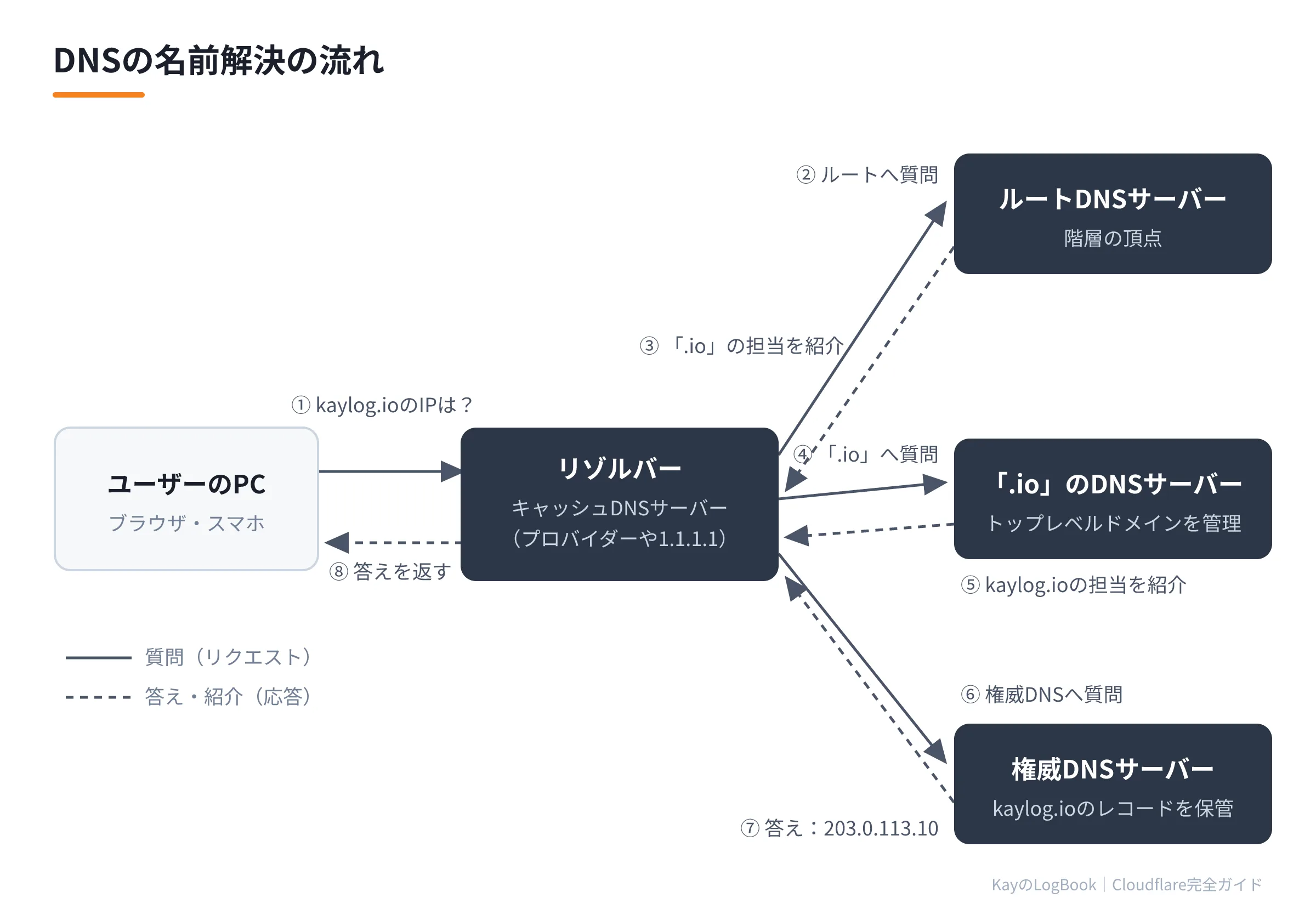
- The PC or smartphone asks the resolver, “What’s the IP address of kaylog.io?”
- The resolver first queries a root DNS server
- The root returns a referral: “For .io, ask the .io DNS servers”
- The resolver queries the referred “.io” DNS server
- The “.io” server returns a referral: “For kaylog.io, ask this authoritative DNS server”
- The resolver queries kaylog.io’s authoritative DNS server
- The authoritative DNS server returns the answer (a record): “It’s 203.0.113.10”
- The resolver returns that answer to the PC, and the browser connects to this IP address to fetch the page
The key point is that it works like a relay: the higher-level servers don’t give the answer itself, but refer you to “who to ask next.” Thanks to this, the world’s enormous number of domains can be managed in a distributed way while still being reliably reachable.
Caching and TTL#
Repeating these eight steps every time would be wasteful, so the resolver remembers an answer for a certain time once it has looked it up. This is called caching. For the second and later questions, it answers instantly from the cache without going all the way to the authoritative DNS server.
How long that “certain time” lasts is set by the TTL (Time To Live) configured for each record. If the TTL is 3600 seconds, the resolver caches the answer for up to one hour. A shorter TTL spreads changes faster; a longer one reduces query load.
The reason DNS changes take time to take effect worldwide is that you have to wait for old cached answers left at resolvers everywhere to reach their TTL expiry. What’s commonly called “DNS propagation” is really just waiting for these caches to expire.
DNS record basics#
Each individual piece of information registered on an authoritative DNS server is called a DNS record. Records come in types, and each has a defined role. First, let’s look at the main ones in a list.
| Record | Role |
|---|---|
| A | Maps a domain name to an IPv4 address |
| AAAA | Maps a domain name to an IPv6 address |
| CNAME | Makes a domain name an “alias” of another domain name |
| MX | Specifies which server receives mail for the domain |
| TXT | Holds arbitrary text (used for ownership verification and email authentication) |
| NS | Indicates which servers are the domain’s authoritative DNS servers |
| CAA | Restricts which certificate authorities may issue SSL certificates |
| SRV | Indicates the host and port number where a specific service runs |
A and AAAA records: the stars of name resolution#
These are the most basic records. They directly link a domain name to a server’s IP address, as in “kaylog.io → 203.0.113.10.” A is for IPv4 and AAAA is for IPv6; to publish a website you need at least one of them.
CNAME records: giving an alias#
A CNAME (Canonical Name) is a declaration of an alias: “this domain name is the same as that domain name.” For example, if you create a CNAME “www.kaylog.io → kaylog.io,” visitors who come with www are directed to the same place as without www. The advantage is that even if the target’s IP address changes, the CNAME itself doesn’t need fixing.
MX and TXT records: supporting email#
MX (Mail Exchange) specifies, “deliver mail for this domain to this mail server.” It has nothing to do with displaying a website, but it’s essential for using email addresses on a custom domain.
TXT is a record that can hold free text. In practice it’s used to prove “I own this domain” and to publish authentication information that prevents email spoofing (mechanisms called SPF, DKIM, and DMARC). Email authentication in detail is beyond the scope of this guide, but remember that “TXT records are deeply involved in email trustworthiness.”
NS records: the signpost showing who’s in charge#
NS (Name Server) is a signpost saying, “this domain’s authoritative DNS servers are here.” The “referrals” that higher-level servers returned in the name resolution flow above are, in substance, these NS records. “Changing the nameservers” when setting up Cloudflare means rewriting this signpost to point to Cloudflare’s servers.
How DNS is used at Cloudflare#
Cloudflare as an authoritative DNS service#
One of Cloudflare’s origins is its authoritative DNS service. Once you change your domain’s nameservers to Cloudflare, you edit that domain’s records from then on in Cloudflare’s management screen (the dashboard).
Cloudflare’s DNS has the following strengths.
- Fast: The independent measurement service DNSPerf rates its response speed among the fastest in the world. Data centers in all 330+ cities worldwide respond, so queries from anywhere are answered from somewhere nearby
- Free: The Free, Pro, and Business plans don’t charge for DNS queries. A personal site can use it completely free
- Robust: The authoritative DNS itself sits inside Cloudflare’s DDoS protection, so it’s resilient against attacks targeting DNS servers
- API-driven: Every record can be created and changed via API, supporting managing your configuration as code
Proxy status: orange cloud and gray cloud#
When you edit A, AAAA, or CNAME records in the Cloudflare dashboard, a field called “Proxy status” appears that other DNS services don’t have. If the cloud icon is orange, the record is Proxied (traffic goes through Cloudflare, and acceleration and protection are in effect); if gray, it’s DNS only (Cloudflare only does name resolution, and traffic reaches the server directly).
Only A, AAAA, and CNAME can be proxied; MX, TXT, and others always operate as DNS only. Also, the TTL of proxied records is automatically fixed at 300 seconds (5 minutes). This orange cloud is Cloudflare’s core feature, and its detailed mechanism is explained on its own page, “What Is the Cloudflare Proxy? How the Orange Cloud Works.”
Its other face: the public resolver 1.1.1.1#
The Cloudflare DNS covered so far is about “the side that holds the answer” (authoritative DNS). In fact, Cloudflare also provides a service on “the side that asks” (a resolver). That’s 1.1.1.1.
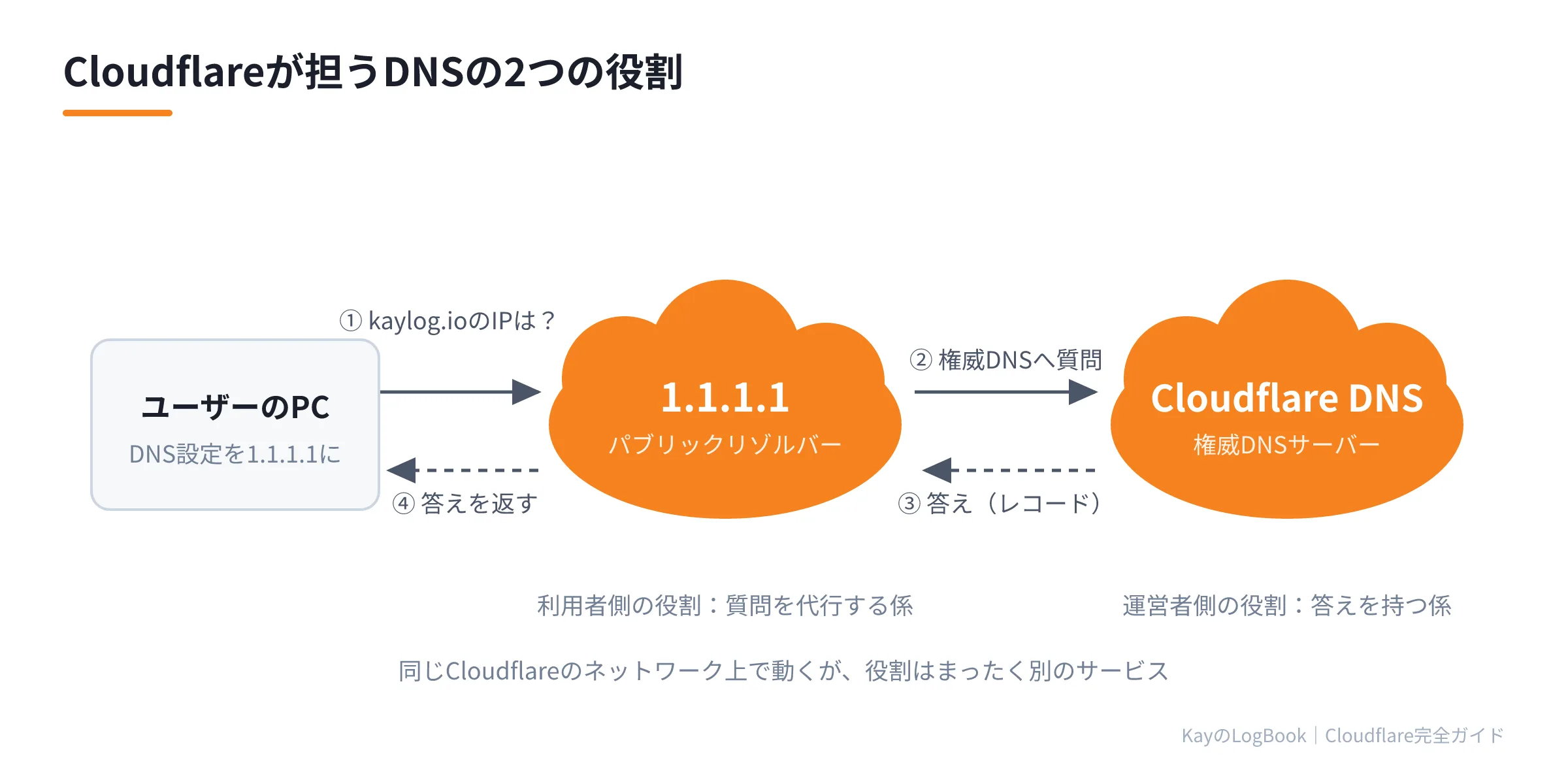
1.1.1.1 is a public DNS resolver anyone can use for free. Just change the DNS setting on your PC, smartphone, or router to 1.1.1.1 (with 1.0.0.1 as backup), and Cloudflare’s resolver handles name resolution instead of your ISP’s. Besides fast responses, it’s notable for its privacy policy of not selling query data, which amounts to your browsing history, for advertising. There’s also a family-oriented variant, 1.1.1.1 for Families, which blocks name resolution for malware sites.
Authoritative DNS (used as a site operator) and 1.1.1.1 (used as an internet user) run on the same Cloudflare network, but they are entirely separate services with different roles. Not confusing the two is the dividing line for whether you really understand DNS.
DNSSEC: preventing tampered responses#
DNS responses are at risk of attacks that swap them for fakes along the way (such as DNS cache poisoning). DNSSEC is an extension that attaches digital signatures to authoritative DNS responses so you can verify that “this is the genuine answer.” At Cloudflare you can enable it with one click from the dashboard, and it’s available on the free plan too.
Example: setting up DNS records for a blog#
To run a blog and email on the custom domain “example.com,” you register at minimum records like these in authoritative DNS (the IP addresses are example values).
| Type | Name | Content | Meaning |
|---|---|---|---|
| A | example.com | 203.0.113.10 | The address of the site’s server |
| CNAME | www.example.com | example.com | Makes www an alias of the main domain |
| MX | example.com | mail.example.com | Mail is received by this server |
| TXT | example.com | v=spf1 … (SPF information) | Protection against spoofed outgoing mail |
Even when you move your nameservers to Cloudflare, the contents of the records you register are the same. The only difference is that you gain the option of turning on the orange cloud (proxy) for A and CNAME. If you can read what this table means, you’ve achieved this page’s goal.
Points for beginners to watch out for#
- Changes don’t spread immediately: Old answers keep being returned until resolver caches everywhere expire. Shortening the TTL before a switchover reduces the window of impact
- Changing nameservers means “moving all your records”: Once you rewrite the signpost, only the contents of the new authoritative DNS are used from then on. The golden rule is to register every record at the destination before switching. Cloudflare reads existing records automatically, but always compare the lists to confirm
- Forgetting to copy, or accidentally deleting, MX and TXT records leads to email incidents: Most cases of “the website shows up, but email doesn’t arrive” come from this
- Deleting or changing records takes effect immediately: Note down the current settings before working, so you can always roll back
Related services#
- Cloudflare DNS (authoritative DNS): The service covered on this page for managing your domain’s records. The gateway to setting up Cloudflare
- 1.1.1.1: A public resolver you use as an end user. You can start using it today, even without owning a domain
- Cloudflare Registrar: A service for registering and managing the domain itself. Covered on the next page, “What Is a Domain?”
- Email Routing: A free service that uses the MX record mechanism to forward mail sent to your custom domain to your usual email address. Explained in a later chapter
Summary#
- DNS is a hierarchical, distributed database for looking up IP addresses from domain names (name resolution)
- It works through a division of roles: resolvers that ask on your behalf, and authoritative DNS servers that officially hold the answers
- Answers are cached at resolvers, and the TTL determines how long they’re kept. Changes take time to take effect because of this caching
- The basic records are A and AAAA (addresses), CNAME (aliases), MX and TXT (email), and NS (signposts)
- Cloudflare has two faces: authoritative DNS (for operators, free, fast) and 1.1.1.1 (a resolver for users)