What Are Magic WAN, Magic Transit and Magic Firewall? (Combined Guide)
On this page11 items
With this page we enter Chapter 4, “Network Services”. Chapters 1 and 2 were about putting “websites” on Cloudflare to make them fast and secure, and Chapter 3 was about protecting “internal apps and devices” with Zero Trust. This chapter deals with what lies even further down: “the company network itself”.
At its center are three services that carry the “Magic” name: Magic Transit, Magic WAN and Magic Firewall. All of them are for businesses (Enterprise contracts), so individuals almost never get to touch them, but the idea that “Cloudflare can take over your entire network” deepens your understanding of this whole guide. The three are always discussed together, so this page covers them in one place.
Note that as of August 2026, two of them have been renamed. Magic WAN is now officially “Cloudflare WAN”, and Magic Firewall is “Cloudflare Network Firewall” (Magic Transit is unchanged). The old names are still widely used in searches and articles, so this page gives both.
What you’ll learn on this page#
- How “the layer being protected” differs from the previous pages
- Magic Transit: protecting an entire network from DDoS
- Cloudflare WAN (formerly Magic WAN): site-to-site connectivity that replaces MPLS
- Cloudflare Network Firewall (formerly Magic Firewall): a cloud firewall
- How the three divide the work, and how they relate to Cloudflare One (SASE)
Background: a different “layer” from before#
The CDN and proxy from Chapter 1 and the WAF from Chapter 2 all dealt with web traffic, HTTP and HTTPS. In terms of network layers, that’s the application layer (Layer 7). Only web traffic to domains with the orange cloud enabled goes through Cloudflare and is protected.
A company network, however, carries plenty of non-web traffic too: mail servers, VPN appliances, internal systems, traffic between sites. Much of it runs not over HTTP but at the level of IP packets, in other words the network layer (Layer 3). That’s what the Magic services deal with.
As an analogy, the previous pages were about “security and customer service at the shop (the website)”. The Magic services deal with “the town’s road network itself”: which roads traffic takes, where to stop dangerous vehicles, how to connect distant towns. This change of viewpoint is where this page starts.
A map of the three services#
Each of the three roles can be summed up in a word.
| Former name | Current name (as of August 2026) | Role |
|---|---|---|
| Magic Transit | Magic Transit (unchanged) | Protects the entire network from DDoS |
| Magic WAN | Cloudflare WAN | Connects sites to each other |
| Magic Firewall | Cloudflare Network Firewall | Inspects the packets passing through |
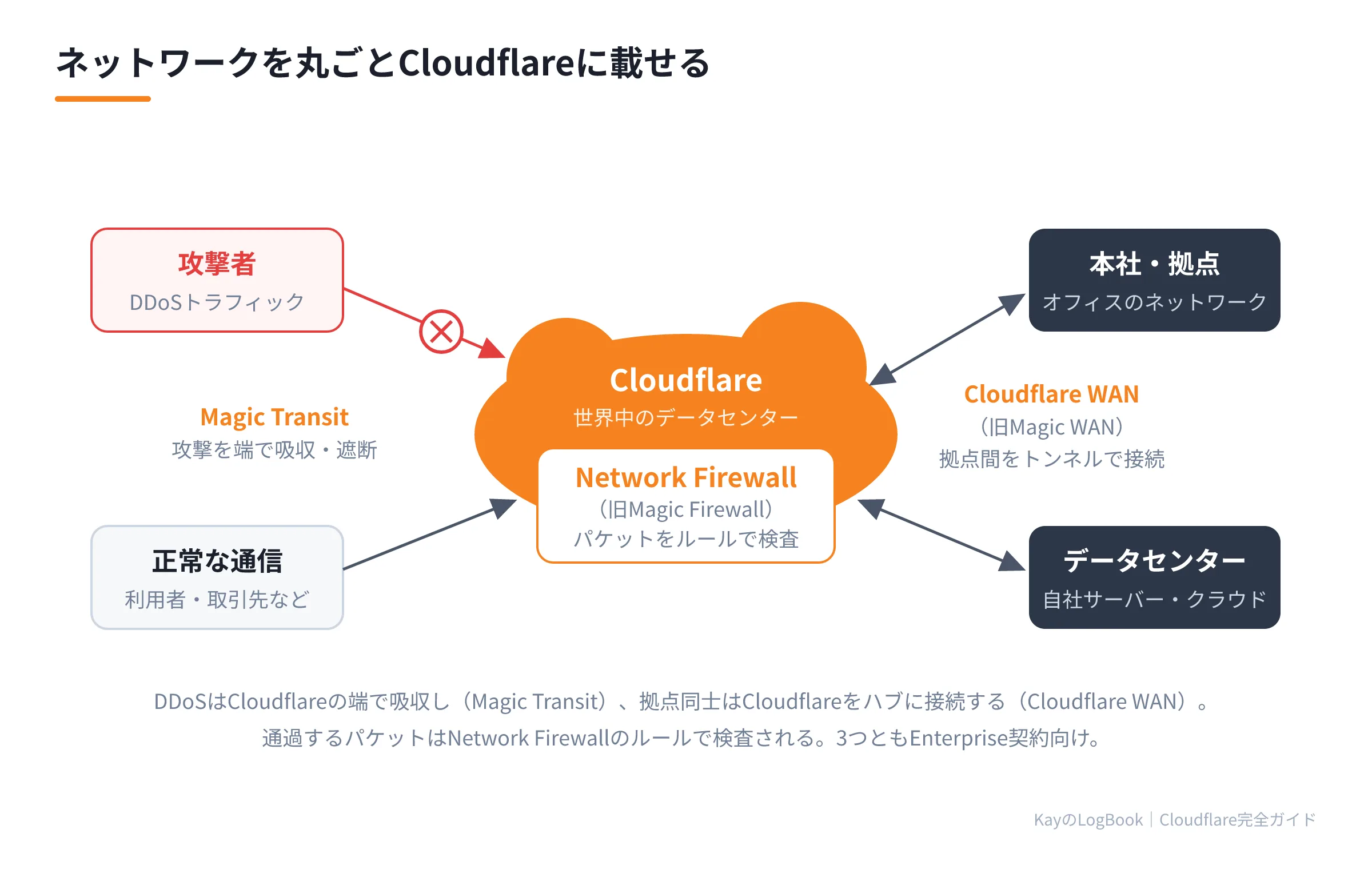
What they share is the idea of having Cloudflare’s global network take over the work of equipment that used to sit in your own data center (DDoS mitigation appliances, leased lines, firewalls). Let’s look at them one at a time.
Magic Transit: protecting the entire network from DDoS#
The protection covered on the DDoS page in Chapter 2 applied to web traffic passing through the orange cloud. But at companies that own their own IP address ranges, mail, VPN and custom-protocol servers sit on the same network alongside the web servers, and the orange cloud can’t protect them from attacks.
Magic Transit is a service that protects this “entire network” from DDoS. Here’s how it works:
- Route advertisement: Cloudflare advertises the company’s IP address ranges from data centers around the world using BGP (the internet’s route exchange protocol). All traffic to those IP addresses then flows into whichever Cloudflare location is closest to the sender (an application of the Anycast covered in Chapter 1)
- Absorbing attacks: Arriving packets are inspected at Cloudflare’s edge, and DDoS attacks are absorbed and blocked. Because attacks are processed in a distributed way near their source, they’re neutralized before they reach the company’s own lines
- Delivering only legitimate traffic: The remaining legitimate traffic is delivered to the company network over GRE or IPsec tunnels, or a dedicated connection (Cloudflare Network Interconnect)
It can be deployed in an ingress configuration that protects only traffic coming in from the internet, or an ingress + egress configuration that also routes outgoing traffic through Cloudflare. It also assumes you own your own IP address ranges (blocks large enough to advertise routes for), so its users are mainly mid-sized and larger companies, carriers, game companies and the like.
Cloudflare WAN (formerly Magic WAN): connecting sites#
A WAN (Wide Area Network) is a network linking distant sites such as headquarters, branch offices and data centers. Traditionally, corporate WANs meant either contracting a carrier’s leased-line service called MPLS, or lining up VPN appliances between sites to interconnect them. The former is expensive and slow to provision; the latter grows more complex to configure with every new site. On top of that, in many setups traffic from regional sites first passes through headquarters (the hub), which means more and more detours in today’s cloud-first world.
Cloudflare WAN replaces this site-to-site connectivity with Cloudflare’s network. Each site only needs a tunnel to its nearest Cloudflare data center, and Cloudflare’s internal network carries traffic between sites along the shortest path. Several connection methods (called on-ramps) are available:
- Anycast GRE / IPsec tunnels: The basic method, set up from your existing routers
- Cloudflare One Appliance: A small device that connects automatically once placed at a site (formerly Magic WAN Connector; its name in the dashboard changed to “Appliances” in January 2026)
- Cloudflare Network Interconnect: Physical or virtual direct connections to data centers
- WARP: The device client covered in Chapter 3. Individual devices working outside the office can join the same network
The important point is that once all sites’ and all devices’ traffic goes through Cloudflare, you can apply the Gateway filtering and Zero Trust policies from Chapter 3 in a single place. Cloudflare WAN is the “network-side component” of the SASE idea introduced on the Cloudflare One page.
Cloudflare Network Firewall (formerly Magic Firewall): inspecting packets#
The third is a firewall that inspects packets passing through the network against rules. Traditionally, you installed firewall appliances at each site’s entrance and managed rules one device at a time. Cloudflare Network Firewall moves this to the cloud, in a form called FWaaS (Firewall as a Service).
- It comes as a standard feature when you subscribe to Magic Transit or Cloudflare WAN
- You can write filter rules with conditions such as protocol, port number, IP address and packet length
- Rules take effect across all Cloudflare data centers in under a minute. The same rules apply everywhere in the world at once, so there’s no configuration drift between devices
- Higher-tier advanced features add custom IP lists, threat intelligence lists (known sources of botnets and malware), country blocking, ASN-based filtering, packet capture, IDS (intrusion detection) and more
Where the WAF from Chapter 2 looks at “the contents of HTTP”, this looks at “the attributes of IP packets”, a defense at a lower layer. The names are similar but the scopes differ, and companies use both.
Which plans include them?#
All three are Enterprise-only (as of August 2026). They don’t appear in the Free, Pro or Business dashboards, and pricing is quoted individually. Of the services covered in this guide, this is the area leaning furthest toward “large enterprises”.
If individuals or small teams want to experience the same idea for free, the combination from Chapter 3 is effectively a scaled-down version. Connecting servers with Cloudflare Tunnel, connecting devices with WARP, and filtering with Gateway realizes the same philosophy of “bringing your network to Cloudflare” within the free tier.
Points beginners should watch out for#
- Old and new names are mixed together: Searching turns up many articles using the old names Magic WAN and Magic Firewall. The current official names are Cloudflare WAN and Cloudflare Network Firewall, and in January 2026 the dashboard menus were reorganized from product-based to function-based (Routes, Connectors and so on). The layout may differ from screenshots in older articles
- They work at a different layer from the WAF and CDN: The WAF is a Layer 7 defense that looks at HTTP contents; Network Firewall is a Layer 3 defense that looks at IP packets. It’s not a case of “one of them is enough”
- It’s a separate mechanism from the orange cloud: The proxy in Chapter 1 was per domain and web traffic only. The Magic services entrust the network itself, by IP address range, and the scale of adoption is entirely different
- There’s no role for them in running a personal site: For this page, “reading it to learn the concepts” is enough. Remember it when you become responsible for a company network, or when you come across terms like SASE or SD-WAN
Related services#
- DDoS Protection: DDoS protection for the web. Magic Transit is the whole-network version of this (Chapter 2)
- Cloudflare One: The big picture of the Zero Trust products. Cloudflare WAN is its network-side component (Chapter 3)
- Cloudflare Gateway / WARP: Egress inspection and device-side connectivity that work on top of Cloudflare WAN (Chapter 3)
- Spectrum: A service that protects TCP/UDP apps per site. Usable at a smaller scale than Magic Transit (next page)
Summary#
- The three Magic services are Enterprise offerings that move the work of corporate network equipment onto Cloudflare’s global network
- Magic Transit uses BGP and Anycast to draw traffic for your own IP address ranges into Cloudflare, protecting the entire network from DDoS
- Cloudflare WAN (formerly Magic WAN) replaces MPLS and VPN appliances by connecting sites via Cloudflare, enabling Zero Trust policies to be applied centrally
- Cloudflare Network Firewall (formerly Magic Firewall) is a cloud firewall that inspects packets against rules. It comes standard with Transit or WAN
- For individuals and small teams, Tunnel + WARP + Gateway is a scaled-down version of the same philosophy