What Is Workers KV? A Key-Value Store at the Edge
On this page11 items
R2, on the previous page, was a place to store whole files such as images and videos. But the data programs actually read most often is much smaller. Site settings, feature on/off switches, redirect mapping tables, each user’s display language — these are all values from a few dozen bytes to a few kilobytes, yet they are read on every request.
Workers KV is the system for reading this kind of small data in a few milliseconds from anywhere in the world. If R2 is a place for “occasionally pulling out big things,” KV is a place for “reading small things over and over.”
What you’ll learn on this page#
- What a key-value store is
- Why KV can be read quickly from anywhere in the world (central store and edge caches)
- The trade-off called eventual consistency, and what to watch out for
- Free tier, pricing, and limits
- Good use cases, and use cases you should not choose it for
What is a key-value store?#
A key-value store is the simplest kind of storage system, managing data solely as pairs of a name (key) and contents (value).
Key: "config:site-title"      →  Value: "Kay's LogBook"
Key: "user:1234:lang"         →  Value: "ja"
Key: "feature:new-checkout"   →  Value: "on"
There are only three things you can do: write a value by key (put), read a value by key (get), and delete by key (delete). Conditional searches such as “find values greater than 100” are not possible.
In exchange for these strong constraints, it behaves very simply and quickly. There’s none of the database overhead of designing tables, deciding columns, adding indexes, and so on. It really is just “a box where you put things under a name.”
How KV works#
The reason KV is fast from anywhere in the world is that it separates where data is stored from where it is read.
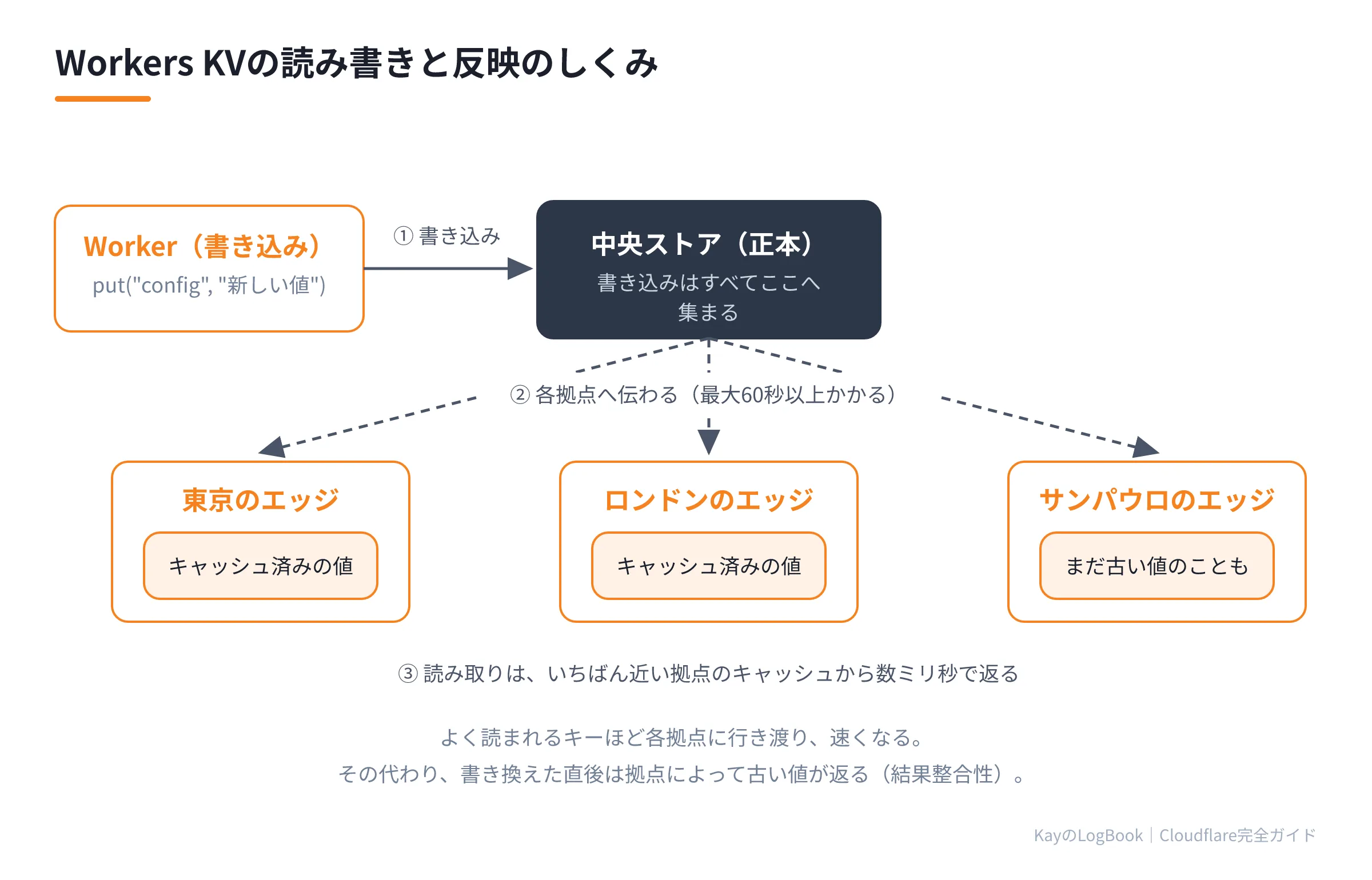
Writes are sent to Cloudflare’s central data centers. This is the authoritative copy of the data.
Reads are different. The first time a key is read at a location, the value is cached there, and subsequent reads from that location are served from the cache. Think of it as the same idea as the CDN caching covered in Chapter 1, applied to data instead of files.
As a result, the more often a key is read, the faster it gets. Keys used all over the world end up cached at locations all over the world, and come back in a few milliseconds from anywhere.
The trade-off of eventual consistency#
This design has an unavoidable side effect: even after you change a value, the old value is returned until each location’s cache expires.
Cloudflare’s official documentation explicitly states that changes “may take up to 60 seconds or more” to become visible at other locations. This is because the default cache retention time (cacheTtl) is 60 seconds; making it longer makes reads even faster, but propagation slower.
This property — “eventually every location will have the same value, but at any given moment they may not match” — is called eventual consistency. Whether to use KV often comes down to this one point.
- Data where “it’s fine if the value is a minute old” → KV is ideal
- Data where “it must be the new value right after writing” → KV is unsuitable
For example, data that must be correct at the moment it’s read, such as inventory counts or balances, should not go in KV. That’s the job of Durable Objects in Chapter 5, or D1 on the next page.
Pricing and free tier#
Pricing as of August 2026. KV has no data transfer (egress) fees for reads or writes.
| Free plan (per day) | Paid plan (included per month / overage) | |
|---|---|---|
| Reads | 100,000 | 10 million / $0.50 per million |
| Writes | 1,000 | 1 million / $5.00 per million |
| Deletes | 1,000 | 1 million / $5.00 per million |
| Lists | 1,000 | 1 million / $5.00 per million |
| Stored data | 1 GB | 1 GB / $0.50 per GB per month |
The price table makes KV’s design philosophy clear. Writes cost 10 times as much as reads, and on the free tier you can only write 1,000 times a day. The pricing assumes read-heavy usage.
Note that billing is counted per key. An operation that reads 100 keys at once counts as 100 reads. Reading a key that doesn’t exist also counts as one read, and operations from the dashboard or Wrangler are billed the same way.
Limits#
| Item | Limit |
|---|---|
| Key length | 512 bytes |
| Value size | 25 MiB |
| Metadata attached to a key | 1,024 bytes |
| Number of namespaces | 1,000 per account |
| Keys per namespace | Unlimited |
| Write rate to the same key | Once per second |
| Operations per Worker invocation | 1,000 |
| Minimum cache retention time (cacheTtl) | 60 seconds |
KV data is grouped into units called namespaces. You create a namespace for each purpose and bind each one in your Worker’s configuration.
Writes to the same key are limited to once per second. Uses like access counters, which update the same key at high frequency, are structurally a poor fit.
Good and bad use cases#
Good use cases
- Site or app settings (titles, display toggles, external API endpoints, etc.)
- Feature flags (switches like showing a new feature to only some users)
- Redirect mapping tables (tens of thousands of old-URL-to-new-URL mappings)
- Allow lists and deny lists (checking IP addresses or member IDs)
- Per-user settings (display language, theme, and other rarely changed values)
- Caching external API responses (to avoid querying every time)
Bad use cases
- Counters, inventory, balances, and anything that must be correct right after writing → Durable Objects
- Conditional searches and aggregation (such as “users who signed up this month”) → D1
- Processes that rewrite the same key many times per second → Durable Objects
- Storing large files (over 25 MiB, or images and videos in general) → R2
Points for beginners to watch out for#
- Reading right after writing may return the old value: When you change a value in the dashboard and it doesn’t seem to take effect, this is usually why. Wait up to 60 seconds before checking
- Free-tier writes are limited to 1,000 per day: That’s far fewer than the 100,000 reads, so check early on that your design isn’t write-heavy
- Lists are expensive: They cost the same as writes and aren’t suited to scanning all keys. Design your key names (e.g.
user:1234:lang) so you can read them directly - Key design pays off later: Separating uses by prefix makes filtering lists and migrating much easier
- It’s not a place to store secrets: For API keys and passwords, use the Workers secrets feature
- Deletes also count against the 1,000-per-day limit: When cleaning up a large number of keys, split the work with the limit in mind
Related services#
-
Workers: The runtime that reads and writes KV, connected via bindings
-
Durable Objects: Handles data that must be correct right after writing
-
R2: Where files themselves go (previous page)
-
D1: A database with conditional search and aggregation (next page)
-
Cloudflare CDN: Delivers files using the same idea as KV’s caching (Chapter 1)
-
Choosing between storage options: How to choose among R2 / KV / D1 / Durable Objects (Chapter 6 summary)
Summary#
- Workers KV is the simplest storage system, handling only keys and values
- Writes go to a central store and reads are served from caches at each location, so the more it’s read, the faster it gets
- In exchange, changes can take up to 60 seconds or more to reach every location (eventual consistency)
- The free tier is 100,000 reads and 1,000 writes per day. Writes cost 10 times as much as reads
- Suited to read-heavy, write-light uses such as settings, feature flags, mapping tables, and allow lists
- Don’t use it for data that must be correct right after writing, such as counters or inventory
R2 and KV have both been storage where you “retrieve by a name you chose.” But real applications need queries like “list the users who signed up this month” or “match orders against products.” The next page looks at a full-fledged database for that: D1.