Introduction to Bot Protection (Bot Fight Mode / Bot Management)
On this page14 items
What share of your website’s traffic do you think comes from humans? In fact, roughly half of all traffic on the internet is said to come not from people but from automated programs — bots. The botnets that appeared on the DDoS page are part of this, but not all bots are bad. Some, like search engines, you actually need.
So bot protection isn’t about “blocking every bot”; it’s a sorting problem: “let the good bots through and keep only the bad ones out.” This page covers the types of bots, the techniques for telling them apart, and the three tiers of bot protection products Cloudflare offers.
What you’ll learn on this page#
- The difference between good and bad bots, and the damage bad bots cause
- How Cloudflare identifies bots
- The differences between the three tiers: Bot Fight Mode / Super Bot Fight Mode / Bot Management
- Handling AI crawlers (bots that collect data for AI training)
- Points beginners should watch out for
What is a bot?#
Good bots: automated access a site needs#
A bot is the general term for a program that accesses websites automatically, without human operation. First, some typical “good bots”:
- Search engine crawlers: Googlebot and the like. They collect (crawl) your site’s content and list it in search results. Block them and you disappear from search
- Uptime monitoring and measurement tools: services that regularly check that your site is working properly
- Social media preview fetchers: access used to build card images when a link is shared on X (formerly Twitter) or LINE
Bad bots: automated attacks and fraud#
“Bad bots,” on the other hand, cause real damage like this:
- Account takeover (credential stuffing): automated login attempts that try huge numbers of ID and password pairs leaked elsewhere
- Scraping: copying content or pricing information en masse without permission. Used by competitors for price monitoring and for stealing articles
- Scalper bots: automation that buys or reserves limited-edition items and tickets faster than humans can
- Spam posting: automated advertising and scam posts in comment sections and contact forms
- Card testing: checking whether stolen credit card numbers work by making small payments on e-commerce sites
None of this is as flashy as DDoS, but it steadily eats away at server capacity, ad spend, business opportunities and trust. Even a blog will almost certainly run into it, regardless of size, in the form of “comment spam” or “login attempts from overseas.”
AI crawlers: a new “gray” kind of bot#
What has surged in recent years is AI crawlers, which collect content for training AI models and for AI search. Unlike search engines, they don’t necessarily send visitors your way, so it’s a new category where the line between “good” and “bad” is left up to each site operator. For this, Cloudflare offers AI crawler identification and control (AI Crawl Control), letting you allow or block AI bots from the dashboard. There is also a unique feature called AI Labyrinth, which lures bots that ignore the rules and keep crawling into a maze of AI-generated decoy pages.
How does Cloudflare tell bots apart?#
Bots don’t necessarily announce “I am a bot.” In fact, the worse the bot, the more it impersonates a human browser. Cloudflare leverages the advantage of processing traffic from around the world and combines several clues to decide.
- Matching against known bots: legitimate bots such as Googlebot are registered as “Verified Bots” after their origin is verified. Impersonators are caught by that origin check
- Machine learning: a model trained on enormous amounts of traffic scores the characteristics of each request (header composition, TLS fingerprint, access patterns and so on)
- Behavioral detection: quietly checks for actions any human browser should be able to perform (such as running JavaScript)
- Challenges: only when something looks suspicious, the browser is asked to solve a computational puzzle or shown a verification screen to filter it
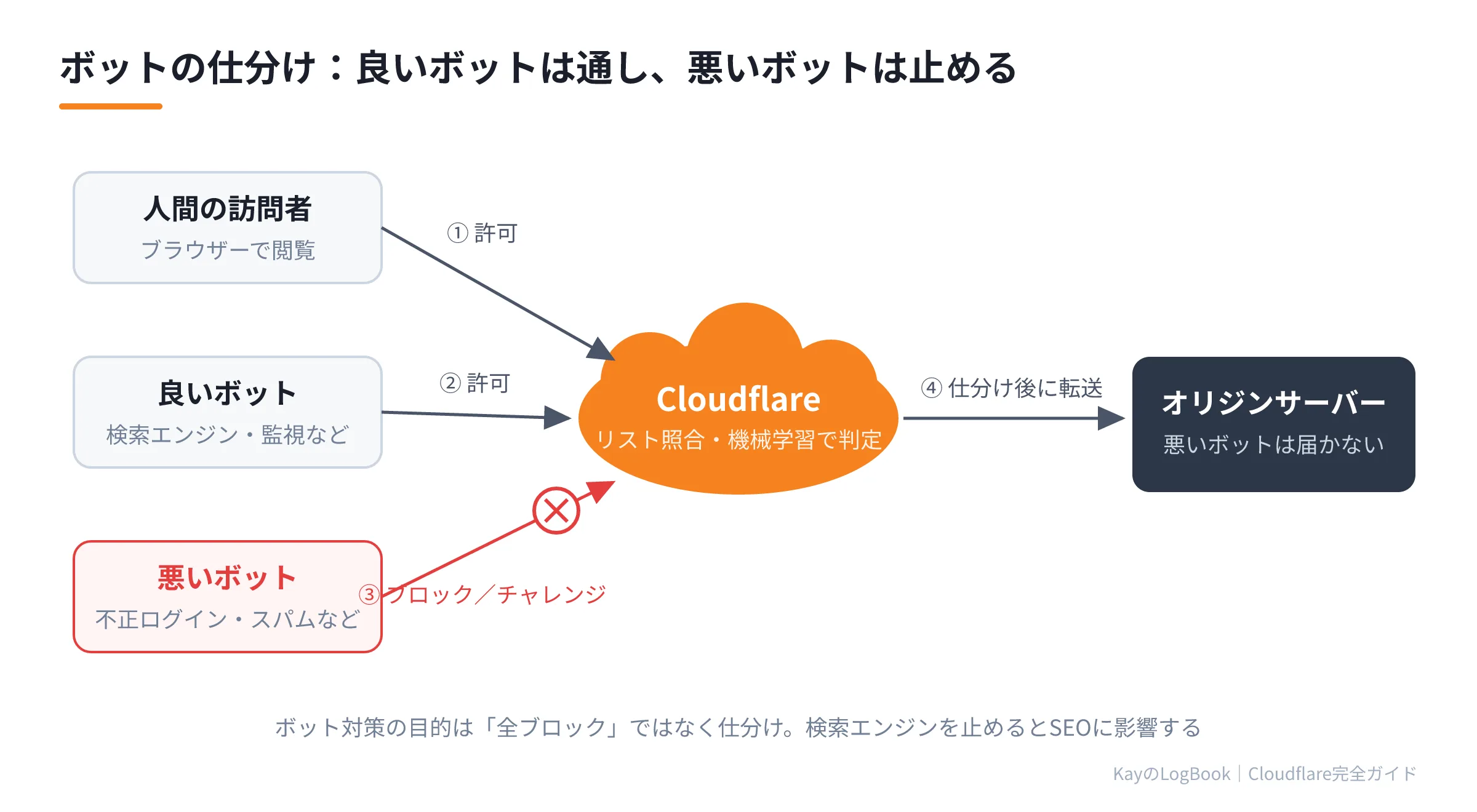
In Bot Management for Enterprise, the result of this assessment is attached to every request as a bot score from 1 to 99 (lower means more bot-like), which you can use in WAF custom rules, for example “block scores under 30.”
Cloudflare’s bot protection comes in three tiers#
Cloudflare’s bot protection products come in three tiers, depending on your plan.
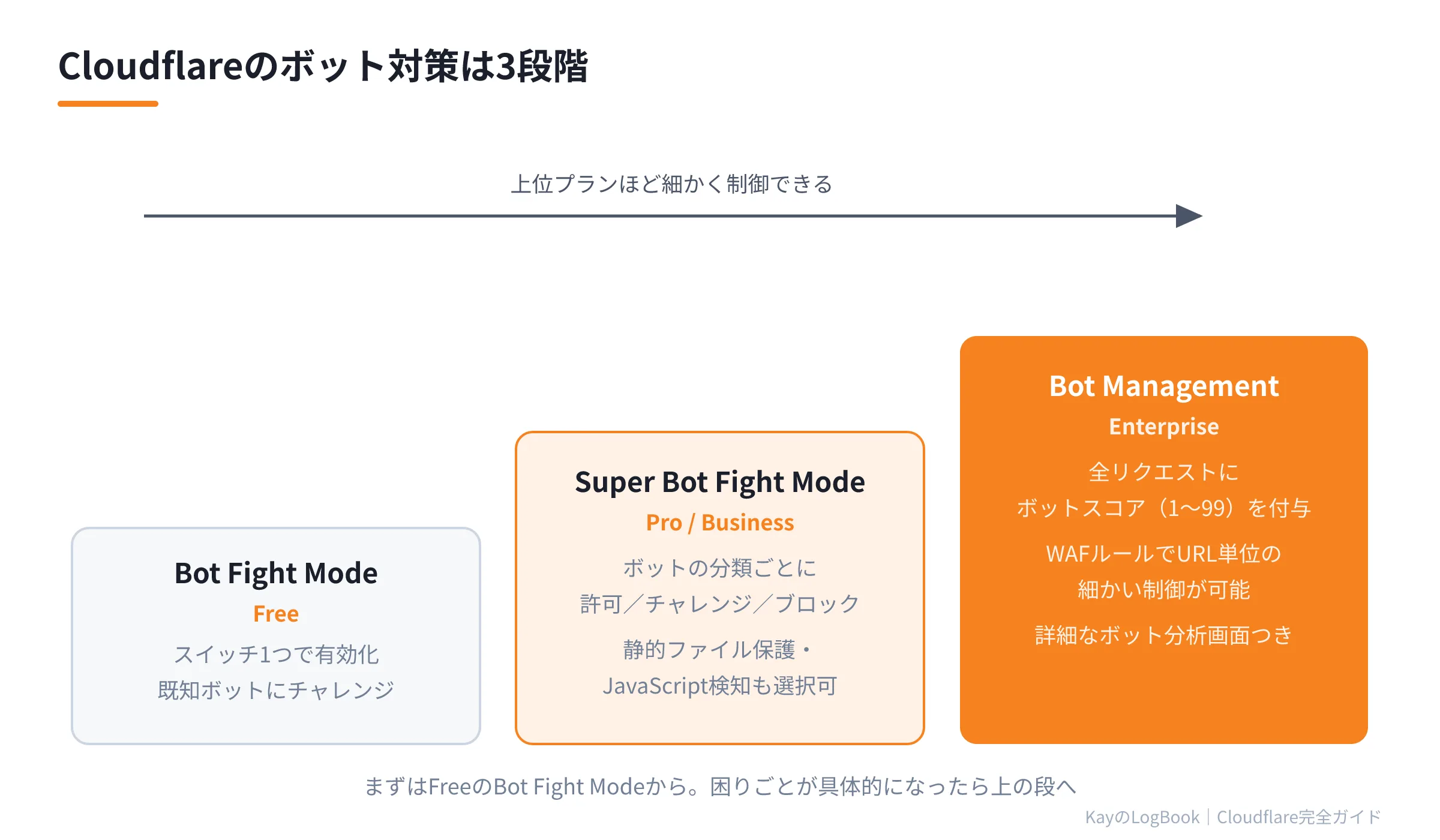
Bot Fight Mode (Free: simple on/off protection)#
Bot Fight Mode, available on the Free plan, is an entry-level feature you enable by flipping a single switch in the settings. It imposes computationally expensive challenges on traffic that matches known bot patterns, raising the cost of running bots. You can’t fine-tune it or narrow its targets, but it works well enough if you “just want to reduce spam and crude bots.”
Super Bot Fight Mode (Pro / Business: choose actions by category)#
Super Bot Fight Mode, included in Pro and above, lets you choose an action (allow / challenge / block) for each category of bot.
- Definitely automated: obvious bots
- Likely automated: suspicious traffic (configurable on Business and above)
- Verified bots: legitimate bots such as search engines
- You can also choose whether to protect static files such as images and whether to use JavaScript detection
Bot Management (Enterprise: fine control with scores)#
Bot Management for Enterprise uses the bot score described above to give you free per-request control, like “be strict only on this URL” or “exclude the mobile app’s API,” and it comes with detailed analytics. It’s the full-scale version for businesses such as e-commerce and finance, where bot damage hits revenue directly.
Points beginners should watch out for#
- Watch for legitimate traffic getting caught: bot protection always carries a risk of false positives. After enabling it, check Security Events to confirm that “what got blocked really was a bad bot.” Social media preview fetchers and external monitoring services are frequent casualties
- Be careful with APIs and mobile apps: Super Bot Fight Mode may classify access from your own programs or smartphone app traffic as “automated.” If you expose your own API, check the behavior carefully
- Compatibility with Cloudflare Tunnel: if you use Cloudflare Tunnel, covered in Chapter 3, setting Super Bot Fight Mode’s “Definitely automated” to block can cause connections to fail (a caveat stated explicitly in the official documentation)
- Don’t block search engines: blocking Verified bots directly affects SEO. As a rule, legitimate crawlers should be set to “allow”
- Bot protection alone isn’t enough: against account takeover, combining it with Rate Limiting (next page) and Turnstile (the page after) is effective
Related services#
- WAF: the foundation that uses bot detection results as rule conditions (previous page)
- Rate Limiting: limits repeated access from bots by request count (next page)
- Turnstile: a CAPTCHA-alternative verification widget that protects forms from bots (a later page)
- AI Crawl Control: visibility into AI crawlers and control to allow or block them
Summary#
- About half of web traffic is bots. Bot protection isn’t “block everything” but “sort good bots from bad”
- Bad bots cause modest-looking but very real damage: account takeover, scraping, scalping, spam and more
- Cloudflare identifies bots by combining list matching, machine learning, behavioral detection and challenges
- Three product tiers: Bot Fight Mode (Free, one switch) → Super Bot Fight Mode (Pro/Business, per-category settings) → Bot Management (Enterprise, free control with scores)
- The new category of AI crawlers can be handled with AI Crawl Control and AI Labyrinth
- Watching for false positives is the top priority. After enabling, monitor Security Events