Cloudflare vs. the Competition (CDN / Hosting / Storage)
On this page24 items
The previous page looked at which Cloudflare plan to choose. Here we widen the view and consider, by comparing it with other companies, whether you should choose Cloudflare in the first place.
Choosing technology is a question of fit, not superiority. Deciding “Cloudflare is the best, so I’ll use Cloudflare” usually causes trouble later. If you have a concrete grasp of where it’s strong and where it’s weak, you’ll be able to judge for yourself whether it fits your requirements.
This page isn’t here to praise Cloudflare; it lays things out including the reasons not to choose it.
What you’ll learn on this page#
- The decisive difference that sets Cloudflare apart from others (the billing model)
- Where it stands in each area: CDN, hosting, storage and DNS
- Concrete rough cost comparisons
- Situations where Cloudflare isn’t a good fit, and the alternatives
- Combining services as a realistic choice
The premise: Cloudflare isn’t a “product”#
Before comparing, you need to understand a difference in character.
Akamai is a CDN company, Amazon S3 is a storage product, and Vercel is a hosting service. Each is a product that “does one thing in depth”.
Cloudflare, on the other hand, is structured as a network spanning more than 330 cities around the world first, with feature after feature built on top of it. The CDN, WAF, Workers and R2 all run on the same servers in the same locations. This is what we saw in What is Cloudflare? in Chapter 1.
This structural difference translates directly into strengths and weaknesses.
- Strengths: the features are connected to each other. Adding one is just a matter of configuration. Data transfer is structurally cheap
- Weaknesses: individual features can be less deep than those of specialists. Constraints that come from running at the edge follow you everywhere
The decisive difference is the billing model#
Whether transfer is charged#
The biggest thing that sets Cloudflare apart from others isn’t a feature but its approach to billing.
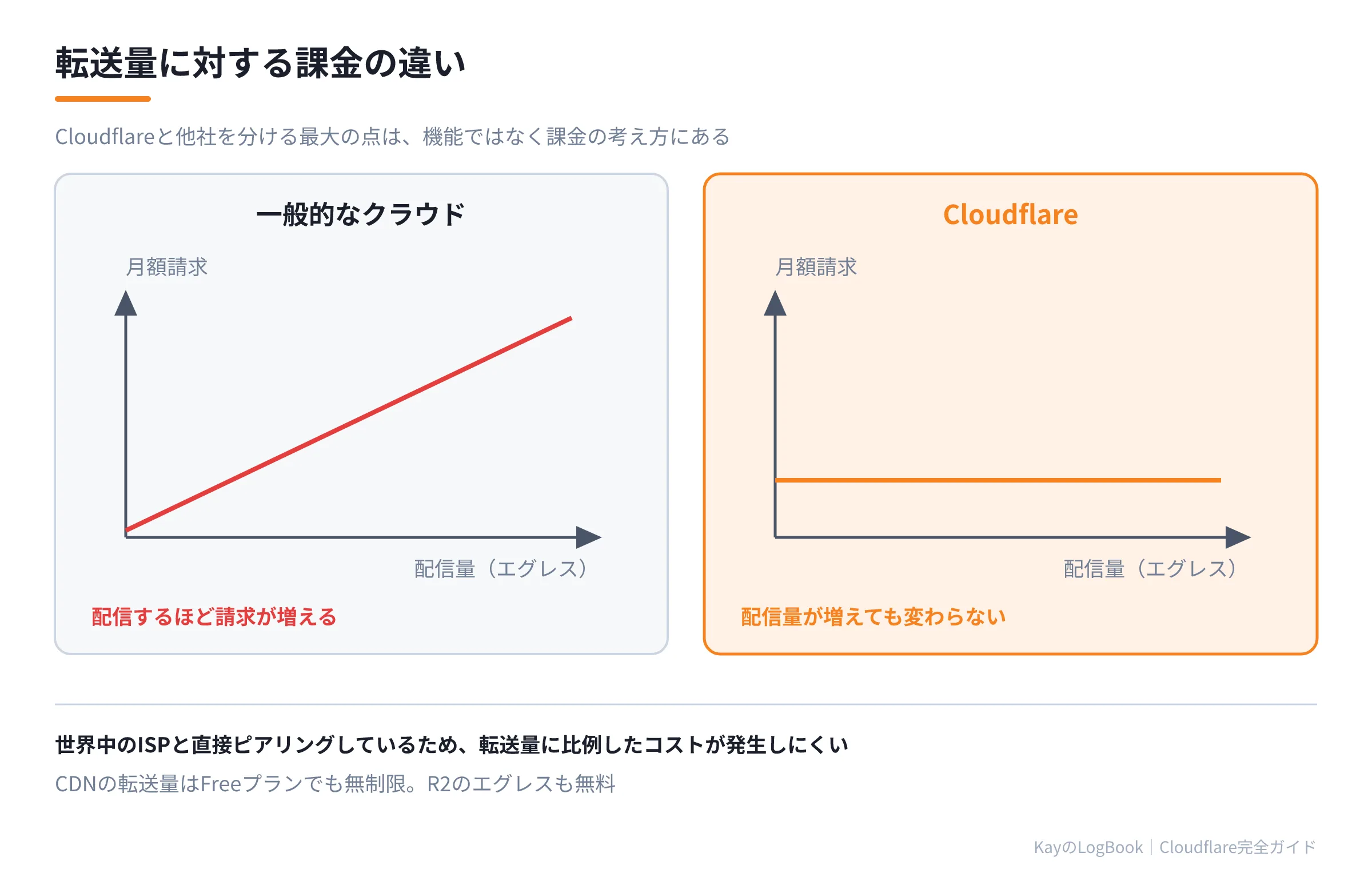
Typical cloud services charge for the amount of data going out (egress). It’s a straightforward scheme: the more you serve, the higher the bill.
Cloudflare, as a rule, doesn’t charge for this. CDN transfer is unlimited even on the Free plan, and egress from R2 is free too.
This is possible because Cloudflare peers (interconnects) directly with ISPs around the world. Since it isn’t paying third parties for bandwidth, its structure makes costs proportional to transfer unlikely to arise in the first place. It’s not “free because they’re generous”; the cost structure is different.
This one point is the backdrop to every comparison below.
Comparing CDNs#
Here’s a comparison with the major CDNs.
| Positioning | Billing model | How to sign up | |
|---|---|---|---|
| Cloudflare | Integrated, combined with security | Flat rate (unlimited transfer) | Self-service, starting free |
| Akamai | The oldest and largest, for large enterprises | Custom contracts based on transfer | Usually through sales |
| Fastly | For developers, highly configurable | Transfer + per-request billing | Self-service available |
| Amazon CloudFront | Assumes AWS integration | Transfer + per-request billing (1TB/month free tier) | AWS account |
What each does best#
Akamai has one of the world’s largest delivery networks and is used for large-scale video delivery and enterprise systems with strict requirements. Many large Japanese companies use it, and it has solid Japanese-language support. However, it assumes a custom contract and isn’t something you can casually use for small projects.
Fastly stands out for its configurability. You can describe delivery logic in fine detail with a configuration language called VCL, and it’s also known for fast instant cache purging. It shines in uses like news sites and e-commerce where “updates need to show up immediately”. Where Cloudflare’s rules are mostly GUI-based, Fastly’s culture is to write things in code.
CloudFront is the first candidate when your origin is on AWS. Integration with S3, EC2 and Lambda is smooth, and permission management via IAM stays consistent. Honestly, there’s little reason to bolt Cloudflare onto a system that already runs entirely on AWS.
Cloudflare is a good fit when you want not just a CDN but someone to take care of “delivery + security + DNS + SSL” together, and when your traffic is unpredictable. The fact that your bill doesn’t go up when traffic spikes pays off across a wide range, from personal sites to mid-sized media.
Comparing hosting and runtime environments#
This is a comparison of places to host static sites and web apps, the area covered in Publishing a static site in Chapter 8.
| Strengths | Free tier | Paid | |
|---|---|---|---|
| Cloudflare Workers / Pages | Edge execution, low cost, integration with other services | Unlimited static delivery. Workers: 100,000 requests/day | From $5/month (per account) |
| Vercel | Tight Next.js integration, developer experience | 100GB transfer/month, non-commercial only | $20/month per person |
| Netlify | Static sites, extras like forms | 100GB transfer/month | From $20/month |
How it differs from Vercel and Netlify#
Vercel is the company behind Next.js, and if you use Next.js it’s the option with the least friction. Its polish on developer experience, such as preview environments, image optimization and analytics, is a step ahead of Cloudflare.
On the other hand, its approach to cost is very different. Vercel’s free tier (Hobby) does not allow commercial use, and sites that generate revenue need Pro ($20 per person per month). A team of five comes to $100 a month. Cloudflare bills per account (from $5/month), which doesn’t scale with headcount.
Netlify has long been used for static site hosting and has a rich set of extras such as form handling and Identity. In April 2026 it dropped per-seat pricing, and Pro became a flat rate ($20/month).
Reasons to choose Cloudflare include:
- Your transfer volume is unpredictable or high (static file delivery is free and unlimited)
- You want to use R2, D1, Workers AI and so on in the same project
- You want costs to stay flat even as your team grows
The reasons to choose Vercel are clear too:
- You want to use the latest Next.js features as they are
- You want to run Node.js libraries without restrictions
- You prioritize a polished developer experience
Comparing storage#
This is where the differences are greatest.
The cost of S3 vs. R2#
Using published prices as of August 2026, here’s a rough estimate for storing 1TB and serving 10TB a month.
| Amazon S3 (alone) | Cloudflare R2 | |
|---|---|---|
| Storage (1TB) | About $23 | About $15 |
| Delivery (10TB) | About $910 | $0 |
| Total (rough) | About $930 | About $15 |
The real source of the difference isn’t storage fees but egress (outbound transfer). S3’s outbound transfer is free for the first 100GB, then roughly $0.09 per GB. Serving 10TB costs around $900 on that alone.
To be fair, when serving large volumes from S3 in practice, you’d normally put CloudFront in front, which lowers the unit price (a 1TB/month free tier, and around $0.085 per GB). Even so, serving 10TB costs several hundred dollars. Structurally, it’s still “the more you serve, the more you pay”.
S3 wins on features#
On cost alone R2 is overwhelming, but S3 has more depth in features.
- Maturity of lifecycle management, versioning, replication and so on
- Fine-grained permission design with IAM
- Integration with analytics infrastructure like Lambda, Athena and Glue
- The ability to specify regions explicitly
R2 has an S3-compatible API, so the migration itself is relatively easy, but if your usage depends heavily on the AWS ecosystem, only part of it can be moved. See also How to choose storage in Chapter 6.
Comparing DNS#
It’s often overlooked, but DNS differs too.
| Price | Features | |
|---|---|---|
| Cloudflare DNS | Free (unlimited queries) | Fast. DNSSEC support. Integrated with the proxy |
| Amazon Route 53 | $0.50 per zone per month + per-query billing | Integration with AWS resources (alias records, etc.) |
| Registrar-provided DNS | Often free | Speed and features are often limited |
Cloudflare’s authoritative DNS is free, with no limit on queries. Using Cloudflare just for DNS is a perfectly valid choice. The underlying mechanics covered in What is DNS? in Chapter 1 are the same with any service.
When Cloudflare isn’t a good fit#
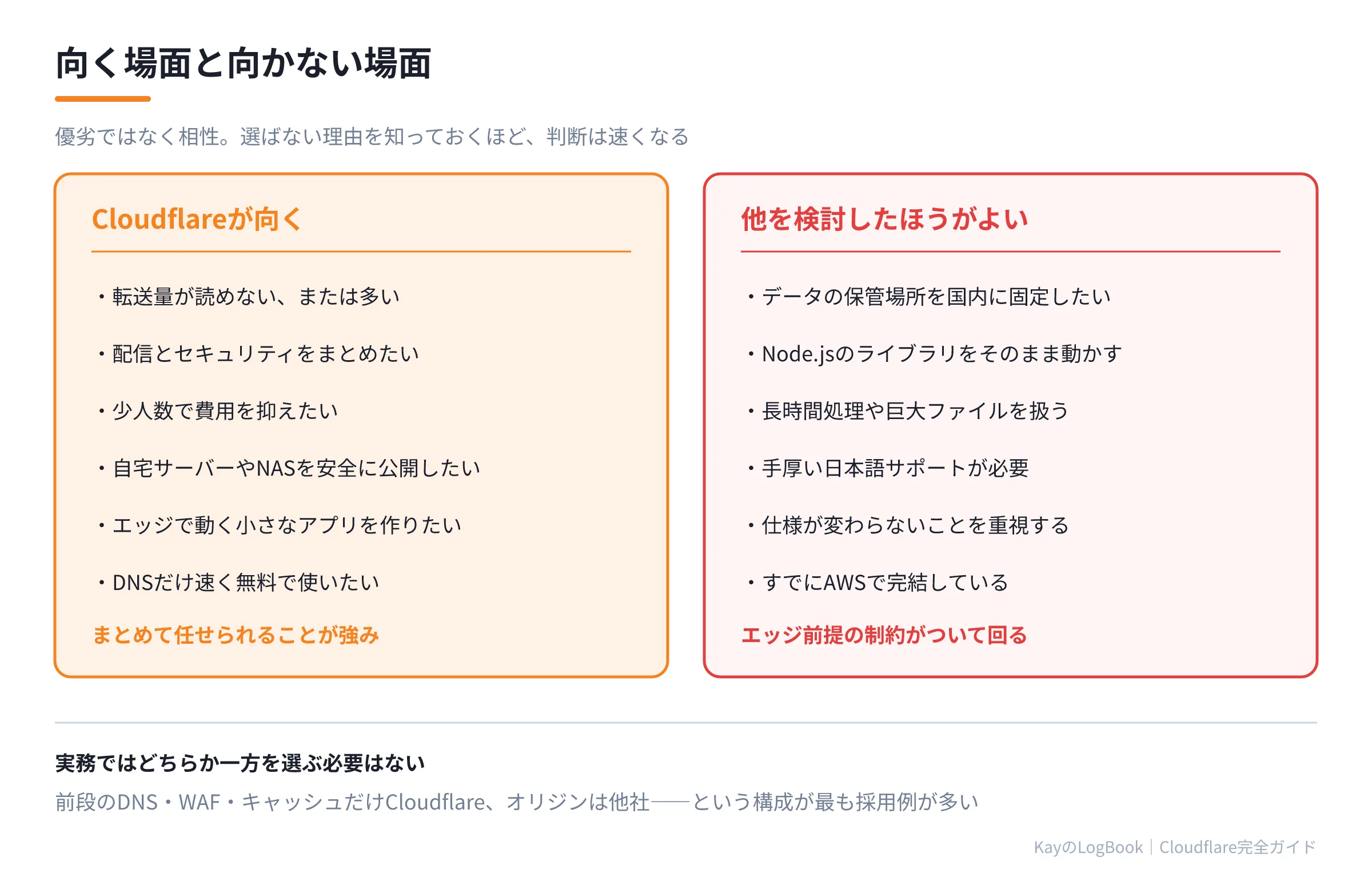
This may be the heart of the matter. Here, honestly, are situations where you shouldn’t choose Cloudflare.
1. You need to strictly specify where data is stored#
Cloudflare’s network is premised on “being distributed around the world”. Requirements like “process only on servers in Japan” can’t be met out of the box. There is a mechanism for controlling data location (the Data Localization Suite), but it’s an add-on for Enterprise.
If personal data protection or industry regulations dictate where data is stored, AWS, Azure or domestic clouds that let you specify regions explicitly are the more straightforward choice.
2. You want to run Node.js libraries as they are#
Workers doesn’t run on Node.js but on its own runtime based on V8 (workerd). The compatibility layer gets thicker every year, but native modules and libraries that assume a file system don’t work.
If you want to bring an existing Node.js app over as is, Vercel, a regular server or containers are more reliable.
3. You need long-running processing or huge files#
- The default request timeout is 125 seconds (Error 524). Extending it is Enterprise only
- The upload limit is 100MB on Free/Pro and 200MB on Business
Out of the box, it’s not suited to video encoding or exchanging large files. Depending on the use case, you can work around this by design, such as uploading directly to R2, but it takes some extra effort.
4. You need extensive Japanese-language support#
Support on the Free plan is community-only. If you expect to reach someone by phone in Japanese during an outage, Akamai, AWS’s domestic support, or a Japanese hosting provider will give you more peace of mind. If you’re thinking of buying support, that’s Business and up, and in practice Enterprise territory.
Japanese documentation and explanatory articles are also far scarcer than for AWS.
5. You don’t want to depend on new features#
Cloudflare launches new services quickly, and as a result some features are used while still in beta, and some change names or specs. AI Search, covered in Chapter 7, being renamed from AutoRAG and having its internals overhauled is one example.
If you value specs that don’t change for years at a time, battle-tested options suit you better.
6. You’re already all-in on AWS#
This bears repeating because it’s important. If your origin, storage and authentication are all on AWS, standardizing on CloudFront and WAF lets you unify permission management and billing. The value lies not in technical superiority but in not adding more boundaries.
Combining services is an answer#
In practice, you don’t have to go all-in on one. Here are some common combinations.
- Origin on AWS, Cloudflare only in front: leave DNS, DDoS protection, WAF and caching to Cloudflare, and keep the app on AWS. This is the most widely adopted setup
- Static site on Cloudflare, app on Vercel: manage the domain and DNS with Cloudflare and split delivery by use case
- Storage on R2, analytics on AWS: put only the high-traffic files on R2 to cut egress costs
As we’ve seen since Chapter 1, the core of Cloudflare is DNS and the proxy. Leaving just that to it and choosing freely for everything behind it is not a compromise at all.
Points beginners should watch out for#
- Comparing by “speed” rarely shows a difference: all the major CDNs are fast enough, and most perceived differences come down to cache settings and origin performance
- Costs are driven by transfer: egress price and volume affect your bill more than storage fees or monthly fees. When estimating, start from how much you’ll serve
- Check whether the free tier allows commercial use: Vercel’s free tier is non-commercial only. Cloudflare has no such restriction
- Include ease of migration as a criterion: just as R2 has an S3-compatible API, “whether you can go back” is an important property
- Support is something you buy with a contract: don’t expect extensive support for free. If you need it, choose a plan for that
- Check primary sources for other companies too: prices change often. Always confirm the figures in this article on each company’s official pages
Related services#
- What is Cloudflare?: its structure as a network
- What is a CDN?: the mechanism underlying the comparison
- What is R2?: object storage with free egress
- How to choose storage: choosing among Cloudflare’s own options
- What is Workers?: the constraints and strengths of edge execution
- How to choose a Cloudflare plan: decisions after you’ve decided to adopt it
Summary#
- Cloudflare isn’t a single-function product but an integrated platform with features built on a network. Both its strengths and weaknesses come from this structure
- The decisive difference from others is the billing model. As a rule, it doesn’t charge for transfer (egress)
- For CDNs: Akamai is for large enterprises, Fastly for configurability, CloudFront for AWS integration, Cloudflare for integration and flat pricing
- For hosting: Vercel for developer experience, Cloudflare for cost and extensibility. Vercel’s free tier is non-commercial only, and paid plans are per seat
- For storage, R2 is overwhelming on cost (roughly $930 vs. $15 for 1TB stored + 10TB served), but S3 has more depth in features
- Cloudflare isn’t a good fit if you need to specify data location, full Node.js compatibility, long-running processing, extensive Japanese support, or stable specs, or if you’re all-in on AWS
- In practice, combining services is realistic. The most widely adopted setup leaves just DNS and the front end to Cloudflare