What Is a DDoS Attack? Cloudflare's DDoS Protection
On this page16 items
This page begins Chapter 2, “Web Security.” In Chapter 1, you learned how Cloudflare stands in a website’s “path” as DNS, CDN, and proxy. In Chapter 2, we’ll go through, one by one, the other major role Cloudflare plays in that path: the features that “protect your site.”
The first topic is DDoS attacks. Many of you have probably seen news headlines like “Such-and-such’s website taken down by DDoS attack.” DDoS attacks are among the most classic attacks on websites, yet they’re a threat that keeps growing in scale even today. This page explains how DDoS attacks work and why Cloudflare can stop them “for free and without limits.”
What you’ll learn on this page#
- The difference between DoS and DDoS attacks
- What a botnet is and how attacks are carried out
- The main types of DDoS attacks (L3/L4 attacks and L7 attacks)
- How Cloudflare’s DDoS Protection stops attacks (distribution with Anycast)
- Why it’s provided without limits on every plan, and points beginners should watch out for
What is a DDoS attack?#
The difference between DoS and DDoS#
Let’s start by sorting out the terms. A DoS attack (Denial of Service attack) sends a server more requests or data than it can handle, driving it into a state where it can’t provide its service. To use a shop as an analogy, it’s like one person calling hundreds of times in a row as harassment, so calls from real customers can’t get through.
A DDoS attack (Distributed Denial of Service attack) distributes that source across many attackers. Picture not one person but tens of thousands of computers around the world all calling at once. If the attack comes from one place, you can just block that caller, but when it comes from tens of thousands of places at once, it becomes hard to tell legitimate users from attackers, and defense becomes far more difficult. Almost all attacks today are of this distributed type.
Botnets: an army of hijacked devices#
How do attackers get hold of tens of thousands of computers? The answer is “by hijacking other people’s devices.” PCs infected with malware (malicious software), and IoT devices such as security cameras and routers left with their default passwords, get drafted, without their owners knowing, into an army that moves in unison on the attacker’s command. This network of hijacked devices is called a botnet.
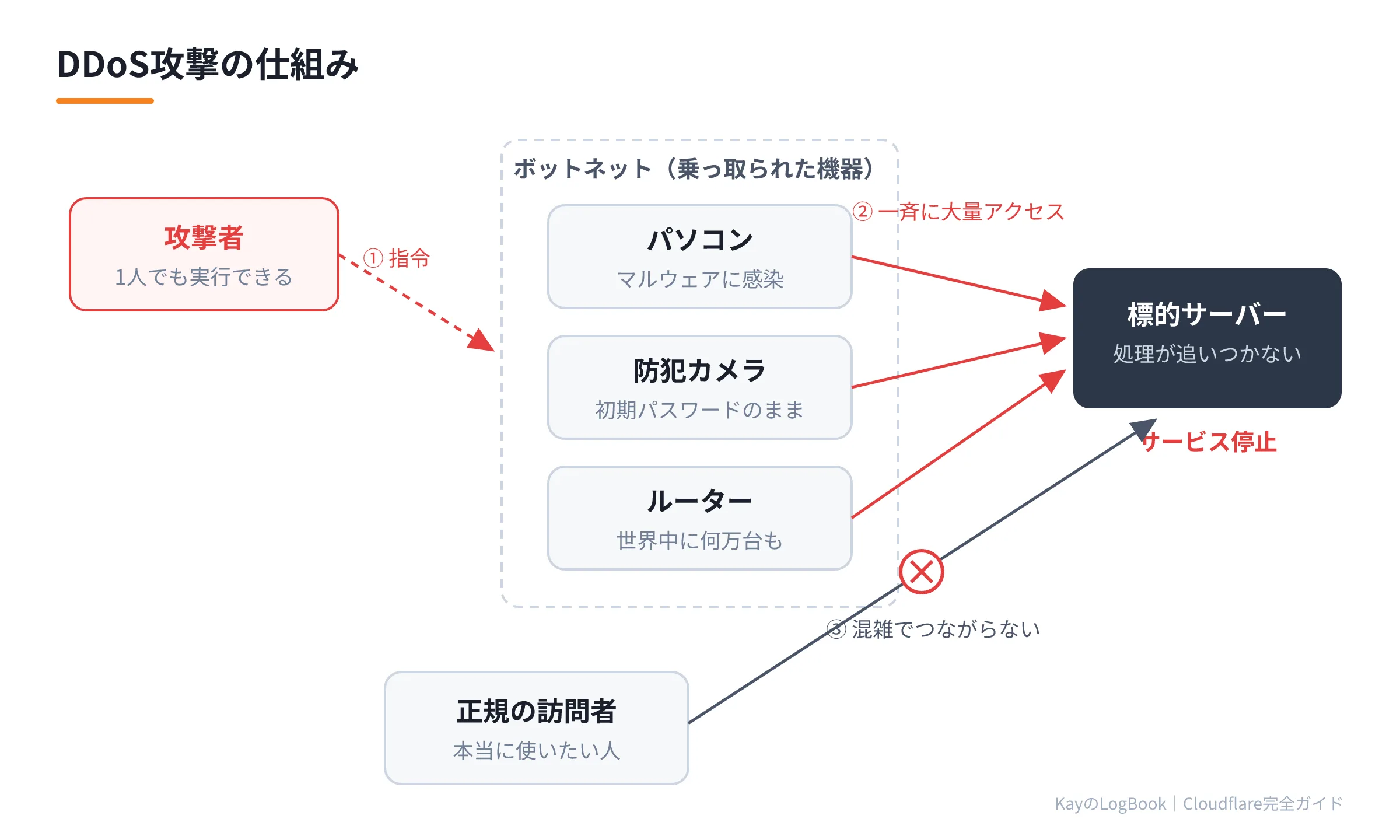
The devices that make up a botnet are “ordinary devices” scattered across homes and businesses around the world, so it’s hard to identify an attack just by looking at the source, and sheer numbers let them generate enormous traffic. Many of the large-scale attacks in recent years have come from botnets made up of poorly secured IoT devices.
Attacks are growing every year#
The scale of a DDoS attack is expressed in terms like how many bits of data per second were sent (bps). According to Cloudflare’s observations, in 2025 an attack of 31.4 terabits per second (Tbps) occurred, far surpassing the previous record. That’s traffic more than 30,000 times a typical home fiber connection (1 Gbps), concentrated on a single target. With “DDoS-for-hire services” renting out attack tools cheaply, the current reality is that not only large companies but personal sites and small business sites can become targets too.
The main types of DDoS attacks#
DDoS attacks fall into two broad groups depending on which layer of the network they target. Rather than going into a strict explanation of the OSI reference model, let’s grasp them with the metaphors “attacks that clog the pipes” and “attacks that wear out the service counter.”
L3/L4 attacks: clogging lines and equipment#
L3/L4 attacks (attacks on the network and transport layers) send huge amounts of data or connection requests to saturate the bandwidth of the line, or the processing capacity of servers and network equipment itself. Typical examples are UDP floods, which send masses of packets using the UDP protocol, and SYN floods, which send masses of TCP connection-start requests to fill up all the seats waiting for connections. They don’t care about meaning; they push through by volume.
L7 attacks: wearing out the web server#
L7 attacks (attacks on the application layer) send masses of seemingly normal HTTP requests and are also called HTTP floods. For example, if an attacker targets “URLs that take the server a lot of work to process,” such as search or login pages, and sends millions of requests per second, the web server or database gives out first even if the line has capacity to spare. What makes them nasty is that each request looks the same as legitimate browsing, so they’re hard to spot by simply monitoring traffic volume.
Cloudflare’s DDoS Protection#
Why it can stop them: “absorb and dilute” with Anycast#
As covered on Chapter 1’s proxy page, all traffic to a site with the orange cloud enabled goes through Cloudflare’s network. Attack traffic is no exception. In other words, attacks hit Cloudflare first, not your server.
This is where Anycast, the technology introduced on the CDN page, comes into play. Cloudflare operates data centers in more than 300 cities around the world on the same IP addresses, and traffic reaches the data center closest to its source. Attacks from a botnet scattered around the world are automatically divided up among the data centers nearest each point of origin, so they don’t concentrate in one place. Even an attack of several terabits per second, when split among data centers worldwide, is diluted into a manageable amount for each.
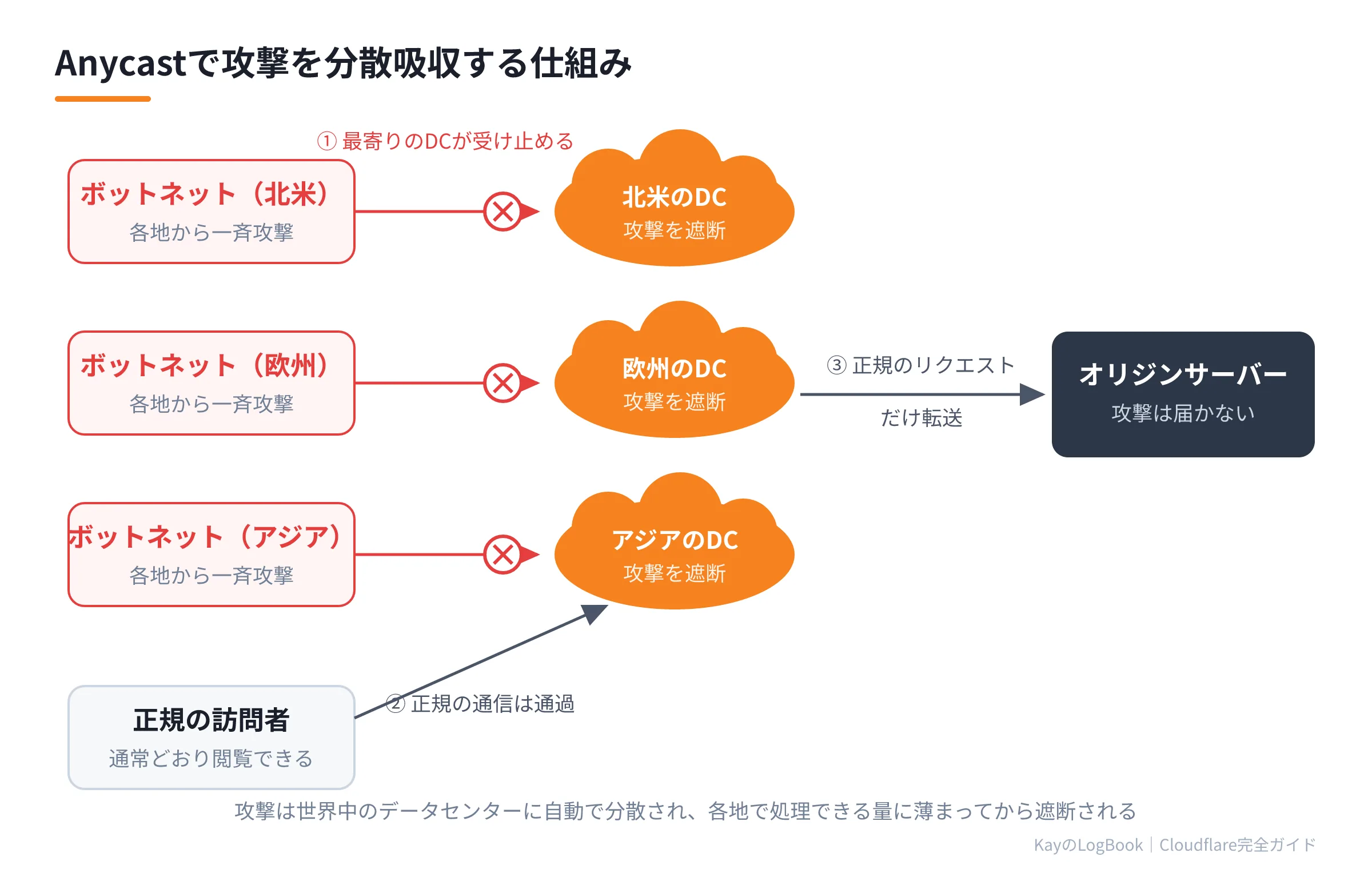
In each data center, automated detection systems constantly analyze traffic patterns and block traffic judged to be an attack on the spot (this is called mitigation). Only legitimate visitors’ requests are forwarded to the origin server, so the site can keep running even in the middle of an attack. A key feature is that everything from detection to blocking runs automatically within seconds, before a human administrator even notices.
Handling L7 attacks#
Against L7 attacks that flood in with seemingly normal requests, suspicious traffic is identified from request frequency, patterns, and the behavior of the source, and when necessary a challenge (verification page) is inserted to check “Are you a human operating a browser?” Bots can’t pass this check, so attacks alone are eliminated while minimizing the impact on legitimate visitors. This mechanism also works together with the WAF and bot protection covered on later pages.
Unmetered on every plan, at no extra charge#
The biggest feature of Cloudflare’s DDoS Protection is that it’s provided unmetered on every plan, including the Free plan, regardless of the size, number, or duration of attacks. As mentioned on the pricing plans page, what other providers often bill based on traffic during an attack or restrict to higher-tier plans is included in Cloudflare’s free tier.
This is less charity than a consequence of Cloudflare’s network structure. Because the mechanisms that stop attacks are built into the entire network from the start, it’s structured so that “protecting more customers adds almost no extra cost.” Conversely, attack data gathered from around the world improves detection accuracy, creating a virtuous cycle that strengthens every customer’s defenses.
Points beginners should watch out for#
- The orange cloud is a prerequisite: DDoS Protection only works on traffic with the proxy (orange cloud) enabled. Gray-cloud (DNS only) records aren’t protected
- Watch out for exposing your origin IP: If your real server IP is known, for example from DNS records from before you adopted Cloudflare, attackers could bypass Cloudflare and attack the server directly. Ideally, change your server’s IP address after adopting Cloudflare and block all traffic that doesn’t come through Cloudflare
- Know about “Under Attack Mode”: As an emergency measure while you’re under attack, there’s Under Attack Mode (a Security Level setting), which puts a verification page in front of every visitor. It can stay off normally; remember it as a switch for when you need it
- Mail, SSH, and similar aren’t covered: What’s protected is basically web traffic (HTTP/HTTPS) going through Cloudflare. Protecting non-HTTP services such as mail servers is the domain of Spectrum and Magic Transit, covered in Chapter 4
- It doesn’t remove the need for server-side measures: Even if DDoS is stopped, attacks that exploit software vulnerabilities are a separate issue. You still need to keep your server and CMS updated (covered in detail on the next page, WAF)
Related services#
- WAF: Protects applications from attacks that exploit vulnerabilities. A pillar of web security alongside DDoS protection (next page)
- Rate Limiting: Limits excessive requests from specific IPs. Used against small-scale L7 attacks and unauthorized logins (a later page)
- Spectrum / Magic Transit: Higher-tier services that protect non-web services and entire networks from DDoS (Chapter 4)
Summary#
- A DDoS attack sends requests from many sources at once to take a service down, carried out by a “botnet,” an army of hijacked devices
- There are L3/L4 attacks, which saturate lines and equipment by volume, and L7 attacks, which wear out web servers with normal-looking requests
- Cloudflare uses Anycast to spread attacks across data centers worldwide, “absorbing and diluting” them, and automated detection blocks only the attacks
- DDoS Protection is unmetered on every plan at no extra charge, but it covers only traffic with the orange cloud enabled
- Watch out for exposing your origin IP. Direct attacks that bypass Cloudflare can’t be stopped