Build an AI That Answers from Your Own Documents with AI Search
On this page20 items
The last page of Chapter 8 puts the AI knowledge from Chapter 7 into practice. What you’ll build is an AI that answers based on materials you provide.
A typical chat AI knows nothing about your company’s manuals or the notes you’ve written. RAG is the mechanism for handing it your own materials and having it answer based on their contents. And AI Search is a service that takes on all the tedious parts of that for you.
Remarkably, you don’t need a single line of code to build the first working version. You just upload files and ask questions. Code only comes in later, when you integrate it into your own app.
What you’ll learn on this page#
- How to create an AI Search instance and load your materials into it
- How to check that it works without writing code
- How to call it from Workers and integrate it into your own app
- Where to look, and how to fix it, when accuracy is poor
- Costs, and things to watch out for when going public
What you’ll build#
First, here’s the big picture of what you’ll build.
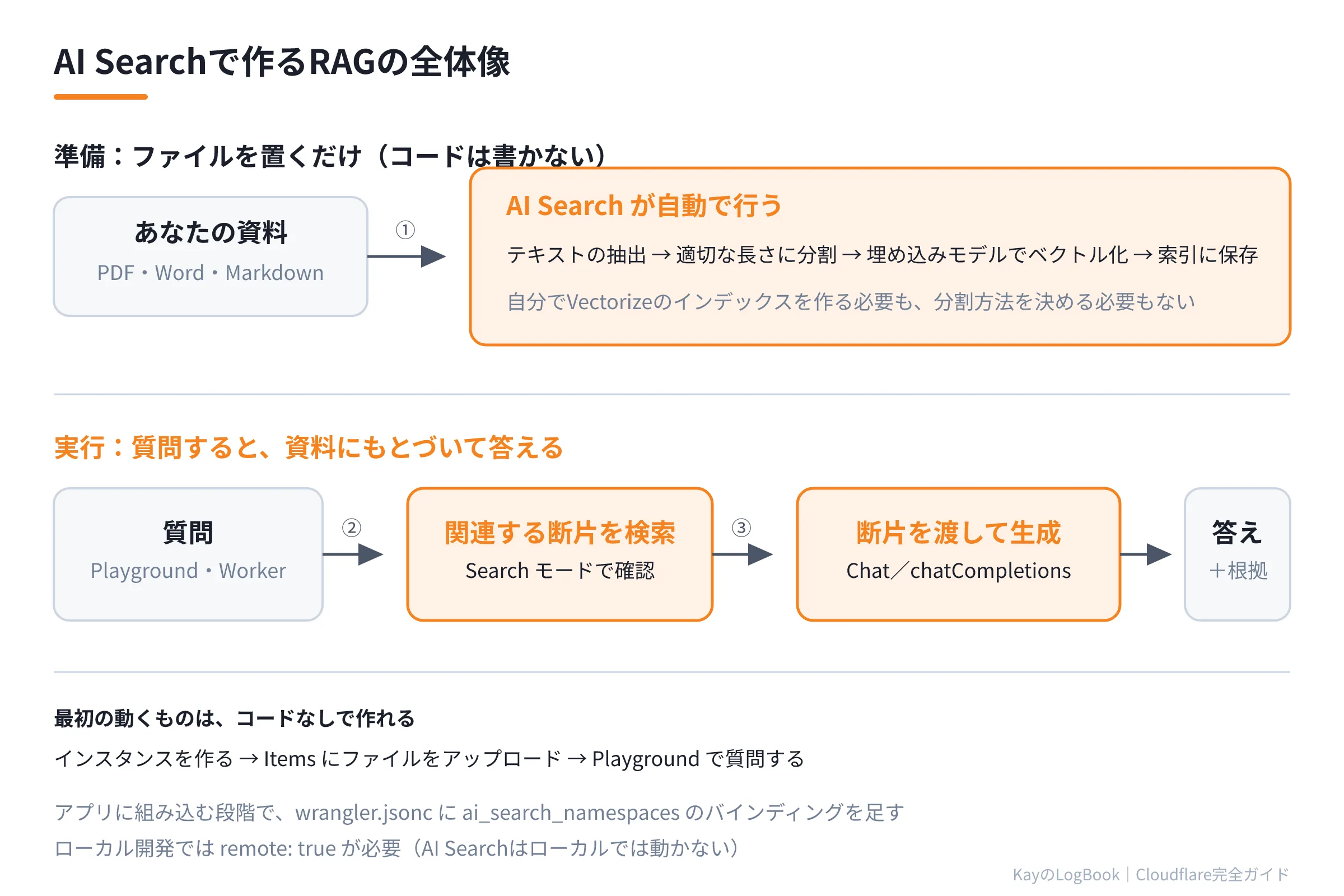
As explained in What Is RAG? in Chapter 7, RAG has two stages: “preparation” and “execution”.
- Preparation: split the materials, convert their meaning into vectors, and store them in a searchable form
- Execution: convert the question into a vector, find nearby chunks, and pass them to the AI to answer
AI Search does all of this automatically. You don’t need to create an index in Vectorize yourself, think about how to split documents, or choose an embedding model.
Possible uses include:
- A help desk that answers from internal manuals
- A search assistant for product documentation
- Search across all of your own blog posts
- A tool for pulling the information you need out of meeting minutes and specifications
Step 1: Create an instance#
In the Cloudflare dashboard, open AI Search and choose Create Instance.
Give the instance a name (such as my-docs). You’ll use this name later when calling it from code, so pick something easy to understand.
You can choose from three types of data source.
| Data source | Best for |
|---|---|
| Built-in storage | Uploading PDFs and Word documents you have on hand |
| Website | Crawling a site you publish and using it as the source |
| R2 bucket | When you already keep files in R2 |
Built-in storage is the easiest to start with. You don’t have to choose it at creation time; it can be configured later.
Step 2: Upload your materials#
Open the instance’s Items tab and upload files.
Once uploaded, AI Search builds the index automatically. This is the biggest difference from the old way. Previously, you’d have had to write all of the following yourself:
- Extract text from PDFs
- Split it into chunks of an appropriate length
- Convert each chunk into a vector with an embedding model
- Store them in a vector database
- Manage them with metadata attached
All of that becomes just dropping in files.
Supported file formats#
Office documents such as PDF, Word, Excel and PowerPoint are automatically converted to Markdown before processing. Text files and Markdown are handled as they are.
The limit is 4 MB per file. Split large PDFs before uploading.
Wait for the index to be built#
Right after uploading, nothing is searchable yet. Processing takes anywhere from tens of seconds to a few minutes depending on the number of files. You can check the status in the Items tab.
Step 3: Try it without writing code#
Open the Playground tab. Here you can actually ask questions.
There are two modes:
- Search: finds and returns relevant chunks (similar to search results)
- Chat: the AI answers in prose based on the chunks it found (RAG itself)
First, use Chat to ask about something written in your materials. If you get an answer based on your materials, RAG is working.
This is an important checkpoint. At this point, you haven’t prepared any of the following:
- A server
- A vector database
- An embedding model choice and the code to call it
- Splitting logic
- A program connecting search and generation
The mechanism you learned in Chapter 7 is running purely from configuration.
Step 4: Call it from your own app#
Once the Playground gives satisfactory answers, it’s time to use it from code.
All you need to do is add a binding to the project you created two pages back in Your First Workers Project.
Add the following to wrangler.jsonc:
{
  "name": "my-rag-app",
  "main": "src/index.js",
  "compatibility_date": "2026-08-20",
  "ai_search_namespaces": [
    {
      "binding": "AI_SEARCH",
      "namespace": "my-namespace",
      "remote": true
    }
  ]
}
remote: true is there because AI Search doesn’t run locally. Even during development with wrangler dev, queries go to the production instance.
Write the code like this:
export default {
    async fetch(request, env) {
        const url = new URL(request.url);
        const question = url.searchParams.get("q");

        if (!question) {
            return new Response("Please add ?q=your question", {
                headers: { "Content-Type": "text/plain; charset=utf-8" },
            });
        }

        const instance = env.AI_SEARCH.get("my-docs");
        const answer = await instance.chatCompletions({
            messages: [
                { role: "system", content: "Answer concisely based on the internal manuals." },
                { role: "user", content: question },
            ],
        });

        return Response.json(answer);
    },
};
Calling chatCompletions returns the result of both search and generation. Along with the answer text, it also returns the chunks used as evidence, so you can show on screen “where in which document it was written”.
If you don’t need a generated answer and only want the relevant passages, use search.
const results = await instance.search({
    messages: [{ role: "user", content: question }],
});
If you only use one instance, you can also specify the instance name directly with ai_search instead of ai_search_namespaces.
Adding a UI#
Combine this with the static assets feature from the previous page and an app with a chat UI fits in a single project.
"assets": {
  "directory": "./public",
  "binding": "ASSETS"
}
Only requests to /api/ask go to AI Search; everything else returns HTML. How to write this is covered in Publishing a Static Site on Cloudflare.
Where to look when accuracy is poor#
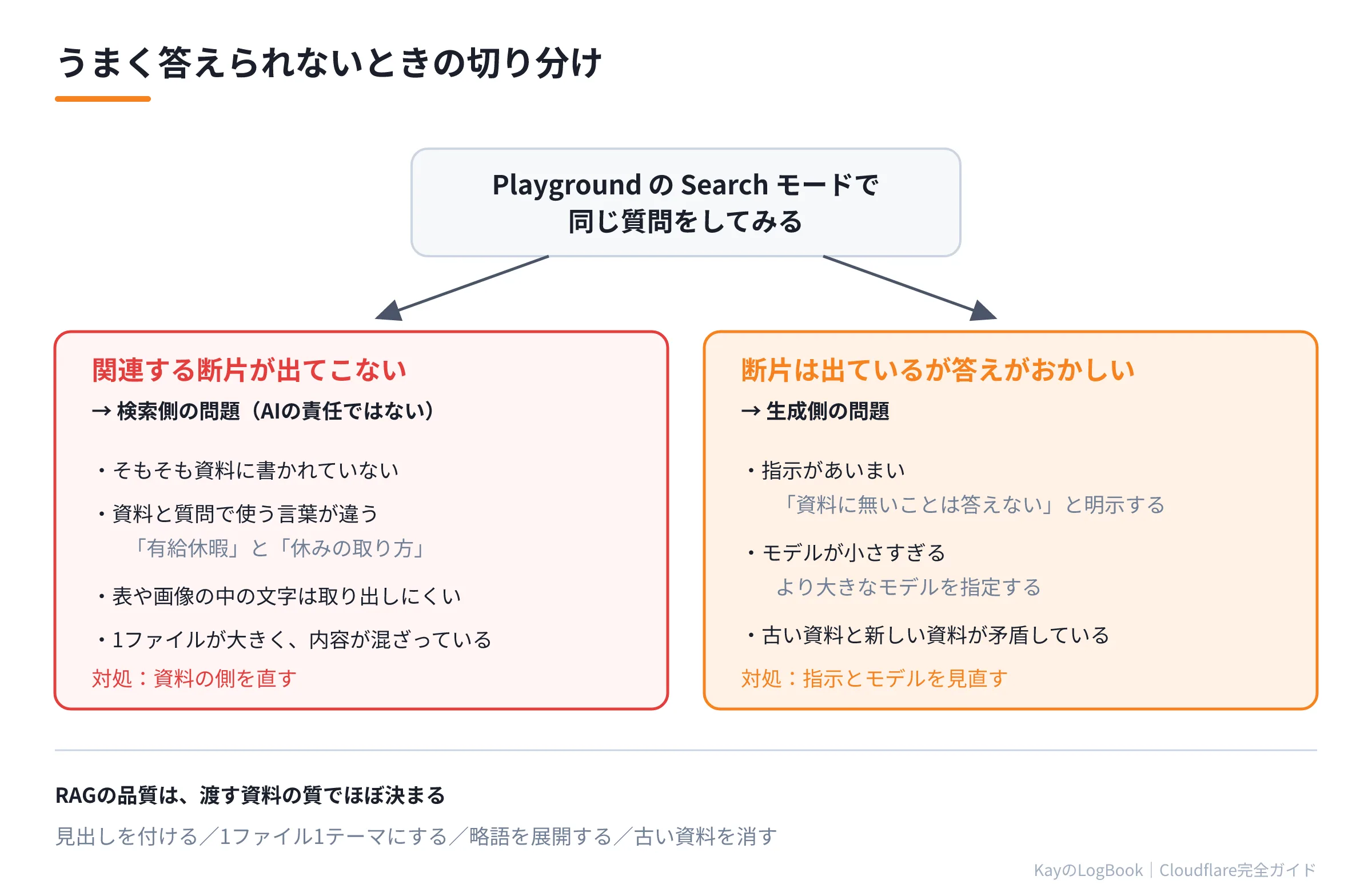
When RAG doesn’t return the answer you expected, the cause lies either on the search side or the generation side. Isolating which is the most important step.
Check with Search mode first#
Ask the same question in the Playground’s Search mode.
If no relevant chunks appear → it’s a search problem. The AI isn’t to blame.
- It isn’t in the materials: if the information isn’t there, it can’t be answered. Suspect this first
- Different wording: if the materials say “paid leave” and the question asks “how to take time off”, they’re harder to match
- It’s inside tables or images: text inside figures and complex table layouts sometimes can’t be extracted well
- A single file is too large: unrelated content gets mixed into the same chunk, lowering search accuracy
If relevant chunks appear but the answer is wrong → it’s a generation problem.
- Make the instructions clearer in the system prompt (for example, “Don’t answer anything not written in the materials”)
- Specify a larger model
How you prepare materials determines the results#
RAG quality is almost entirely determined by the quality of the materials you provide. This was touched on in Chapter 7, but you really feel it once you build one.
- Add headings: when the structure shows what’s written where, splitting becomes more accurate
- One topic per file: huge files crammed with everything make search harder
- Expand abbreviations: for abbreviations only understood internally, write the full name alongside on first use
- Don’t mix in outdated materials: when information conflicts, the AI ends up picking one. Deleting wrong materials is often the single most effective improvement
About costs#
As of August 2026, AI Search itself is in open beta and free to use.
However, usage of Workers AI (embeddings and generation) and AI Gateway used internally is billed. Workers AI has a free allowance of 10,000 Neurons per day, so personal experimentation should usually fit within it.
The main limits are as follows.
| Item | Free | Paid |
|---|---|---|
| Instances | 100 | 5,000 |
| Files | 100,000 | 1,000,000 |
| Monthly queries | 20,000 | Unlimited |
| Website crawling | 500 pages/day | ― |
Keep in mind that it’s in beta. The specifications may change. In fact, this service started in 2025 under the name AutoRAG, was later renamed AI Search, and had its internals overhauled in June 2026. If you build it into production business workflows, decide with that premise in mind.
Cautions when going public#
If you publish what you’ve built, there are two things you must think about.
Don’t leave it open to everyone#
If you publish an AI that answers from internal manuals without protection, anyone can extract the contents of your internal documents. Ask it “Tell me everything in the manual” and the AI will happily comply.
The fix is to put Cloudflare Access in front. The steps from three pages back work as is. AI Search can also be published as an MCP server, which can likewise be protected with Access.
Put a cap on costs#
When you publish a feature that calls AI, costs can balloon even without malicious intent. If someone fires off a large number of questions with a script, you’re billed for every one.
Set rate limits and spending caps in AI Gateway. For peace of mind, also throttle the number of requests themselves with Rate Limiting, and add Turnstile to forms.
Points for beginners to watch out for#
- Check in the Playground first: before writing code, confirm how well your materials and questions match. Anything it can’t answer here, it won’t answer after you write code either
- After updating materials, wait for reindexing: replacing a file doesn’t take effect immediately
- Always show the basis for answers on screen: showing which material an answer came from lets users judge whether it’s correct. It’s essential if you use RAG in practice
- Make it say “I don’t know”: unless the system prompt explicitly says “don’t answer what isn’t in the materials”, the AI tries to fill gaps with guesses
- Check permissions before adding confidential documents: anyone who can use that AI can effectively access the uploaded materials
- Don’t forget
remote: true: it’s the typical cause when things don’t work in local development - Design on the assumption that it’s in beta: to withstand specification changes, keep the code that calls AI Search in one place within your own code, so it won’t cause trouble later
Related services#
- What Is AI Search?: how it works and its limits (the premise for this page)
- What Is RAG?: why this setup can answer questions
- What Is Vectorize?: the core component if you build it yourself
- What Is Workers AI?: handles embeddings and generation
- What Is AI Gateway?: cost caps and logging
- What Is Cloudflare Access?: protection when publishing
- What Are Agents?: giving this search capability to an AI as a tool
Summary#
- With AI Search, you can hand off the entire RAG preparation process (splitting, vectorizing, storing)
- The steps are three: “create an instance → upload files → try it in the Playground”. No code needed up to this point
- Supported formats include PDF and office documents, up to 4 MB per file. Office documents are automatically converted to Markdown
- To integrate into an app, add an
ai_search_namespacesbinding and callchatCompletionsorsearch - Local development requires
remote: true - When accuracy is poor, first use Search mode to isolate whether it’s the search side or the generation side
- RAG quality is determined by the quality of your materials. Add headings, keep one topic per file, and delete outdated materials
- It’s free during the beta, but Workers AI and AI Gateway usage is billed. Also assume the specifications may change
- If you publish it, protect it with Access and cap costs with AI Gateway
That completes Chapter 8, “Hands-On”. Connecting WordPress, publishing a NAS, adding authentication, developing Workers, publishing a static site, email on a custom domain, and RAG — you can now build the main forms of what Cloudflare can do with your own hands.
In the final Chapter 9, the focus shifts to operations: how far the free plan actually takes you, how Cloudflare compares with other services, and common stumbling points during adoption and how to deal with them.