What Is Cloudflare One? An Overview of the Zero Trust Product Suite
On this page13 items
On the previous page, you learned that Zero Trust is a design philosophy of “never trust, always verify,” and that putting it into practice requires combining several components. Cloudflare One is Cloudflare’s offering that bundles that full set of components together.
Cloudflare One includes many products, so opening its dashboard for the first time can be overwhelming. But if you organize everything around “two traffic flows,” the picture becomes surprisingly clear. This page is that map. Rather than going deep into individual products, it focuses on where each one sits on the map. The details are covered one at a time on the following pages.
What you’ll learn on this page#
- What Cloudflare One is, and the idea of SASE
- A map that organizes the product suite into “two flows”
- How Access, Tunnel, Gateway and WARP divide the work
- Where the data protection products (DLP, CASB and others) fit
- Pricing and what you can use for free
What is Cloudflare One?#
Unifying networking and security in the cloud (SASE)#
Cloudflare One is a platform that delivers corporate networking and Zero Trust security together on Cloudflare’s global network. In industry terms, it falls into the product category called SASE (Secure Access Service Edge, pronounced “sassy”).
The idea behind SASE is this. Traditionally, each company bought and installed its own security appliances: firewalls, VPN appliances, web filtering appliances. But as the previous page showed, now that both the things you protect and the people who work are scattered across the cloud, putting boxes in your own office has hit its limits. So why not place the security checkpoint itself in the cloud and route all traffic through it first? Cloudflare has data centers in over 300 cities worldwide, so wherever users are, there’s a checkpoint nearby.
Note that this product suite has been renamed several times. Older names such as “Cloudflare for Teams” and “Cloudflare Zero Trust” linger in articles and books, but they are now unified under Cloudflare One (as of August 2026). When you read older material, treat them as the same thing.
The big picture: organizing by two flows#
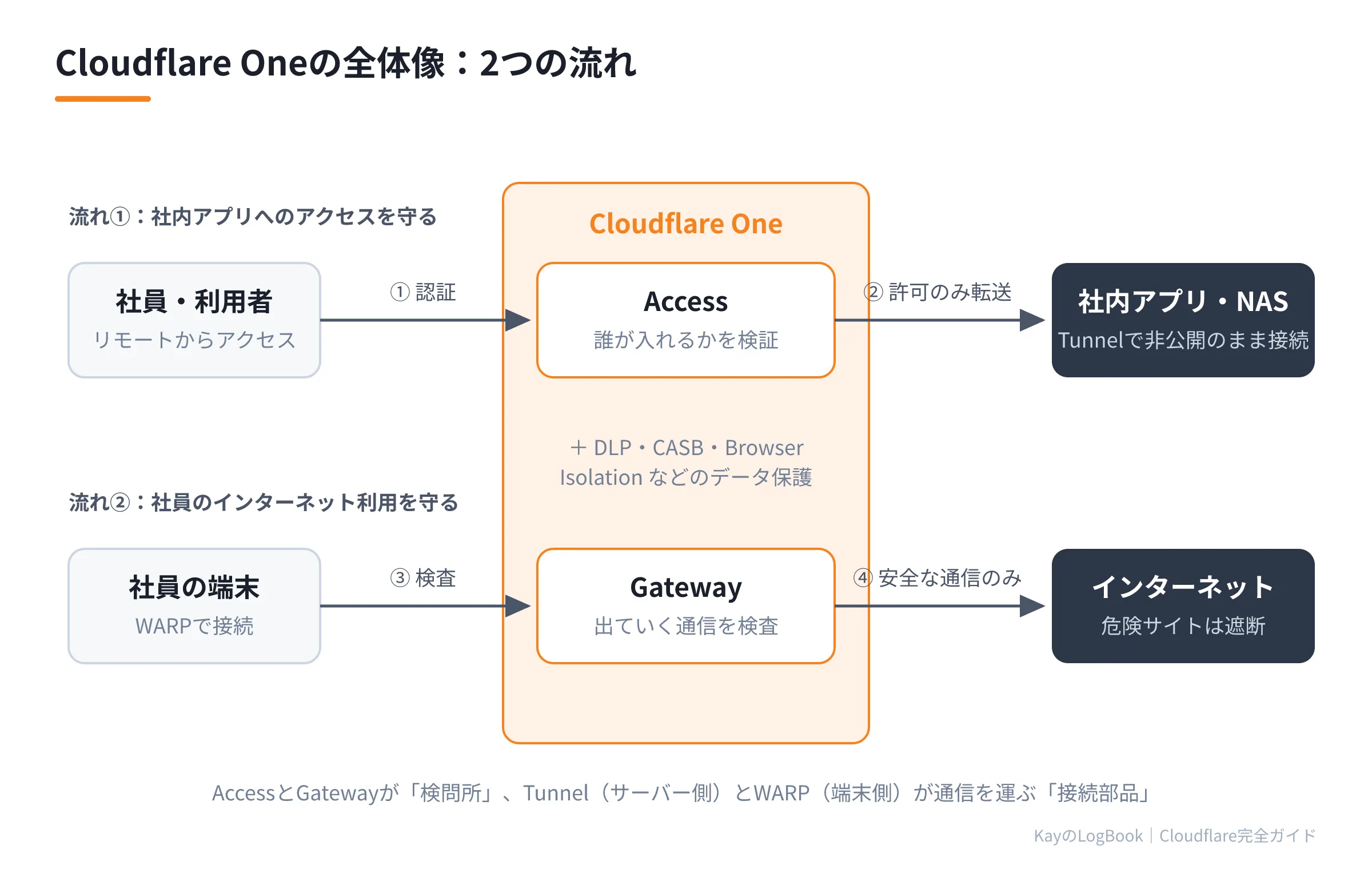
Cloudflare One’s main products can be split into two groups by the direction of the traffic they protect.
Flow 1: outside in — protecting access to internal apps#
The first is the flow of users accessing internal resources such as company apps or a NAS. The mechanism that protects this is called ZTNA (Zero Trust Network Access), and it replaces VPNs. Two products handle it:
- Cloudflare Access: an authentication gatekeeper standing in front of your apps. On every access it verifies “who, on which device,” and lets only authorized people through
- Cloudflare Tunnel: a connector that links the protected side (servers or a NAS) to Cloudflare. Because it’s an outbound connection that needs no open ports, the app itself stays invisible from the internet
Flow 2: inside out — protecting employees’ internet use#
The second is traffic going from employees’ devices out to the internet. Visits to phishing sites and malware downloads are inspected and stopped at the exit. This mechanism is called SWG (Secure Web Gateway).
- Cloudflare Gateway: the filter that inspects traffic. It blocks threats at multiple layers, such as at the DNS stage and at the stage of inspecting traffic content
- WARP (Cloudflare One Client): an app installed on employees’ devices. It’s the connector that delivers the device’s traffic to Cloudflare, and it also reports device health (device posture)
In short, Access and Gateway are the “checkpoints,” while Tunnel and WARP are “connectors that carry traffic to the checkpoints.” It helps to remember Tunnel as the server-side connector and WARP as the device-side connector.
Products that protect data and the user environment#
On top of the two flows sit products that protect the “data” flowing through them. All of these are covered later in this chapter or on related pages.
- DLP (Data Loss Prevention): detects and blocks sensitive data, such as credit card numbers, from being sent outside
- CASB: audits SaaS such as Google Workspace for misconfigurations and risky sharing
- Browser Isolation: an isolation technique that opens risky sites in a browser on Cloudflare’s side and delivers only the rendered screen to the device
- Email Security: detects and quarantines phishing emails
- DEX (Digital Experience Monitoring): an operations tool that monitors employees’ connection quality and helps track down the causes of “can’t connect” or “it’s slow”
There is also a product called Magic WAN that connects a company’s office networks themselves to Cloudflare, but that’s covered in Chapter 4.
Pricing and what’s free#
Cloudflare One’s pricing is separate from the Free/Pro/Business plans for websites and is billed per user (as of August 2026).
- Free plan: free for up to 50 users. Core features such as Access, Tunnel, Gateway and WARP are available, logs are kept for 24 hours, and some features like DLP are limited
- Pay-as-you-go: $7 per user per month. Adds longer log retention and more
- Contract (Enterprise): annual contracts for large organizations. Includes full-featured DLP, CASB and Browser Isolation, long-term logs, and support
Free for 50 users is remarkably generous compared with other vendors’ Zero Trust products. For individuals, households and small teams, you can build enterprise-grade Zero Trust essentially for free.
Example: start with a small setup#
You don’t deploy every Cloudflare One product at once. A typical way to start goes in stages like this:
- First, Tunnel + Access: expose your home NAS or an internal admin panel without opening ports, and put authentication in front of it (minimal ZTNA)
- Next, WARP + Gateway: install WARP on family members’ or employees’ devices and block phishing and malware sites via DNS (minimal SWG)
- Add data protection when needed: add CASB as SaaS use grows, DLP if you handle sensitive data, and so on
You can probably see that steps 1 and 2 alone already answer the “three limits of perimeter-based defense” from the previous page.
Points beginners should watch out for#
- Same account, different world of a dashboard: Cloudflare One is used from a regular Cloudflare account, but its settings live in a separate dashboard from the website features. When you first choose a team name, the URL for the login page (teamname.cloudflareaccess.com) is created
- Watch out for the name changes: “Cloudflare for Teams” and the “Zero Trust dashboard” that show up in searches refer to today’s Cloudflare One. Setup articles may show an outdated screen layout
- You don’t have to use everything: the full SASE picture is grand, but using only Tunnel and Access is perfectly fine. Use just the components you need
- How the 50 users are counted: it’s per user who authenticates. Household or team use will almost never hit the limit, but if you’re considering a company-wide rollout, you’ll need a quote for a paid plan
Related services#
- Cloudflare Access: the authentication gatekeeper for Flow 1 (next page)
- Cloudflare Tunnel: the server-side connector
- Cloudflare Gateway: the inspection filter for Flow 2
- WARP: the device-side connector
- DLP and CASB: data protection (the last page of this chapter)
Summary#
- Cloudflare One is Cloudflare’s product suite for Zero Trust, a platform in the category called SASE
- It can be organized into two flows: “outside in (protecting apps = Access + Tunnel)” and “inside out (protecting traffic = Gateway + WARP)”
- Access and Gateway are the checkpoints; Tunnel and WARP are the connectors
- Data protection such as DLP, CASB and Browser Isolation sits on top
- It’s free for up to 50 users, and you can start with partial use such as just Tunnel and Access