Choosing Cloudflare Storage (R2 / KV / D1 / Durable Objects Compared)
On this page14 items
In Chapter 6, we went through R2, Workers KV, D1 and Hyperdrive in turn. Counting Durable Objects from Chapter 5, that gives you five options for storing data on Cloudflare.
There are so many because each one narrows its focus to what it does best. There’s no all-purpose store that does everything. Put the other way around, it means once you have criteria for choosing, you won’t get lost. This page lays out those criteria.
What you’ll learn on this page#
- The role of each of the five stores in a nutshell
- A decision flow for choosing with three questions
- A comparison table of the main points
- How to combine them in real applications
- Where people tend to go wrong on pricing
The five options in a nutshell#
| Service | In a nutshell |
|---|---|
| R2 | A warehouse where you deposit whole files |
| Workers KV | A shelf for reading small values quickly from anywhere in the world |
| D1 | A SQL database for conditional queries and aggregation |
| Durable Objects | A place to gather things in one spot to count and keep them accurately |
| Hyperdrive | A bridge for using an existing PostgreSQL / MySQL database faster |
Hyperdrive alone is different in nature: it isn’t a store itself but a path to an external database. So below, we first separate “store it inside Cloudflare” from “use an external database.”
Choose with three questions#
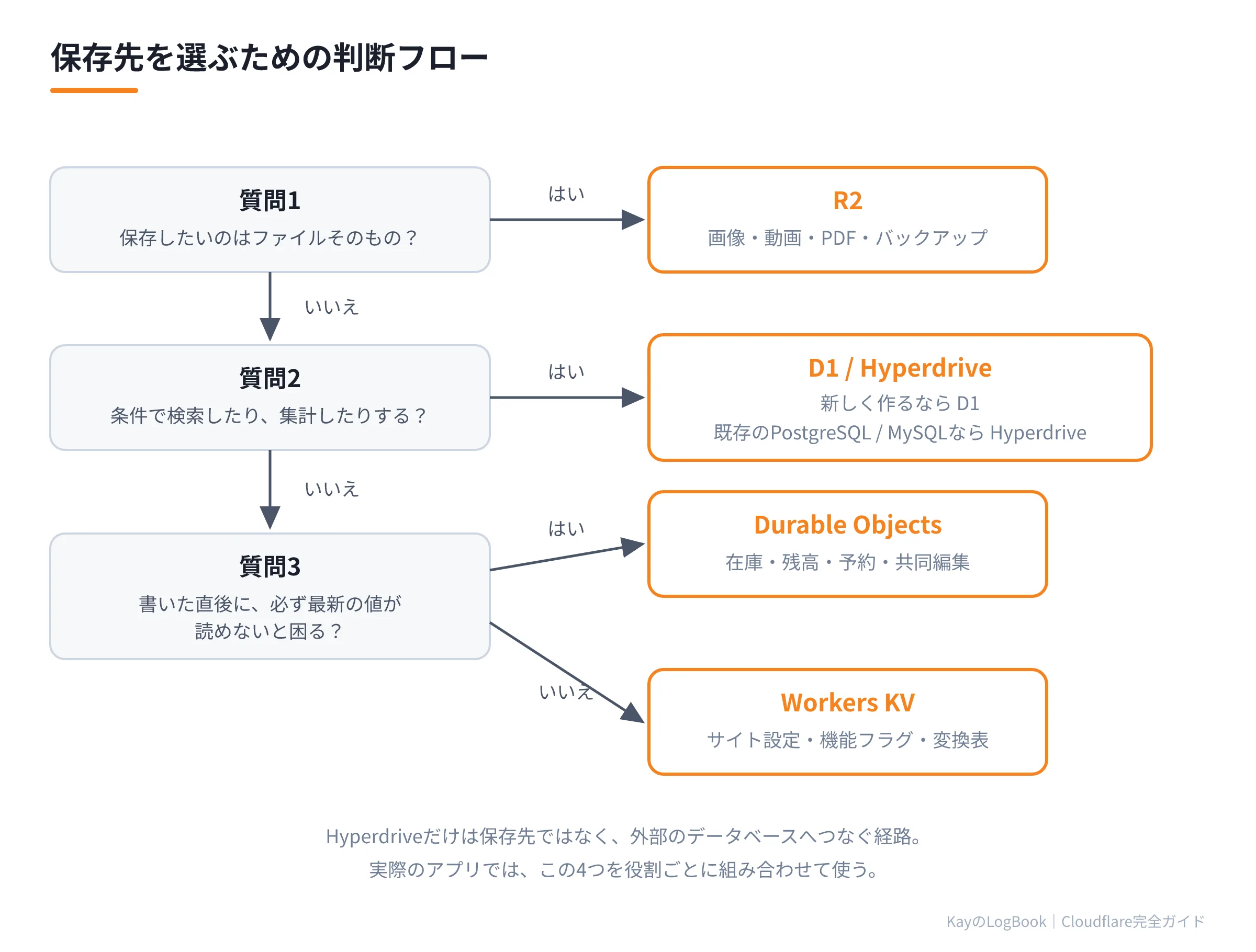
Question 1: Are you storing the files themselves?#
Images, video, audio, PDFs, CSVs, backups — if it’s “something you put in and take out whole, without needing to search its contents,” use R2.
The basic pattern is to record information attached to a file (upload time, uploader, public or private and so on) in D1, not R2, and keep only the file itself in R2.
Question 2: Do you search by conditions or aggregate?#
If you need things like “list this month’s orders,” “total the amount per user” or “join two tables,” that’s a job for a database.
- If you’re building something new → D1
- If you already have something running on PostgreSQL / MySQL → use the existing database via Hyperdrive
Question 3: Is it a problem if you can’t always read the latest value right after writing?#
This is the final fork.
If it’s a problem (stock counts, balances, seat reservations, queues, collaborative editing and so on), choose Durable Objects. Each object runs in a single place, which acts as the gateway for all reads and writes, so accidents like “a double booking” structurally can’t happen.
If it isn’t a problem (site settings, feature toggles, redirect tables, display language and so on), choose Workers KV. Changes can take 60 seconds or more to propagate, but in exchange you can read from anywhere in the world in a few milliseconds.
Comparison table#
| R2 | Workers KV | D1 | Durable Objects | Hyperdrive | |
|---|---|---|---|---|---|
| Data shape | Files | Keys and values | Tables (SQL) | Per-object state | Path to an external DB |
| Conditional queries / aggregation | No | No | Yes | Yes, with SQL inside the object | Depends on the existing DB |
| Reads right after writes | Consistent | Can lag 60+ seconds | Consistent on the primary | Always consistent | Depends on caching |
| Read speed | Suited to file delivery | Very fast (a few ms) | Fast | Depends on the object’s location | Faster connections |
| Rough capacity | Unlimited | Values up to 25 MiB | Up to 10 GB per DB | Up to 10 GB per object | Depends on the external DB |
| Free plan | Yes (10 GB) | Yes (1 GB, 100k reads/day) | Yes (5 GB, 5M rows read/day) | Yes | Yes |
| How it’s billed | Storage + operations | Operations + storage | Rows read/written + storage | Requests + duration + storage | No extra charge |
In practice, you combine them#
In real applications, you don’t pick just one; you use each for its role.
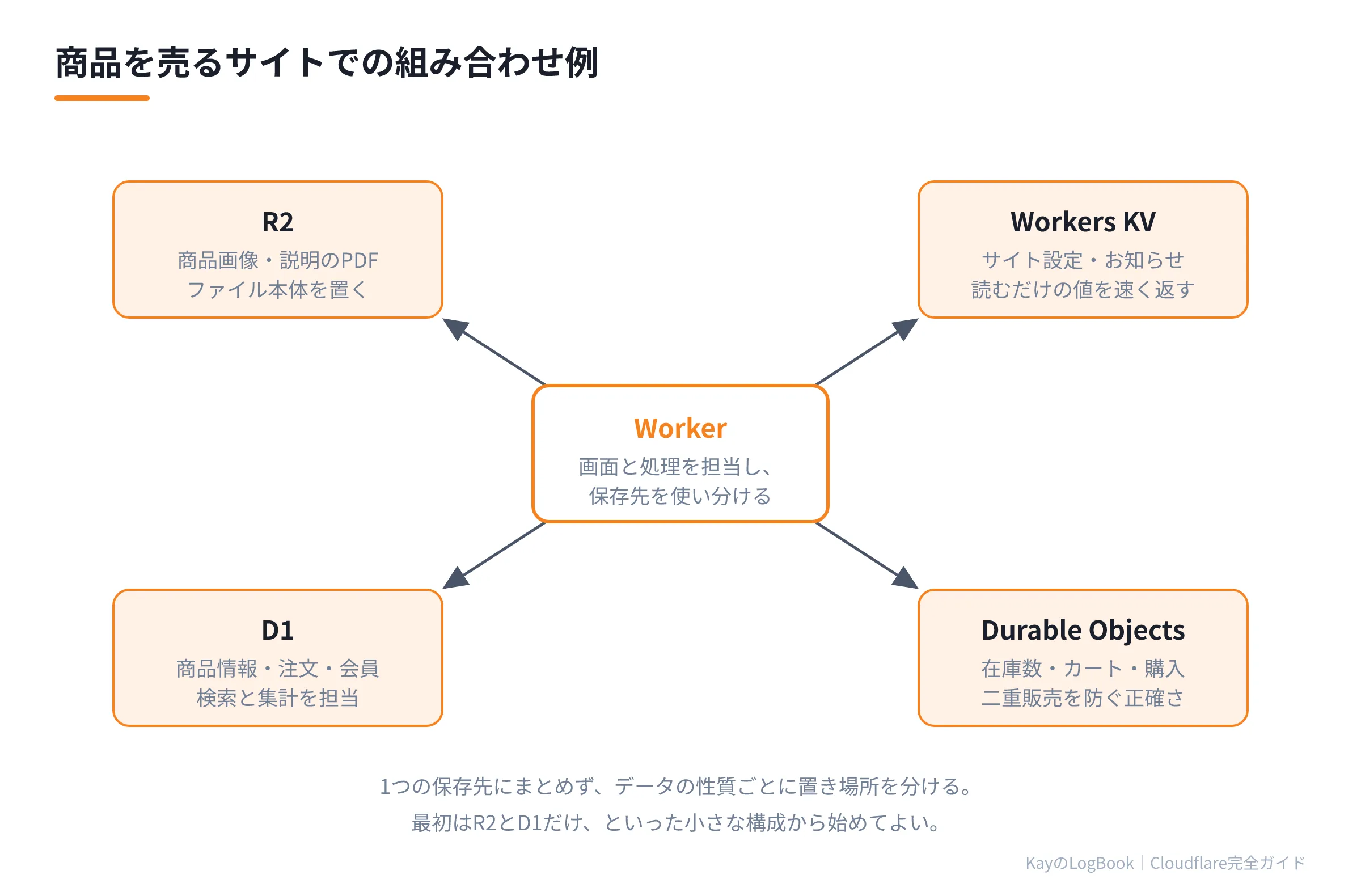
For example, if you build a site that sells products, it looks like this.
- Product images and description PDFs → R2 (the files themselves)
- Product information, order history, member information → D1 (needs searching and aggregation)
- Site settings, notices, enabling/disabling campaigns → Workers KV (read-only, rarely changes)
- Stock counts, carts, checkout → Durable Objects (needs the accuracy to prevent overselling)
For a blog, you’d put the article bodies and lists in D1, images in R2, and theme settings and redirect tables in KV. Durable Objects become necessary once you add real-time comments or simultaneous editing.
You don’t need to use everything from the start. For many personal sites, R2 and D1, or even just KV, are enough. It’s perfectly fine to add stores as problems come up, choosing one that fits each problem.
Patterns that are easy to get stuck on#
“Either KV or D1 looks like it would work”
Decide by how you read. If you just fetch one item by key, use KV; if you filter by conditions, use D1. If you need both, the standard setup is to keep the source of truth in D1 and cache only frequently read results in KV.
“Either Durable Objects or D1 looks like it would work”
Decide by write concurrency. If multiple users rewrite the same data at the same time and order and accuracy matter, use Durable Objects. If it’s mostly reads and you need aggregation or reports, use D1.
“Either R2 or KV looks like it would work”
Decide by size. KV values max out at 25 MiB, and you’re billed per operation on top of that. Files over a few tens of KB are better suited to R2.
“I have an existing database. Should I move it to D1?”
There’s no need. Using it as is through Hyperdrive avoids both the migration work and the risk. Consider D1 when you’re creating a new database from scratch, or when you want to stop running the existing one.
Where people tend to go wrong on pricing#
Each store bills for different things. Mix them up and you can end up with an unexpected bill.
- R2: listing (Class A operations) costs more than 10 times as much as reads. Watch out for designs that fetch the file list every time
- Workers KV: writes cost 10 times as much as reads, and the free tier is 1,000 a day. Write-heavy usage doesn’t work
- D1: you’re billed for “rows scanned.” Without an index, finding a single row counts as reading the whole table
- Durable Objects: time spent awake is billed too. Put them to sleep with hibernation while idle
- Hyperdrive: there’s no extra charge, but the database you connect to has its own costs
What applies across the board is to get in the habit of counting “how many operations run per request.” If one page view runs ten queries, the cost hits you ten times over too.
Points for beginners to watch#
- Don’t try to consolidate into one: forcing everything into one store will cause strain somewhere. Splitting by role ends up simpler
- Separate files from their information: files in R2, their information in D1 is the basic pattern
- Decide where the source of truth lives: be clear about roles, using KV as a cache and keeping the correct values in D1 or Durable Objects
- Free allowances differ between “per day” and “per month”: KV and D1 free tiers are per day; R2 is per month
- Keep things easy to migrate: if you put the code that calls the store in one place, it’s easier to swap later
Related services#
- Workers: the runtime that calls every store
- R2 / Workers KV / D1 / Hyperdrive: the individual pages in Chapter 6
- Durable Objects: Chapter 5. Managing state that requires accuracy
- Queues / Workflows: running heavy processing asynchronously before and after storing
Summary#
- Cloudflare has five stores. Each narrows its focus to what it does best
- Three questions for choosing: “Is it a file?”, “Do you search by conditions?”, “Do you need accuracy right after writing?”
- Files in R2, searching and aggregation in D1 (Hyperdrive for an existing DB), accuracy in Durable Objects, fast reads in KV
- Real apps combine them. You don’t need to use everything from the start
- Each store bills for different things. Get in the habit of counting operations per request
That completes Chapter 6, “Storage and Databases.” Once you’ve decided where data lives, we can move on to what to do with that data. Chapter 7 covers the AI services Cloudflare is investing heavily in, starting with Workers AI, which runs AI models at the edge.