What Is Cloudflare Pages? Static Site Hosting
On this page13 items
Where Workers, on the previous page, was a service for “running code,” Cloudflare Pages, covered on this page, is a service for “hosting and publishing a site you’ve built.” Hand Cloudflare a set of files — HTML, CSS, images — and it becomes a website served quickly around the world.
For a long time, Pages was the standard entry point for publishing static sites on Cloudflare. Now, however, as mentioned on the previous page, Workers itself supports serving static files, and the relationship between the two has been changing. This page explains how Pages works and then sorts out which one you should choose today.
What you’ll learn on this page#
- What a static site is, and how it differs from a dynamic site
- What Cloudflare Pages does for you
- How automatic deployment via Git integration, preview deployments, and rollbacks work
- How to add dynamic processing with Pages Functions
- The free tier and main limits
- The current relationship between Pages and Workers, and which to choose for new projects
Static sites and dynamic sites#
Websites can be broadly divided into two kinds.
A static site returns prebuilt HTML files as they are. Whoever accesses it, whenever, gets the same files. Company profiles, documentation, and blogs (where articles are converted to HTML ahead of time) fall into this category.
A dynamic site assembles HTML on the server for each request. The content changes depending on login state or search criteria. Sites built with WordPress are a typical example of dynamic sites.
Because a static site runs nothing on the server, it is fast, hard to break, and hard to attack. This is also why it pairs well with the CDN from Chapter 1: files whose contents don’t change can simply be cached and returned instantly from anywhere in the world.
In recent years, it has become common to develop with tools such as React, Vue, Astro, or Hugo and export a set of static HTML files at publish time (static site generators). Pages is where those exported files are stored and served.
What is Cloudflare Pages?#
Cloudflare Pages is a hosting service that stores static sites and serves them from Cloudflare’s global network. What sets it apart from a mere file host is that it takes on the entire publishing process for you.
Its main roles are:
- Integrating with GitHub or GitLab repositories so that simply updating your code publishes it automatically
- Running the build (the process of generating publishable files from the source) on Cloudflare’s side if needed
- Distributing the generated files to locations worldwide and serving them quickly as a CDN
- Setting up custom domains and HTTPS certificates automatically
You don’t need a server contract or FTP uploads. Another feature is that there’s no charge for bandwidth, so your bill doesn’t spike when traffic grows.
The deployment flow#
At the heart of Pages is Git integration. The process goes like this.
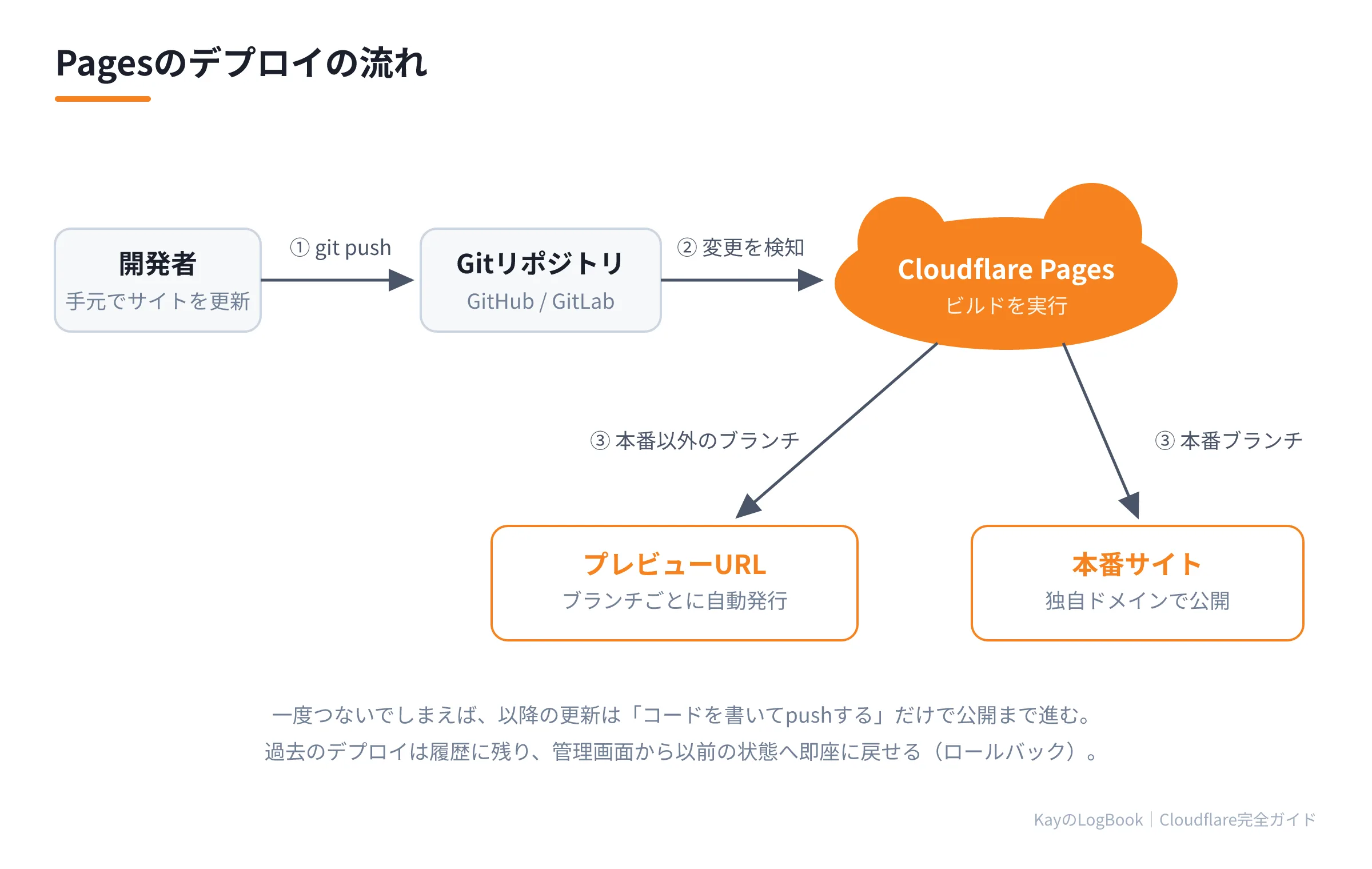
- Connect a GitHub (or GitLab) repository to a Pages project
- Register a build command (e.g.
npm run build) and an output directory (e.g.dist) - When you
git pushyour code, Pages detects the change and runs the build - The generated files are distributed to locations worldwide, and the site is updated
Once it’s set up, updating becomes just “write code and push.” For a plain HTML site that needs no build, you can also choose to upload files directly (Direct Upload).
Preview deployments#
A handy feature of Pages is that when you push to a branch other than production, a URL dedicated to that branch is issued automatically. This is called a preview deployment.
You can check a fully working version of the site on the spot without affecting the production site at all, and share the URL to ask for a review. In other words, you can check proposed changes on the real thing before they go to production.
Rollbacks#
Past deployments are kept as history, and you can instantly return to a previous state just by selecting it in the dashboard. Even if a bug is found after publishing, being able to decide to “just roll back for now” before investigating the cause is a big reassurance in operations.
Pages Functions: adding dynamic processing to a static site#
Even a static site sometimes needs a form submission endpoint or a small process that calls an external API. Pages Functions exists for that.
Put files in the functions folder of your project, and their layout becomes the URL routes directly (file-based routing). For example, if you put functions/api/hello.js, that code runs when /api/hello is accessed.
Since it runs in the same runtime as Workers, you write it the same way as you saw on the previous page. Bindings such as KV and D1 are available too.
Pricing and main limits#
Pages is available from the free plan, and serving static files itself incurs no charges for requests or bandwidth (as of August 2026). The main limits are:
- Builds: Free plan up to 500 per month (1 concurrent build; Pro 5, Business 20)
- Files: Free plan 20,000 files per site (100,000 on paid plans)
- Maximum file size: 25 MiB. For large videos and the like, storing them in R2 (Chapter 6) is recommended
- Projects: 100 per account
- Build time: Up to 20 minutes per build
- Preview deployments: Unlimited
If you use Pages Functions, their invocations are billed under the same scheme as Workers. Within the free plan, running a personal site costs nothing at all.
The relationship between Pages and Workers#
This is currently the most confusing point.
Originally, the roles were split: Pages was “for static sites,” and Workers was “for running code.” But since Workers gained support for serving static files, a single Worker can now handle both the frontend and the backend.
Cloudflare has now indicated that it is concentrating development resources on Workers as the foundation for full-stack development. In fact, the following features exist in Workers but not in Pages:
- Durable Objects (next page)
- Cron Triggers (scheduled execution)
- Gradual deployments (switching to a new version a little at a time)
- Detailed observability features such as Workers Logs
- Email Workers, Queues consumers, Rate Limiting, and more
On the other hand, some advantages remain unique to Pages. The main ones are that you can set up a custom domain with just a CNAME record even for a domain whose nameservers aren’t managed by Cloudflare, and the file-based routing mentioned above.
Pages has not been discontinued, and existing sites keep running as they are. However, if you’re building something new, choosing Workers — even for a static site — will save you trouble when you add features later. Sites already running on Pages don’t need to be migrated in a hurry unless something is causing problems.
Points for beginners to watch out for#
- You can’t host WordPress: Pages is not a place to run PHP or databases. To use Cloudflare with a WordPress site, you keep it on a rental server or similar and put Cloudflare in front of it (covered in Chapter 8)
- Build settings are a common stumbling block: Most deployment failures are due to a wrong build command or a mistyped output directory name. Check the build log first
- You’ll hit the build limit on the free tier first: Serving is free, but there’s still a limit of 500 builds per month. Pushing small fixes dozens of times eats into it
- Watch who can see it: Anyone who knows a preview deployment’s URL can view it. If you want to protect unreleased content, you can secure it with Cloudflare Access from Chapter 3
Related services#
- Workers: Supports static asset serving and is now the center of full-stack development (previous page)
- CDN and caching: The foundation behind Pages delivery (Chapter 1)
- R2: Where to put large files over 25 MiB (Chapter 6)
- Cloudflare Access: Adds authentication to unreleased sites and previews (Chapter 3)
- Turnstile: Adds spam protection to forms on static sites (Chapter 2)
Summary#
- A static site returns prebuilt HTML as is. It’s fast, hard to break, and pairs well with a CDN
- Cloudflare Pages is a hosting service that automatically builds, publishes, and serves such static sites via Git integration
- Per-branch preview deployments and one-click rollbacks are available out of the box
- With Pages Functions, you can add dynamic processing that runs in the same runtime as Workers
- Unlimited bandwidth on the free plan. Limits apply to things like builds (500 per month) and files (20,000)
- Cloudflare is now concentrating its investment on Workers with static asset support. Choose Workers for new projects; existing Pages sites are fine to keep running as they are
The next page covers Email Routing, another “practical service you can use without owning a server.” It lets you create email addresses on a domain you own without setting up a mail server.