What Is R2? Object Storage with Free Egress
On this page14 items
Chapter 6 looks at where to put the data your programs handle. Workers, from Chapter 5, keeps nothing once a request ends. Images and database contents alike need somewhere to be stored outside Workers.
The storage Cloudflare provides for this is R2 on this page, KV on the next, and D1. We’ll start with the most basic: a place to store the files themselves, R2. R2’s biggest feature is that retrieving the data you’ve stored is free.
What you’ll learn on this page#
- What object storage is, and how it differs from an ordinary file server
- What egress fees are, and why R2 being “free” is a big deal
- How R2 works, and the three ways to access it
- Pricing, limits, and what it is and isn’t suited for
- Caveats to know before you start using it
What is object storage?#
Object storage is a storage service for keeping large numbers of files. You hand it data you want to store as is: images, video, PDFs, backups, logs and so on.
The way of thinking is a little different from folders on your computer. In object storage, the container you store things in is called a bucket, and files are placed inside it as objects. Each object has a key (name) like photos/2026/08/cat.jpg, and you read and write by specifying this key.
Even if a key contains slashes, no folder actually exists; it’s simply a long name. Think of any apparent hierarchy as just a way of displaying it. This simplification gives it a structure whose speed barely drops even with hundreds of millions of files.
Access is via HTTP. There’s no special protocol or mounting; you just send GET, PUT and DELETE to a URL. A service called Amazon S3 established this approach as the de facto standard, and R2 follows the same conventions (an S3-compatible API).
The problem of egress fees#
Cloud storage broadly incurs three kinds of charges.
- Storage fees: a monthly charge for the amount of data you keep there
- Operation fees: a charge for the number of requests, such as reads and writes
- Egress fees: a charge for taking (transferring) data out
The third of these, egress (meaning “going out”), has long been a headache for users. That’s because the common structure is cheap storage at around 2 to 3 cents per GB per month, but around 9 cents per GB to take it out. In other words, retrieving data once can cost more than storing it for a month.
Sites that serve images and video retrieve the stored data again and again. The more traffic grows, the bigger the bill, and it’s hard to predict in advance. And even if you want to move to another service, retrieving all your data triggers a huge bill, so you can’t move. This situation has been called “holding your data hostage”.
R2 makes this egress fee zero. You pay only storage and operation fees, and no matter how much retrieval increases, there’s no transfer charge.
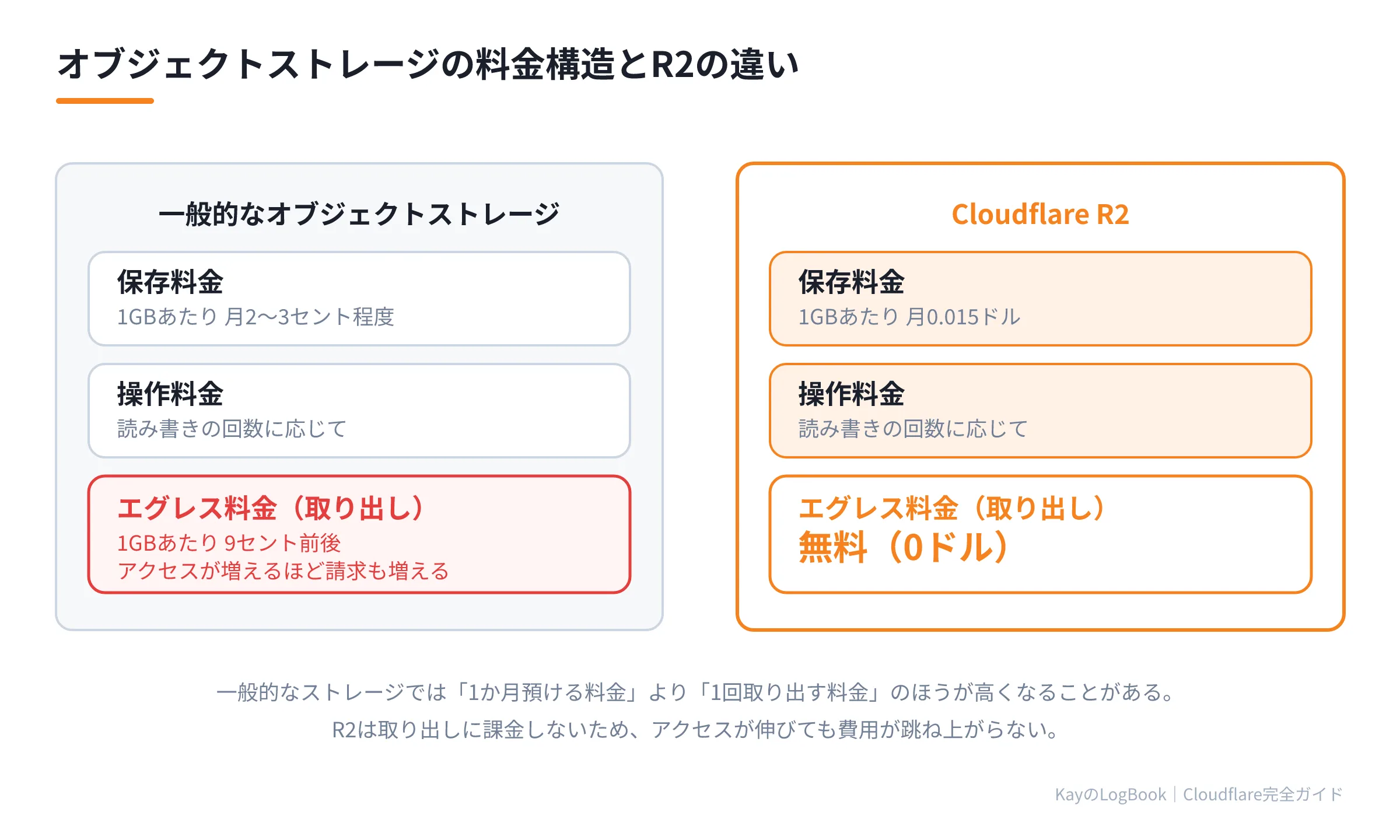
This is possible because Cloudflare already has its own global network as a CDN. As we’ve seen through Chapter 4, Cloudflare can deliver data to users without going through other companies’ lines. The backdrop to R2 is that the very structure of its transfer costs is different.
How to use R2 (three ways to access it)#
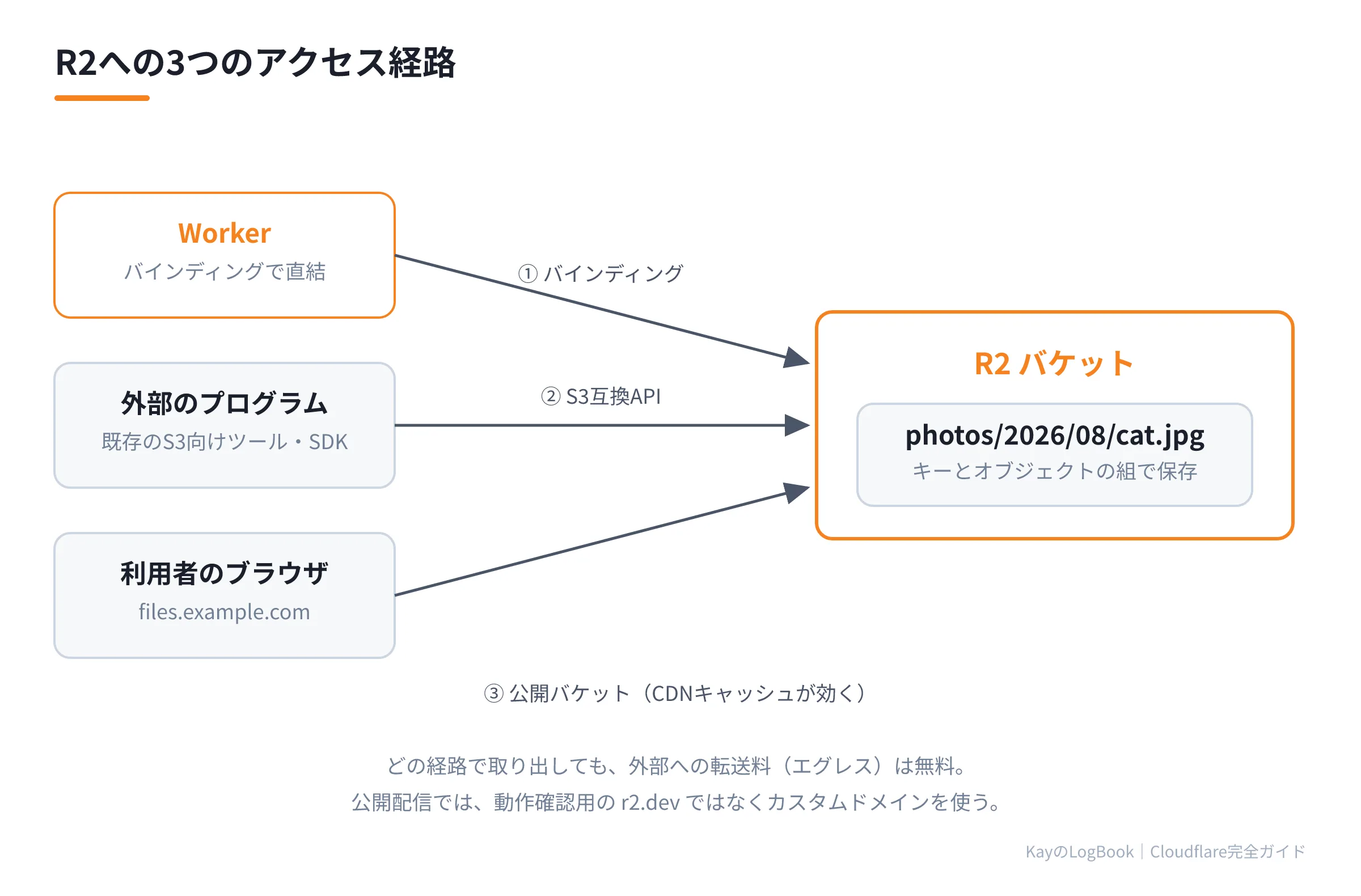
Data stored in R2 can be accessed through three routes depending on your purpose.
1. From a Workers binding#
This is the most Cloudflare-like way. If you bind a bucket in your Worker’s configuration, your code can read and write directly, like env.MY_BUCKET.get("photos/cat.jpg"). There’s no need to put credentials in your code, and since everything stays within Cloudflare’s network, it’s fast.
Another advantage is that you can insert processing, such as checking permissions on upload or transforming an image before returning it.
2. From the S3-compatible API#
R2 has an API that follows the same conventions as Amazon S3. So existing programs written for S3, and tools like the AWS CLI and SDKs for various languages, can be used almost unchanged just by switching the endpoint and access keys.
This is the route for use from outside Cloudflare, such as server-side backup jobs or uploads from existing systems.
3. Serving directly from a public bucket#
If you make a bucket public, you can serve files by URL. Assign your own domain (e.g. files.example.com) and CDN caching works as is.
Note that the r2.dev URL issued during setup is for testing, and because it’s rate limited, Cloudflare explicitly says not to use it in production. If you serve files publicly, always set up a custom domain.
Pricing#
Pricing as of August 2026 is as follows. Egress (retrieval) is always free.
| Standard | Infrequent Access | |
|---|---|---|
| Storage | $0.015 per GB per month | $0.01 per GB per month |
| Class A operations (writes, lists) | $4.50 per million | $9.00 per million |
| Class B operations (reads) | $0.36 per million | $0.90 per million |
| Retrieval fee | None | $0.01 per GB |
| Egress | Free | Free |
The monthly free tier is 10GB of storage, 1 million Class A operations and 10 million Class B operations (Standard class only). Delete operations are free.
The Infrequent Access class is for data you rarely read. Storage is cheaper, but operation fees go up and there’s a retrieval fee when you read. There’s also a minimum storage charge of 30 days, so it’s not suited to data you delete soon. Think of it as an option for storing backups and old logs.
Limits#
| Item | Limit |
|---|---|
| Size of one object | 5 TiB |
| Size you can send at once (single upload) | 5 GiB |
| Number of parts in a multipart upload | 10,000 |
| Object key length | 1,024 bytes |
| Number of buckets | 1 million per account |
| Concurrent writes to one object | Once per second |
| Custom domains per bucket | 100 |
There’s no limit on the amount of data or number of objects you can store. For files over 5GiB, use multipart upload, which sends the file in pieces.
What it is and isn’t suited for#
Suited for
- A place for files you serve as is: images, video, audio, PDFs and so on
- Files uploaded by users of your site or app
- Storing backups and archives
- Accumulating data you’ll process in bulk later, such as logs and sensor data
- Migrating from other storage (costs don’t rise as retrieval increases)
Not suited for
- Queries like “search for data matching certain conditions”. That’s the job of a database (D1)
- Small settings values that are read and written one at a time, frequently. KV is better suited for that
- Rewriting one file many times per second. Writes to the same object are limited to once per second
The rule of thumb is: “Do you store it whole and retrieve it whole?” If you handle data file by file, choose R2; if you filter the contents by conditions, choose a database.
Points beginners should watch out for#
- Only egress is free: storage and operation fees still apply. Class A operations (writes, listing) in particular cost more than 10 times as much per operation as reads, so be careful with designs that list objects repeatedly
- Reading a key that doesn’t exist still costs an operation: a read that finds nothing still counts as one
- Don’t use
r2.devin production: it’s rate limited, and Cloudflare itself advises against production use. Always set up a custom domain - Be careful with public bucket settings: once a bucket is public, anyone who knows a key can fetch it. Consider issuing temporary URLs while keeping it private (presigned URLs), or putting authentication in front with Workers
- The Infrequent Access class has a 30-day minimum: using it for data you delete quickly ends up costing more
- Deletion can’t be undone: to guard against accidental deletion, consider enabling versioning or replicating to another bucket
Related services#
-
Workers: the runtime that reads and writes R2. Connects directly via bindings (Chapter 5)
-
Workers KV: storage for reading small values quickly (next page)
-
D1: a database you can query with conditions
-
Cloudflare CDN: caches public bucket delivery to speed it up (Chapter 1)
-
Cloudflare Images / Stream: delivery services specialized for images and video. Use these if you want to hand off transformation and playback as well
-
Choosing between storage options: how to choose among R2 / KV / D1 / Durable Objects (the Chapter 6 wrap-up)
Summary#
- R2 is object storage that keeps files as they are, handling data with buckets and keys
- Its biggest feature is free egress (retrieval). Transfer charges don’t rise as traffic grows
- There are three ways to access it: Workers bindings, the S3-compatible API, and public buckets
- Pricing is $0.015 per GB per month for storage plus operation fees. The free tier is 10GB of storage and 10 million reads per month
- It’s suited to storing and retrieving data file by file, and not suited to conditional searches or high-frequency rewrites
- Be careful with public settings and how you handle
r2.dev
The next page looks at storage that contrasts with R2. Not files, but a mechanism for reading small pieces of data, like settings values and session information, from edges around the world in a few milliseconds: Workers KV.