What Is Cloudflare Workers? Serverless at the Edge
On this page14 items
This begins Chapter 5, “Developer Platform”. Through Chapter 4, Cloudflare was something that protected, sped up or connected servers you already had. Your own server was always the star, and Cloudflare was the pathway standing in front of it.
This chapter deals with a world where that premise changes. With Cloudflare Workers, you can run programs you’ve written on Cloudflare’s network without owning a single server. Cloudflare’s locations in more than 300 cities around the world become the runtime for your application.
What you’ll learn on this page#
- What serverless is, and how it differs from traditional server operations
- Where and how Cloudflare Workers runs (what it means to run at the edge)
- Why Workers starts so fast (how V8 isolates work)
- What Workers code looks like, and how to publish it
- How bindings connect it to other Cloudflare services
- Pricing and the main limits, plus points where beginners tend to stumble
What is serverless? A way of running code without thinking about servers#
Serverless literally means “no server”, but servers don’t actually disappear. More precisely, it means “you don’t have to provision and operate servers yourself”.
A traditional web application starts by setting up a server. You install the OS, install middleware, keep applying security updates, scale up when traffic grows and sit on excess capacity when it falls. This kind of work trails on endlessly before and after you write any code.
With serverless, all the developer provides is the processing itself. Hand over code that says “when a request comes in, run this”, and the platform takes care of provisioning, starting, scaling up and scaling down the runtime. When no requests come in, nothing runs and nothing is charged.
Cloudflare Workers is a service that delivers this serverless model on Cloudflare’s global network. And “where it runs” is the decisive difference from other companies’ serverless offerings.
Where does Workers run?#
With typical cloud serverless (such as AWS Lambda), you choose the region to run in. If you pick the Tokyo region, processing runs in Tokyo no matter where in the world the request comes from. A user in Brazil waits for processing to finish halfway around the globe.
Workers has no region selection. Deployed code is distributed across Cloudflare’s entire network and runs right at the location that received the request. Requests from Japan are processed in Tokyo or Osaka, and requests from Germany in Frankfurt. From the user’s point of view, there’s always a server at the nearest point.
In networking terms, this “place close to the user” is called the edge. Whereas the CDN covered in Chapter 1 was a mechanism for “putting content close to users”, Workers is a mechanism for “putting program execution itself close to users”.
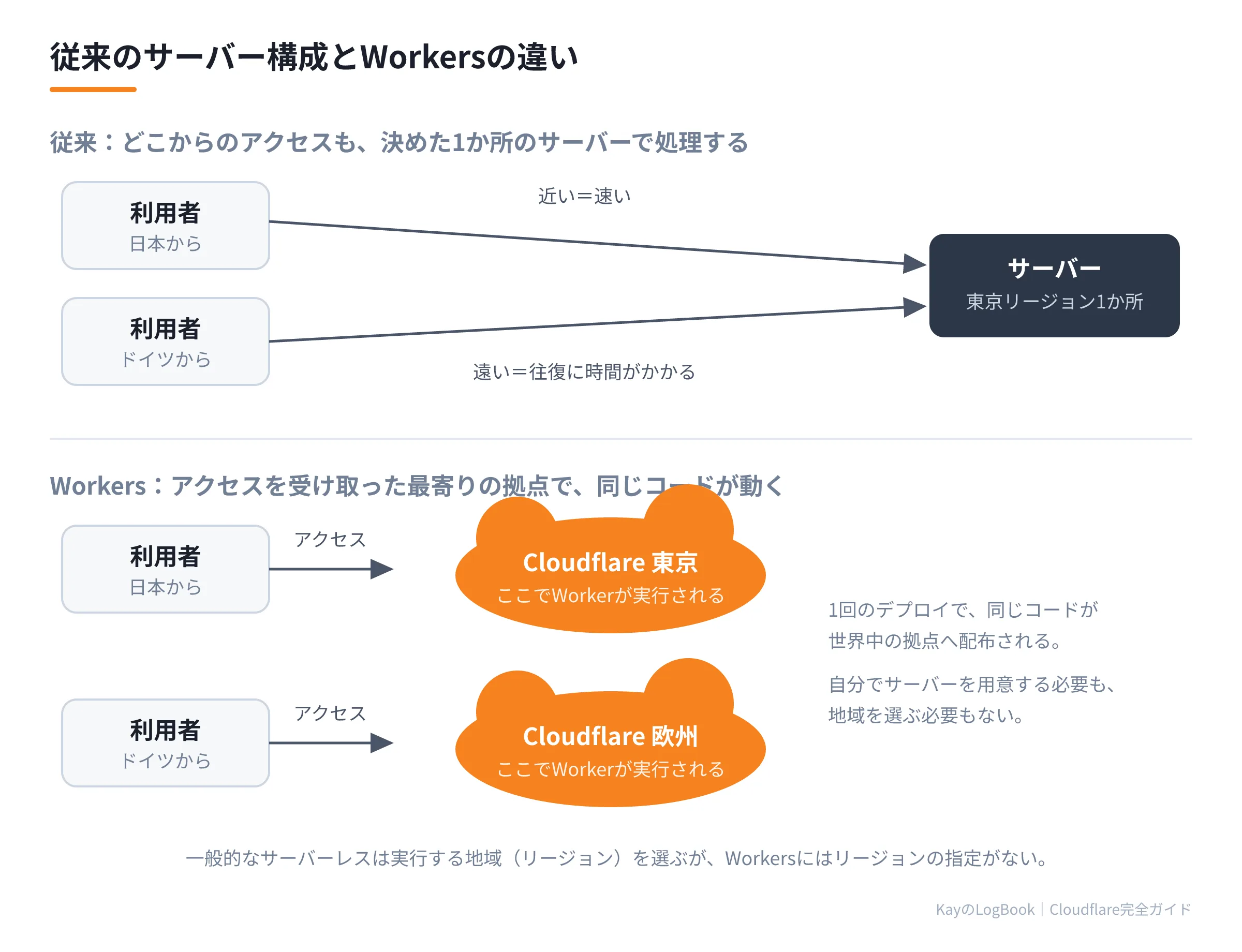
Deployment speed is another feature. A single wrangler deploy command rolls your code out to locations worldwide within tens of seconds. There’s no need to set up servers region by region.
Why does it start so fast? V8 isolates#
Serverless has long had a weakness called cold start (the wait while the runtime starts up for a request after a period of inactivity). Typical serverless platforms spin up a container or virtual machine for each function and start the language runtime inside it. This preparation can take anywhere from hundreds of milliseconds to several seconds.
Workers doesn’t use this structure. It uses a mechanism called V8 isolates. V8 is the JavaScript engine also used in Google Chrome, and an isolate is a small, isolated execution space created inside it. It’s the same idea as how a browser runs multiple tabs without them interfering with each other.
On each Cloudflare server, the JavaScript runtime is started just once up front, and hundreds or thousands of isolates are lined up on top of it and switched between. When a request comes in, only a single isolate needs to be prepared, so it’s orders of magnitude faster than spinning up a container or virtual machine and uses far less memory. The official documentation says it starts about 100 times faster than starting a Node process in a container.
Because isolation is guaranteed, even when countless users’ Workers are running simultaneously on the same server, none of them can touch another’s data or memory.
What does Workers code look like?#
Workers code takes the form of “a function that receives a request and returns a response”. The simplest Worker looks like this:
export default {
  async fetch(request, env, ctx) {
    return new Response("Hello World!");
  },
};
fetch is the entry point (handler) called when an HTTP request arrives. The arguments mean the following:
request: the incoming request. You can read the URL, headers, method, body and so onenv: holds the bindings (connections to other services, described below) and environment variablesctx: used for control such as continuing processing after returning a response (waitUntil)
The syntax is almost the same as JavaScript in the browser, and web-standard APIs like Request / Response / fetch() work as is. Besides JavaScript and TypeScript, it supports Python, Rust, and other languages via WebAssembly.
Besides HTTP requests, there are several other entry points, such as Cron Triggers that start at scheduled times (scheduled execution), Email Workers triggered by incoming email, and handlers that receive messages from a queue.
From development to publishing#
For development, you use Wrangler, Cloudflare’s official command-line tool. The basic flow is three steps.
npm create cloudflare@latest -- my-first-worker   # Create a project scaffold
npx wrangler dev                                  # Run it locally (localhost:8787)
npx wrangler deploy                               # Publish it worldwide
wrangler dev reproduces the Workers runtime on your own PC, so you can check that it behaves the same as in production, even offline.
When you deploy, a free URL of the form <worker-name>.<account-name>.workers.dev is assigned immediately, and you can check that it works right away. If you want to publish on your own domain, set up a route (e.g. example.com/api/*) or a custom domain on a domain managed by Cloudflare. For getting or transferring a domain, see the explanation in Chapter 1.
Workers also supports serving static files (HTML, CSS, images and so on), and serving static assets itself is free. Publishing the frontend and backend together in a single Worker is now the standard way to build things.
Bindings: how it connects to other services#
What keeps Workers from being just a small runtime is a mechanism called bindings.
A binding is a connection point that gives a Worker both permission to “use this resource” and the means to operate it. Once you map it in the configuration file, you can call it directly in code as something like env.MY_KV. There’s no need to write API keys or tokens in your code, and since the keys themselves are never exposed in code, accidental leaks don’t happen.
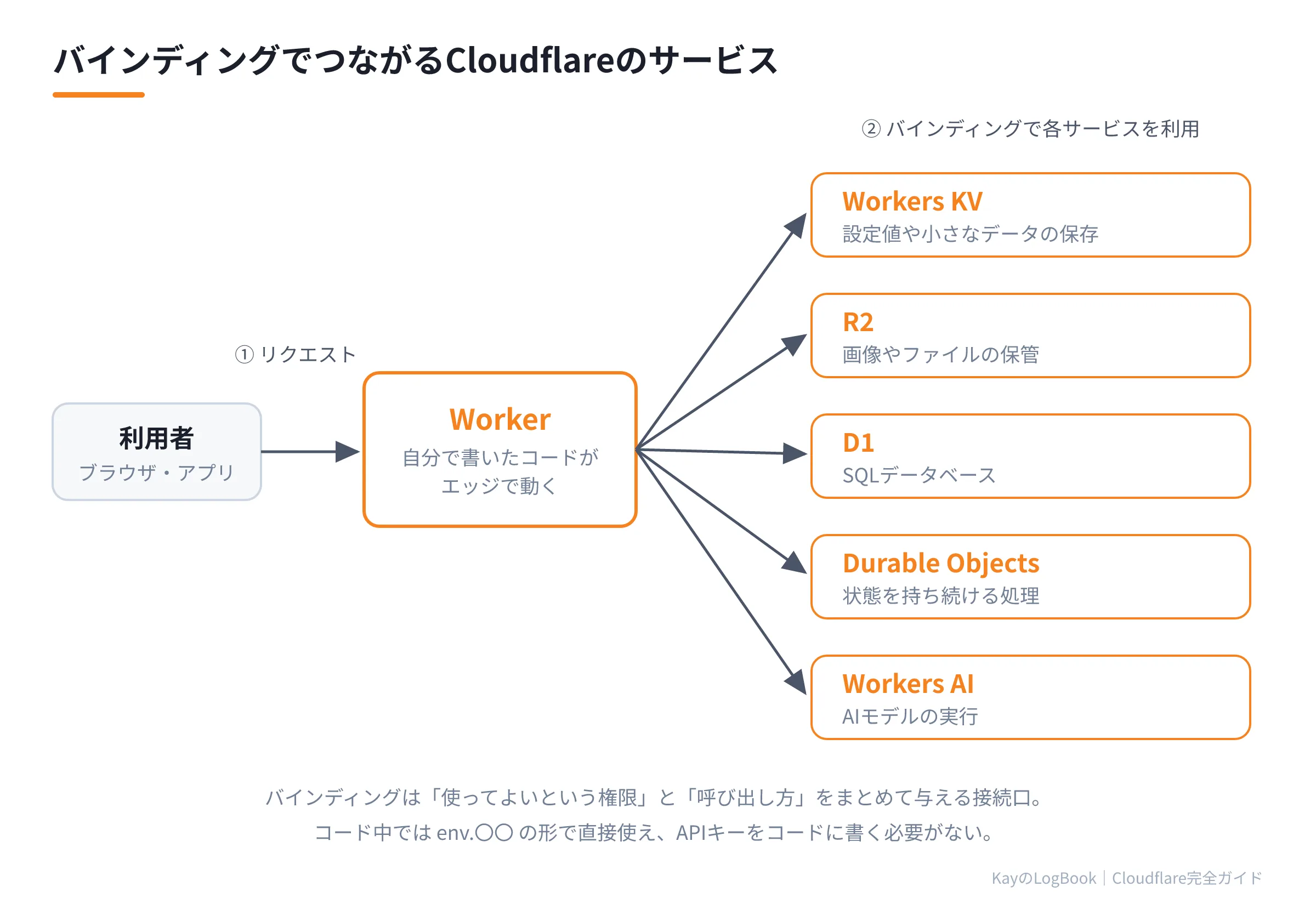
The main bindings are listed below. Each is explained individually in later chapters of this guide.
- Workers KV: a key-value store at the edge (Chapter 6)
- R2: object storage (Chapter 6)
- D1: a SQLite-based database (Chapter 6)
- Durable Objects: Workers that can hold state (one of the topics in the next chapter)
- Queues / Workflows: asynchronous and long-running processing (second half of Chapter 5)
- Workers AI / Vectorize: running AI models and vector search (Chapter 7)
- Hyperdrive: fast connections to existing databases (Chapter 6)
- Service bindings: connections that call other Workers directly
Put Workers at the center and add the parts you need through bindings. That’s the basic structure of Cloudflare’s developer platform.
What can you use it for?#
Here are some concrete examples.
- API servers: receiving form submissions, relaying external APIs, fetching data with authentication and so on. You can have a backend without owning a server
- Rewriting requests: showing different content depending on the visitor’s country or device, redirecting old URLs to new ones, adding headers and similar processing
- Full-stack apps: combine static asset delivery and server-side processing in a single Worker, running frameworks like React, Next.js and Astro as they are
- Scheduled batch jobs: automate morning tallies or fetching external data with Cron Triggers
- AI applications: combine it with Workers AI or AI Gateway to build apps that return AI responses (Chapter 7)
Whereas the WAF and Rate Limiting covered through Chapter 4 were about “using fixed features through configuration”, Workers is the layer where “you can write and add whatever processing you need”. Requirements that Cloudflare’s standard features can’t reach can now be filled in with your own code.
Pricing#
Workers has a free plan and a paid plan (as of August 2026).
| Free | Workers Paid | |
|---|---|---|
| Monthly price | ¥0 | From $5 |
| Requests | Up to 100,000 per day | 10 million per month included, then $0.30 per million |
| CPU time | Up to 10 ms per request | 30 million CPU-ms per month included, then $0.02 per million CPU-ms |
| Transfer charges | None | None |
The important point here is that billing and limits are based on CPU time, not on time spent waiting. CPU time means the time the processor actually spends computing. While waiting for responses from external APIs or databases, the CPU isn’t being used, so that time isn’t counted. “Up to 10 ms on the free plan” sounds harsh, but for typical API processing that’s mostly waiting, fitting within 10 ms is not unusual.
On the paid plan, you can use up to 5 minutes of CPU time per invocation (the default is 30 seconds). For Cron Triggers and Queue processing, this can be extended up to 15 minutes.
Main limits#
The typical limits are as follows (as of August 2026).
- Memory: 128MB per isolate on every plan
- Code size: Free 3MB / Paid 10MB (both after gzip compression)
- Subrequests: outgoing requests from one invocation: Free 50 / Paid 1,000 (can be raised on higher tiers)
- Number of Workers: Free 100 / Paid 500 per account
- Environment variables: Free 64 / Paid 128 (up to 5KB each)
Points beginners should watch out for#
- It’s not Node.js itself: the Workers runtime is based on web-standard APIs. However, for Workers that specify a compatibility date of August 4, 2026 or later, Node.js compatibility mode is enabled by default, and major built-in APIs such as
node:cryptoandnode:bufferwork without extra configuration. Even so, there are cases where server-oriented libraries, such as ones that freely read and write the file system, won’t work as is - It can’t hold state: Workers basically run independently for each request, and there’s no guarantee that two requests from the same user reach the same runtime. Putting a value in a variable and reading it on the next request doesn’t work. To keep data, use storage like KV or D1, and if you need consistent real-time state, use Durable Objects
- Confusing CPU time with wall-clock time: as mentioned, the limit is CPU time. Conversely, processing that runs heavy computation in a loop will hit the limit even if the wall-clock time is short
- You can’t choose the region: processing runs at the location that received the request. If you have data residency requirements like “it must always be processed in Japan”, you’ll need to consider that separately
- 100,000 requests per day on the free plan: requests here means Worker invocations. If you serve a page’s images and CSS through a Worker, you’ll use them up faster than you’d think. Static asset delivery is handled under the free allowance, so separating the setup avoids waste
Related services#
- Pages: static site hosting. Workers with static asset support is now positioned as its successor (next page)
- Durable Objects: Workers with state. Used for processing that needs consistency, such as chat or collaborative editing (Chapter 5)
- KV / R2 / D1: storage and databases used from Workers (Chapter 6)
- Workers AI: run AI models on top of Workers (Chapter 7)
- Email Routing: process incoming email with Workers (Email Workers)
- WAF and Rate Limiting: APIs you build with Workers can be protected by the security features from Chapter 2 as is
Summary#
- Serverless is an approach where you leave provisioning and operating servers to the platform and write only the processing
- Cloudflare Workers has no region selection and runs code at the nearest location that received the request
- Thanks to V8 isolates, it starts orders of magnitude faster than container-based serverless
- Code takes the form of a function that “receives a request and returns a response”. Wrangler covers everything from creation and local execution to deployment
- Bindings connect it to services like storage, databases and AI, and this forms the core of the developer platform
- The free plan allows 100,000 requests per day and up to 10 ms of CPU time. The paid plan starts at $5 per month
The next page covers Cloudflare Pages, which was the other entry point alongside Workers. It has been widely used for static site hosting, and we’ll also sort out where its relationship with Workers stands today.