What Is Hyperdrive? Speeding Up Your Existing Database
On this page15 items
D1, on the previous page, was a way to set up a new database inside Cloudflare. In reality, though, you may more often find yourself with a system already running on PostgreSQL or MySQL, and wanting to use that data from Workers.
The trouble is that using an existing database directly from Workers is, in many cases, very slow. Hyperdrive removes the cause of that slowness: it’s a way to speed up an existing database with almost no code changes.
What you’ll learn on this page#
- Why using an existing database from Workers is slow
- Hyperdrive’s three mechanisms (accepting connections at the edge, connection pooling, query caching)
- Supported databases and how to get started
- Caching caveats (what isn’t cached)
- Pricing and limits
Why are existing databases slow?#
The cause isn’t transferring the data itself, but the back-and-forth needed to establish a connection.
When connecting to a database, the client and server go through these steps.
- Establish a TCP connection (one or more round trips)
- Establish TLS encryption (one or two round trips)
- Authenticate with a username and password (one or more round trips)
- Finally send the query (one round trip)
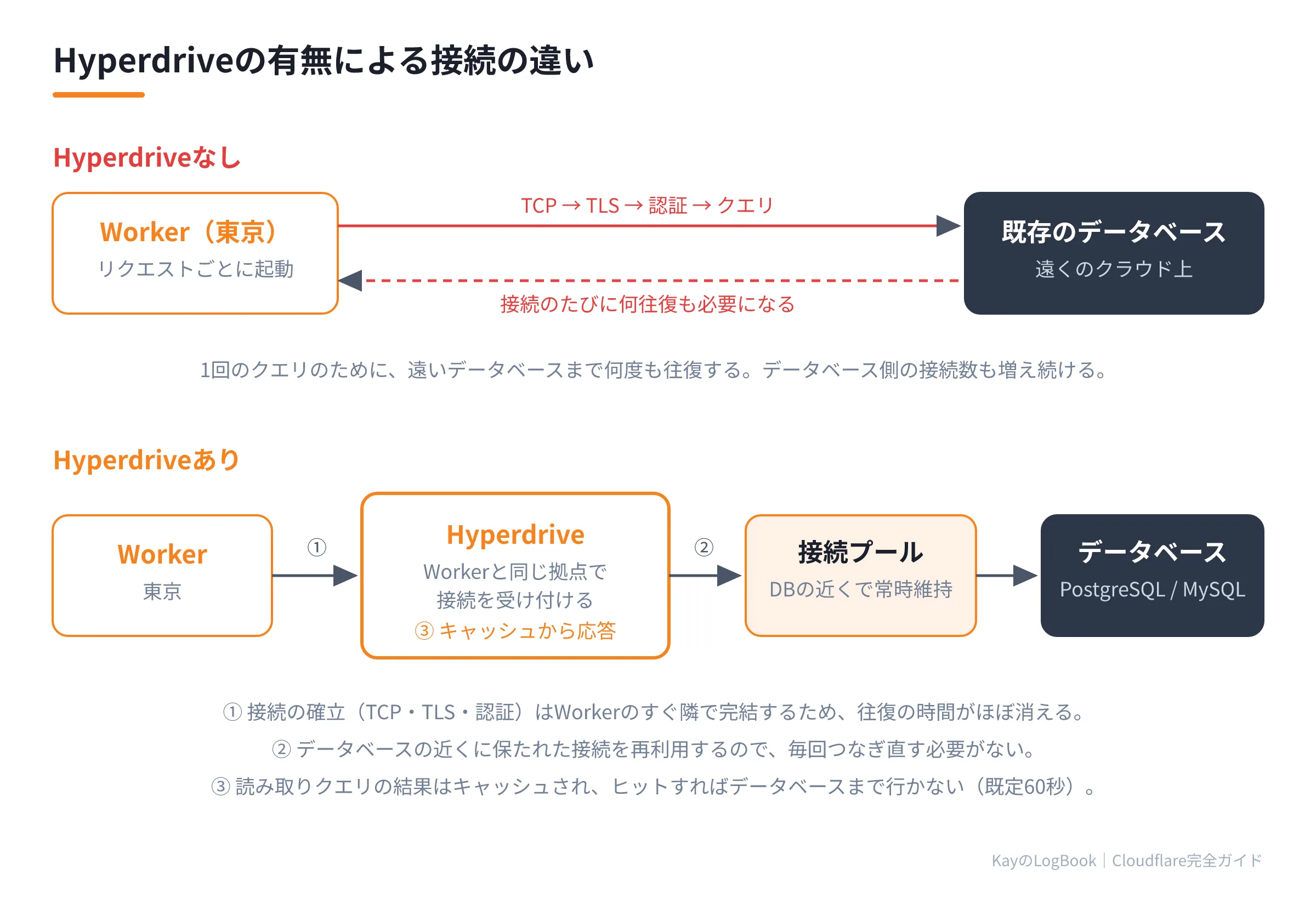
If a round trip takes, say, 150 milliseconds, running a single query can take close to a second. Picture a Worker in Tokyo connecting to a database in the United States.
Workers also have their own particular circumstances. A Worker starts up for each request and disappears when it finishes. Since it can’t “create a connection at startup and reuse it” like an ordinary server, it has to redo these steps from scratch on every request.
On top of that, the database has a limit on concurrent connections. If Workers all open connections at once from Cloudflare locations around the world, the limit can be hit and connections refused.
Hyperdrive’s three mechanisms#
Hyperdrive sits between the Worker and the database and solves this problem in three ways.
1. Accepting connection setup at the edge#
The Worker connects not to the distant database, but to Hyperdrive, right next door. The TCP, TLS, and authentication exchanges complete within the same location, so round-trip time nearly disappears.
2. Keeping a connection pool#
Hyperdrive holds a set of already-established connections at a location near the database (a connection pool). Requests from Workers ride on these existing connections, so there’s no need to establish a connection every time.
At the same time, this keeps the number of connections the database sees constant. Even if Workers around the world run simultaneously, the connections the database receives stay within the size of the pool.
3. Caching read queries#
By default, Hyperdrive caches the results of read-only queries (SELECT). When the same query comes in again, it answers on the spot without going to the database.
By default, cached results are kept for 60 seconds, followed by 15 seconds of “serve the stale value while refreshing in the background” (stale-while-revalidate). The retention time can be extended to a maximum of one hour.
Supported databases#
It supports PostgreSQL and MySQL, along with compatible databases. MySQL support became generally available (GA) on August 7, 2026.
- PostgreSQL family: Amazon RDS / Aurora, Google Cloud SQL, Azure Database, Neon, Supabase, CockroachDB, Timescale, and more
- MySQL family: Amazon RDS / Aurora MySQL, Google Cloud SQL for MySQL, Azure Database for MySQL, PlanetScale, MariaDB, and more
A database on a server you run yourself also works, as long as it’s reachable from the internet. With Cloudflare Tunnel from Chapter 3, you can even connect without exposing the database to the internet.
Getting started#
- Create a configuration with
npx wrangler hyperdrive create my-db --connection-string="postgres://..." - Link it to your Worker in the configuration file (a binding)
- In code, keep using the driver or ORM you’ve been using, and just swap the connection string for
env.HYPERDRIVE.connectionString
Almost no code rewriting is needed. That’s Hyperdrive’s big advantage. Existing queries and ORMs keep working as they are.
Note that database drivers use Node.js features, so you need to enable Node.js compatibility in your Worker settings (this is the nodejs_compat mentioned in the Workers page in Chapter 5).
Things to watch out for with caching#
Caching is on by default, so it’s important to know what isn’t cached.
- Writes aren’t cached: INSERT, UPDATE, DELETE, CREATE TABLE, and so on always reach the database
- Queries containing functions whose results change every time aren’t cached: This covers queries using
NOW(),CURRENT_TIMESTAMP,RANDOM(), and so on. If you need the time, the recommendation is to compute the value in your application and pass it as a parameter - Results over 50 MB aren’t cached: The results themselves are still returned to the Worker, though
The problem is queries that are “reads, but must always be up to date.” Authentication and permission checks, or reads right after a write, fall into this category. In these cases, create a separate configuration with caching disabled and use each depending on the purpose.
npx wrangler hyperdrive create my-db-fresh --caching-disabledFor the same database, you can have a caching-enabled configuration (for heavy reads) and a caching-disabled configuration (for processing that needs accuracy) side by side.
Pricing and limits#
Hyperdrive itself has no additional charge. It’s available on the Workers free plan too (as of August 2026). Of course, usage fees on the database side still apply.
| Item | Free plan | Paid plan |
|---|---|---|
| Databases you can configure | 10 | 25 |
| Connections to the database (per configuration) | About 20 | About 100 |
| Maximum execution time per query | 60 seconds | 60 seconds |
| Size of cacheable results | 50 MB | 50 MB |
| Connection setup timeout | 15 seconds | 15 seconds |
| Idle connection retention | 10 minutes | 10 minutes |
There’s no limit on concurrent connections from Workers. The limits apply on the side going from Hyperdrive to the database.
Good and bad use cases#
Good use cases
- You want to use data from a system already running on PostgreSQL / MySQL from Workers
- You want to move an existing application to Workers, but the database can’t move
- Read-heavy pages where results a few tens of seconds old are fine (listings, product information, articles, etc.)
- You’re struggling with the database’s concurrent connection limit
Bad use cases
- Creating a new database. Unless you have a special reason, D1 has a simpler setup
- Databases that can’t be reached from outside Cloudflare (possible if you combine it with Tunnel)
- Processing dominated by reads that must always be up to date (you can use it with caching disabled, but the only benefit is faster connections)
Points for beginners to watch out for#
- Caching is on by default: If you “updated it but still see the old value,” suspect the cache first
- Connection details are stored at Cloudflare: Since you’re entrusting the database username and password, it’s recommended to create a dedicated user for Hyperdrive with only the minimum necessary permissions
- Don’t forget the Node.js compatibility setting: Without it, drivers won’t work
- Queries are cut off at 60 seconds: Not suited to long-running aggregation jobs
- The database itself doesn’t get faster: What Hyperdrive reduces is round-trip time and connection overhead. Slow queries need to be fixed through index design
- Prepare a caching-disabled configuration too: Always handle authentication-related processing through a path that bypasses the cache
Related services#
-
Workers: The runtime that queries the database via Hyperdrive
-
D1: The choice for new databases (previous page)
-
Cloudflare Tunnel: Connect from Hyperdrive without exposing the database
-
Workers KV: An option when you want to cache query results for even longer
-
Cloudflare CDN: The basics of the caching concept (Chapter 1)
-
Choosing storage: How to choose between R2 / KV / D1 / Durable Objects (the Chapter 6 wrap-up)
Summary#
- Existing databases are slow from Workers because every request incurs the round trips of establishing a connection
- Hyperdrive accepts connection setup at the edge, keeps a connection pool near the database, and caches read results
- It supports PostgreSQL and MySQL (GA in August 2026), along with compatible databases
- You can keep your existing driver or ORM and adopt it just by swapping the connection string
- Caching is on by default. Writes and queries containing
NOW()aren’t cached - Hyperdrive itself has no additional charge and is available on the free plan
That completes the individual services of Chapter 6. R2, KV, D1, Hyperdrive, and Durable Objects from Chapter 5: there are many storage options, and you’re bound to be unsure at first. The next page brings together how to choose between them as a single set of decision criteria.