What Is Vectorize? An Introduction to Vector Databases
On this page16 items
On the previous page about RAG, we looked at the idea of converting text into vectors, “coordinates of meaning,” and finding the ones closest to a question.
What you need for this is a store that can hold a large number of vectors and quickly find the “close” ones. D1 and Workers KV, covered in Chapter 6, don’t handle this use case well. Comparing tens of thousands of sequences of numbers with thousands of dimensions and sorting them by closeness requires a dedicated mechanism.
That dedicated store is a vector database, and on Cloudflare, Vectorize plays that role.
What you’ll learn on this page#
- How a vector database differs from a regular database
- Three basic concepts: indexes, dimensions, and distance metrics
- Filtering with metadata and namespaces
- How to use it together with Workers AI
- How pricing works (with its unusual unit, the “dimension”) and the limits
What is a vector database?#
A regular database looks for things that match exactly.
SELECT * FROM articles WHERE title = 'About paid leave';This returns only rows whose title doesn’t differ from this string by a single character. An article titled “Number of annual paid leave days granted” won’t be found.
A vector database looks for things that are close.
Give me the top 5 closest to this vectorAs we saw, the property of vectors is that being close as numeric coordinates means being close in meaning. So this query effectively means “give me 5 pieces of text with similar meaning.”
Vectorize became generally available (GA) in April 2026 and is no longer an experimental service.
Three basic concepts#
Index#
The unit of “container” in Vectorize. It corresponds to a database in D1 or a bucket in R2 from Chapter 6. Vectors go into an index, and searches are also performed per index.
When you create an index, you decide three things.
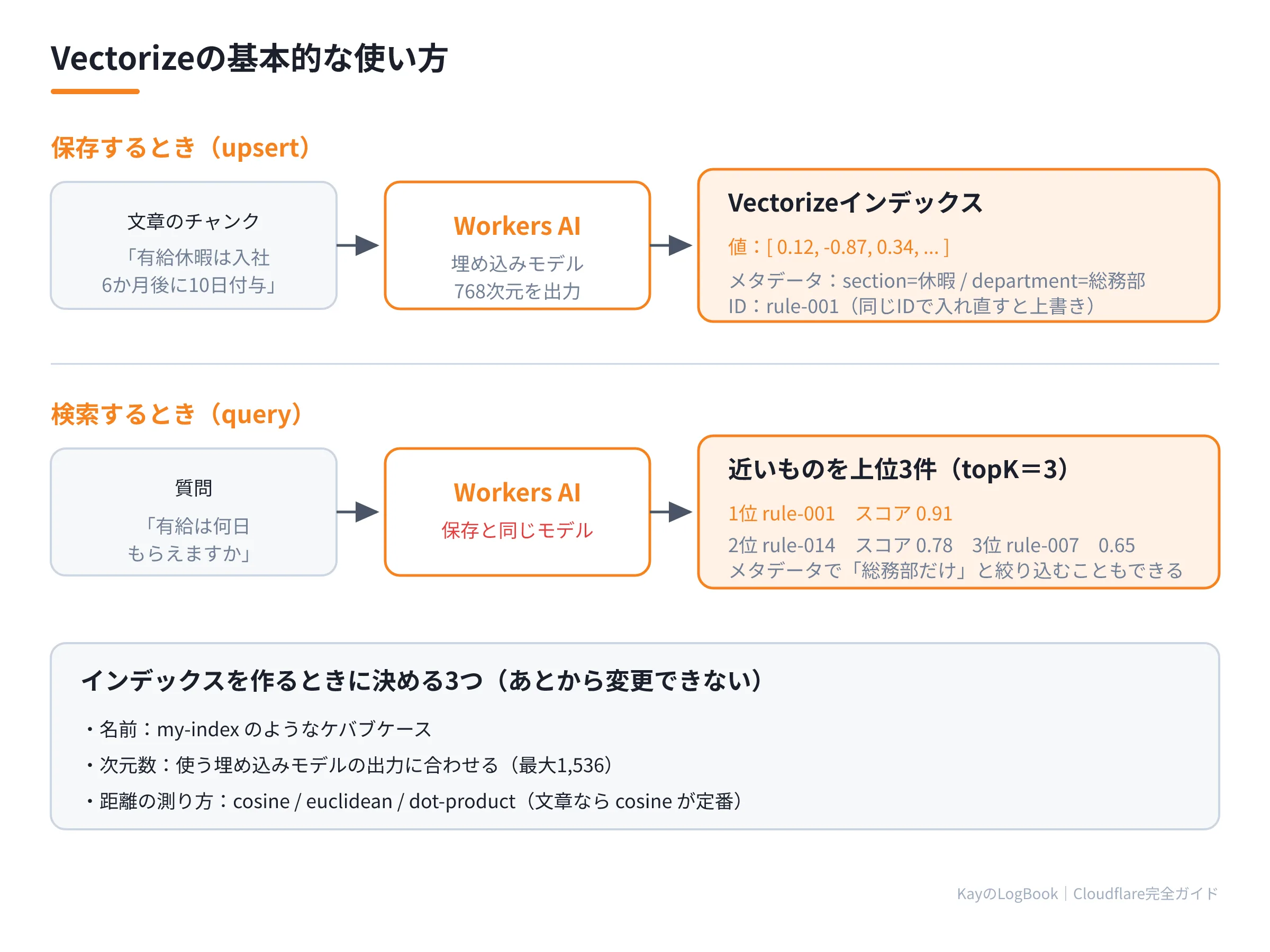
npx wrangler vectorize create my-index --dimensions=768 --metric=cosine- Name: A kebab-case name (lowercase letters and hyphens) such as
my-index - Dimensions: The number of values in each vector
- Distance metric: How closeness is calculated
What’s important is that the dimensions and the distance metric can’t be changed after creation. If you want to change them, you have to recreate the index and insert all the vectors again.
Dimensions#
The number of values contained in a vector. You don’t decide this number yourself; it’s determined by the embedding model you use.
| Embedding model | Output dimensions |
|---|---|
| Workers AI bge-base-en-v1.5 | 768 |
| OpenAI ada-002 | 1536 |
| Cohere embed-multilingual-v2.0 | 768 |
| Google Cloud multimodalembedding | 1408 |
The index’s dimensions must match the output of the embedding model you use. If you use a 768-dimension model, create the index with 768 dimensions too.
More dimensions can represent finer differences between texts, so accuracy tends to improve. On the other hand, storage and search load increase proportionally, which translates directly into cost. The maximum Vectorize supports is 1,536 dimensions.
Distance metric#
The method for calculating “closeness.” There are three kinds.
| Method | Characteristics |
|---|---|
cosine | Expressed from -1 (least similar) to 1 (identical). 0 means unrelated. The most commonly used for text similarity search |
euclidean | The straight-line distance between coordinates. 0 is identical; larger means farther |
dot-product | The negated dot product. The smaller the value (a large negative number), the more similar |
If in doubt, choose cosine. It’s the de facto standard for text embeddings. If the documentation for the embedding model you use recommends a metric, follow that.
Metadata and namespaces#
Alongside the sequence of numbers, a vector can be stored with metadata (accompanying information).
await env.VECTORIZE.upsert([
  {
    id: "doc-123-chunk-4",
    values: [0.12, -0.87, 0.34, /* ... 768 values */],
    metadata: {
      title: "Employee Handbook",
      section: "Chapter 5: Leave",
      updated: "2026-04-01",
      department: "General Affairs",
    },
  },
]);
This metadata plays two roles at search time.
The first is filtering. You can add conditions such as “search for close matches only among General Affairs documents.” This is the basic means of implementing access control in RAG.
The second is showing sources. Because metadata is returned along with search results, you can show users “From the Employee Handbook, Chapter 5.”
A namespace is a mechanism for further partitioning the inside of an index. Use it when you want to separate data per user or per tenant. When you search with a namespace specified, vectors from other namespaces are never returned. It provides clearer separation than filtering by metadata.
Using it with Workers AI#
Vectorize can’t do anything on its own. Creating vectors is the job of an embedding model such as Workers AI. The actual code looks like this.
When storing
// 1. Convert the text into a vector
const { data } = await env.AI.run("@cf/baai/bge-base-en-v1.5", {
  text: ["Employees are granted 10 days of paid leave six months after joining"],
});

// 2. Store it in Vectorize
await env.VECTORIZE.upsert([
  { id: "rule-001", values: data[0], metadata: { section: "Leave" } },
]);
When searching
// 1. Convert the question into a vector with the same model
const { data } = await env.AI.run("@cf/baai/bge-base-en-v1.5", {
  text: ["How many days of paid leave do I get?"],
});

// 2. Retrieve the top 3 closest matches
const results = await env.VECTORIZE.query(data[0], { topK: 3 });
upsert is an operation that “adds if it doesn’t exist, updates if it does.” Inserting again with the same ID replaces the content, so you don’t need to think of deletion and insertion separately when updating documents.
topK is the number of results to retrieve. You can specify up to 50 if you also receive values and metadata, or up to 100 for IDs and scores only.
Uses beyond RAG#
Vector search tends to be thought of as a technology for RAG, but its uses are much broader.
- Recommending similar articles: Show articles whose vectors are close to the one being read
- Detecting duplicates and near-duplicates: Check whether a similar inquiry has already come in
- Image search: Pass images through an embedding model and you can find “similar images”
- Classification: Place a representative vector for each category in advance and assign items to the closest one
- Anomaly detection: Find things that are far from the usual patterns
They all have one thing in common: finding things that exact matching can’t find.
Pricing#
Vectorize pricing is calculated in units of “dimensions.” What’s unusual is that it counts not the number of vectors but the total multiplied by the number of dimensions.
| Item | Workers Free plan | Workers Paid plan |
|---|---|---|
| Queried dimensions | Up to 30 million per month | 50 million per month included; $0.01 per million beyond that |
| Stored dimensions | Up to 5 million | 10 million included; $0.05 per 100 million beyond that |
Stored dimensions are straightforward: number of vectors × dimensions. Insert 10,000 vectors of 768 dimensions and that’s 7.68 million dimensions.
Queried dimensions are a bit unusual and are calculated as (monthly queries + number of stored vectors) × dimensions. Note that the number of stored vectors is added in directly. As your data grows, queried dimensions increase even if the number of searches stays the same.
There are no charges for CPU time, memory, number of indexes, or data transfer (egress). Empty indexes don’t count toward stored dimensions.
Cost estimates#
Here are the examples given officially. All amounts exclude the free tier and included allowances.
| Scale | Dimensions | Stored vectors | Monthly queries | Approx. monthly cost |
|---|---|---|---|---|
| Experiment | 384 | 5,000 | 10,000 | Fits within the free tier |
| Small | 768 | 25,000 | 50,000 | About $0.59 (mostly within the Paid plan’s included allowance) |
| Production | 768 | 50,000 | 200,000 | About $1.94 |
| Large | 768 | 250,000 | 500,000 | About $5.86 |
| Extra large | 1536 | 500,000 | 1,000,000 | About $23.42 |
For a personal site or searching internal documents, it usually fits within the free tier or a few dollars. Vector databases tend to have a reputation for being expensive, but this sense of scale is worth remembering.
Main limits#
| Item | Free plan | Paid plan |
|---|---|---|
| Indexes (per account) | 100 | 50,000 |
| Vectors per index | 20 million | 20 million |
| Dimensions per vector | Up to 1,536 | Up to 1,536 |
| Metadata size (per vector) | 10 KiB | 10 KiB |
| Metadata indexes (per index) | 10 | 10 |
| Namespaces (per index) | 1,000 | 50,000 |
| Batch size for bulk inserts | Workers 1,000 / HTTP API 5,000 | Same as left |
| Size per upload | 100 MB | 100 MB |
A “metadata index” is a mechanism for registering metadata fields in advance so they can be used for filtering. The limit is 10 fields per index, so you need to decide at design time which fields you’ll filter on.
Points beginners should watch out for#
- Dimensions and metric can’t be changed later: Decide on the embedding model before creating the index. Switching models means recreating it
- Use the same embedding model for storing and searching: Comparing vectors from different models doesn’t give meaningful results
- Search results are “in order of closeness,” not “correct answers”: Even unrelated content is returned if it’s the closest. Set a minimum score and design it to discard low-scoring results
- Decide the metadata filter fields in advance: There’s a limit of 10, and there are constraints on adding more later
- Queried dimensions grow in proportion to stored data: If your data grows tenfold, queried dimensions grow roughly tenfold even with the same number of searches
- Store the original text somewhere too: Putting the full text in Vectorize metadata runs into the 10 KiB limit. The standard pattern is to keep long text in R2 or D1 and put only a reference to it in Vectorize
Related services#
- Workers AI: Provides the embedding models that create vectors
- RAG: The typical system Vectorize is used in
- D1: Where to store document text, attributes, and permission data
- R2: Where to keep the original PDFs and images
- Workers: The runtime that calls Vectorize
Summary#
- Vectorize is Cloudflare’s vector database. It became GA in April 2026
- Whereas a regular database looks for “matches,” Vectorize looks for “close” items
- When creating an index, you decide its name, dimensions, and distance metric. Dimensions and metric can’t be changed
- Dimensions are determined by the embedding model. The maximum is 1,536. If in doubt, use
cosineas the distance metric - Metadata enables filtering and showing sources, and namespaces let you separate data per user
- Pricing is per “dimension.” Personal and small-scale uses often fit within the free tier or a few dollars a month
You now have all the parts to build RAG yourself. But writing document conversion, chunking, embedding, storage, search, and generation all by yourself is a fair amount of work. The next page covers AI Search, which takes all of this on for you.