What Is Workers AI? Running AI Models at the Edge
On this page13 items
Up through Chapter 6, we’ve looked at how to put programs on Cloudflare (Workers) and store data (R2, D1 and so on). Chapter 7 moves on to building AI into that.
When building an application that uses AI, most people first think of calling an API from OpenAI, Anthropic or the like. That’s a valid choice, but Cloudflare offers another route: running open AI models directly on GPUs located on Cloudflare’s network. That’s Workers AI.
What you’ll learn on this page#
- What Workers AI is, and where the AI models run
- What kinds of models are available
- How to call it from a Worker
- The pricing unit called the Neuron, and the free allowance
- How to choose between it and external AI APIs
What is Workers AI?#
Workers AI is a service that runs AI model inference on GPUs deployed in Cloudflare’s data centers around the world.
“Inference” means feeding input to a trained AI model and getting a result. Having it write text, generate images, transcribe speech, or convert text into numerical vectors — all of this “using the model” work is inference. Training an AI model from scratch is outside the scope of Workers AI.
What sets Workers AI apart is that you don’t have to provision a single server to run inference. GPUs are expensive, and if you keep one running all the time you’re billed even when it’s idle. Workers AI follows the same idea as Workers: it runs only when a request comes in, and you pay only for what you use.
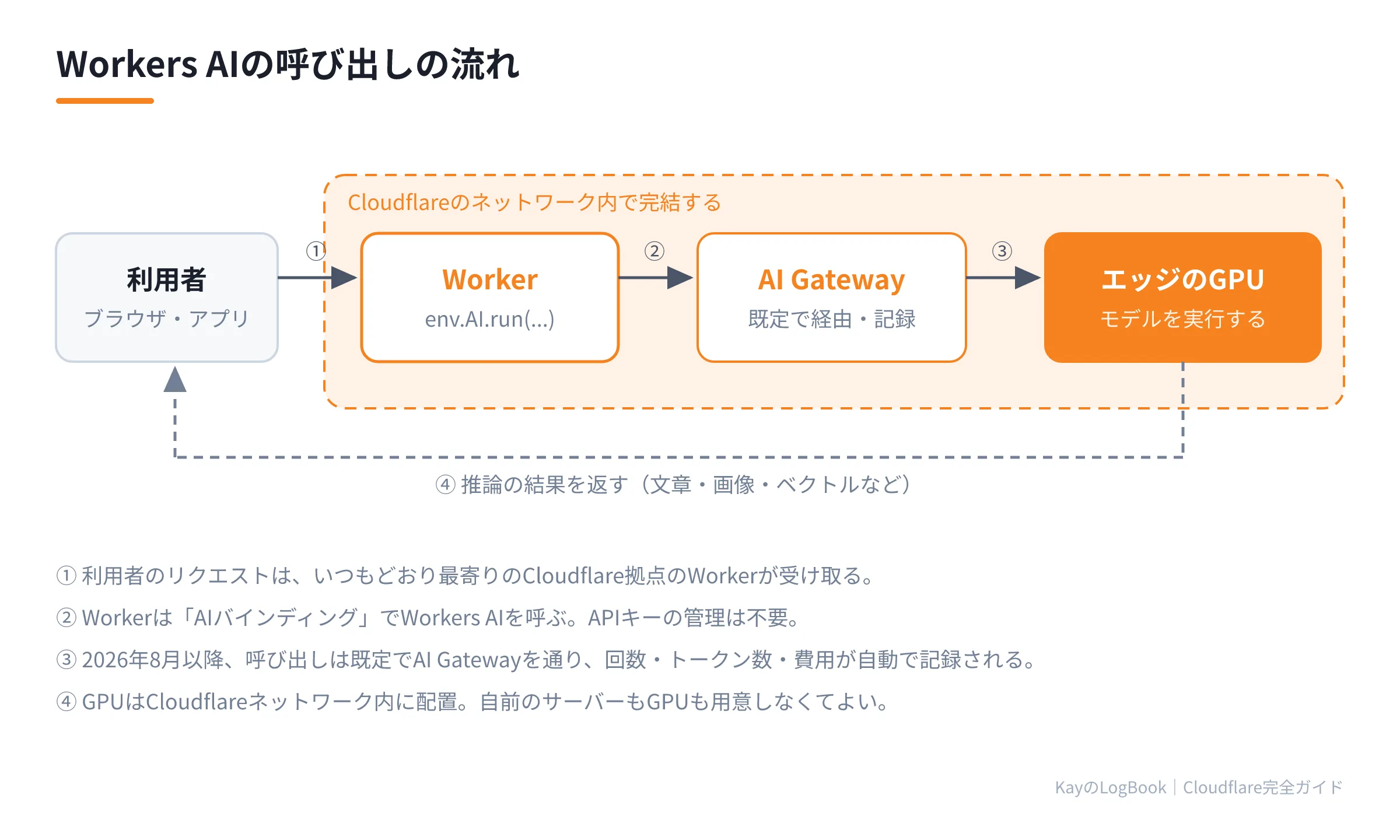
Where does it run?#
Workers AI’s GPUs are deployed at many locations within Cloudflare’s network. If processing can happen at a location close to the user, the round-trip time is shorter.
However, GPUs aren’t at every location the way CDN caches are. The larger the model, the fewer locations can run it, so rather than thinking “it always runs in the nearest city”, a more accurate picture is that inference is handled within Cloudflare’s network instead of being sent to a dedicated server.
The important point is that, from the user’s side, there’s no need to think about where it runs. You don’t choose a region, specify a GPU type or estimate capacity.
Types of models available#
Workers AI provides a model catalog organized by use case. It centers on open models (with published weights), with models from many providers such as Meta’s Llama, Mistral, Google, DeepSeek and Moonshot AI.
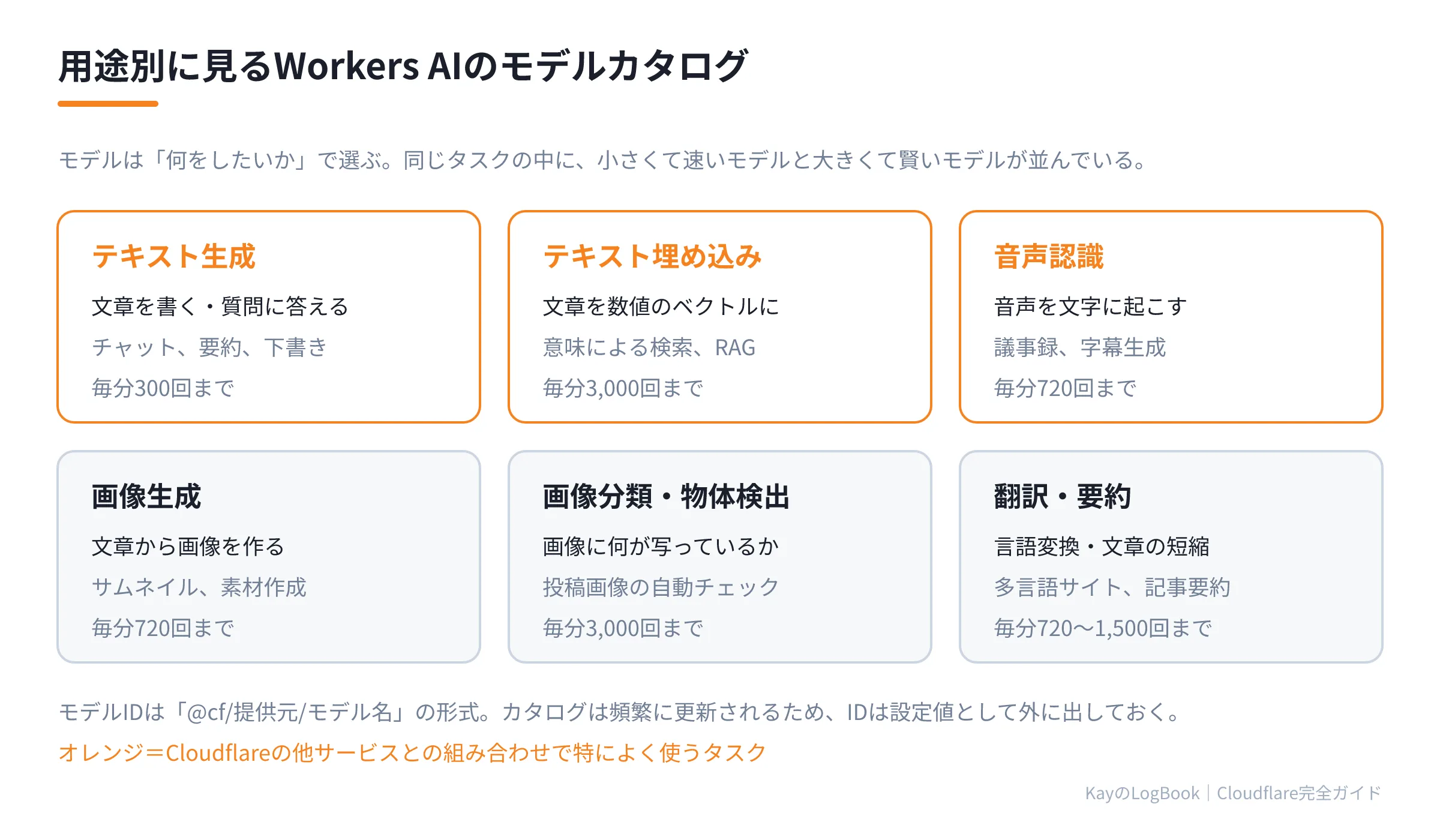
The main task types are as follows.
| Task | What it does | Where it’s useful |
|---|---|---|
| Text generation | Writes text, answers questions | Chatbots, summaries, drafting |
| Text embeddings | Converts text into numerical vectors | Semantic search, RAG |
| Speech recognition | Transcribes audio into text | Meeting minutes, subtitles |
| Image generation | Creates images from text | Thumbnails, assets |
| Image classification / object detection | Determines what’s in an image | Automatic checks on uploaded images |
| Translation / summarization | Converts languages, shortens text | Multilingual sites, article summaries |
Models are specified by IDs in the form @cf/provider/model-name, such as @cf/meta/llama-3.1-8b-instruct. New models are constantly added to the catalog, and old models are retired after advance notice. Rather than hard-coding model IDs, keep them outside the code as configuration values, so they’re easy to swap later.
Calling it from a Worker#
The most basic way to use Workers AI is to add an “AI binding” to your Worker. A binding is the connection setting that lets a Worker use other Cloudflare services (explained on the Workers page).
Add the following line to the configuration file (wrangler.jsonc):
{
  "ai": { "binding": "AI" }
}
Now you can call it as env.AI from your Worker’s code.
export default {
  async fetch(request, env) {
    const response = await env.AI.run("@cf/meta/llama-3.1-8b-instruct", {
      prompt: "What is Cloudflare?",
    });
    return Response.json(response);
  },
};
Notice that no API key appears anywhere. When using an external AI API, you need to obtain an API key, store it securely as a secret, and load it from your code. Workers AI is a service within your Cloudflare account, so setting up the binding takes care of authentication. No key management, and no worrying about leaked keys.
You can also use it from outside Workers. By calling the REST API, you can invoke the same models from your home computer or another company’s server.
The Neuron pricing unit#
Workers AI pricing is calculated in its own unit called the Neuron.
How much GPU a single operation uses differs completely from model to model. A small text model and a large image generation model can differ in compute by dozens of times. The Neuron is the unit for measuring all of that on one scale.
- Free allowance: 10,000 Neurons per day (resets daily at 00:00 UTC)
- Overage: $0.011 per 1,000 Neurons (requires the Workers Paid plan)
The free allowance of 10,000 Neurons per day is the same on both the Workers Free plan and the Paid plan. The Workers Paid plan (from $5/month) is needed if you want to use more than 10,000 Neurons a day.
The per-model rates are published in the official model list as “X Neurons per million input tokens”. Small text generation models cost about 2,500 Neurons per million tokens, while the largest top-tier models cost about 120,000 Neurons — a gap of nearly 50x. The efficient approach is to choose a small model while prototyping and switch to a larger one once you need it.
Also, since July 28, 2026, some large models (Moonshot AI’s Kimi K2.6 and K2.7-code, GLM-5.2, and DeepSeek’s v4-flash and v4-pro) aren’t available on the free plan and require the Workers Paid plan or prepaid AI Gateway credits.
Rate limits#
Separately from pricing, there are also limits on the number of calls per minute. They’re set per task type; typical ones are:
- Text generation: 300 per minute
- Text embeddings: 3,000 per minute
- Image classification / object detection: 3,000 per minute
- Speech recognition, image generation, translation: 720 per minute
Personal sites and internal tools will rarely hit these, but you need to keep them in mind for batch jobs that process large amounts of data at once.
Integration with AI Gateway (August 2026)#
On August 7, 2026, Cloudflare merged Workers AI and AI Gateway into a single control plane.
Previously, running models with Workers AI and monitoring calls with AI Gateway were separate products. Since the integration, both are available through the same AI binding and the same API endpoint, and calls to Workers AI go through AI Gateway by default.
From the user’s point of view, the changes are:
- All inference is logged without any configuration
- Token counts and costs per model are tallied automatically
- Credits loaded into AI Gateway can pay for both Workers AI and external providers
In other words, as soon as you start using Workers AI, the AI Gateway observability features covered on the next page are already working from the start.
Choosing between it and external AI APIs#
Having Workers AI doesn’t make the OpenAI or Anthropic APIs unnecessary. Each has its own strengths.
| Workers AI | External AI APIs | |
|---|---|---|
| Model types | Mainly open models | Includes each company’s top models |
| Performance ceiling | Up to medium-to-large models | Cutting-edge large models |
| API key management | Not needed (binding) | Needed |
| Response speed | Runs at a nearby location | Depends on the provider’s region |
| Pricing model | Neurons (pay for what you use) | Per-token pricing |
| Data path | Within Cloudflare’s network | Sent to an external service |
Rules of thumb:
- For uses that churn through fixed processing in volume, like embeddings, classification, translation, summarization and speech recognition → Workers AI is a good fit. It’s cheap, fast and needs no key management
- For uses where the model’s intelligence determines the result, such as difficult reasoning and long-form writing → external top-tier models often have the edge
- Using both is a normal choice too. Embeddings with Workers AI and final answer generation with an external model is a combination often used in RAG
Points for beginners to watch out for#
- The free allowance is per “day”: not per month. If you accidentally send a flood of requests while prototyping, you’re done for the day
- Input and output formats vary by model: even among text generation models, some take a
promptand others take amessagesarray. Check each model’s documentation before using it - Responses can be slow: larger models take longer. For screens where users wait, use streaming (returning output bit by bit) or consider a design that processes asynchronously with Queues
- Prepare for models being retired: open models turn over quickly, and deprecations are announced. Keep model IDs in one place
- Don’t trust AI answers blindly: not just with Workers AI, there’s no guarantee generated content is factual. If you need accuracy, you need a RAG setup that grounds answers in your own data
Related services#
- Workers: the runtime that calls Workers AI
- AI Gateway: logging, caching and control of AI calls. Merged with Workers AI in August 2026
- Vectorize: stores and searches the vectors created by embedding models
- Queues / Workflows: processes time-consuming inference asynchronously
- R2: a place to keep files, such as audio and images, used as inference input
Summary#
- Workers AI is a service that runs open AI models on GPUs on Cloudflare’s network. No servers to provision
- Model catalogs are available by use case: text generation, embeddings, speech recognition, image generation and more
- Add an AI binding to a Worker and you can call it with
env.AI.run(). No API key management needed - The pricing unit is the Neuron. Free up to 10,000 Neurons per day; overage costs $0.011 per 1,000 Neurons
- On August 7, 2026, it was merged with AI Gateway, and logs, token counts and costs are now recorded by default
- It’s not a competitor to external AI APIs but a complement. Workers AI for high-volume routine processing and external models for advanced generation is a practical combination
Once you start using Workers AI, the next question is “how many times is it actually being called, and how much is it costing?” And when you call multiple destinations, including external AI APIs, managing that gets even harder. The next page covers AI Gateway, which brings all of it into view in one place.