What Is the Cloudflare Proxy? How the Orange Cloud Works
On this page15 items
At the end of the previous page, “What Is a CDN? How Cached Delivery Works,” we noted that Cloudflare’s CDN “starts working just by enabling the proxy on a DNS record.” When you open the Cloudflare dashboard, an orange cloud icon appears next to your DNS records. This is the switch that turns the proxy on and off, commonly known as the “orange cloud.”
This small cloud icon is the gateway to almost every Cloudflare feature. The CDN, as well as the WAF and DDoS protection covered in later chapters, only work when the cloud is orange. On this page, you’ll learn what happens behind the scenes when you turn the orange cloud on.
What you’ll learn on this page#
- What a proxy (reverse proxy) is
- How the traffic path changes between the orange cloud (Proxied) and the gray cloud (DNS only)
- How visitors anywhere in the world connect to the nearest Cloudflare location (Anycast)
- The features that become available when the proxy is enabled
- Which record types can be proxied, and the traffic limits and caveats
What is a proxy?#
An “agent” standing between visitors and your server#
“Proxy” means “agent” or “stand-in,” and refers to a server that sits in the middle of communication and mediates between the two sides. In particular, a proxy like Cloudflare, which accepts all connections from visitors on behalf of the website, is called a reverse proxy.
When the proxy is enabled, visitors don’t connect directly to the origin server (your own server). Instead, they connect to Cloudflare’s edge servers, and Cloudflare queries the origin server as needed and returns the result to the visitor. Think of a company’s main phone line: the receptionist answers every incoming call (request), turns away nuisance calls, answers common questions on the spot (cache), and transfers only what’s necessary to the person in charge (the origin server).
Orange cloud and gray cloud#
Each DNS record in Cloudflare has a setting called Proxy status.
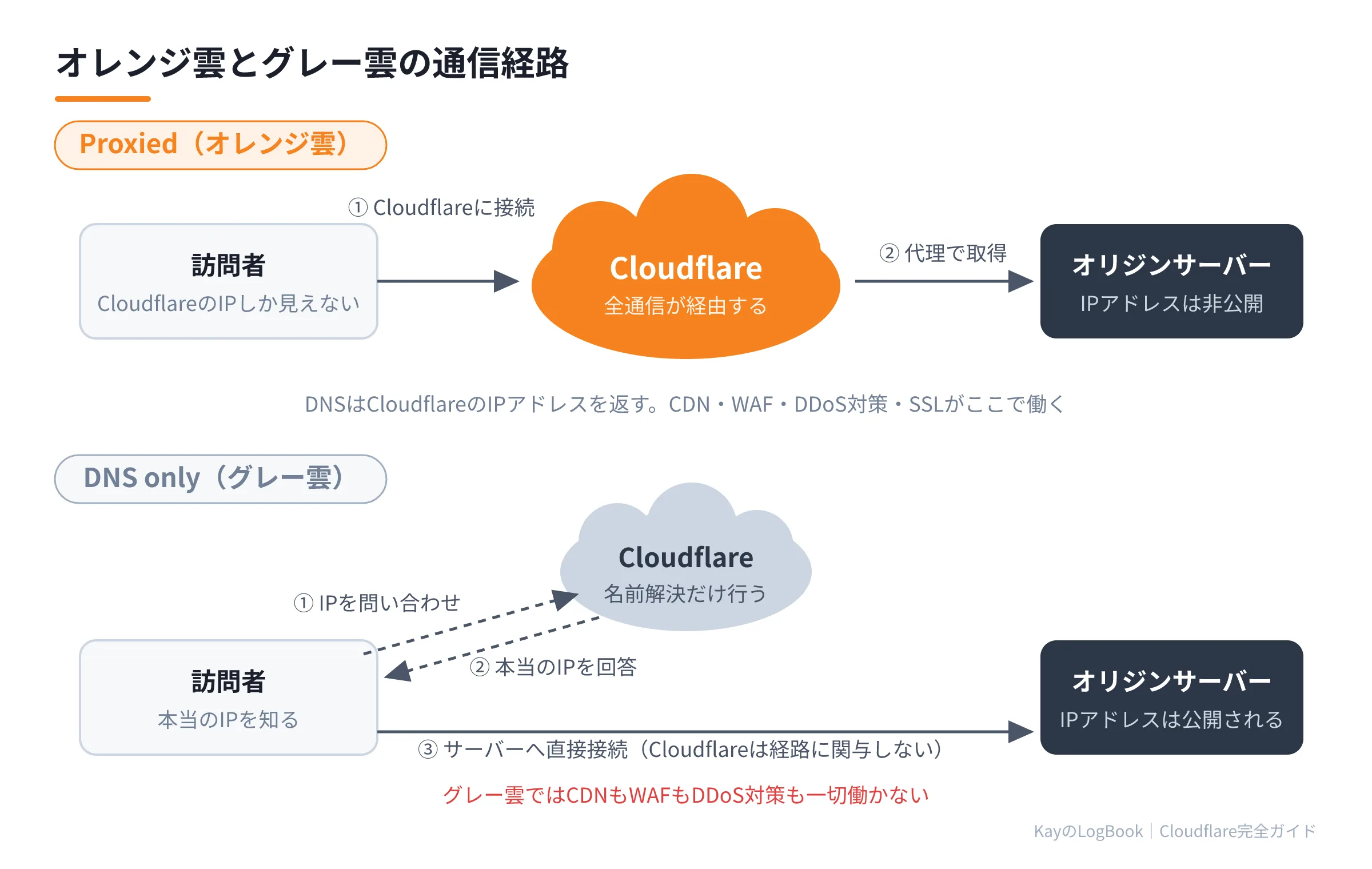
- Proxied (orange cloud): The proxy is enabled. In response to DNS queries, Cloudflare returns Cloudflare’s IP addresses instead of the origin server’s real IP address. All visitor traffic passes through Cloudflare before reaching the origin server
- DNS only (gray cloud): The proxy is disabled. Cloudflare acts as an ordinary authoritative DNS server and returns the registered IP address as is. Traffic flows directly from visitors to the origin server, and Cloudflare isn’t involved in the path
The important point here is that with the orange cloud, the IP address returned by DNS is replaced with “one of Cloudflare’s.” Visitors only see Cloudflare’s IP addresses, and the origin server’s real IP address is no longer exposed. If you’re publishing a NAS or server at home, this means you don’t have to expose your home connection’s IP address to the world.
Anycast: claiming the same address all over the world#
The answer to the question “Won’t going through Cloudflare make things slower?” is a technology called Anycast.
Cloudflare announces the same IP addresses simultaneously from its data centers in more than 330 cities around the world. Thanks to the way internet routing works, a visitor’s packets automatically reach the nearest data center on the network. A visitor in Tokyo and a visitor in London both connect to the same IP address, yet each is actually connected to a Cloudflare location near them.
This is what’s really behind the mechanism described on the previous page, where “the edge server closest to the visitor responds.” There’s no special routing server; the address (IP address) itself has come to point to “the nearest counter.”
Features enabled by the orange cloud#
When the proxy is enabled, all traffic passes through Cloudflare. Precisely because it sits in the path, Cloudflare can do work there.
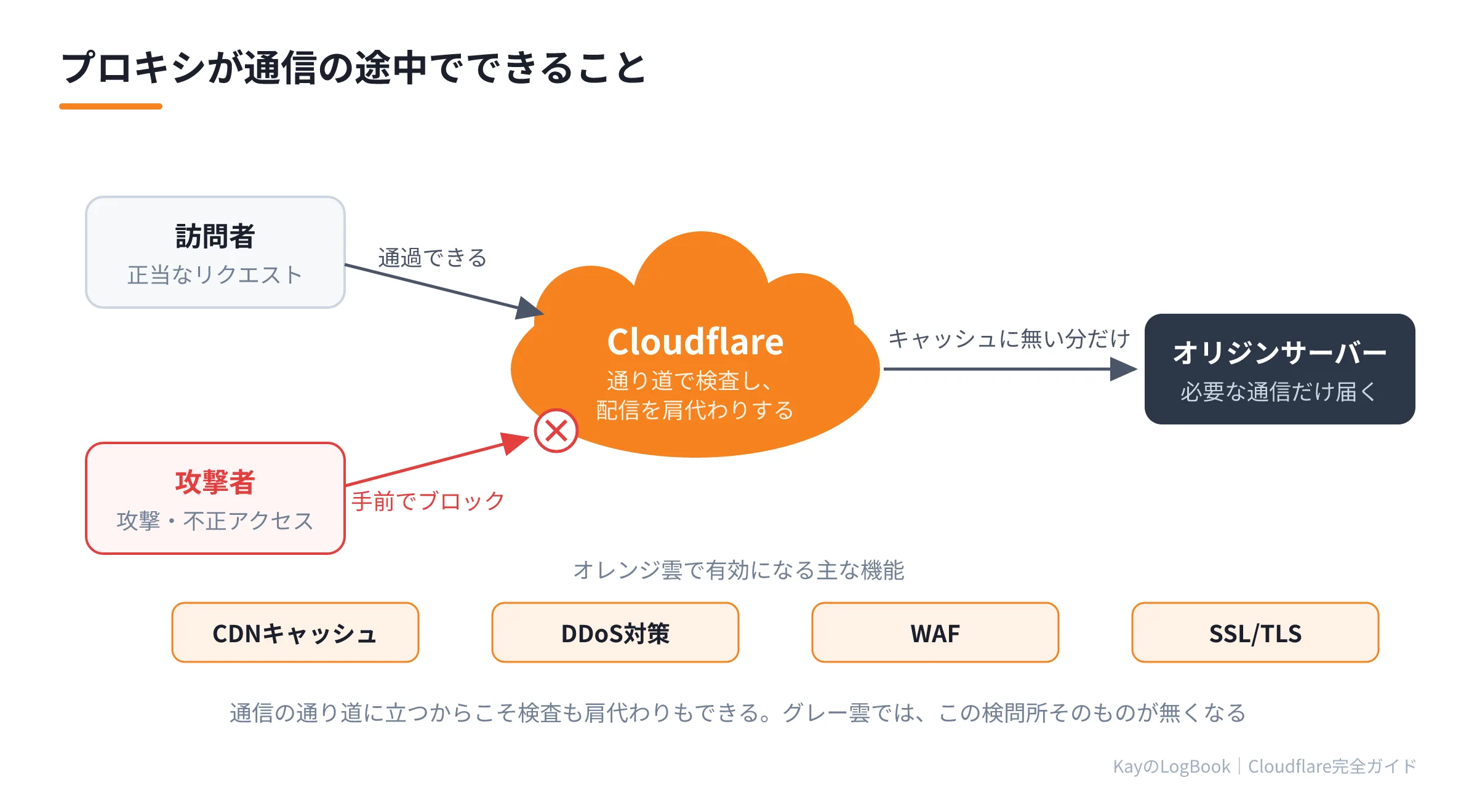
- CDN caching: The cached delivery covered on the previous page. Edge servers serve static files on the origin’s behalf
- DDoS protection: Absorbs and blocks attack traffic before it reaches the origin server (covered in detail in Chapter 2)
- WAF: Inspects and blocks malicious requests (covered in detail in Chapter 2)
- SSL/TLS: Encrypts communication with visitors (covered in detail on the next page)
- Various rules: Redirects, header rewriting, country-based access control and more
Conversely, none of these apply to gray-cloud records. Many cases of “I registered with Cloudflare, but it wasn’t protecting me” come down to the simple cause of the record still being gray.
What can be proxied, and the limits#
The orange cloud isn’t a cure-all. Knowing what it covers and its limits is the shortcut to avoiding trouble.
Only web traffic can be proxied#
- The proxy can only be enabled on A, AAAA and CNAME records
- Only HTTP and HTTPS (web traffic) can pass through. Other protocols such as SSH, FTP and game servers can no longer connect via an orange-cloud hostname
- Supported ports are also limited (only some, such as 80 and 443). Traffic to other ports won’t get through
- MX records, which direct email to its destination, can’t be proxied in the first place. What needs even more care is the A record an MX record points to (such as mail.example.com). If you make it orange, email traffic (SMTP and so on) can’t pass through Cloudflare, and email stops arriving. Always keep email-related hostnames gray
If you want to protect protocols other than HTTP through Cloudflare, a separate service called Spectrum is available (covered in Chapter 4).
Traffic limits#
Traffic through the proxy has several limits (as of August 2026).
- Upload size: Up to 100 MB per request on the Free and Pro plans, and 200 MB on Business. Sites with large file upload features need to use chunked uploads or make the relevant hostname gray
- Response timeout: If the origin server doesn’t respond within about 125 seconds, Cloudflare gives up and returns an error (524). Be careful with systems that have long-running batch jobs or produce huge data output
Hiding the real IP address is a “supplementary defense”#
The orange cloud stops the origin server’s IP address from being published, but it can still become known through other routes: old DNS records may remain in third-party databases, or it may leak through the headers of emails the server sends. An attacker who knows the IP address can bypass Cloudflare and attack the origin server directly.
That’s why, for serious protection, the standard practice is to also restrict the origin server to “accept no connections except from Cloudflare.” Cloudflare publishes the list of IP addresses it connects from, so you can block everything else with a firewall. A more advanced option is Cloudflare Tunnel (Chapter 3), which doesn’t open any inbound port in the first place.
Example: running a blog and a NAS#
Consider a case where you run a blog at “kaylog.io,” share photos from a home NAS at “nas.kaylog.io,” and also use email on your own domain.
- kaylog.io and www (the blog): Orange cloud. Gets the full benefit of the CDN and security
- nas.kaylog.io (the NAS web interface): Orange cloud. Hides your home connection’s IP address. However, only the web interface (HTTPS) is covered; SSH connections to the NAS and the like won’t get through
- mail.kaylog.io and the MX record: Gray cloud. Email can’t pass through the proxy, so making it orange stops email from arriving
The basic pattern, then, is to decide per hostname: “orange for what you publish as a website, gray for everything else.”
Things beginners should watch out for#
- When in doubt, “web is orange, email and everything else is gray”: Making email-related records orange is the classic accident. If email stops arriving, check the cloud color first
- A gray cloud means “not protected by Cloudflare”: DNS still answers, but neither the CDN nor the WAF works, and the IP address is exposed. Always check the cloud color of records you want to protect
- If something breaks right after switching to orange, isolate the cause: Often it’s simply that the port number or protocol isn’t supported. Temporarily switching back to gray lets you determine whether Cloudflare is the cause
- Your origin server’s access logs will look different: Connections through the proxy come from Cloudflare’s IP addresses, so as is, every visitor appears to have the same IP address. The visitor’s original IP address is passed in a request header, so you configure the server to restore it (covered on a hands-on page)
Related services#
- Cloudflare Spectrum: A service that can also proxy non-HTTP TCP/UDP applications. Explained in Chapter 4
- Cloudflare Tunnel: A service that connects to Cloudflare using only outbound connections from the origin server, eliminating the need to open ports at all. Explained in Chapter 3
- Load Balancing: Distributes load across multiple origin servers. Explained in Chapter 4
Summary#
- The proxy places Cloudflare between visitors and your site, acting as the site’s agent (a reverse proxy)
- Orange cloud = proxy enabled. DNS returns Cloudflare’s IP addresses, and all traffic goes through Cloudflare
- Gray cloud = DNS only. Just name resolution; none of Cloudflare’s features apply
- Thanks to Anycast, visitors all over the world automatically connect to the nearest Cloudflare location
- The CDN, WAF, DDoS protection and SSL all depend on the orange cloud
- Only web traffic is covered. Always keep email-related records gray