How to Choose a Cloudflare Plan (How Far the Free Plan Goes)
On this page14 items
In Chapter 9, the final chapter, we shift our viewpoint from “building” to “operating.” The first topic is money.
Chapter 1’s Introduction to Cloudflare’s Pricing Plans laid out the pricing structure — a three-story building of plans, add-ons and usage-based billing — as a map. At that point, though, WAF, Workers and R2 hadn’t appeared yet. We had a map but didn’t know what was where.
Over the past eight chapters, we’ve gone through all of that. Now we’ll treat the same pricing topic as a decision problem: “Which should I choose in my case?”
To give the conclusion up front: for many readers, the answer is “for now, the free tier covers everything.” But if you use it without knowing how far that holds, you won’t be able to decide to upgrade when you need to, and you may end up spending money unnecessarily. Let’s look at the boundaries concretely.
What you’ll learn on this page#
- That Cloudflare billing is split into three separate accounts
- Concrete material for judging, by use case, how far the free tier goes
- The conditions under which you should upgrade to Pro, Business or Workers Paid
- What upgrading your plan won’t fix
- Patterns where costs balloon without you noticing, and how to prevent them
First, think of it as “three separate accounts”#
The biggest cause of confusion in choosing a plan is that Cloudflare doesn’t send just one bill.
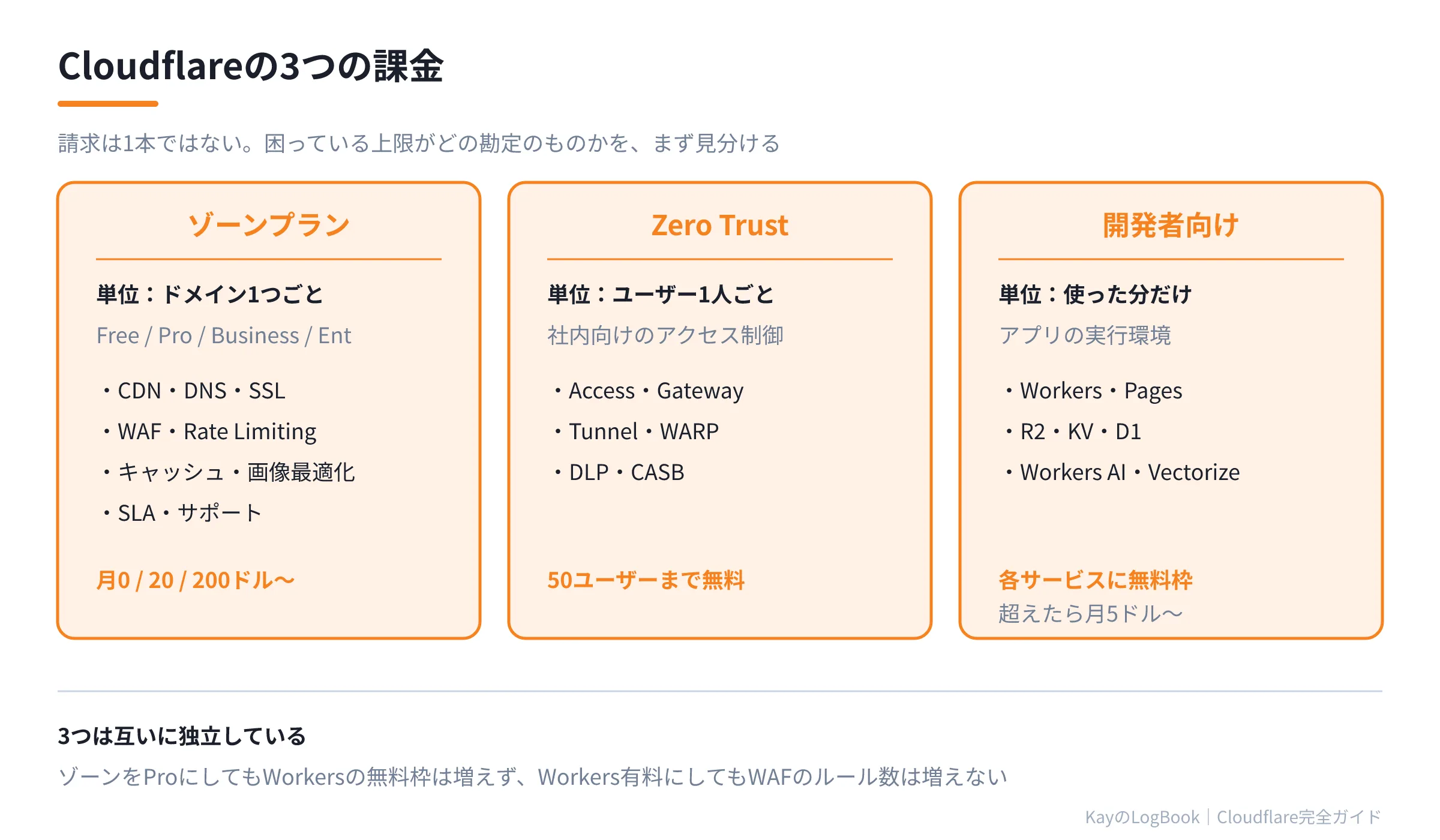
| Account | Billing unit | Covers |
|---|---|---|
| Zone plans | Monthly fee per domain (zone) | Website protection and delivery: CDN, DNS, SSL, WAF, caching and so on |
| Zero Trust | Monthly fee per user | Internal access control: Access, Gateway, Tunnel, WARP and so on |
| Developer Platform | Pay-as-you-go for what you use | App runtime environments: Workers, R2, KV, D1, Workers AI and so on |
These three are independent of each other. Putting a zone on the Pro plan doesn’t increase your Workers free tier, and subscribing to Workers Paid ($5/month) doesn’t increase your number of WAF rules.
Instead of thinking “I want to make Cloudflare paid,” identify “which limit, in which account, is causing me trouble.” That’s the starting point for choosing a plan.
How far does the free tier go?#
The big picture#
Here are the main free allowances as of August 2026.
| Service | Free allowance |
|---|---|
| CDN bandwidth | Unlimited (no bandwidth charges) |
| DDoS protection | Unlimited (no extra charges based on attack size) |
| Authoritative DNS | Unlimited, with DNSSEC support |
| SSL certificates (Universal SSL) | Free, auto-renewed |
| WAF | 5 custom rules + free managed rules |
| Rate Limiting | 1 rule |
| Turnstile | Unlimited verifications, 20 widgets |
| Zero Trust (Access/Gateway/Tunnel/WARP) | Free for up to 50 users |
| Workers | 100,000 requests/day, 10 ms CPU per request |
| Static asset delivery (including Pages) | Unlimited requests and bandwidth. 500 builds/month |
| R2 | 10 GB storage, 1 million Class A operations/month, 10 million Class B operations/month. Free egress |
| KV | 1 GB storage, 100,000 reads/day, 1,000 writes/day |
| D1 | 5 GB storage, 5 million rows read/day |
| Workers AI | 10,000 Neurons/day |
| AI Search | Free during open beta (Workers AI and AI Gateway usage is billed) |
| Email Routing | Free (200 destination addresses, 200 rules) |
Laid out like this, you can see that the very things other providers charge for are free. Bandwidth, attack size, verification counts — all items that are “scary when they grow” — are free with no ceiling at Cloudflare.
Judging by use case#
Personal blogs and corporate websites
Free covers everything. CDN, HTTPS, DDoS protection and a basic WAF are all included, and you’re never charged no matter how much your monthly traffic grows. The setup covered in Chapter 8’s Connecting WordPress can run on the Free plan as is.
Exposing a home server or NAS
Free covers everything. Both Cloudflare Tunnel and Access are free for up to 50 users. For use by a family or a small team, you’ll almost never exceed that.
Small web apps and APIs
Free is enough in most cases. Workers’ 100,000 requests a day averages out to about 1.16 requests per second. For a personal service in its early days, that’s plenty of headroom.
AI prototypes
You can start on Free. Workers AI’s 10,000 Neurons a day corresponds to anywhere from several hundred to several thousand calls a day with a lightweight model. Prototyping fits within the free tier.
Business-critical sites
This is the fork in the road. Technically it runs on Free, but the decision depends on whether you need uptime guarantees or support as part of a contract. More on this below.
When to upgrade to Pro ($20–25/month)#
Consider moving to Pro when any of the following apply.
1. You want the full set of WAF managed rules
Free’s managed rules are a reduced version. For a site that’s under attack, or realistically could be, the full set in Pro and above is effectively a requirement. This was covered in Chapter 2’s What Is a WAF?
2. Five WAF custom rules aren’t enough
Pro increases this to 20. Once you start stacking rules — country blocks, per-path restrictions, blocking specific User-Agents — five fill up fast.
3. You want image optimization (Polish)
On photo-heavy sites, the effect on load speed is clear.
4. You want to cache WordPress HTML (APO)
APO is available on the Free plan as a $5/month add-on. But it’s included at no extra cost on Pro and above, so if you’re in the position of “paying $5 a month just for APO,” spending $15 more to get Pro is the better deal. This is a decision people actually make often.
5. You need detailed analytics
You can see basic numbers on Free, but the time range and granularity are limited.
Put the other way around, if none of the above apply, there’s no reason to go Pro. Upgrading because “paying will probably make it faster” usually ends in disappointment. CDN delivery itself uses the same network on Free.
When to upgrade to Business ($200–250/month)#
Business is a plan you choose for contractual requirements rather than features.
- You need a 100% uptime SLA (with refund guarantees): when internal approval processes or customer contracts demand guaranteed uptime
- You need support with guaranteed response times: when it has to be defined “by when you’ll get a reply” during an outage
- You need PCI DSS compliance or to bring your own custom certificates: for sites handling payments, for example
- You need a 200 MB upload limit: Free/Pro allow 100 MB
- You need 100 WAF custom rules
$200 a month is a lot for an individual, but once you reach the scale where the business stops when the site stops, it starts to make sense as insurance. The deciding question isn’t “do I want the features?” but “when it goes down, who do I have to explain it to, and how?”
When to upgrade to Workers Paid (from $5/month)#
This is a completely separate decision from zone plans. Consider it when:
- You exceed 100,000 requests a day: on Free, requests beyond that aren’t executed and return errors
- You hit the 10 ms CPU limit: Workers doing heavy processing will reach the limit. On the paid plan, the default goes up to 30 seconds
- You seriously use Durable Objects or Hyperdrive
- You use more than 10,000 Neurons a day of Workers AI
The $5 a month includes 10 million requests and 30 million CPU milliseconds. For personal projects, even after moving to the paid plan, you’ll almost always stay at $5 a month. There’s no need to brace yourself thinking “pay-as-you-go means a scary, open-ended bill.”
How to decide#
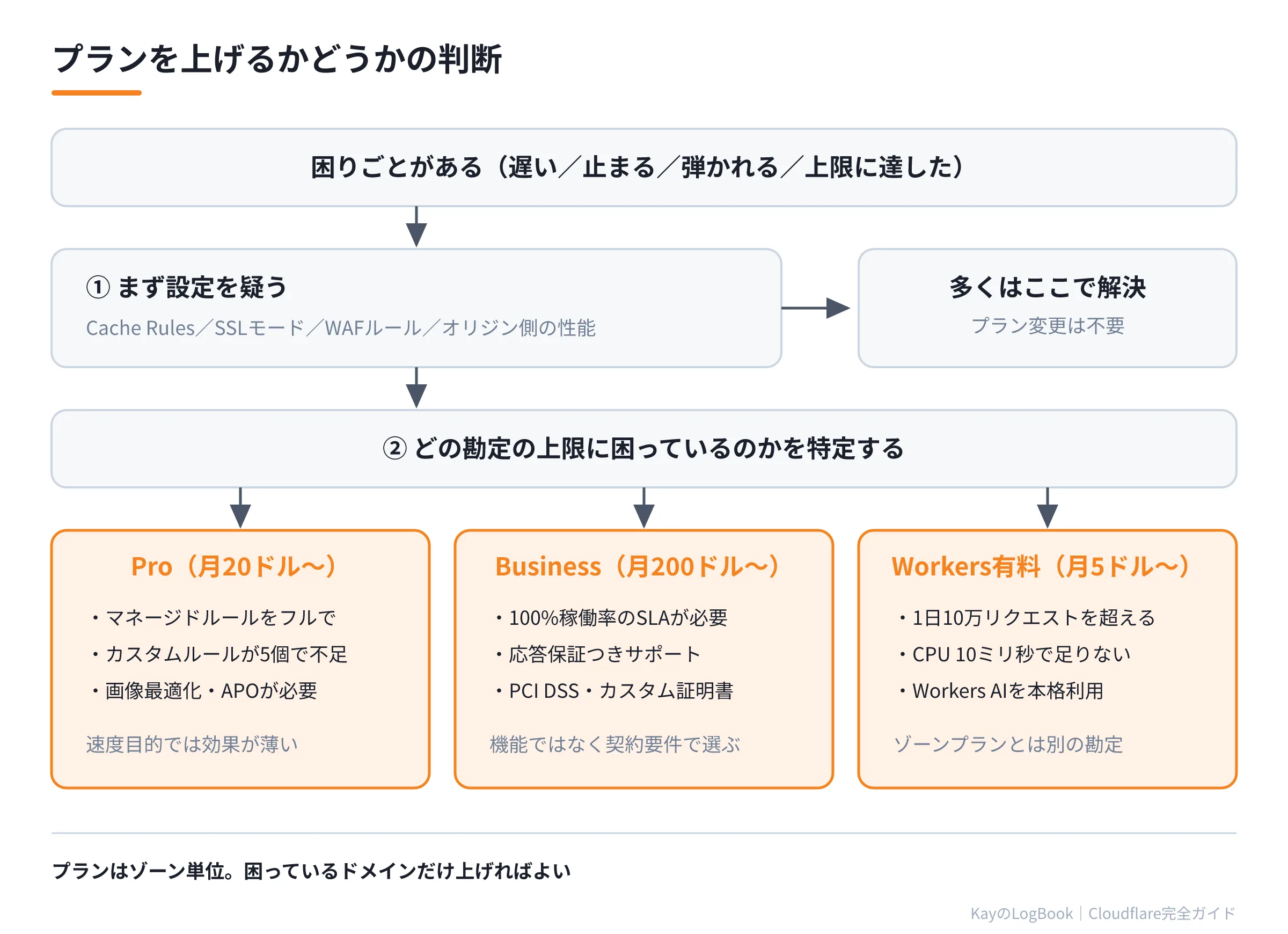
Asking yourself these questions in order sorts things out.
- What’s the problem? Speed, protection, limits, or contractual requirements?
- Which account does it belong to? Zone plan, Zero Trust, or Developer Platform?
- Is it really a plan issue? Could it be fixed with settings instead? (see below)
- Is upgrading just that domain enough? Plans are per zone. You don’t need to upgrade every domain
Number 3 is especially important. Here are typical problems that upgrading won’t solve.
- The site is slow: in most cases the cause is the origin server or cache settings. Review your Cache Rules first (up to 10 on Free)
- You want to use protocols other than HTTP: non-HTTP protocols like SSH and RDP fall under Spectrum, not your plan
- Requests time out: Error 524 occurs at 125 seconds by default, and only Enterprise can extend it. Going Pro won’t change it
- You want to stop bots: there are three tiers. Free has Bot Fight Mode, Pro/Business have Super Bot Fight Mode, and full score-based Bot Management is Enterprise-level. First check whether what Free offers is enough
Patterns that drive up costs, and how to prevent them#
Because the free tier is so generous, you get charged when you use things in ways you didn’t expect. Here are the ones that actually tend to happen.
Publishing an AI feature that gets called heavily
This is the most realistic risk. As mentioned in Chapter 8, set spending limits and rate limits with AI Gateway.
KV write counts
The free tier allows only 1,000 writes a day. A design that writes on every access (such as a hit counter) will blow through that quickly. Following the “read-heavy” principle from Chapter 6’s What Is KV? doubles as cost control.
D1 rows read
D1 bills by “rows read.” A query that scans an entire table without an index consumes rows all at once. It’s not just slow but expensive, which is different from how a regular database feels.
R2 Class A operations
Operation counts can matter more than storage. Be careful with jobs that write large numbers of small files.
Upgrading multiple domains
Plans are per zone. Put five domains on Pro and it’s $100–125 a month. The basic rule is to upgrade only the domains that really need paid features.
As a preventive measure, if you use a paid plan, I recommend setting up usage alerts under Notifications in the dashboard. That way you avoid discovering it had already ballooned by the time you noticed.
Points for beginners to watch#
- Start on Free: Cloudflare doesn’t pressure you to upgrade. Upgrading once you hit a problem is plenty
- Get in the habit of classifying problems by “account”: zone, Zero Trust, or developer? Get this wrong and upgrading won’t fix it
- Annual billing is 20% cheaper: Pro and Business are 20% off per month on annual billing. Worth considering for sites you know you’ll keep running
- Billing is in US dollars: the yen equivalent changes with exchange rates
- Check the unit of each free allowance (day/month): Workers and related services use “per day”; R2 uses “per month.” Daily allowances can be used up all at once during testing
- You can also downgrade: you can try Pro temporarily and go back if you don’t need it
- Beta features can change even while free: as with AI Search, there’s no guarantee it will stay free in the future
Related services#
- Introduction to Cloudflare’s Pricing Plans: the basic plan structure (the premise of this page)
- What Is a WAF?: the core feature that changes at Pro and above
- What Are Workers?: the entry point to developer pay-as-you-go
- How to Choose Storage: choosing between R2, KV and D1, and their costs
- What Is AI Gateway?: putting a cap on AI spending
- What Is Zero Trust?: the framework that’s free for up to 50 users
Summary#
- Cloudflare billing comes in three separate accounts: zone plans, Zero Trust, and developer pay-as-you-go. First identify which one your problem belongs to
- Items that are “scary when they grow” — bandwidth, DDoS protection, verification counts — are free and unlimited
- Personal blogs, exposing a home server, small web apps, AI prototypes — all of these can often be done entirely on Free
- Go Pro for the full managed rule set, 20 custom rules, image optimization or APO. It does little for speed
- Choose Business for SLA, support and audit requirements, not features
- Workers Paid ($5/month) is a separate account from zone plans. Personal projects usually stay at $5 a month
- Costs balloon from publishing AI features, KV writes, D1 full table scans and upgrading multiple domains. Prevent this with alerts
- Know that some problems (speed, timeouts, non-HTTP protocols) aren’t solved by upgrading your plan