What Is a Domain? The Basics from Registration to Management
On this page22 items
On the previous page, “What Is DNS? How Name Resolution Works and the Basics of Records”, you learned how an IP address is looked up from a domain name. So where does the domain name “kaylog.io” itself come from? Who issues it, who keeps the registry, and what do you need to do to get one?
Many Cloudflare services assume you have a domain of your own (a custom domain). DNS settings, as well as the CDN and security covered later, are all things you configure “for your own domain”. This page lays out the structure of domains, how they’re administered, and their life from registration to expiry, and then looks at how to maintain a domain with Cloudflare.
What you’ll learn on this page#
- The structure of a domain name (TLD, second-level domain, subdomain)
- The organizations that manage domains (registry, registrar, registrant)
- The lifecycle from registration through renewal to expiry
- Registrant information (WHOIS) and how privacy protection works
- Features of Cloudflare Registrar and things to watch out for when using it
What is a domain?#
You don’t “buy” a domain; you “rent” it#
A domain is an internet name such as “kaylog.io”, registered so that only you in the whole world can use it. In everyday speech we say “buy a domain”, but strictly speaking you don’t purchase ownership; you register the right to use it on a yearly basis and keep it by renewing every year. Stop renewing and you lose the right, and eventually someone else can register it. This fact — that it’s renewal-based — is an important point behind many of the problems described later.
The structure of a domain name#
As we saw on the previous page, a domain name has a hierarchical structure separated by dots. Breaking down “www.kaylog.io” from right to left gives:
- Top-level domain (TLD): “io” at the far right. This part classifies the domain, and it’s the unit of global administration
- Second-level domain: “kaylog”, just to the left of the TLD. This is the part you choose and register yourself, and no two identical names can exist within the same TLD
- Subdomain: “www” and the like, further to the left. These are names the registrant can freely create under the registered domain
The only part you pay to register is “kaylog.io” (the registered domain, also called the root domain or apex domain). Subdomains such as “www.kaylog.io” or “blog.kaylog.io” can be created in any number at no cost, just by adding the DNS records you learned about on the previous page.
Types of TLD#
TLDs fall broadly into two families.
- Generic top-level domains (gTLDs): TLDs such as “.com”, “.net” and “.org” that can be used regardless of country. In recent years many new gTLDs have appeared, such as “.dev”, “.app”, “.shop” and “.xyz”
- Country code top-level domains (ccTLDs): TLDs assigned to countries and regions, like “.jp” (Japan) or “.uk” (United Kingdom). Some, like “.io” (British Indian Ocean Territory) and “.ai” (Anguilla), are country codes by origin but have become globally popular with tech services because of what the letters suggest
Japan’s “.jp” includes general-use JP domains anyone can register (for example, kaylog.jp), as well as organizational-type JP domains such as “co.jp” that only registered companies can obtain, one per organization. Because the requirements are strict, “a co.jp site = a real company” serves as a mark of trust, and these are widely used for corporate sites.
Which TLD you choose changes the price, the registration requirements and the renewal rules. A TLD isn’t just a “cosmetic difference”; it’s a difference in who you’re contracting with. The next section explains why.
Who manages domains?#
Registry, registrar and registrant#
Three parties with different roles are involved in managing domains. The names are similar and confusing, so let’s sort them out here.
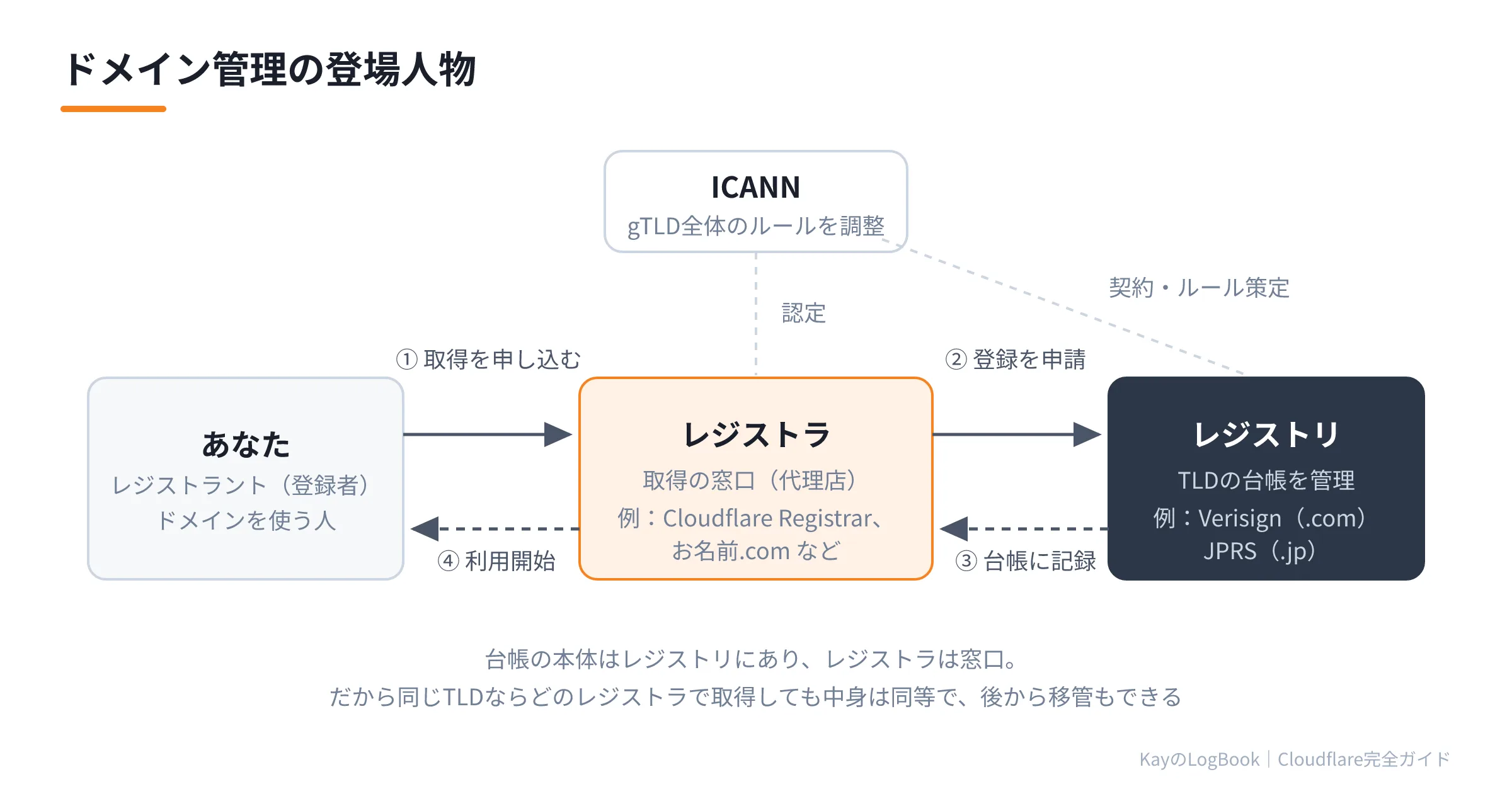
- Registry: the keeper of the ledger (database), one for each TLD. The registry for “.com” is Verisign, and for “.jp” it’s Japan’s JPRS (Japan Registry Services). It holds the official records of every domain registered under that TLD
- Registrar: the business that acts as the point of contact for registration. It accepts applications from users and handles registering them in the registry’s ledger. Japanese domain registration services such as Onamae.com and Muumuu Domain, as well as Cloudflare Registrar described later, are all registrars (or their resellers)
- Registrant: the person who registers the domain — that is, you
When you register a domain, you (the registrant) apply to a registrar, and the registrar enters it in the registry’s ledger. The ledger itself lives with the registry; the registrar is only the point of contact. That’s why a “.com” domain is the same no matter which registrar you get it from, and why you can later switch just the registrar (a transfer).
ICANN coordinates the whole system#
The rules for gTLDs as a whole are coordinated by a nonprofit called ICANN. It accredits registries and registrars and sets rules such as the transfer rules described later. The small ICANN fee added to gTLD registration charges goes toward these operating costs. ccTLD rules are set by organizations in each country or region; the rules for “.jp” are managed by JPRS.
From registration to management#
How to register#
Registering a domain is simple and takes three steps:
- On a registrar’s (registration service’s) site, search for the name you want and check that it’s available
- If it’s available, enter the registrant information (name, address, email address, etc.) and apply
- Once you pay, registration usually completes within minutes, and you can move on to DNS settings
It’s first come, first served, so it’s not unusual for the name you want to be taken already. In that case, you either try a different TLD or rework the name. Some TLDs and organizational-type JP domains require additional conditions and documents, such as company registration information.
Renewal and the lifecycle#
Once registered, a domain has a life that revolves around renewing the contract. What happens if you forget to renew is one of the most important things a site operator should know.
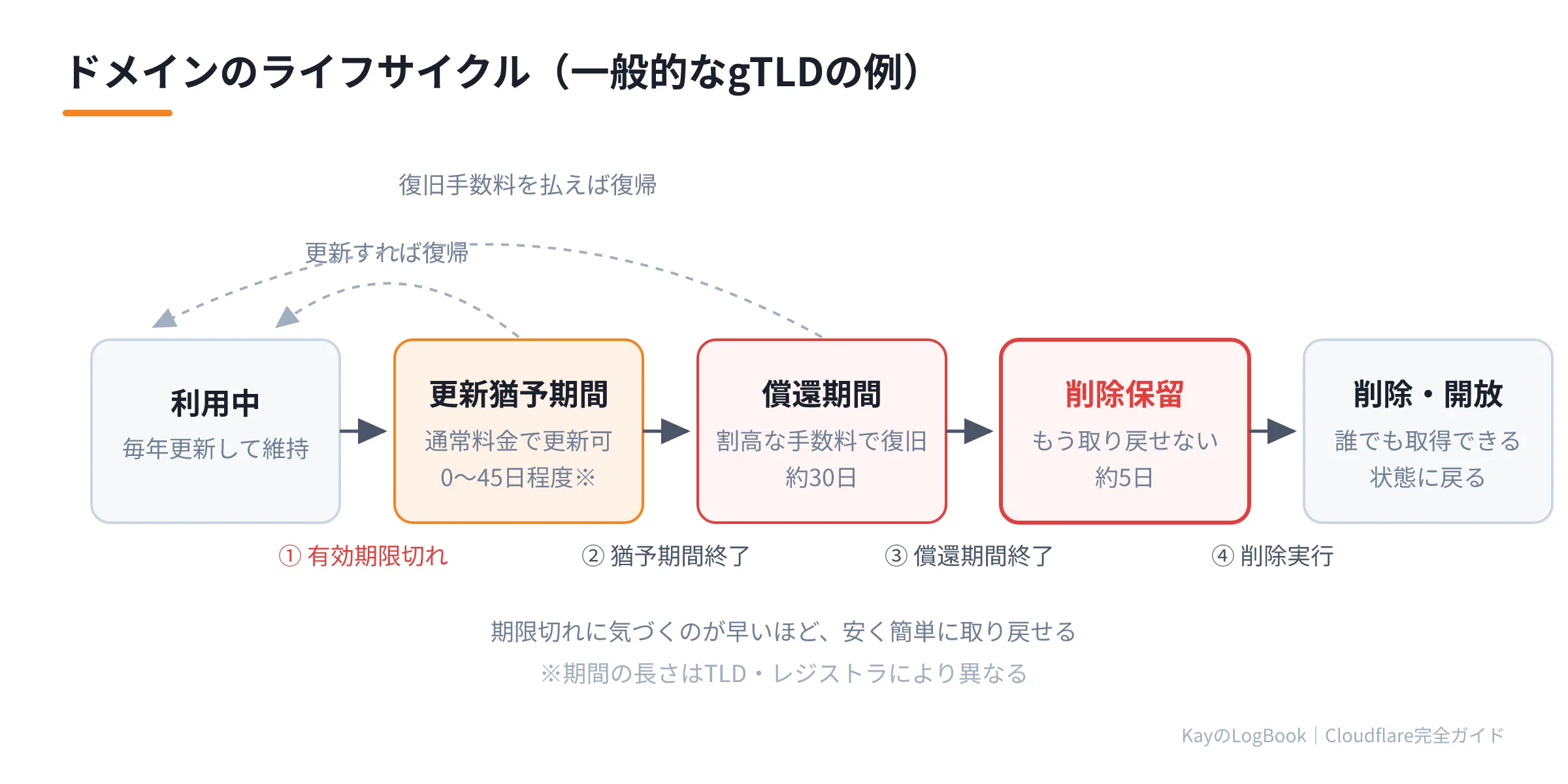
- Active: you keep it by paying the renewal fee every year (or several years at once)
- Renewal grace period: even after the expiry date, many registrars let you renew at the normal price for a certain period. During this time, however, your site and email may stop working
- Redemption period: after the grace period, you enter a period in which you can get it back by paying a restoration fee (considerably more than the normal renewal fee). For gTLDs this is about 30 days
- Pending delete: a deletion processing period of about 5 days. Once it’s here, nobody can get it back
- Deleted and released: it’s removed from the ledger and anyone can register it again
The lengths of these periods vary by TLD and registrar, but the structure — “the sooner you notice it’s expired, the cheaper and easier it is to get back” — is the same everywhere. Conversely, a fully released domain can be registered by a third party, and there are real cases where domains lost to expiry were snapped up by others who then demanded large sums to sell them back, or used them for fake sites.
Transfers: moving to another registrar#
A registered domain can later be moved to another registrar. This is called a transfer. Think of it as the registration in the ledger (registry) staying the same while only the point of contact changes. A transfer doesn’t change your domain name or website.
Transfers follow ICANN’s common rules, the best known being the “60-day rule”. You can’t transfer within 60 days of registration, within 60 days of the previous transfer, or within 60 days of changing the registrant’s name, organization or email address. This rule is why you can’t immediately move a newly registered domain to another company.
Registrant information (WHOIS) and privacy#
When registering a domain, you’re obliged to submit accurate registrant information. For a long time, this information could be searched and viewed by anyone through a system called WHOIS. Since this exposed individuals’ names and addresses to the world, “privacy proxy” services, where the registrar lists its own details instead, came into wide use.
Today, the situation has changed in response to the trend toward privacy protection. For gTLDs, most personal information is now hidden by default, and the lookup system itself has moved from WHOIS to its successor, RDAP (the obligation to provide WHOIS for gTLDs ended in 2025). Even so, “the obligation to keep registration information accurate” hasn’t changed. The registered email address in particular is a lifeline, since renewal notices and transfer confirmations go there, so register an address you can reliably receive mail at.
How to use Cloudflare’s Registrar#
At-cost pricing with zero markup#
Cloudflare also operates as a registrar, called Cloudflare Registrar. Its biggest feature is “at-cost pricing”: you pay only the wholesale cost paid to the registry plus the ICANN fee, with no profit added. For “.com”, for example, it’s the registry fee of $10.26 + ICANN fee of $0.18 = $10.44 per year (as of August 2026), with no first-year discount and no price hike from the second year.
Many domain registration services attract customers with discounts like “1 yen for the first year” and make their money from renewal fees in later years and options such as privacy proxies. With Cloudflare Registrar, that “renewal turned out more expensive than I thought” structurally doesn’t exist. Redaction of registrant information is free and on by default, and DNSSEC (the protection against tampering with responses explained on the previous page) can be enabled with one click. It supports more than 400 TLDs, including “.com”, “.io”, “.dev” and “.ai”.
Requirements and caveats#
It may look like all upside, but there are requirements and caveats.
- “.jp” is not supported (as of August 2026): JP domains such as “.jp” and co.jp can’t be registered or transferred with Cloudflare Registrar. JP domains need to be registered and maintained with a Japanese registrar
- Using Cloudflare DNS is a prerequisite: to transfer an existing domain, you first need to add it to Cloudflare and activate it by pointing its nameservers to Cloudflare (the free plan is fine). It’s more accurate to think of Cloudflare Registrar not as a standalone domain registration service, but as “a service that lets you keep domains you use with Cloudflare at cost”
- Payment is in dollars: fees are charged to a card in US dollars. The yen equivalent fluctuates with the exchange rate
- The 60-day rule applies: a domain just registered or transferred at another company can’t be transferred until 60 days have passed
You can use Cloudflare without changing registrars#
Here’s an important point to clarify. You don’t have to transfer to Cloudflare Registrar to use Cloudflare. As you learned on the previous page, all you need to adopt Cloudflare is to change your nameservers. Even if you keep a “.jp” domain registered at Onamae.com, pointing its nameservers to Cloudflare lets you use DNS, the CDN and security.
In other words, “where you keep your domain” (registrar) and “where you run your DNS” (authoritative DNS) are separate choices. Cloudflare Registrar is an option that minimizes the cost of the former for supported TLDs.
Example: registering a domain for a blog#
Let’s consider registering a domain to start a personal blog.
- Decide on a name and TLD: you’ll use it for a long time, so make it short, easy to remember and easy to spell out loud. For personal sites, “.com”, “.net” and “.blog” are the usual choices, costing roughly 1,000 to 2,000 yen per year. If you want to signal that the site is for Japan, “.jp” (from about 3,000 yen per year) is also an option
- Register it: register with a Japanese registrar or with Cloudflare Registrar (for supported TLDs). Be sure to enable auto-renewal at the same time
- Add it to Cloudflare: add the domain to Cloudflare and switch the nameservers. From then on, manage DNS in the Cloudflare dashboard
Later in this guide, as a continuation of this, there’s a hands-on page on connecting a WordPress site to Cloudflare.
Points for beginners to watch out for#
- The biggest accident is forgetting to renew: when you lose a domain, your site and email stop at the same time. Enable auto-renewal and keep an eye on the expiry date of the credit card you pay with (auto-renewal failing because a card expired is a classic case)
- The registered email address is a lifeline: it’s where renewal notices and transfer confirmations arrive. Avoid registering an email address on the domain itself, because if the domain stops, the notices won’t arrive either
- Watch out for trademarks in the name: domains containing other companies’ names or service names risk being lost over trademark issues
- Remember the 60-day transfer rule: you can’t transfer right after registering or right after changing information. If you plan to transfer, change your registrant information with that in mind
- Price increases can happen: even with at-cost Cloudflare Registrar, prices change if the registry itself revises its wholesale price. “.com” has been going up a little every year recently
Related services#
- Cloudflare Registrar: the registrar service described on this page that lets you register and keep domains at cost
- Cloudflare DNS (authoritative DNS): the service that manages your domain’s records. See the previous page, “What Is DNS?”, for details
- Email Routing: a free service that lets you create email addresses like “info@yourdomain” on your domain and forward them to your usual inbox. Covered in a later chapter
Summary#
- A domain isn’t a one-time purchase; it’s a right you keep by registering and renewing on a yearly basis
- What you register goes down to the second-level domain; subdomains can be created freely at no cost
- The system is run by three parties: the registry that keeps the ledger, the registrar that acts as the point of contact, and the registrant
- Expiry goes through stages — grace period → redemption period → deletion — and the sooner you notice, the less it hurts
- Cloudflare Registrar features at-cost pricing and free redaction. However, “.jp” isn’t supported, and using Cloudflare DNS is a prerequisite
- You can use Cloudflare just by changing nameservers, without changing registrars