What Is Rate Limiting? How Request Limits Work
On this page11 items
The WAF we’ve covered so far identifies attacks by “the contents of the request”, and bot protection by “who the sender really is”. Rate Limiting, covered on this page, focuses on a third angle: “frequency”.
Even if each individual request is perfectly normal, hundreds of repetitions from the same client in a short time can’t be called normal use. Brute-force logins, API abuse, mechanical harvesting of content: Rate Limiting defends against this kind of “brute force of numbers”. The mechanism is simple, and precisely because it’s so simple, it’s a fundamental technique used by every kind of web service.
What you’ll learn on this page#
- What Rate Limiting is and what it can prevent
- The three elements that make up a rule (condition, threshold, action)
- Concrete configuration examples (login protection, API protection)
- Differences between Cloudflare plans (number of rules, counting period, identification method)
- Points for beginners to watch out for
What is Rate Limiting?#
Spotting anomalies by “frequency”#
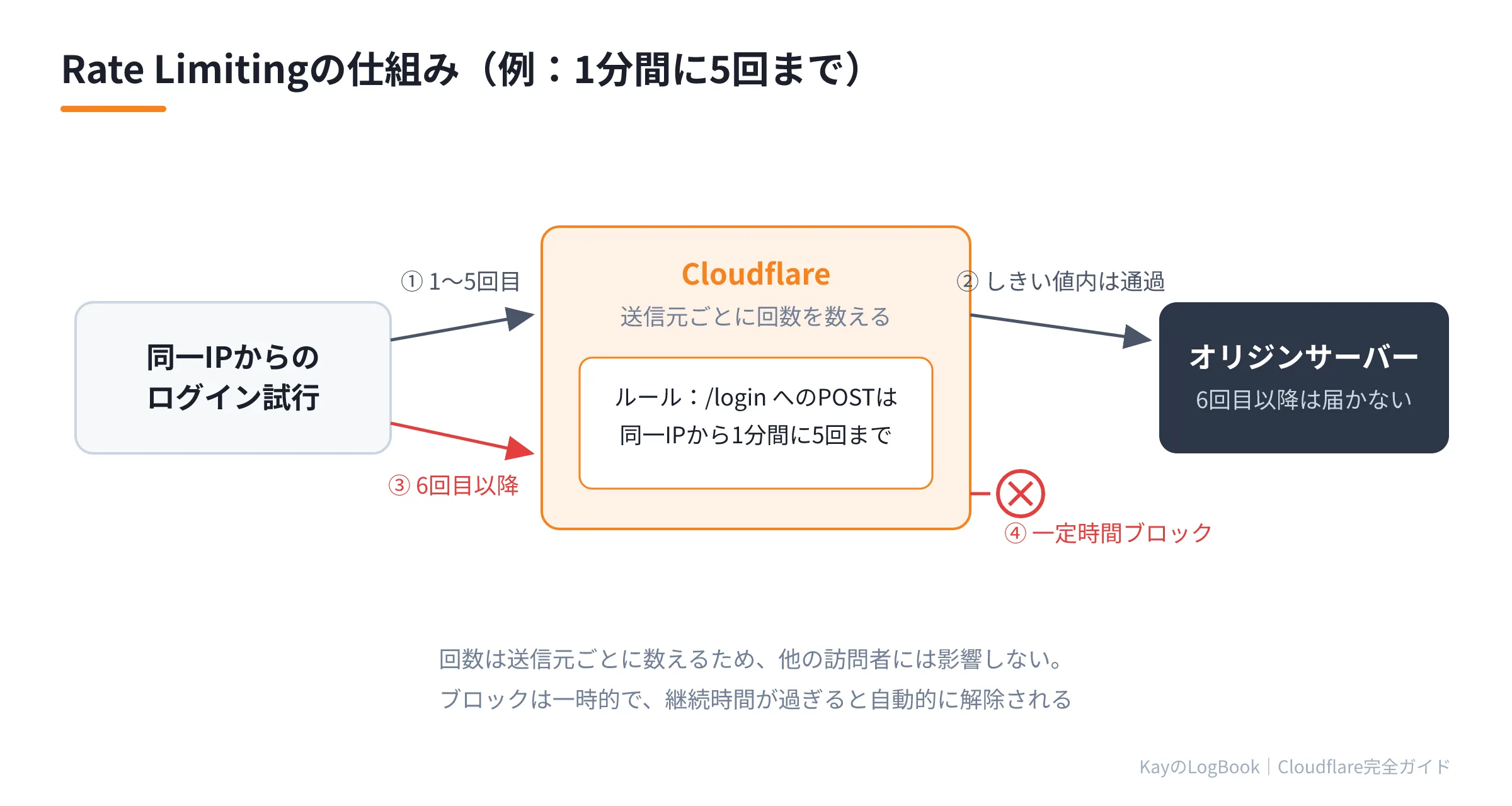
Rate Limiting is a mechanism that sets an upper limit on the number of requests within a given time and temporarily refuses access from senders who exceed it. You set rules such as “if the same IP address accesses the login page more than 5 times in 1 minute, block it for the next 10 minutes”.
Think of a bank ATM. Enter the wrong PIN a few times and your card gets locked. Anyone can mistype once, but getting it wrong dozens of times in a row is evidence that someone who doesn’t know the number is guessing. Rate Limiting applies the same idea to web requests.
What it can prevent#
- Brute-force attacks: login attempts that try passwords one after another. Limiting the number of attempts is the most direct countermeasure
- Credential stuffing: the attack covered on the previous page that tries lists of leaked passwords. At its core, this too is “a large number of login attempts”
- API abuse: increased server load or pay-as-you-go charges caused by programs hitting an API more often than expected
- Curbing scraping: bots that mechanically crawl every page access the site at a frequency no human could
- Mitigating small-scale L7 DDoS: among the HTTP floods covered on the DDoS page, limiting request counts is effective against small-scale ones from a limited number of sources
Conversely, Rate Limiting doesn’t work against “attacks that succeed if even one request gets through” (such as SQL injection). Those are the WAF’s job. It’s precisely because each feature covers a different area that it makes sense to layer them.
The three elements of a rule#
Cloudflare Rate Limiting rules are created on the same screen as the WAF (under Security) and consist of three elements:
- Condition (which requests to count): the target URL, HTTP method and so on. Example: “POST requests to /login”
- Threshold and period (how many to allow): the maximum count within the counting period. Example: “up to 5 per minute from the same IP address”
- Action and duration (what to do when exceeded): a response such as block or challenge, and how long to keep it up. Example: “block for 10 minutes”
The key point is that counts are kept “per sender”. Since it counts requests from the same IP address rather than the site-wide total, other normal visitors aren’t affected. The restriction is temporary and lifts automatically once the duration passes.
Example: protecting a WordPress login page#
Taking a WordPress site, common among this guide’s readers, as an example, even this single rule is effective:
- Condition: POST to the URL path
/wp-login.php - Threshold: a few times per minute (10 seconds on Free) from the same IP
- Action: block for a set period (or challenge)
A WordPress login page is typically probed by bots from all over the world from the moment it goes public. Combine a WAF custom rule (restricting by country) with this Rate Limiting rule, and most login attempts vanish at the entrance.
Differences by plan#
Rate Limiting used to be a paid option, but it’s now included as standard on all plans (as of August 2026). The main differences between plans are as follows.
| Item | Free | Pro | Business | Enterprise |
|---|---|---|---|---|
| Number of rules | 1 | 2 | 5 | 100 (with add-on) |
| Counting period | 10 seconds | Up to 1 minute | Up to 10 minutes | Up to 10 minutes (about 18 hours with extension) |
| Sender identification | IP address | IP address | IP (NAT-aware) | Any: headers, cookies, API keys, country, etc. |
The Free plan’s “1 rule, 10 seconds” is quite limited, but it works well enough against concentrated attacks such as on a login page. With Enterprise (Advanced Rate Limiting), you can count by information other than IP address (API keys, sessions, etc.), enabling precise API-oriented control such as “up to 100 calls per minute from the same API key”.
Points for beginners to watch out for#
- Know the legitimate usage patterns before configuring: if the threshold is too strict, ordinary visitors get caught. For example, on a site with 50 images per page, setting “up to 50 per minute” could hit the limit just by opening one page. Narrowing the target URL (only the login page, for example) is the safe approach
- Remember shared IPs: at companies and schools, many people access from the same IP address (NAT). One person’s abnormal behavior could get all their colleagues blocked, so using a challenge rather than a block as the action is one option
- There are limits against attacks that rotate IPs: attacks from botnets spread across many IPs slip past per-IP limits. That’s the territory of bot protection and DDoS Protection (automatic response)
- Don’t confuse it with Cloudflare’s other features: for serious API protection, that’s the territory of API Shield, covered on a later page. Think of Rate Limiting as general-purpose request limiting and API Shield as a complete set of API-specific defenses
Related services#
- WAF custom rules: control by content and sender. Managed on the same screen as Rate Limiting (two pages back)
- Bot protection: identifies whether the sender is automated. This is the counter to IP-distributed attacks (previous page)
- Turnstile: a way to build a human check into the login form itself. Complements Rate Limiting (next page)
Summary#
- Rate Limiting sets an upper limit on the number of requests within a given time and temporarily refuses senders who exceed it
- A rule consists of three elements, “condition, threshold and period, action and duration”, and counts per sender
- It works against “brute force of numbers” such as brute-force logins, API abuse and scraping. Attacks that succeed in a single request are the WAF’s job
- It’s now standard on all plans. The number of rules and flexibility grow from Free 1 / Pro 2 / Business 5 / Enterprise 100
- Start by protecting your login page. Begin with a conservative threshold so legitimate use isn’t caught